
Yamnweo MIX-8
Yamnweo MIX-8 DJ Controller Mixer User Manual
Comprehensive guide for setup, operation, and maintenance of your MIX-8 DJ Audio Mixer.
Introduction
The Yamnweo MIX-8 is an 8-channel DJ Controller Mixer designed for professional audio mixing in various environments such as stages, bars, and studios. It features 99 built-in DSP effects, a 7-segment equalizer, Bluetooth connectivity, USB recording, and MP3 playback capabilities. This manual provides detailed instructions to help you set up, operate, and maintain your MIX-8 mixer for optimal performance.

Figure 1: Front view of the Yamnweo MIX-8 DJ Controller Mixer, showcasing its 8 input channels, main output section, and digital display.
Safety Information
Please read and understand all safety instructions before operating the MIX-8 mixer. Retain this manual for future reference.
- Power Supply: Use only the specified power adapter. Ensure the voltage matches your local power supply.
- Ventilation: Do not block ventilation openings. Ensure adequate airflow around the unit to prevent overheating.
- Moisture: Keep the mixer away from water, rain, and excessive humidity. Do not operate with wet hands.
- Cleaning: Disconnect power before cleaning. Use a dry, soft cloth. Do not use liquid cleaners or aerosols.
- Servicing: Do not attempt to service this product yourself. Refer all servicing to qualified service personnel.
- Placement: Place the mixer on a stable, flat surface. Avoid placing it near heat sources or in direct sunlight.
Product Features and Components
The MIX-8 mixer is equipped with a comprehensive set of features for versatile audio control.

Figure 2: Detailed diagram illustrating the various knobs, faders, and input/output interfaces of the MIX-8 mixer.
Key Components:
- Microphone/Music Inputs: 8 channels with XLR and line inputs for connecting various audio sources.
- Gain Knob: Adjusts the input sensitivity for each channel.
- EQ Knobs (Treble, Midrange, Bass): 3-band equalizer for precise tone shaping on each channel.
- Effect Knob: Controls the amount of effect applied to each channel.
- Auxiliary Output Knob: Adjusts the level sent to auxiliary outputs.
- Sound and Image Knob: General control for overall sound characteristics.
- 60mm Stroke Fader: Smooth, durable faders for precise volume control on each channel.
- Main Output Interface: Connects to main speakers or recording devices.
- 99 Kinds of DSP: Built-in digital signal processing effects for enhanced audio.
- Oversized MP3 Display: Digital HD display for MP3 playback and effect selection.
- Signal Light: Indicates signal presence and clipping.
- 48V Phantom Power Supply: Provides power for condenser microphones.
- Real-time Monitoring Knob Adjustment: For headphone monitoring.
- 7-Stage Equalizer: A master 7-band graphic equalizer for overall mix adjustment.
- MP3 Function Button: Controls MP3 playback.
- MP3 Volume Fader: Adjusts the volume of MP3 playback.
- Reverberation Fader: Controls the overall reverberation effect level.
- Main Output Fader: Controls the master volume.
- USB Interface: For connecting USB drives for playback and recording.
- Bluetooth Function: Wireless connectivity for mobile devices.
DSP Effects
The MIX-8 features 99 built-in DSP effects to enhance your audio. These include various types of reverb, delay, chorus, flanger, tremolo, wah-wah, radio voice, pitch shifter, distortion, and multi-effects.

Figure 3: Display showing the categories of the 99 built-in DSP effects, ranging from Reverb to Multi FX.

Figure 4: Close-up view highlighting the 7-band stereo graphic equalizer, extended fader slides for comfortable damping, 3-stage balance adjustment for individual channels, and the 48V phantom power supply indicator.
Setup
1. Power Connection
Connect the provided power adapter to the mixer's power input and then to a suitable electrical outlet. Ensure the power switch on the mixer is in the OFF position before connecting.
2. Audio Input Connections
- Microphones: Connect XLR microphones to the XLR inputs (channels 1-8). If using condenser microphones, activate the 48V phantom power by pressing the PHANTOM button.
- Line-Level Devices: Connect instruments (keyboards, guitars with preamps), CD players, or other line-level devices to the 1/4" TRS/TS line inputs.
3. Audio Output Connections
- Main Output: Connect the MAIN OUTPUT (XLR or 1/4" TRS) to your powered speakers, power amplifier, or recording interface.
- Headphones: Connect your headphones to the PHONES output for monitoring.
- Auxiliary Output: Use the AUX outputs to send a separate mix to stage monitors or external effects processors.
4. Bluetooth Connection
The MIX-8 supports wireless Bluetooth connection for audio streaming from mobile devices.
- Press the Bluetooth button on the mixer to activate Bluetooth mode. The display will indicate Bluetooth readiness.
- On your mobile device (phone, tablet), enable Bluetooth and search for available devices.
- Select "Yamnweo MIX-8" (or similar name) from the list to pair.
- Once paired, you can stream audio wirelessly to the mixer.

Figure 5: Illustration of connecting a mobile phone to the mixer via Bluetooth for wireless audio streaming.
5. USB Connection (Playback & Recording)
The built-in USB interface allows for direct MP3 playback from a USB drive and recording of your mix to a computer.
- USB Playback: Insert a USB flash drive containing MP3 files into the USB port. The mixer will automatically detect and begin playback. Use the MP3 function buttons to control playback (play/pause, next/previous track).
- USB Recording: Connect the mixer to a computer via a USB cable. The mixer will be recognized as an audio interface, allowing you to record the main mix using your preferred digital audio workstation (DAW) software.

Figure 6: Demonstrates inserting a USB drive into the mixer for direct audio playback.
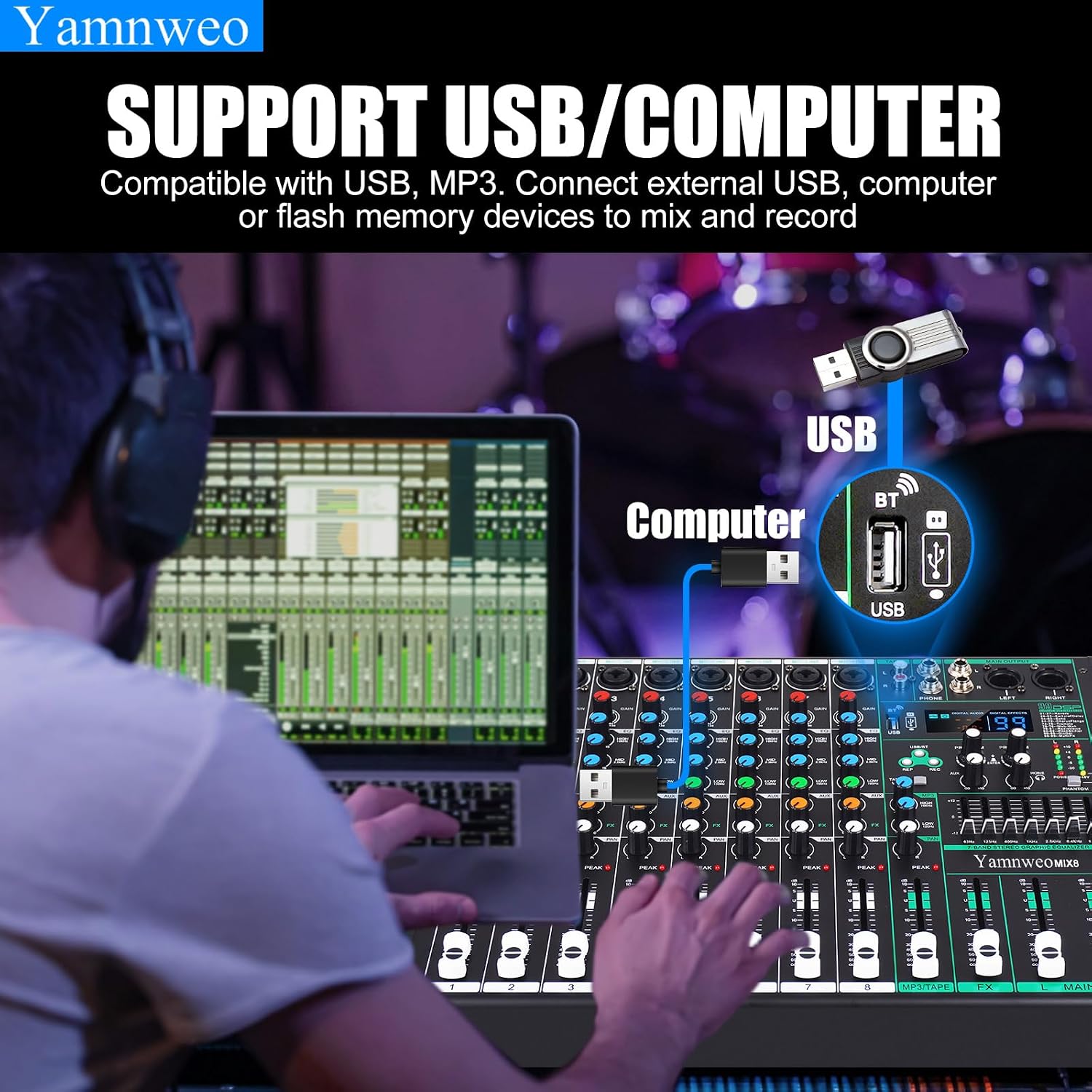
Figure 7: Illustrates connecting the mixer to a computer via USB for mixing and recording, alongside USB flash drive compatibility.
Operating Instructions
1. Channel Controls
- GAIN: Adjust this knob to set the input level for each channel. Aim for the signal light to occasionally flash, avoiding constant illumination which indicates clipping.
- EQ (HIGH, MID, LOW): Use these three knobs to adjust the treble, midrange, and bass frequencies for each input. This allows for precise tone shaping of individual instruments or vocals.
- AUX: Controls the amount of signal sent from the channel to the auxiliary output.
- FX: Controls the amount of signal sent from the channel to the internal DSP effects processor.
- PAN: Adjusts the stereo position of the channel's signal (left to right).
- PEAK: An indicator light that illuminates when the input signal is too high, indicating potential clipping. Reduce the GAIN if this light stays on.
- FADER: The main volume control for each individual channel.
2. DSP Effects Selection and Application
The MIX-8 offers 99 digital effects. To select and apply effects:
- Use the PROGRAM knob to scroll through the available effects (01-99) displayed on the digital screen.
- Press the ENTER button (usually by pressing the PROGRAM knob) to confirm your selection.
- Adjust the FX knob on each channel to send the desired amount of that channel's signal to the selected effect.
- Use the master REVERBERATION FADER to control the overall output level of the effects.
Video 1: Demonstrates the product's appearance, functionality, and effectiveness, including the use of faders, knobs, and the digital display for effect selection. This video highlights the mixer's low bottom noise and clear sound quality.
3. 7-Band Graphic Equalizer
The master 7-band graphic equalizer allows for fine-tuning of the overall mix. Adjust the sliders for specific frequency bands (63Hz, 125Hz, 400Hz, 1KHz, 2.5KHz, 6.4KHz, 15KHz) to shape the final sound output.

Figure 8: Close-up of the 7-band graphic equalizer, emphasizing its role in professional sound regulation and delicate high school bass regulation.
4. Monitoring
Use the PHONES output and its dedicated volume knob to monitor your mix privately. The main output meters provide visual feedback on the overall signal level.
5. Recording
To record your performance, connect the mixer to a computer via the USB port. The mixer acts as an audio interface, sending the main stereo mix to your computer. Use recording software on your computer to capture the audio.
Maintenance
- Cleaning: Regularly wipe the surface of the mixer with a soft, dry, lint-free cloth. Avoid abrasive cleaners or solvents.
- Dust Protection: When not in use, cover the mixer with a dust cover to prevent dust and debris from entering the controls and internal components.
- Cable Management: Ensure cables are neatly organized and not under strain to prevent damage to connectors and ports.
- Storage: Store the mixer in a cool, dry place away from extreme temperatures and direct sunlight.
Troubleshooting
| Problem | Possible Cause | Solution |
|---|---|---|
| No sound output. | Power off; cables disconnected; faders down; incorrect input/output selection. | Check power connection and switch; ensure all audio cables are securely connected; raise channel and main faders; verify correct input source and output destination. |
| Distorted sound. | Input gain too high (clipping); damaged cables; faulty speaker/headphone. | Reduce GAIN knob on channels where the PEAK light is constantly on; check and replace damaged cables; test with different speakers/headphones. |
| Bluetooth not connecting. | Bluetooth not activated on mixer; device too far; interference; already paired to another device. | Ensure Bluetooth mode is active on the mixer; move device closer; reduce interference from other wireless devices; unpair from other devices if necessary. |
| Phantom power not working. | Phantom power switch off; faulty microphone. | Press the 48V PHANTOM button to activate; test with a different condenser microphone. |
Specifications
| Feature | Detail |
|---|---|
| Brand | Yamnweo |
| Model | MIX-8 |
| Number of Channels | 8 |
| Item Weight | 8.58 pounds |
| Product Dimensions | 15.3 x 11.8 x 3.1 inches (390mm x 300mm x 80mm) |
| Country of Origin | China |
| Power Source | Corded Electric |
| Voltage | 110 Volts |
| Connectivity Technology | Bluetooth, USB |
| Phantom Power Supply | 48V |
| Total Harmonic Distortion | 0.03% |
| SNR | >90dB |
| Maximum Input Level | 22dB |
| Input Sensitivity MIC Input | 60dB |
| LINE Enter | 20dB |
| Frequency Response | 20Hz-20KHz (+3dB) |
| Auxiliary Transmit Output Level | 0dBu |
| Line Input Gain Range | 10dB to +20dB |
| Power Supply | 100-240V 6A 250V |

Figure 9: Visual representation of the mixer's dimensions and a summary of key technical specifications.
Warranty and Support
Specific warranty terms and conditions for the Yamnweo MIX-8 DJ Controller Mixer are not detailed within this user manual. For comprehensive warranty information, technical support, or service inquiries, please refer to the official Yamnweo website, your purchase documentation, or contact the retailer from whom you purchased the product.
Ask a question about this manual
Ask about setup, troubleshooting, compatibility, parts, safety, or missing instructions. Manuals+ will review the question and use this page’s manual context to help answer it.