
1. Introduction
Thank you for choosing the LIPETY 9" Portable Oscillating Standing Fan. This versatile fan is designed for convenience and powerful cooling, whether you're at home, in the office, or enjoying outdoor activities. Its unique foldable and telescopic design allows it to transform from a compact unit to a full-sized standing fan, meeting various cooling needs. Please read this manual thoroughly before use to ensure proper operation and maintenance.

Figure 1: The LIPETY Portable Oscillating Standing Fan in various modes (folded, desk, and standing) with its remote control.
2. Product Features
- 9" Portable Fan with Remote: Supports 1h to 4h timer function.
- Unique Telescopic Design: Lightweight and compact, adjustable height from 4.1" to 41.3". Functions as a table, pedestal, or floor fan.
- 65° Oscillating Function: Provides wide-angle air distribution.
- 4 Speeds & Quiet Operation: Includes breeze, soft, strong, and natural wind modes. Operates quietly (12~22±5db) for undisturbed sleep.
- 7200mAh Rechargeable Battery: Built-in battery supports charging while in use. Provides 5 to 23.5 hours of working time depending on speed.
- Height Adjustable and Easy to Clean: Fan head can be flipped 180°, and the front grille is detachable for easy cleaning. Features a non-slip silicone pad for stability.

Figure 2: The fan's versatile design allows for adjustable height and compact storage, unlike traditional fans.
3. Package Contents
Upon opening the package, please ensure all items listed below are present and in good condition:
- 1 x Foldable Fan
- 1 x USB to Type C Cable
- 1 x Remote Control (with battery)
- 1 x User Manual (this document)

Figure 3: All components included in the product package.
4. Setup Instructions
4.1 Unfolding the Fan
- Place the folded fan on a flat, stable surface.
- Gently pull the fan head upwards from the base in the direction of the arrow marked "OPEN" until it locks into an upright position.
- Adjust the fan head to your desired angle (up to 180° tilt).
4.2 Adjusting Height
- To extend the fan, firmly hold the base and pull the telescopic rod upwards to your desired height. The rod can extend up to 41.3 inches.
- To retract, press the release button on the back of the telescopic rod and gently push the rod downwards.

Figure 4: Visual guide for unfolding and adjusting the fan's height.
4.3 Charging the Fan
The fan comes with a built-in 7200mAh rechargeable battery. Use the provided USB to Type C cable for charging.
- Connect the Type C end of the cable to the charging port on the fan's base.
- Connect the USB end to a compatible USB power source (e.g., USB wall adapter, power bank, computer USB port).
- The charging indicator lights on the base will illuminate to show charging progress. A full charge typically takes 4-6 hours.
- The fan can be used while charging.

Figure 5: Battery life indication based on fan speed.

Figure 6: Charging the fan via USB-C cable.
5. Operating Instructions
5.1 Power On/Off and Speed Control
The fan can be operated using either the touch controls on the base or the included remote control.
- Touch Control: Press the power button on the fan base to turn it on. Each subsequent press cycles through the 4 wind speeds (Breeze, Soft, Strong, Natural Wind). Press and hold to turn off.
- Remote Control: Use the red power button on the remote to turn the fan on/off. Use the speed buttons (1, 2, 3, 4) to select your desired wind mode.

Figure 7: Fan speed settings and remote control overview.
5.2 Oscillation Function
The fan features a 65° oscillation function to distribute air across a wider area.
- Remote Control: Press the oscillation button on the remote control to activate or deactivate the 65° oscillation.
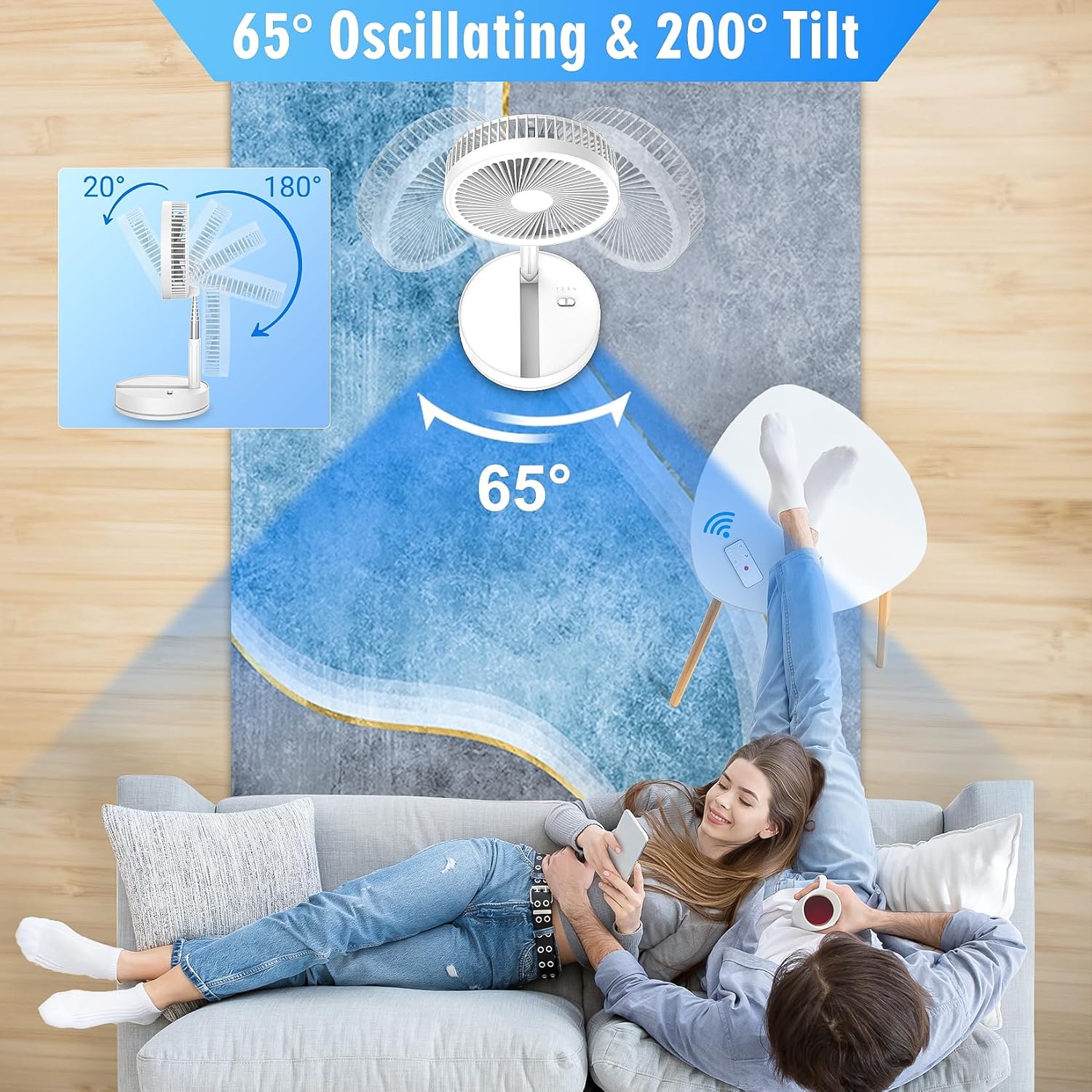
Figure 8: Fan oscillation and tilt angles.
5.3 Timer Function
Set the fan to automatically turn off after a specified period.
- Remote Control: Use the timer buttons (1H, 2H, 3H, 4H) on the remote to set the desired auto-off time. The timer function can only be set via the remote.

Figure 9: Timer settings for automatic fan shut-off.
5.4 Official Product Video
Video 1: This video provides a visual demonstration of the fan's features, including its portability, folding mechanism, and oscillation. It highlights the 7200mAh battery and quiet operation, showcasing its suitability for various environments.
6. Maintenance and Cleaning
Regular cleaning ensures optimal performance and longevity of your fan.
- Power Off: Always ensure the fan is turned off and unplugged before cleaning.
- Detachable Front Grille: The front grille can be detached for easy cleaning of the fan blades. Gently twist or unclip the grille as indicated by markings on the fan.
- Cleaning Blades and Grille: Use a soft, damp cloth to wipe down the fan blades and grille. For stubborn dust, a mild soap solution can be used, but ensure no liquid enters the motor or electronic components.
- Base Cleaning: Wipe the base with a dry or slightly damp cloth.
- Reassembly: Ensure all parts are completely dry before reassembling the front grille and operating the fan.
7. Troubleshooting
If you encounter any issues with your fan, please refer to the following common problems and solutions:
| Problem | Possible Cause | Solution |
|---|---|---|
| Fan does not turn on | Low battery or no power. | Charge the fan fully. Ensure the power button is pressed correctly. |
| Weak airflow | Low speed setting; dirty fan blades/grille. | Increase the fan speed. Clean the front grille and blades. |
| Fan makes unusual noise | Obstruction in fan blades; unstable surface. | Turn off and check for any foreign objects. Place the fan on a stable, flat surface. |
| Oscillation not working | Oscillation function not activated. | Press the oscillation button on the remote control. |
8. Specifications
| Feature | Detail |
|---|---|
| Brand | LIPETY |
| Model Name | F9 |
| Color | White |
| Electric Fan Design | Floor Fan |
| Power Source | DC & Battery Powered |
| Product Dimensions | 8.6"D x 8.6"W x 41.3"H |
| Noise Level | 22 dB |
| Number of Blades | 5 |
| Voltage | 6 Volts |
| Switch Type | Electronic Touch Controls |
| Control Method | Remote |
| Connector Type | USB Type C |
| Battery | 7200mAh Lithium Ion (built-in) |
| Working Time | 5 h to 23.5 h (depending on speed) |
| Charging Time | Approx. 6 hours |
| Item Weight | 2.99 pounds |
9. Warranty and Support
For warranty information or technical support, please refer to the product packaging or contact LIPETY customer service directly. Keep your purchase receipt for any warranty claims.