1. Setup and Installation
This section provides instructions for setting up and installing your ANJIELO SMART Wired Video Door Phone Intercom System. Ensure all components are present before beginning installation.
1.1 Packing List & Tools Needed
Before installation, verify that you have all the necessary components and tools:
- Doorbell Unit (1)
- 10-inch Touch Monitor (2)
- Power Supply (for monitors)
- 4-Pin Wires (for wired connections)
- Mounting Bracket (for doorbell)
- Hanging Plate (for monitors)
- Screw Packs
- Rain Cover (for doorbell)
Tools Required: Drill, Screwdriver, Measuring Tape, Pencil.
1.2 Wiring Requirements
The monitor and doorbell require a wired connection using 4-core cable. The main monitor can connect to your home Wi-Fi network (2.4GHz band only) for mobile phone access via the Tuya app. You can extend the distance between the monitor and doorbell, or between monitors, using RVV4/Cat5/Cat6 wires up to 300ft.

Image: Illustration of 4-wire cable connections between the indoor monitor, outdoor doorbell, and an electronic lock. The diagram indicates that the longest distance between the monitor and camera is 100m.
1.3 Doorbell Unit Installation
The doorbell unit is designed for surface mounting and includes a waterproof cover. It features a 1080P camera with a 148° view angle, IR LEDs for night vision, and a keypad for access control.
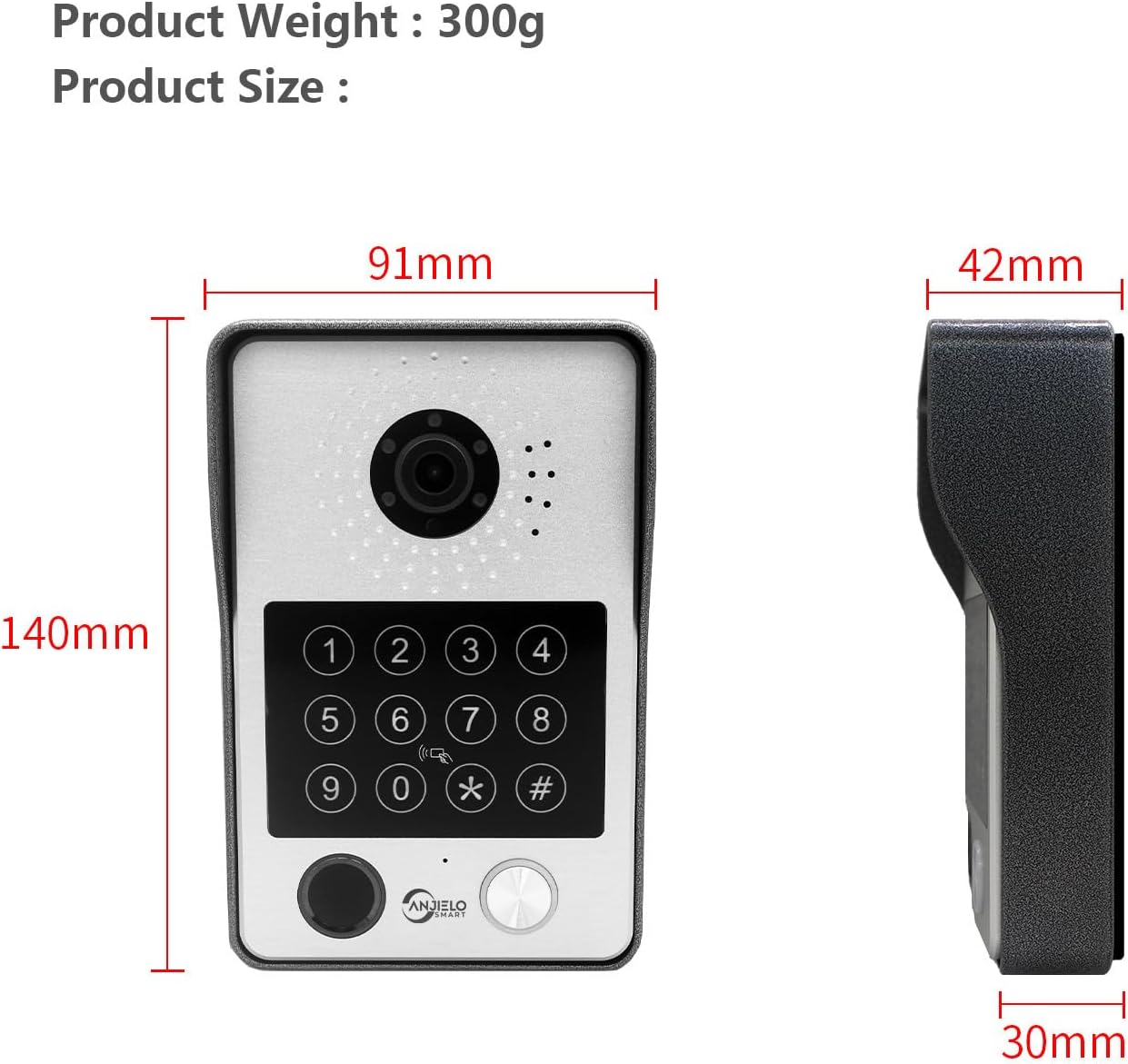
Image: A close-up diagram of the doorbell unit, labeling its components such as the rain cover, IR-LED, camera, speaker, keypad, card reader, microphone, call button, and fingerprint sensor. Dimensions are also provided: 140mm height, 91mm width, and 30mm depth.
- Drill a hole (diameter > 1.5cm) for wiring and mounting screws at the desired doorbell location.
- Secure the doorbell bracket to the wall using the provided screws.
- Connect the 4-pin wire from the doorbell to the main wiring.
- Mount the doorbell unit onto the secured bracket.
1.4 Indoor Monitor Installation
The 10-inch TFT-LCD touch screen monitor is for indoor use. It supports Wi-Fi connectivity for app integration.
- Drill holes for the hanging plate at the desired monitor location.
- Secure the hanging plate to the wall.
- Insert the Micro SD card (32GB included) into the monitor's TF card slot.
- Connect the 4-pin wires from the doorbell and other monitors (if applicable) to the monitor's input ports.
- Connect the 12V 2A power supply to the monitor.
- Mount the monitor onto the hanging plate.
1.5 Installation Video Guide
Video: A detailed assembly guide demonstrating the step-by-step installation process for the ANJIELO SMART Video Intercom System, including unboxing, wiring, and mounting of both the doorbell and indoor monitor.
2. Operating Instructions
This section covers the daily operation of your intercom system.
2.1 Two-Way Audio Communication
When a visitor presses the doorbell, all connected indoor monitors and your mobile phone (via the Tuya app) will ring. You can see, hear, and speak to the visitor from any monitor or your phone. This allows for convenient communication and the ability to grant access remotely.
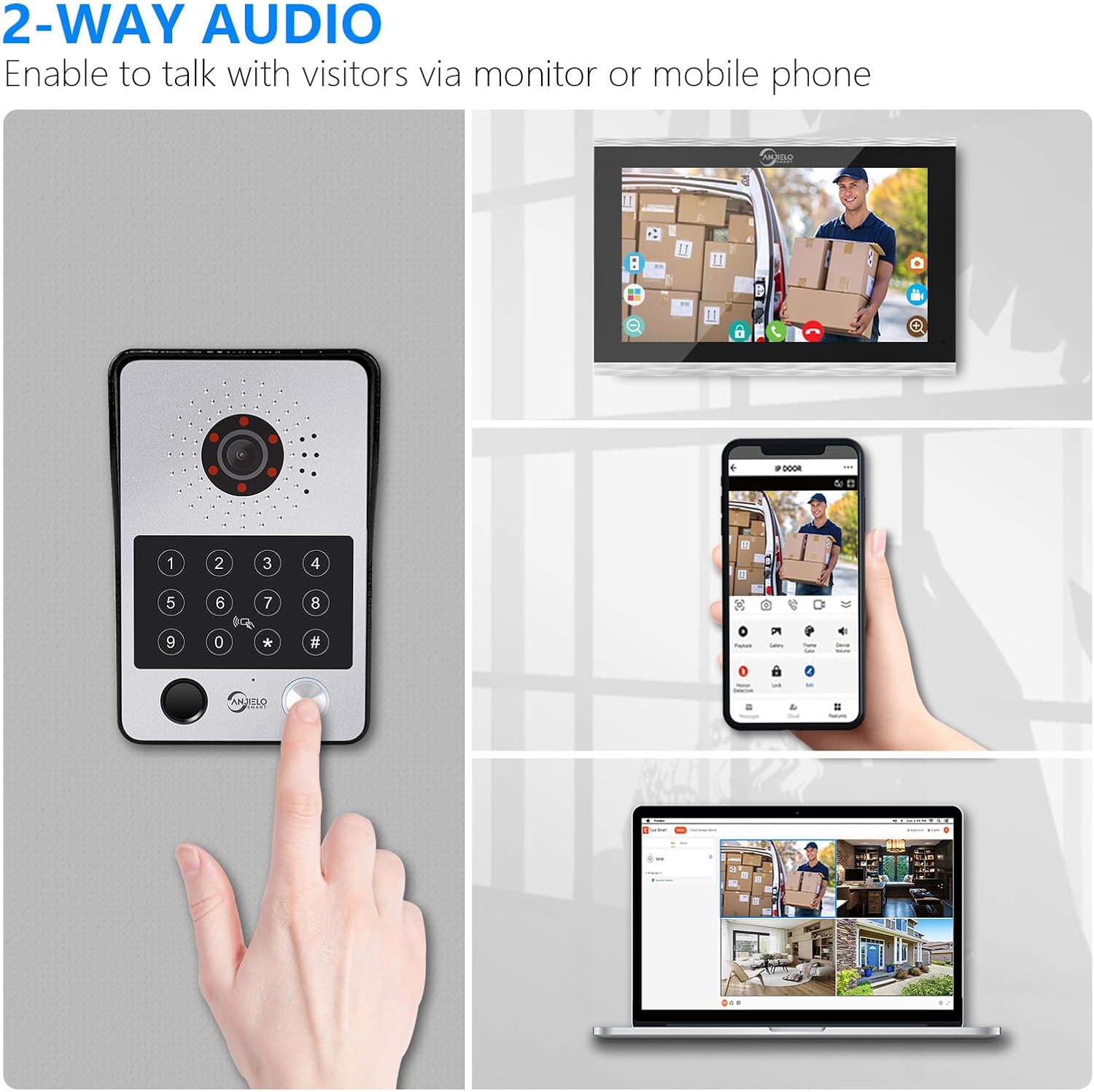
Image: Demonstrates the two-way audio functionality, allowing users to communicate with visitors via the indoor monitor, mobile phone, or even a computer.
2.2 Multiple Unlocking Methods
The system offers five methods to unlock connected electronic locks:
- Password: Enter a pre-set code on the doorbell keypad.
- Fingerprint: Use the integrated fingerprint sensor on the doorbell.
- IC Card: Tap an authorized RFID card on the doorbell's card reader. Five passes are included.
- Tuya App: Remotely unlock the door using the mobile application.
- Indoor Monitor: Unlock directly from any connected indoor monitor.

Image: Visual representation of the five unlocking methods available for the system: fingerprint, password, IC card, direct control from the indoor monitor, and remote control via the Tuya app.
2.3 Motion Detection and Automatic Recording
The system is equipped with motion detection. When motion is detected or the doorbell is pressed, the camera automatically records videos or takes snapshots. These are saved to the Micro SD card (32GB included) and can be viewed on your mobile phone or indoor monitor.

Image: Illustrates the smart PIR motion detection feature, where an alert is received on a mobile phone and monitor when movement is detected, allowing for immediate response or warning.
2.4 Product Usage Scenarios Video
Video: Demonstrates various usage scenarios of the ANJIELO SMART Video Intercom System, including motion detection alerts, remote unlocking via the mobile app, and two-way communication with visitors.
3. Maintenance
Proper maintenance ensures the longevity and optimal performance of your intercom system.
3.1 Cleaning
- Wipe the indoor monitor screen and doorbell unit with a soft, dry cloth.
- Avoid using abrasive cleaners or solvents that may damage the surfaces.
- Ensure the camera lens and IR LEDs on the doorbell are clear of dust and debris for optimal image quality.
3.2 Weather Resistance
The outdoor doorbell unit features an IP65 waterproof rating, providing protection against dust and water splashes. The aluminum alloy shell with a rain cover enhances its durability against various weather conditions.

Image: The doorbell unit is shown installed on an exterior wall during a rain shower, highlighting its IP65 waterproof and anti-vandal features.
3.3 Connection Checks
- Periodically check all wired connections to ensure they are secure and free from damage.
- Verify that the power supply is properly connected to the indoor monitors.
4. Troubleshooting
This section addresses common issues you might encounter with your intercom system.
4.1 No Power to Monitor/Doorbell
- Ensure the power adapter is securely plugged into a working electrical outlet and the monitor.
- Check all wired connections between the monitor and doorbell for proper seating.
4.2 No Video or Poor Image Quality
- Verify that the camera lens on the doorbell is clean and unobstructed.
- Check the video signal wires for any damage or loose connections.
- Ensure sufficient lighting for the camera. The system includes IR LEDs for night vision.
4.3 No Audio or Poor Audio Quality
- Check the audio wires for secure connections.
- Ensure the microphone and speaker on both the doorbell and monitor are not obstructed.
- Adjust the volume settings on the indoor monitor.
4.4 Wi-Fi Connection Issues
- Ensure your router is operating on the 2.4GHz band, as the monitor only supports this frequency.
- Check the Wi-Fi signal strength at the monitor's location.
- Restart your router and the indoor monitor.
- Reconfigure the Wi-Fi connection through the Tuya app.
5. Specifications
Detailed technical specifications for the ANJIELO SMART Video Door Phone Intercom System.
5.1 Outdoor Doorbell Unit
- Camera Sensor: 1/2.7 CMOS
- Resolution: 1080P
- Lens: 3.2mm
- View Angle: 148°
- Night Vision: IR LEDs (120°)
- Power Consumption: 200mA max
- Power Supply: Supplied from indoor unit
- Operating Temperature: -40℃ to +50℃
- Installation: Surface mount
- Accessory: Rain Cover
- Size: 137mm x 85.5mm x 23.5mm
- Protection Rating: IP65 Waterproof, Dustproof, Vandal Resistant

Image: Displays the doorbell's 1080P HD camera performance during both day and night, emphasizing the 148-degree wide-angle view and the effectiveness of the 120-degree IR LEDs for clear night vision.
5.2 Indoor Touch Monitor
- Screen: 10 inch TFT-LCD touch screen
- Resolution: 1024 x 680
- Rings: 7-chord melody rings
- Adjustments: Volume, Color adjustable
- Connection: 4-wires, WIFI TUYA solution (2.4GHZ only)
- Panel Material: Acrylic/ABS cover
- Installation: Surface mounting
- Input Voltage: AC 100-240V 50/60Hz
- Working Voltage: DC 12V, 2A
- Size: 272mm x 180mm x 21mm (approx. 10.7 x 7.1 x 0.8 inches)
5.3 General System Information
- Connectivity Technology: Wired (monitor to doorbell), Wi-Fi (monitor to app)
- Control Method: App, Touch
- Included Components: One doorbell, Two 10-inch monitors
- Max Monitors Supported: 6 indoor monitors
- Max Doorbells Supported: 2 doorbells
- Compatible Devices: Personal Computer, Smartphone
- Recording: Automatic video/snapshot recording to Micro SD card (32GB included)
6. Warranty and Support
For warranty information and technical support, please refer to the documentation included with your product or contact ANJIELO SMART customer service. Keep your purchase receipt for warranty claims.
6.1 Contact Information
Please visit the official ANJIELO SMART website or refer to your product packaging for the most up-to-date contact details for customer support.


