1. Product Overview
This CFTGIW Car Audio Wiring Harness Adapter with Canbus Box is designed as a direct replacement for specific Ford models, including the Ford Escape. It facilitates the connection of an aftermarket car audio system to the vehicle's existing wiring without requiring modifications to the factory harness. The integrated Canbus box ensures proper communication between the new audio unit and the vehicle's electronic systems, maintaining functionality such as steering wheel controls (if applicable) and other vehicle data.
The harness is manufactured with CNC machined precision to ensure an exact match with the original car adapter cable interface, guaranteeing a secure and reliable fit. Its color-coded wires simplify the installation process, aligning with standard wiring conventions.
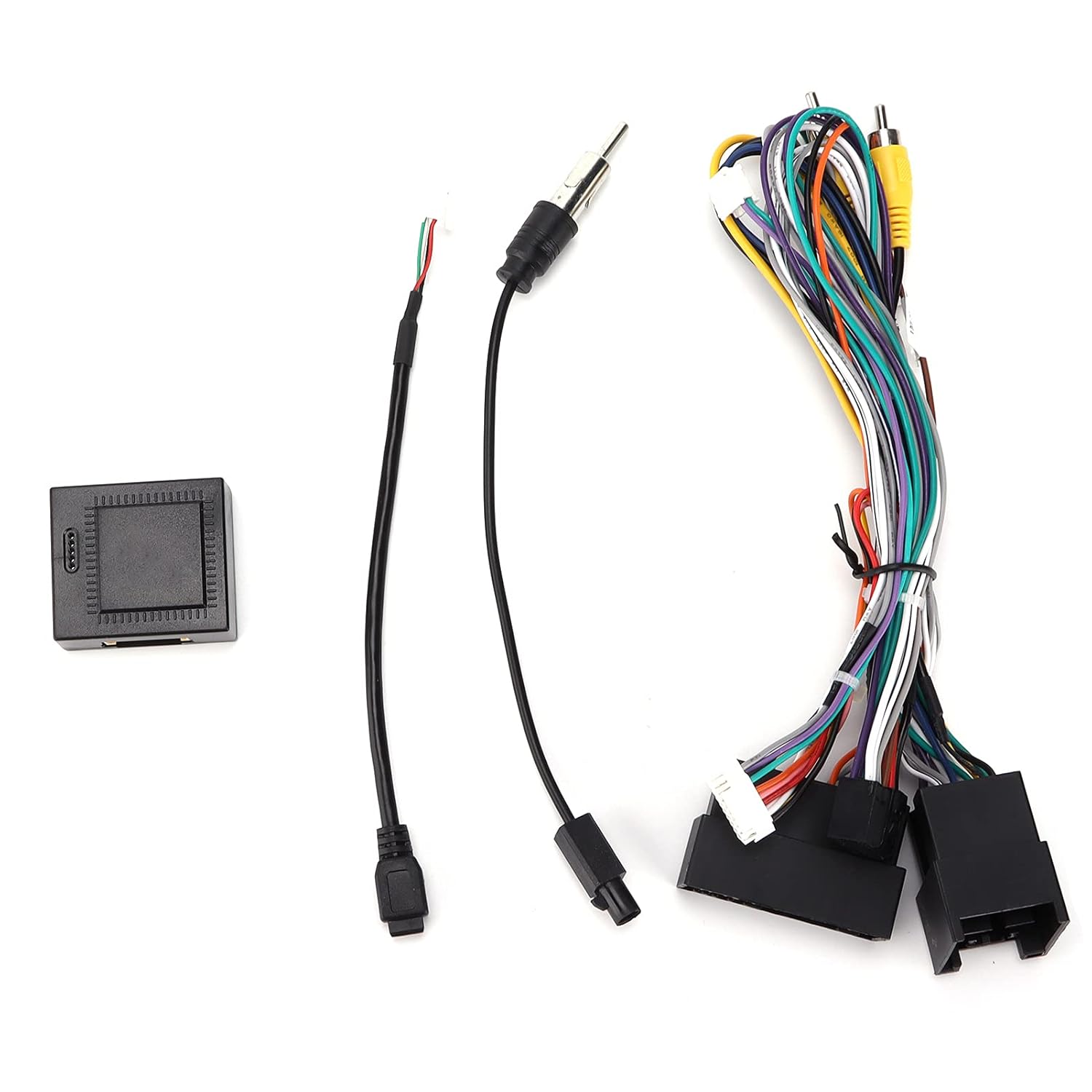
Image 1.1: Overview of the CFTGIW Car Audio Wiring Harness Adapter components, including the main wiring harness, Canbus box, and antenna adapter.
2. Setup and Installation
The CFTGIW Car Audio Wiring Harness Adapter is designed for plug-and-play installation, minimizing the need for complex wiring procedures. No modification to the vehicle's original wiring is typically required.
2.1. Before You Begin
- Ensure the vehicle's battery is disconnected to prevent electrical shorts during installation.
- Verify that the new aftermarket head unit is compatible with the vehicle and the wiring harness.
- Gather necessary tools, which may include a panel removal tool, screwdriver, and wire crimpers (if any custom connections are needed, though generally not for this harness).
2.2. Installation Steps
- Remove the Factory Head Unit: Carefully remove the trim panels surrounding the factory radio using a panel removal tool. Unscrew and detach the factory head unit from the dashboard.
- Disconnect Factory Wiring: Disconnect all wiring harnesses and the antenna cable from the back of the factory head unit.
- Connect the CFTGIW Harness:
- Connect the vehicle-specific end of the CFTGIW wiring harness to the corresponding connectors in your vehicle's dashboard.
- Connect the Canbus box to the designated connector on the CFTGIW harness.
- Connect the antenna adapter (if included and necessary) to the vehicle's antenna cable and the new head unit.
- Connect to Aftermarket Head Unit: Connect the other end of the CFTGIW wiring harness (which typically has ISO or universal connectors) to the wiring harness provided with your aftermarket head unit. Ensure all color-coded wires match correctly (e.g., yellow to yellow for constant power, red to red for accessory power, black to black for ground, speaker wires to corresponding speaker wires).
- Test Connections: Before fully reassembling, temporarily reconnect the vehicle's battery. Turn on the ignition and test the new head unit's functionality, including audio output, radio reception, and any steering wheel controls.
- Secure and Reassemble: Once all functions are verified, disconnect the battery again. Secure all wiring to prevent rattles or interference. Mount the new head unit into the dashboard and reattach all trim panels. Reconnect the battery.

Image 2.1: Close-up view of the CFTGIW wiring harness connectors, showing the various color-coded wires for different audio and power functions.

Image 2.2: The CFTGIW Canbus box, an essential component for vehicle communication with the aftermarket head unit.
3. Operating the System
Once the CFTGIW Car Audio Wiring Harness Adapter and Canbus Box are correctly installed, the operation of your car audio system will primarily depend on the features and interface of your aftermarket head unit. The harness acts as an intermediary, ensuring that power, ground, speaker signals, and vehicle data (via Canbus) are correctly transmitted between the vehicle and the new audio system.
- Power On/Off: The head unit should power on and off with the vehicle's ignition, as controlled by the accessory power signal routed through the harness.
- Audio Output: Sound will be routed to the vehicle's speakers through the harness connections.
- Steering Wheel Controls: If your aftermarket head unit supports steering wheel controls and the Canbus box is designed to translate these signals, your factory steering wheel buttons should function with the new head unit. Refer to your head unit's manual for specific setup instructions for steering wheel controls.
- Vehicle Data: The Canbus box may provide other vehicle data to the head unit, such as illumination signals, reverse gear signals, or speed pulse, depending on the specific vehicle and head unit capabilities.
4. Maintenance
The CFTGIW Car Audio Wiring Harness Adapter is a passive component designed for long-term reliability. Minimal maintenance is required.
- Secure Connections: Periodically, if accessible, ensure all connections remain secure and free from corrosion. Loose connections can lead to intermittent audio or power issues.
- Environmental Protection: Ensure the harness and Canbus box are installed in a dry environment, protected from excessive heat, moisture, and physical damage.
- Cleaning: If necessary, gently clean any exposed parts of the harness with a dry, lint-free cloth. Avoid using liquid cleaners directly on electrical components.
5. Troubleshooting
If you encounter issues after installing the CFTGIW Car Audio Wiring Harness Adapter, consider the following troubleshooting steps:
5.1. No Power to Head Unit
- Check Battery Connection: Ensure the vehicle's battery is fully charged and properly connected.
- Verify Fuse: Check the fuse for the aftermarket head unit, both on the unit itself and in the vehicle's fuse box.
- Harness Connections: Confirm that the yellow (constant power) and red (accessory power) wires are securely connected from the CFTGIW harness to the head unit's harness, and that the vehicle-side connectors are fully seated.
- Ground Connection: Ensure the black (ground) wire has a solid connection.
5.2. No Sound Output
- Speaker Connections: Verify that all speaker wires (e.g., white, gray, green, purple) are correctly matched and securely connected from the CFTGIW harness to the head unit's harness and to the vehicle's speaker wiring.
- Head Unit Settings: Check the audio settings on your aftermarket head unit (e.g., volume level, mute function, fader/balance).
- Amplifier (if applicable): If an external amplifier is used, ensure it is receiving power and a remote turn-on signal.
5.3. Steering Wheel Controls Not Working
- Canbus Box Connection: Ensure the Canbus box is properly connected to the CFTGIW harness.
- Head Unit Compatibility: Confirm that your aftermarket head unit supports steering wheel controls and that the feature is enabled in its settings.
- Head Unit Programming: Some head units require programming or learning of steering wheel buttons. Refer to your head unit's instruction manual.
5.4. Intermittent Issues
- Loose Connections: Recheck all connections for tightness and proper seating.
- Wire Damage: Inspect visible wires for any signs of pinching, cuts, or corrosion.
6. Specifications
| Feature | Specification |
|---|---|
| Model Number | CFTGIWgr346o7yc5 |
| Material | ABS, Rubber |
| Item Weight | 143 Grams (approximately 5.04 ounces) |
| Package Dimensions | 7.87 x 3.54 x 2.36 inches |
| Connector Type | Vehicle-specific, compatible with 3.5mm Jack (for certain audio inputs/outputs) |
| Compatibility | Replacement for Ford Escape (specific years may apply, verify with product listing) |
7. Warranty and Support
For warranty information and technical support regarding your CFTGIW Car Audio Wiring Harness Adapter, please refer to the original purchase documentation or contact the seller directly. Keep your proof of purchase for any warranty claims.
When contacting support, please provide the product model number (CFTGIWgr346o7yc5) and a detailed description of the issue you are experiencing.