
Kaschun EX4
Kaschun EX4 4-Channel Stereo Audio Mixer
Instruction Manual
1. Introduction
Thank you for purchasing the Kaschun EX4 4-Channel Stereo Audio Mixer. This professional audio mixer is designed for a wide range of applications, including studio recording, live concerts, karaoke, and party PA systems.
The EX4 integrates a powerful amplifier, 99 DSP effects, 48V phantom power, and Bluetooth connectivity to provide a versatile and high-quality audio experience. Its built-in amplifier delivers 2x250W at 4Ω, allowing direct connection to speakers without the need for additional external amplification. The 99 DSP effects provide extensive sound shaping capabilities, while the 7-band master EQ offers precise audio tailoring.

Image: The Kaschun EX4 mixer is versatile, suitable for studio, vocal concerts, wedding concerts, and DJ performances.
2. Safety Information
Please read and understand all safety instructions before operating this device. Keep this manual for future reference.
- Power Source: Connect the unit only to the specified power supply. Ensure the voltage matches the requirements of your region.
- Ventilation: Do not block ventilation openings. Ensure adequate airflow around the unit to prevent overheating.
- Moisture: Do not expose the unit to rain, moisture, or excessive humidity. Avoid placing liquids on or near the unit.
- Cleaning: Disconnect power before cleaning. Use a dry, soft cloth. Do not use liquid cleaners or aerosols.
- Servicing: Do not attempt to service this unit yourself. Refer all servicing to qualified service personnel.
- Phantom Power: When using 48V phantom power, ensure microphones are connected before activating to prevent damage.
3. Package Contents
Verify that all items are present in the package:
- Kaschun EX4 4-Channel Stereo Audio Mixer
- Power Cable
- User Manual

Image: The Kaschun EX4 4-Channel Stereo Audio Mixer as it appears in its packaging.
Video: Unboxing and initial overview of the Kaschun EX4 Professional Audio Mixer, showing the contents of the box including the mixer, manual, and power cable.
4. Product Overview
The Kaschun EX4 is a feature-rich audio mixer designed for professional sound control. Below is an overview of its key components and features:
4.1 Front Panel Controls and Inputs

Image: Detailed view of the mixer's control surface, highlighting the LED screen, various knobs, phantom power indicator, and durable metal chassis.
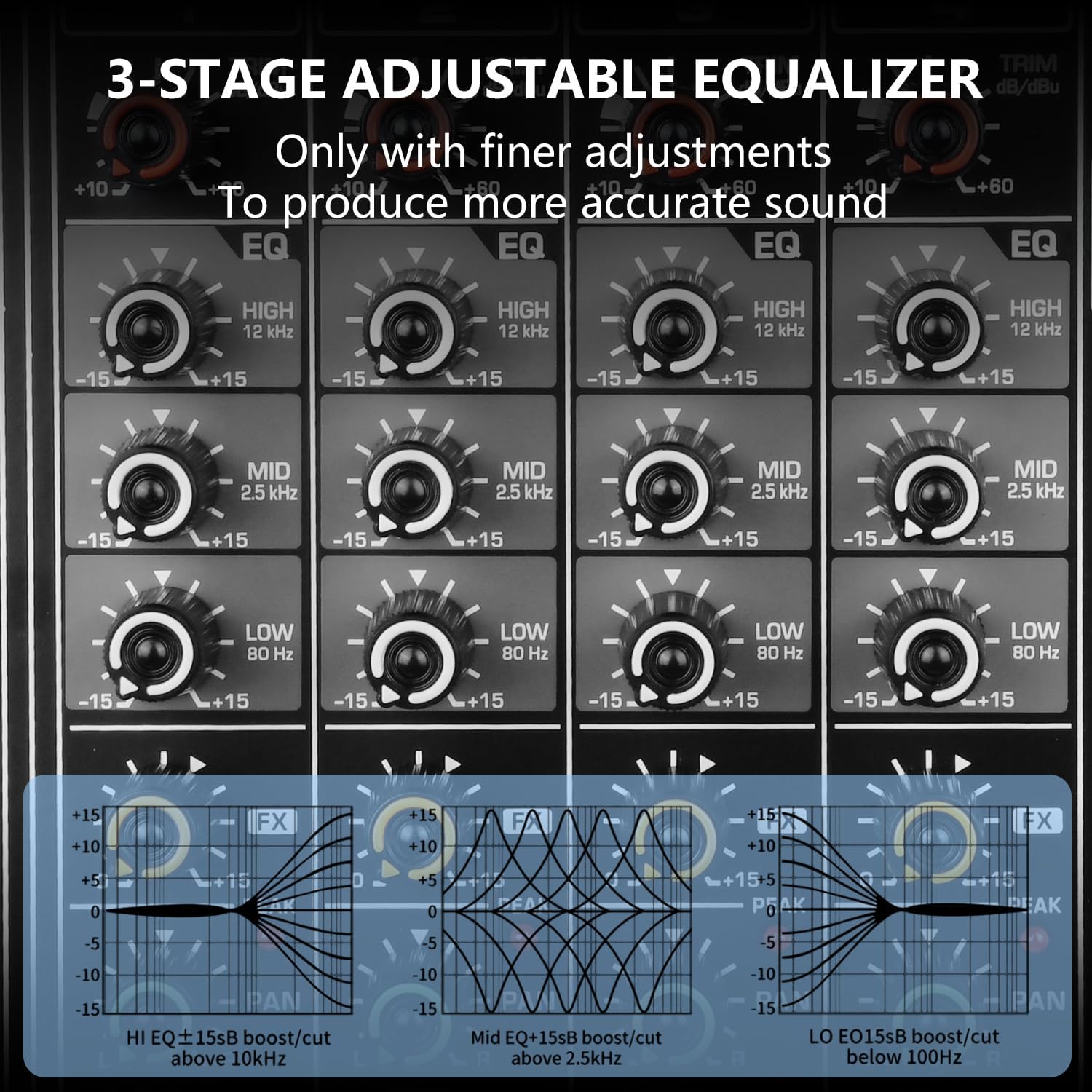
Image: The 3-stage adjustable equalizer section, allowing precise control over high, mid, and low frequencies for optimal sound. This includes controls for HIGH (12 kHz), MID (2.5 kHz), and LOW (80 Hz) frequencies.
- Input Channels (1-4): Each channel features XLR/TRS combo jacks for balanced/unbalanced microphone and line signals.
- +48V Phantom Power: Switchable phantom power for condenser microphones.
- Gain Control: Adjusts the input sensitivity for each channel.
- 3-Band EQ: High, Mid, and Low frequency controls for tone shaping on each channel.
- FX Send: Controls the amount of signal sent to the internal DSP effects processor.
- Pan Control: Adjusts the stereo position of the channel signal.
- Mute Button: Mutes the individual channel.
- Channel Faders: Adjust the volume level of each input channel.
- DSP Effects Processor: Built-in with 99 adjustable presets (reverb, equalization, etc.). Features a digital display for effect selection.
- 7-Band Stereo Graphic Equalizer: Master EQ for precise audio tailoring across bass, midrange, and treble frequencies.
- USB/Flash Reader/MP3 Interface: Supports USB flash drives for playback and recording. Compatible with MAC for digital audio.
- Main Output: XLR and 1/4" TRS outputs for connecting to main speakers.
- Headphone Output: 1/4" TRS jack with dedicated volume control for monitoring.
4.2 Rear Panel Connections

Image: The rear panel of the mixer, showing the power input, power switch, and main output connections, along with the integrated cooling fan for heat dissipation.
- AC Input/Fuse: Power connection and fuse holder.
- Power Switch: Turns the unit ON/OFF.
- Main Output (Right A/B, Left A/B): Speaker outputs with 2 x 250W @ 4 Ohm amplification.
- Cooling Fan: Integrated fan for efficient heat dissipation.
5. Setup
Follow these steps to set up your Kaschun EX4 mixer:
5.1 Initial Placement and Power Connection
- Place the mixer on a stable, flat surface with adequate ventilation.
- Ensure the power switch on the rear panel is in the OFF position.
- Connect the supplied power cable to the AC input on the rear panel and then to a suitable power outlet.
Video: Demonstration of connecting the power cable and turning on the Kaschun EX4 mixer, highlighting the power switch and heat dissipation fan.
5.2 Connecting Audio Devices
The EX4 supports a variety of audio inputs and outputs:

Image: Comprehensive connection diagram illustrating how to connect various audio devices to the Kaschun EX4 mixer.
- Microphones: Connect wired or wireless microphones to the XLR/TRS combo jacks on channels 1-4. For condenser microphones, activate the +48V phantom power switch for the respective channel.
- Instruments: Connect instruments like guitars or electronic organs to the TRS inputs.
- Speakers: Connect passive speakers directly to the Main Output (Right A/B, Left A/B) using appropriate speaker cables. The built-in amplifier provides 2x250W @ 4 Ohm output.
- Headphones: Plug your headphones into the dedicated headphone jack for monitoring.
- External Audio Devices (AUX): Use the AUX auxiliary output to expand connectivity to powered speakers or other audio devices.
- USB/Computer: Connect the mixer to a MAC computer via USB to use it as an audio interface for recording and mixing, or insert a USB flash drive for MP3 playback or recording.
6. Operating Instructions
This section details the operation of the Kaschun EX4 mixer's various functions.
6.1 Basic Audio Mixing
- Power On: After all connections are made, switch the power ON.
- Adjusting Input Gain: Use the TRIM knob for each channel to set the input gain. Adjust until the PEAK LED occasionally flashes, then back off slightly.
- Channel EQ: Use the HIGH, MID, and LOW knobs on each channel to adjust the tone.
- Channel Volume: Use the individual channel faders to control the volume of each input.
- Main Mix: Use the main faders (L/R) to control the overall output volume.
6.2 DSP Effects
The EX4 features 99 built-in DSP effects to enhance your sound.
Video: Demonstration of adjusting the 99-bit DSP reverberation effects on the Kaschun EX4 mixer.
- Selecting Effects: Use the PROGRAM (PUSH) knob to scroll through the 99 effects. Press the knob to select.
- Adjusting FX Send: Use the FX knob on each channel to send signal to the effects processor.
- FX Return: Use the main FX return knob to control the overall volume of the effects.
6.3 Bluetooth Connectivity
Wirelessly stream music from your smartphone, tablet, or other Bluetooth-enabled devices.

Image: Bluetooth connection in action, demonstrating wireless audio streaming to the mixer.
- Pairing: Activate Bluetooth on your device and search for "EX4". Select to pair.
- Control: Use the built-in controls on the mixer for play/pause/skip songs and mode switching. The Bluetooth range is approximately 15 feet.
6.4 USB/MP3 Playback and Recording
The integrated USB interface allows for direct playback from and recording to USB flash drives.

Image: The mixer connected to a laptop and a USB drive, illustrating its USB/computer/MP3 usage capabilities.
- Playback: Insert a USB flash drive with MP3 files. Use the controls on the mixer to navigate and play tracks.
- Recording: The mixer can record directly to a USB flash drive. Refer to the display and controls for recording functions.
- Computer Connectivity: Connect the mixer to a MAC computer via USB to use it as an audio interface for recording and mixing.
7. Maintenance
Proper maintenance ensures the longevity and optimal performance of your Kaschun EX4 mixer.
- Cleaning: Regularly wipe the surface with a soft, dry cloth. Avoid abrasive cleaners or solvents.
- Dust: Keep the unit free from dust, especially around the faders and knobs. Use compressed air to clean hard-to-reach areas.
- Storage: When not in use for extended periods, store the mixer in a cool, dry place, away from direct sunlight and extreme temperatures.
- Heat Dissipation: Ensure the cooling fan on the rear panel is not obstructed to maintain proper heat dissipation.
8. Troubleshooting
If you encounter issues with your Kaschun EX4 mixer, refer to the following common problems and solutions:
| Problem | Possible Cause | Solution |
|---|---|---|
| No sound output | Power off; incorrect connections; faders down; mute engaged. | Check power cable and switch; verify all audio connections; raise channel and main faders; disengage mute buttons. |
| Distorted sound | Input gain too high; damaged cables; speaker impedance mismatch. | Reduce input TRIM gain; check/replace cables; ensure speakers match 4Ω impedance. |
| Microphone not working (condenser) | 48V phantom power not activated. | Activate the +48V phantom power switch for the specific channel. |
| Bluetooth connection issues | Device out of range; pairing mode not active; interference. | Ensure device is within 15 ft range; re-enter pairing mode on mixer and device; reduce interference sources. |
| USB playback not working | Unsupported file format; USB drive not properly inserted. | Ensure files are in supported digital audio formats; re-insert USB drive securely. |
If the problem persists, please contact customer support.
9. Specifications
Key technical specifications for the Kaschun EX4 4-Channel Stereo Audio Mixer:
- Model: EX4
- Channels: 4
- Amplifier Output: 2 x 250W @ 4Ω
- DSP Effects: 99 built-in presets
- Phantom Power: +48V
- Equalizer: 3-band EQ per channel, 7-band Stereo Graphic Equalizer (Main Output)
- Connectivity: XLR/TRS Combo Jacks, USB, Bluetooth
- Bluetooth Range: Approximately 15 ft
- Item Weight: 15.62 pounds (7.1 kg)
- Package Dimensions: 17.48 x 13.54 x 8.07 inches
- Power Source: Corded Electric
- Voltage: 48 Volts (for phantom power)
10. Warranty and Support
For warranty information and customer support, please refer to the warranty card included with your product or visit the official Kaschun Store on Amazon. You can also find additional support and FAQs on the product's Amazon listing page.
Kaschun Store: https://www.amazon.com/stores/Thepursuitofsoundquality/page/E6470C7E-1D55-4B68-90CC-2BF99B95C08A
Ask a question about this manual
Ask about setup, troubleshooting, compatibility, parts, safety, or missing instructions. Manuals+ will review the question and use this page’s manual context to help answer it.