
Introduction
Thank you for choosing the EsaSam Double Din Car Stereo. This advanced multimedia system is specifically designed for select Mercedes-Benz SL R230 series models, including SL350, SL500, SL55, SL600, and SL65. Featuring a 9-inch touchscreen, GPS navigation, MP5 player, DSP, RDS FM radio, and seamless integration with Apple CarPlay and Android Auto, it offers a comprehensive upgrade to your vehicle's infotainment. This manual provides essential information for proper installation, operation, maintenance, and troubleshooting to ensure you get the most out of your new car stereo.

Figure 1: Front view of the EsaSam Double Din Car Stereo.
Setup and Installation
Proper installation is crucial for the optimal performance of your new car stereo. It is highly recommended to have the installation performed by a qualified professional to avoid damage to the unit or your vehicle.
Pre-Installation Check
- Verify that your vehicle's original center console matches the product picture to ensure compatibility. If different, contact customer support with a photo of your console for confirmation.
- Ensure all components listed in the packaging are present before beginning installation.
Wiring and Connections
The stereo comes with a necessary power adapter and wiring harness. Connect all cables securely according to the wiring diagram provided with the product packaging. Pay special attention to the following:
- Power Connection: Connect the main power harness to your vehicle's electrical system.
- Speaker Connections: Connect the speaker wires to the corresponding vehicle speakers.
- GPS Antenna: Connect the GPS antenna and position it in a location with clear sky view for optimal signal reception.
- USB Ports: Connect any external USB devices as needed.
- AHD Rear View Camera: Connect the included AHD rear view camera for enhanced safety during reversing.
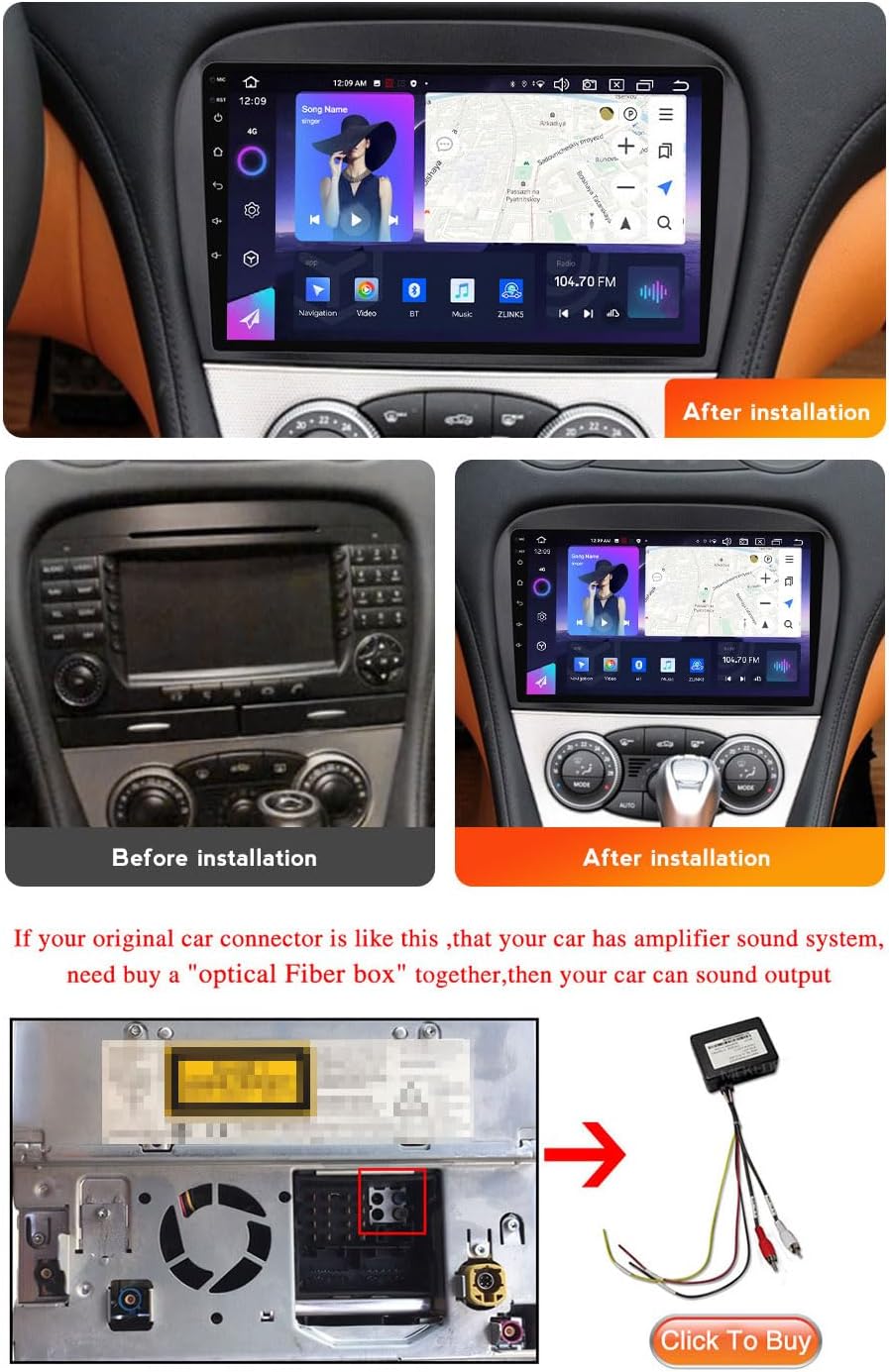
Figure 2: Visual comparison of the car console before and after stereo installation.

Figure 3: Diagram illustrating the connection of an optional optical fiber box for vehicles with amplifier sound systems.
Note: If your original car connector has an optical fiber output (often found in vehicles with an amplifier sound system), you may need to purchase an additional "optical Fiber box" for sound output.
Initial Power-On
After installation, turn on your vehicle's ignition. The stereo should power on automatically. Follow any on-screen prompts for initial setup, such as language selection and time zone settings.
Operating Instructions
This section details the various functions and features of your EsaSam car stereo.
Touchscreen Interface
The 9-inch capacitive multi-touch screen provides intuitive control. Navigate through menus, select applications, and adjust settings by tapping, swiping, and pinching gestures.

Figure 4: Overview of various features including QLED screen, DSP Equalizer, and Cooling Fans.
Navigation (GPS)
The built-in GPS module supports both online and offline maps. Connect to Wi-Fi to download offline maps for areas with limited internet access. The system provides real-time traffic conditions and accurate positioning.

Figure 5: Display showing GPS navigation, rear view camera feed, and RDS radio interface.
Multimedia Playback
- MP5 Player: Supports HD 1080P video playback.
- USB Connection: Play music and videos directly from a USB drive.
- AUX-IN Audio: Connect external audio devices via the AUX input.
- Audio Output: Features subwoofer audio output and various sound effects (pop, rock, jazz, etc.) via the DSP Equalizer.
Bluetooth 5.0
Connect your mobile phone via Bluetooth for hands-free calling and audio streaming. Synchronize your contact list for easy access.
FM/AM/RDS Radio
Enjoy your favorite radio stations with support for FM (87.5-108.5MHz) and AM (520-1700 Hz) frequencies. RDS (Radio Data System) provides additional information like station name and song title where available.
Apple CarPlay & Android Auto
Connect your smartphone to access compatible apps, navigation, music, and messaging directly from the stereo's screen. Supports both wireless CarPlay and wired Android Auto.
Steering Wheel Control (SWC)
The unit supports your vehicle's original steering wheel controls. Access system settings and follow the on-screen instructions to learn or configure the CANBUS protocol for seamless integration.
Rear View Camera
The included 1080P AHD waterproof rear view camera automatically displays the rear view when reversing, providing clear visibility even in low light conditions. The system also supports original reversing radar.
Advanced Features
- Built-in WIFI & 4G LTE: Stay connected on the go. (4G LTE available on NF-3 to NF-7 models).
- Split Screen: Display two applications simultaneously for enhanced multitasking.
- Floating Window: Support for DVR and other applications to be displayed as a floating window.
- File Manager: Download, install, and delete Android applications.
- Multi-language Support: Supports English, Russian, French, German, Spanish, Italian, Arabic, and many more.
Maintenance
To ensure the longevity and optimal performance of your car stereo, follow these maintenance guidelines:
- Cleaning: Use a soft, dry cloth to clean the touchscreen and exterior. For stubborn smudges, slightly dampen the cloth with a screen cleaner designed for electronics. Avoid abrasive cleaners or solvents.
- Software Updates: Periodically check for software updates provided by the manufacturer to ensure you have the latest features and bug fixes. Updates can typically be performed via Wi-Fi.
- Temperature Control: Avoid exposing the unit to extreme temperatures for prolonged periods. The built-in dual cooling fans help dissipate heat during operation.
Troubleshooting
If you encounter issues with your car stereo, refer to the following common problems and solutions:
| Problem | Possible Cause | Solution |
|---|---|---|
| No Power | Loose power connection, blown fuse. | Check power cables and vehicle fuses. Ensure proper wiring. |
| No Sound | Incorrect speaker wiring, volume too low, optical fiber box needed. | Verify speaker connections. Increase volume. If your car has an amplifier, ensure the optical fiber box is correctly installed if required. |
| GPS Signal Lost/Inaccurate | GPS antenna obstructed or improperly placed. | Ensure the GPS antenna has a clear view of the sky. Re-position if necessary. |
| Bluetooth Connection Issues | Bluetooth not enabled, device not discoverable, interference. | Ensure Bluetooth is enabled on both devices. Restart both devices. Try pairing again. |
| Touchscreen Unresponsive | System freeze, temporary software glitch. | Restart the unit (turn off vehicle ignition and restart). If issue persists, consult professional. |
Specifications
Below are the key specifications for the EsaSam Double Din Car Stereo (8 core nf6 8g+128g model):
- Operating System: Android 13
- Processor: 8-core (nf6 model)
- RAM: 8GB
- ROM: 128GB
- Screen Size: 9-inch
- Screen Resolution: 1280*720 (QLED, Capacitive Multi-Touch)
- Video Format Support: HD 1080P
- Bluetooth: Version 5.0 (Hands-free phone call, contact list sync)
- Connectivity: Built-in WIFI, 4G LTE (on NF-3 to NF-7 models), USB, Auxiliary
- Radio: FM (87.5-108.5MHz), AM (520-1700 Hz), RDS support
- Navigation: Built-in GPS antenna, supports online and offline maps
- Audio Output Mode: AUX, Stereo, Subwoofer audio output
- Special Features: Dual Zone function, Apple CarPlay (Wireless), Android Auto (Wired), Steering Wheel Control, AHD Rear View Camera support, Original Reversing Radar support, Mobile Mirror Link, File Manager, Split Screen, Floating Window, DSP Equalizer.
- Human Interface Input: Touchscreen, Buttons
- Vehicle Service Type: Car (Specifically for Benz SL R230, SL350, SL500, SL55, SL600, SL65)

Figure 6: Detailed comparison of features across different EsaSam car stereo models (NF-1 to NF-7).
Warranty and Support
For warranty information, please refer to the documentation provided with your purchase or contact the retailer. For technical support, product inquiries, or assistance with installation, please reach out to EsaSam customer service through the contact information provided on their official website or through your point of purchase.