1. Important Safety Information
Read all instructions before using the appliance. Keep this manual for future reference. Follow all safety warnings to reduce the risk of fire, electric shock, or injury.
- Ensure the refrigerator is properly grounded.
- Do not damage the refrigerant circuit.
- Do not use electrical appliances inside the food storage compartments unless they are of the type recommended by the manufacturer.
- Unplug the appliance before cleaning or performing maintenance.
- Keep ventilation openings clear of obstruction.
- This appliance is intended for household use only.
2. Product Overview
The Hitachi RV760PUK7K is a 550-liter top mount refrigerator featuring an Inverter control system and Dual Fan cooling for efficient and consistent temperature management. It includes a freezer compartment at the top and a fresh food compartment below.

Front view of the Hitachi RV760PUK7K Top Mount Refrigerator in Brilliant Silver finish.

Interior view of the refrigerator and freezer compartments, showing shelves, drawers, and door storage.
3. Setup and Installation
3.1 Unpacking
Carefully remove all packaging materials. Inspect the refrigerator for any damage. Keep packaging materials away from children.
3.2 Placement
- Place the refrigerator on a firm, level floor.
- Ensure adequate ventilation space around the appliance (minimum 10 cm at the back, 5 cm on sides, and 30 cm at the top).
- Avoid direct sunlight or heat sources.
- The appliance is designed for freestanding installation.
3.3 Electrical Connection
Connect the refrigerator to a dedicated 220 Volt AC power outlet. Ensure the outlet is properly grounded. Do not use extension cords or adapters.
3.4 Initial Operation
After installation, wait at least 2-4 hours before plugging in the refrigerator to allow the refrigerant to settle. Once plugged in, allow the appliance to run for several hours (e.g., 4-6 hours) to reach optimal operating temperatures before storing food.
4. Operating Instructions
4.1 Temperature Control (Touch Screen Controller)
The refrigerator features a Touch Screen Controller for adjusting temperature settings. Refer to the display for current settings and adjustment options.
4.2 Dual Sensing Control and Inverter System
The refrigerator utilizes Dual Sensing Control with an Inverter Compressor and Dual Fan Cooling system to maintain precise temperatures in both the freezer and refrigerator compartments independently, optimizing energy efficiency.

Illustration of the Inverter Compressor and Dual Fan Cooling system, showing airflow to both freezer and refrigerator sections.
4.3 Fresh Select Compartment
The Fresh Select lever allows you to adjust the temperature of a specific compartment to suit different food storage needs. You can switch between Vegetable Mode (approximately 5°C) and Dairy/Meat Mode (approximately 1°C).

Diagram illustrating the Fresh Select lever and its two modes: Vegetable (approx. 5°C) and Dairy/Meat (approx. 1°C).
4.4 Movable Twist Ice Tray
The ice tray can be moved or removed entirely to optimize storage space within the freezer compartment. To make ice, fill the tray with water and place it in the freezer. Once frozen, twist the tray to release the ice cubes into the collection bin.
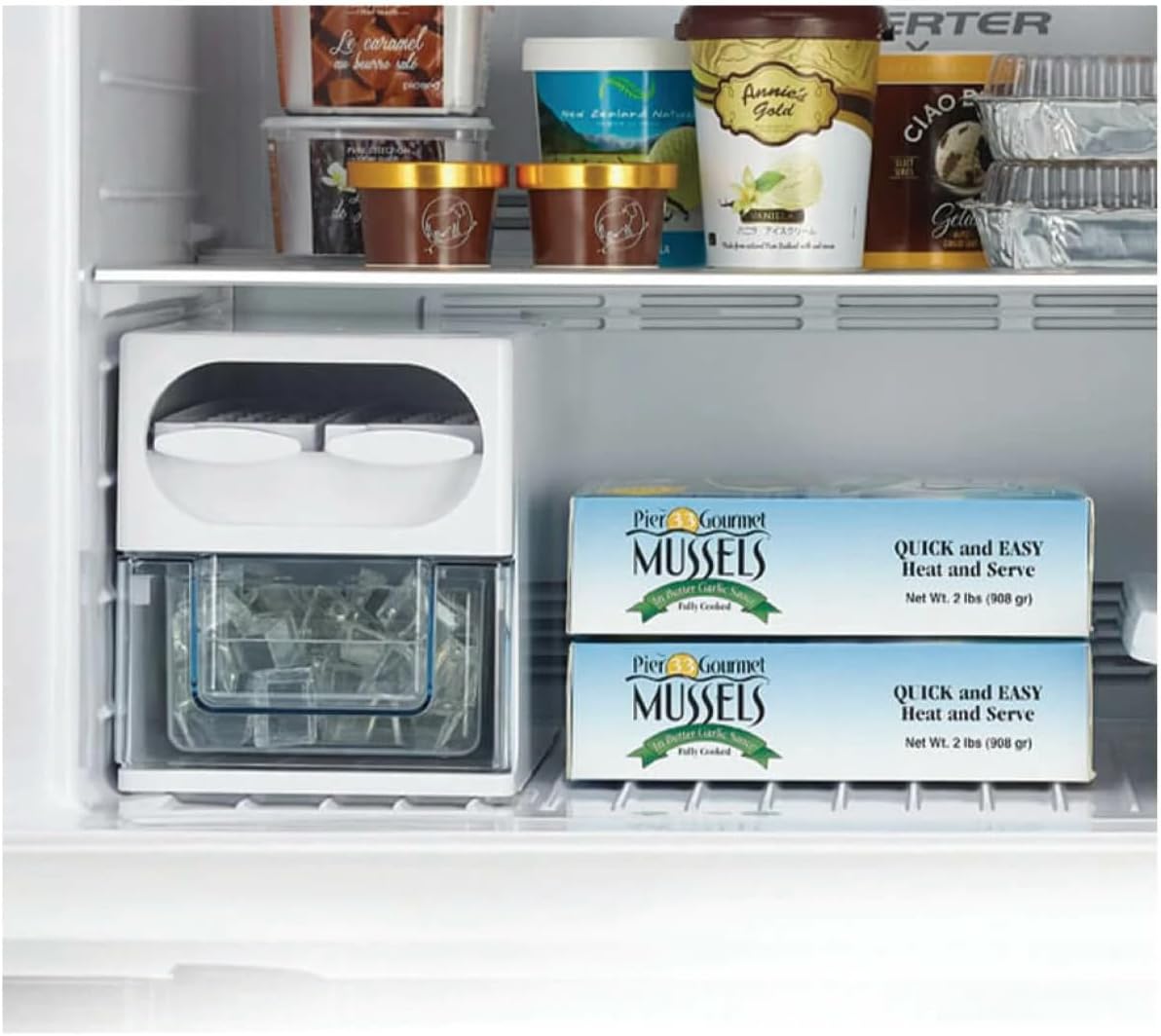
Close-up view of the Movable Twist Ice Tray and its ice collection bin within the freezer.

Images demonstrating how the Movable Twist Ice Tray can be repositioned or removed for flexible storage.
4.5 Tempered Glass Shelves
The refrigerator is equipped with scratch-proof and heat-resistant tempered glass shelves, each capable of holding up to 100 kg. These shelves can be adjusted to different heights to accommodate various items.

Close-up views of the durable tempered glass shelves, highlighting their robust construction and load-bearing capacity.
4.6 LED Lighting
The interior of the refrigerator is illuminated by bright, energy-saving LED lights, providing clear visibility of stored items.

View of the refrigerator interior, highlighting the bright and energy-efficient LED lighting.
5. Maintenance and Cleaning
Regular cleaning and maintenance ensure optimal performance and longevity of your refrigerator.
5.1 General Cleaning
- Always unplug the refrigerator before cleaning.
- Clean the interior and exterior surfaces with a soft cloth and a mild detergent solution.
- Wipe dry with a clean cloth.
- Do not use abrasive cleaners, solvents, or hot water.
- The refrigerator features a Frost Free defrost system, eliminating the need for manual defrosting.
5.2 Mouldproof Door Gasket
The door gasket has a mouldproofing treatment for easier maintenance. Regularly wipe the door gaskets with a damp cloth to keep them clean and ensure a proper seal.

Illustration highlighting the mouldproof door gasket, designed for easy cleaning and hygiene.
5.3 Cleaning Shelves and Drawers
Remove shelves and drawers for thorough cleaning. Wash them with mild soap and water, rinse, and dry completely before returning them to the refrigerator.
6. Troubleshooting
Before contacting service, review the following common issues and solutions:
| Problem | Possible Cause | Solution |
|---|---|---|
| Refrigerator does not operate. | No power supply; power cord not plugged in; circuit breaker tripped. | Check power connection; ensure outlet is functional; reset circuit breaker. |
| Temperature is not cold enough. | Door left open; excessive food load; temperature setting too high; poor ventilation. | Ensure door is closed; reduce food load; adjust temperature setting; check ventilation. |
| Unusual noises. | Appliance not level; items vibrating inside; normal operating sounds (e.g., refrigerant flow). | Level the appliance; rearrange items; normal sounds are expected. |
| Water on floor. | Drain hose blocked or dislodged. | Check and clear the drain hose. |
If the problem persists after attempting these solutions, contact authorized service personnel.
7. Specifications
| Brand | HITACHI |
| Model Number | RV760PUK7K |
| Total Capacity | 550 Liters |
| Refrigerator Fresh Food Capacity | 30 Liters |
| Freezer Capacity | 170 Liters |
| Product Dimensions (D x W x H) | 80 cm x 65 cm x 180 cm |
| Item Weight | 90 Kilograms |
| Color | Brilliant Silver |
| Voltage | 220 Volts |
| Efficiency Rating | A++ (Energy Star Certified) |
| Annual Energy Consumption | 419750 Kilowatt Hours Per Year (Note: This value may be a typo. Please refer to the product label for accurate energy consumption.) |
| Defrost System | Frost Free |
| Installation Type | Freestanding |
| Special Features | Dual Sensing Control, Inverter Control, Dual Fan Cooling, Fresh Select, LED Light, Movable Twist Ice Tray, Powerful Cooling at 60C, Tempered Glass Shelves, Mouldproof Door Gasket |
| Included Components | Egg Tray, Glass Shelves, Ice Tray |
8. Warranty and Support
8.1 Warranty Information
This Hitachi refrigerator comes with an International Warranty. Specific terms and conditions, including warranty duration for different components (e.g., 10-year warranty on the intelligent compressor), are detailed in the warranty card provided with your appliance. Please retain your proof of purchase for warranty claims.

Front view of the refrigerator highlighting key features such as the 10-year warranty on the intelligent compressor, ECO Thermo-Sensor, Nano Titanium, and Inverter x Dual Fan Cooling.
8.2 Customer Support
For technical assistance, service requests, or inquiries regarding your Hitachi refrigerator, please contact your local authorized Hitachi service center. Refer to the contact information provided in your warranty documentation or visit the official Hitachi website for your region.


