
1. Introduction
This manual provides essential information for the safe and efficient operation of your new Elevon Portable Clothes Dryer. Please read all instructions carefully before use and retain this manual for future reference.
The Elevon Portable Clothes Dryer is a compact, 1350W front-load dryer with a 2.6 cubic feet stainless steel tub, designed for small spaces such as RVs, apartments, and offices. It features 5 drying modes and overheat protection for safe and effective clothes drying.
2. Safety Information
WARNING: RISK OF FIRE
- Do not dry items that have been soiled with cooking oils, flammable chemicals, or other combustible substances.
- Clean the lint filter before or after each load to prevent fire hazards and maintain drying efficiency.
- Ensure adequate ventilation around the dryer. Do not block air vents.
- Do not install or store the dryer in areas where it will be exposed to water or extreme temperatures.
- Keep children and pets away from the appliance during operation.
- Always unplug the dryer before cleaning or performing any maintenance.
This appliance is ETL certified, ensuring it meets recognized safety standards.
3. Product Features
- Compact Design: Ideal for small living spaces, RVs, and apartments. Weighs approximately 50.7 pounds for easy relocation.
- Generous Capacity: 2.6 cubic feet stainless steel inner tub, rust-resistant, capable of drying up to 17.6 lbs (wet clothes weight). For faster drying, do not exceed 13.3 lbs.
- Powerful Drying: Equipped with a 1350W motor for efficient drying performance.
- 5 Drying Modes: Includes Cooling, Anti-Wrinkle, Normal Cloth, Heavy Cloth, and Cool Air Care.
- Overheat Protection: Features a PTC ceramic heating element to maintain stable drying performance and prevent overheating, protecting clothes and ensuring electrical safety.
- Quiet Operation: Designed to run quietly, minimizing disturbance.
- Visible Window: Allows monitoring of the drying process.
- Lint Filter: Integrated lint filter to capture dust and lint.

Figure 1: Front view of the Elevon Portable Clothes Dryer.

Figure 2: Dimensions of the dryer and examples of suitable small spaces like homes, apartments, dorms, and RVs.
4. Setup and Installation
The Elevon Portable Clothes Dryer offers flexible installation options to suit your space:
- Freestanding: Place the dryer on a flat, stable surface.
- Stacking: The dryer can be stacked on top of a compatible washing machine. Ensure the washer is stable and can support the dryer's weight.
- Wall-Mounted: The dryer can be mounted on a wall using a wall bracket (not included). Follow the bracket manufacturer's instructions for safe installation.
Ensure the dryer is connected to a standard electrical outlet. An exhaust pipe is included for venting. If venting outdoors is not possible, an indoor dryer vent kit can be used (purchased separately).
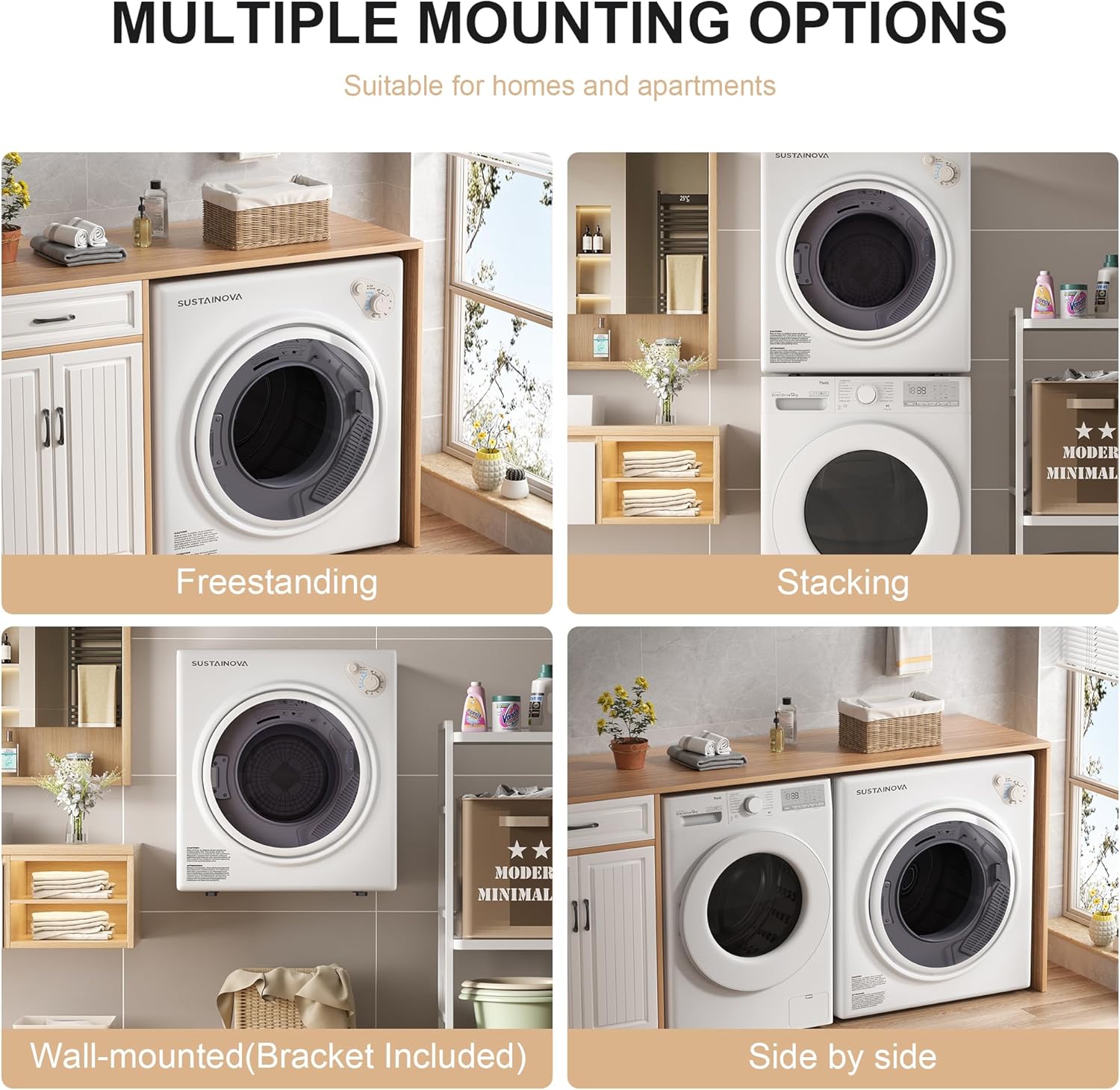
Figure 3: Illustration of freestanding, stacking, wall-mounted, and side-by-side installation options.
5. Operating Instructions
To operate your Elevon Portable Clothes Dryer, follow these steps:
- Load Clothes: Open the dryer door and place your wet clothes inside. Do not overload the dryer; for optimal and fast drying, do not exceed 13.3 lbs of clothes.
- Close Door: Ensure the door is securely closed. The dryer will automatically stop if the door is opened during operation.
- Select Drying Mode: Use the control panel to select one of the 5 available drying modes:
- Cooling: For cooling down clothes after a hot cycle.
- Anti-Wrinkle: Helps reduce wrinkles.
- Normal Cloth: Standard drying for everyday items.
- Heavy Cloth: For thicker or larger items requiring more heat and time.
- Cool Air Care: For delicate items or refreshing clothes without heat.
- Set Timer/Heat: Adjust the timer and heat settings as needed for your selected mode and load size.
- Start Dryer: Press the start button to begin the drying cycle.

Figure 4: Detailed view of the control panel with timer and heat settings.
Video 1: Demonstration of a compact capacity laundry dryer, showing its operation and features. Note: This video is provided by Dessiz, a seller of similar products.
6. Maintenance
Regular maintenance ensures optimal performance and longevity of your dryer.
- Lint Filter Cleaning: The lint filter must be cleaned before or after each use. This is crucial for preventing fire hazards and maintaining drying efficiency. The dryer features an easily accessible lint filter at the front of the drum.
- Exterior Cleaning: Wipe the exterior with a soft, damp cloth. Do not use abrasive cleaners.
- Interior Cleaning: Periodically wipe the interior of the drum with a damp cloth.

Figure 5: Close-up of the stainless steel drum and the accessible lint filter (labeled as 'Outlet filter').
7. Troubleshooting
If you encounter issues with your dryer, refer to the following common troubleshooting tips:
- Dryer does not start: Ensure the power cord is securely plugged into a working outlet. Check if the door is fully closed. Verify that the timer and mode settings are correctly selected.
- Clothes are not drying: Check if the lint filter is clean. Ensure the dryer is not overloaded. Verify that the correct drying mode and temperature setting are selected. Check for any obstructions in the exhaust vent.
- Dryer is noisy: Ensure the dryer is placed on a level surface. Check for any foreign objects inside the drum.
- Overheating: The dryer has overheat protection. If it stops due to overheating, allow it to cool down before restarting. Ensure the lint filter is clean and ventilation is adequate.
For persistent issues, please contact customer support.
8. Specifications
| Manufacturer | Elevon |
| Model Number | QD-DY-DRYER3 |
| Item Weight | 44 pounds |
| Package Dimensions | 37 x 29.75 x 21 inches |
| Size | 2.6 Cubic Feet |
| Color | White/Black |
| Material | Plastic, Stainless Steel |
| Item Package Quantity | 1 |
| Certification | ETL |
| Included Components | Clothes Dryer |
| Form Factor | Front Load |
| Access Location | Front Load |
| Capacity | 17.6 Pounds (wet clothes) |
9. Warranty and Support
The Elevon Portable Clothes Dryer comes with a 1-year manufacturer's warranty.
For customer support, please refer to the contact information provided with your product packaging or visit the official Elevon website.