
1. Product Overview
The JoFomp Digital Wall Clock (Model 5503) features a 9-inch LED display designed for clear visibility. It integrates multiple functions including time, calendar, week, temperature (°C/°F), humidity, Daylight Saving Time (DST), dual alarms, 12/24-hour format, and a snooze function. The clock also includes automatic and manual brightness adjustment modes.

Image 1.1: Front view of the JoFomp Digital Wall Clock showing its large display and overall dimensions.

Image 1.2: Visual representation of the clock's multiple functions, including dual alarm, temperature, week, brightness control, drowsiness (snooze), humidness, memory function, and date.
2. Package Contents
- JoFomp Digital Wall Clock Unit
- USB Power Cable
- Power Adapter
- Wall Mounting Nails (2)
- Instruction Manual
3. Setup
3.1 Power Connection
The JoFomp Digital Wall Clock requires a continuous power supply. Connect the provided USB cable to the clock's input port and then to the power adapter. Plug the adapter into a standard electrical outlet. The clock will power on and display.
3.2 Memory Battery Installation
For time memory function during power outages, install two 1.5V AAA batteries (not included) into the memory battery compartment located on the back of the clock. This ensures that time settings are retained even if the main power is disconnected.
3.3 Mounting Options
The clock can be placed on a desk or mounted on a wall. For wall mounting, use the two provided nails and the wall hanging holes on the back of the unit.

Image 3.1: Rear view of the clock, highlighting the 'SET', 'UP', 'DOWN' buttons, memory battery storage, wall hanging hole, and power outlet.
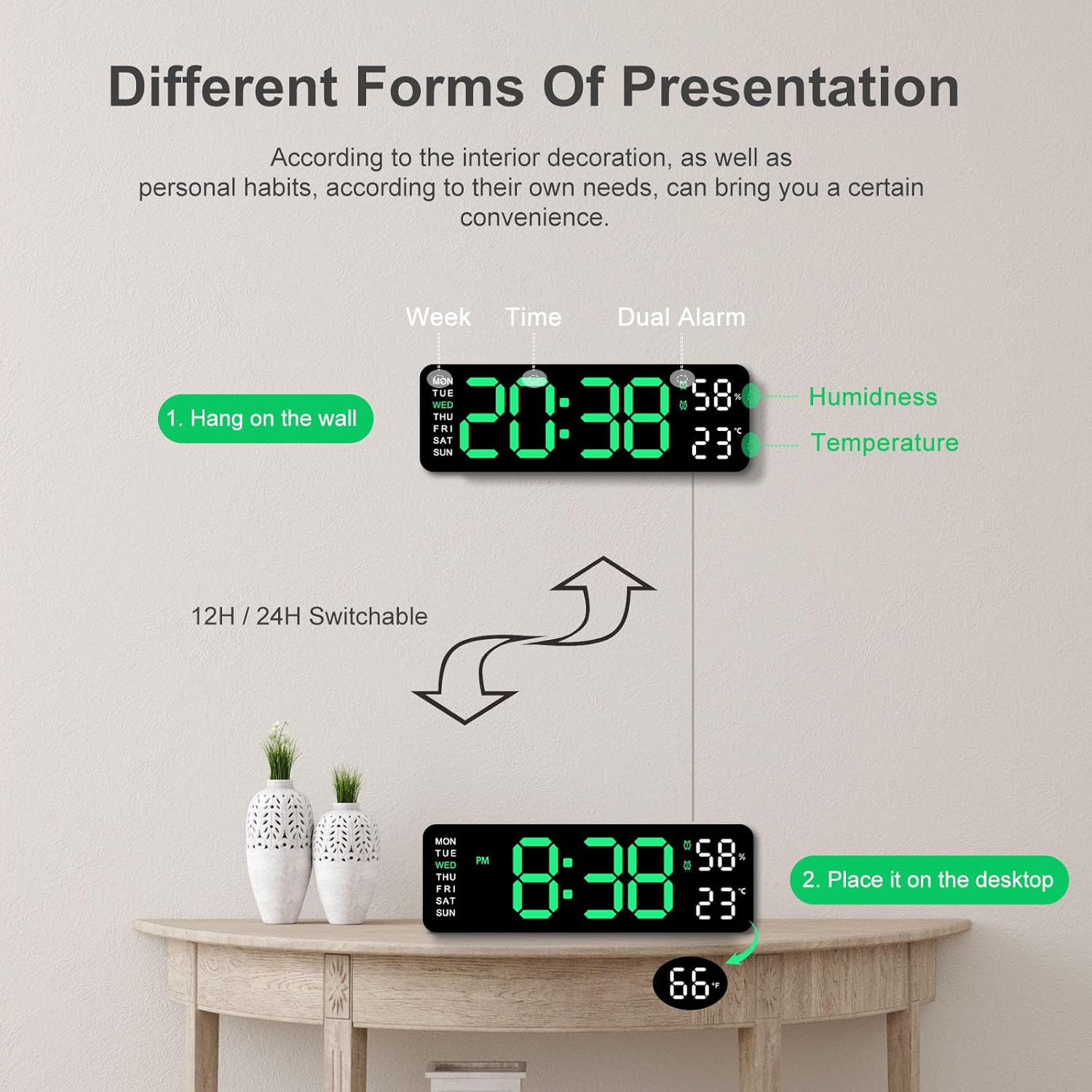
Image 3.2: The clock can be used as a desk clock or wall-mounted.
4. Initial Settings
After connecting power, the clock will display a default time. Use the 'SET', 'UP', and 'DOWN' buttons on the back of the clock to adjust settings.
4.1 Setting Time and Date
- Press the 'SET' button to enter time setting mode. The hour digits will flash.
- Use the 'UP' and 'DOWN' buttons to adjust the hour.
- Press 'SET' again to move to minute adjustment, then adjust with 'UP'/'DOWN'.
- Continue pressing 'SET' to cycle through setting the year, month, and day, adjusting each with 'UP'/'DOWN'.
- Press 'SET' one last time to exit setting mode.
4.2 12/24-Hour Format Switch
In normal time display mode, press the 'UP' button to switch between 12-hour and 24-hour formats.
4.3 Temperature Unit (°C/°F)
In normal time display mode, press the 'DOWN' button to switch between Celsius (°C) and Fahrenheit (°F) temperature units.
4.4 Daylight Saving Time (DST)
To enable or disable DST, press and hold the '-' button (often combined with 'DOWN') in time display mode. The clock will automatically adjust the time by one hour when DST is activated.

Image 4.1: Illustration of DST activation, showing time adjustment.
Video 4.1: A demonstration of setting the time, switching between 12/24-hour format, changing temperature units, and enabling/disabling DST on the JoFomp Digital Wall Clock.
5. Operating Instructions
5.1 Display Functions
The clock continuously displays time, day of the week, temperature, and humidity. The date will periodically cycle through the display.
5.2 Brightness Adjustment
The clock offers three brightness modes:
- Automatic Light-Sensitive Mode (L-AU): The built-in light sensor intelligently adjusts display brightness based on ambient light.
- Sleep Mode (L-SL): A low-brightness setting ideal for nighttime use to avoid disturbance.
- Manual Adjustment (L-01, L-02, L-03): Manually select from low, medium, or high brightness levels.
To cycle through brightness modes, press the brightness control button (often labeled with a sun icon) on the top of the clock.

Image 5.1: Various brightness settings available for the clock display.

Image 5.2: Comparison of the clock's display visibility in daytime and nighttime conditions.
5.3 Dual Alarm Function
The clock supports two independent alarms. To set an alarm:
- Press the 'AL1 SET' or 'AL2 SET' button on the back of the clock to enter alarm setting mode. The hour digits will flash.
- Use the 'UP' and 'DOWN' buttons to adjust the alarm hour.
- Press the respective 'AL SET' button again to move to minute adjustment, then adjust with 'UP'/'DOWN'.
- Press the 'AL SET' button one last time to confirm and exit.
- To activate or deactivate an alarm, use the 'AL1 ON/OFF' or 'AL2 ON/OFF' switch.
5.4 Snooze Function
When an alarm sounds, press the 'SNOOZE/MULTICOLOR' button on the top of the clock to activate the snooze function. The alarm will pause and sound again after a set interval (typically 5-9 minutes).

Image 5.3: The dual alarm feature can be set for different schedules, such as wake-up time and exercise time.
6. Maintenance
- Cleaning: Wipe the clock surface with a soft, dry cloth. Avoid abrasive cleaners or solvents.
- Environment: Keep the clock away from direct sunlight, extreme temperatures, and high humidity to ensure optimal performance and longevity.
- Power: Always use the provided USB cable and adapter.
7. Troubleshooting
- No Display: Ensure the USB power cable is securely connected to both the clock and the power adapter, and the adapter is plugged into a working outlet.
- Incorrect Time: Re-enter time setting mode and adjust the time, date, and 12/24-hour format as needed. Check if DST is correctly enabled/disabled for your region.
- Alarm Not Sounding: Verify that the alarm is set correctly and the 'AL ON/OFF' switch is in the 'ON' position. Check the alarm volume setting.
- Display Brightness Issues: Cycle through the brightness modes using the brightness control button. If in automatic mode, ensure the light sensor is not obstructed.
- Time Loss During Power Outage: Ensure fresh AAA batteries are installed in the memory battery compartment.
8. Specifications
| Feature | Specification |
|---|---|
| Brand | JoFomp |
| Model Number | 5503 |
| Display Type | Digital LED |
| Size | 9 Inch (11.8"W x 4"H) |
| Color | Green |
| Power Source | Corded Electric (USB) |
| Memory Battery | 2 x 1.5V AAA batteries (not included) |
| Special Features | Dual Alarm, Adjustable Brightness, Calendar, Large Display, Temperature, Humidity, DST |
| Mounting Type | Wall Mount, Desk Placement |
| Material | Plastic |
9. Warranty and Support
For warranty information or technical support, please refer to the contact details provided with your purchase or visit the official JoFomp website. Keep your purchase receipt for warranty claims.