
Introduction
This manual provides comprehensive instructions for the setup, operation, and maintenance of your ZdalaMit HTR-U27A Voice Replacement Remote Control. This remote is designed to be compatible with various Haier Smart Google Android TV models, offering voice control functionality for an enhanced user experience. Please read this manual carefully before using the remote control.
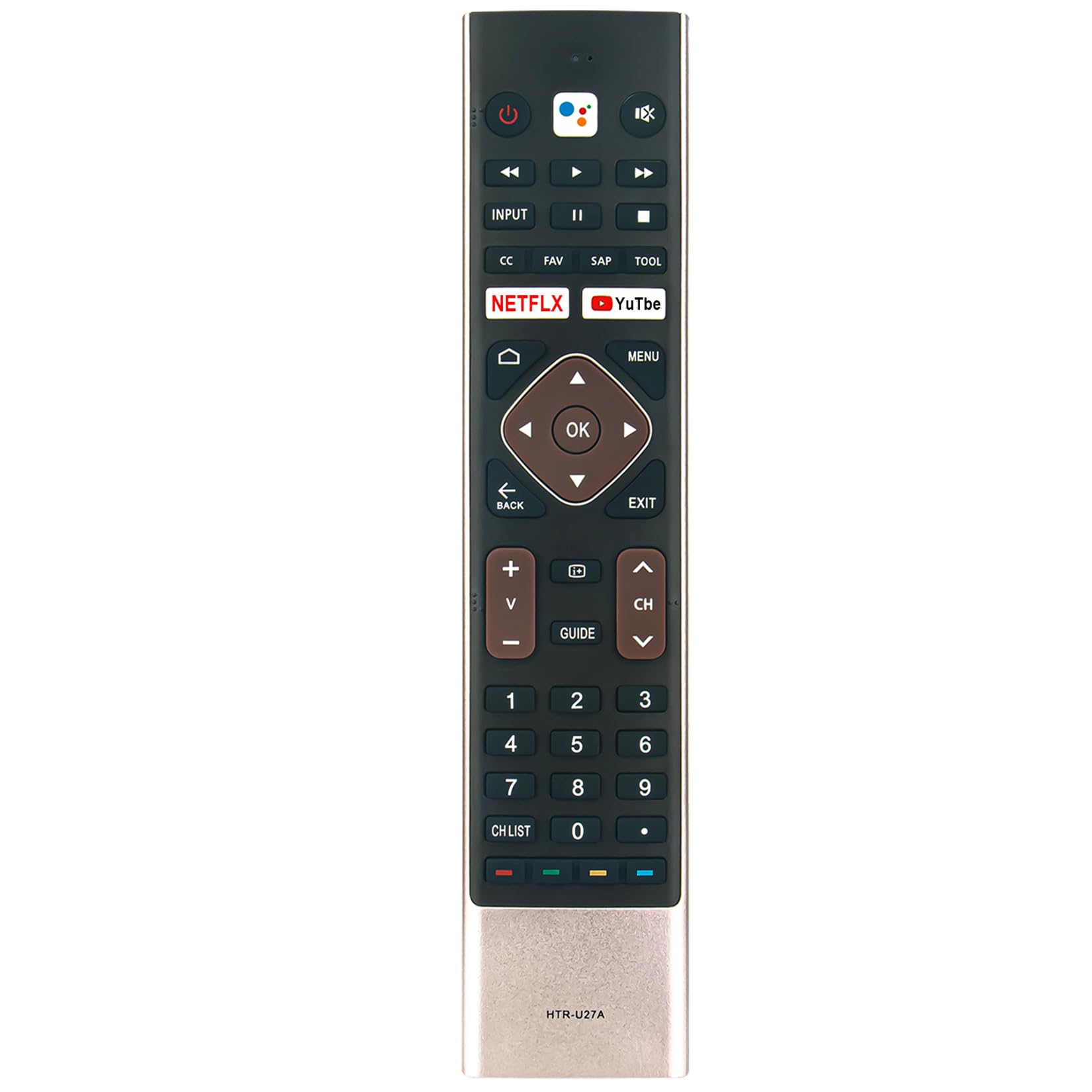
Image: Front view of the HTR-U27A Voice Replacement Remote Control, showing all buttons and the voice assistant icon.
Package Contents
Verify that all items are present in your package:
- 1x HTR-U27A Voice Replacement Remote Control
Note: 2x 1.5V AAA Alkaline Batteries are required and are not included in the package.
Setup
1. Battery Installation
- Locate the battery compartment cover on the back of the remote control.
- Slide the cover downwards or press the latch to open it.
- Insert two (2) 1.5V AAA alkaline batteries, ensuring the positive (+) and negative (-) terminals match the diagrams inside the compartment.
- Replace the battery compartment cover, sliding it back into place until it clicks securely.

Image: The HTR-U27A remote control showing its dimensions, indicating the general size and where the battery compartment would be located on the back.
2. Pairing the Remote Control with Your TV
This remote control requires pairing with your Haier Smart Google Android TV before use. Follow these steps:
- Ensure your TV is powered on.
- Point the remote control towards your TV.
- Press and hold the Red button and the Blue button simultaneously for approximately 5 seconds. These buttons are typically located near the bottom of the remote, often colored.
- After holding the buttons, a pairing prompt should appear on your TV screen.
- When "HaierTV-RC" displays in the upper right corner of the screen, press the "OK" button on the remote control to confirm pairing.
- If pairing is unsuccessful, wait a few minutes and repeat the pairing process from step 3.
- To exit the accessory adding process at any time, press the "EXIT" button.

Image: A hand holding the HTR-U27A remote control, pointing towards a television screen, illustrating typical usage.
Operating Instructions
Basic Functions
- Power Button (⏻): Turns the TV on or off.
- Input Button: Selects the input source (HDMI, AV, etc.).
- Navigation Pad (Up, Down, Left, Right, OK): Navigates menus and confirms selections.
- Volume Up/Down (V+/V-): Adjusts the TV volume.
- Channel Up/Down (CH+/CH-): Changes TV channels.
- Home Button (⌂): Returns to the TV's home screen.
- Back Button (←): Returns to the previous screen or menu.
- Exit Button: Exits the current menu or application.
- Menu Button: Accesses the TV's main menu.
- Netflix / YouTube Buttons: Direct access to Netflix and YouTube applications.
- Media Control Buttons (Play, Pause, Fast Forward, Rewind): Controls media playback.
Voice Control
The HTR-U27A remote features voice control capabilities through the integrated Google Assistant. To use voice commands:
- Press the Google Assistant button (typically represented by a microphone icon or Google Assistant logo) on the remote control.
- Speak clearly into the microphone located on the remote control.
- You can ask questions, search for content, control smart home devices, and more.

Image: The HTR-U27A remote control highlighting the Google Assistant button and a separate microphone icon, indicating voice control functionality.
Compatible Haier TV Models
This remote control is compatible with the following Haier Smart Google Android TV models:
- LE65K6600UG
- LE40K6600GA
- LE32K6600SG
- LE65K6600HQGA
- LE58U6900UG
- LE43K6600SG
- LE40K6600G
- LE50K6700UG
- LE43K6700UG
- LE43K6600G
- LE50K6600UG
- LE50K6600HQGA
- LE65U6900UG
- LE55K6700UG
- LE58K6600UG
- LE43K6600GA
- LE58U6900HQGA
- LE58K6600HQGA
- LE65K6700UG
- LE43K6600UGA
- LE55K6600HQGA
- LE50U6900UG
- LE55K6600UG
- LE32K6600GA
- LE55U6900UG
Troubleshooting
| Problem | Solution |
|---|---|
| Remote is not responding. |
|
| Voice control is not working. |
|
| Remote does not pair with the TV. |
|
Specifications
- Model: HTR-U27A
- Power Supply: 2x 1.5V AAA Alkaline Batteries (not included)
- Special Feature: Voice Search (Google Assistant)
- Compatible Devices: Haier Smart Google Android TVs
- Product Dimensions: 8.22 x 1.71 x 0.55 inches (approximately)
- Item Weight: 1.41 ounces (approximately, without batteries)
Maintenance
- Cleaning: Use a soft, dry cloth to clean the remote control. Do not use liquid cleaners or abrasive materials.
- Battery Care: Remove batteries if the remote will not be used for an extended period to prevent leakage. Dispose of used batteries responsibly.
- Storage: Store the remote in a cool, dry place away from direct sunlight and extreme temperatures.
- Avoid Drops: Protect the remote from physical impact, as drops can damage internal components.
Warranty and Support
For warranty information and customer support, please refer to the documentation provided at the time of purchase or contact the seller directly. Keep your purchase receipt as proof of purchase.