
Introduction
The ANENG MH12 is a high-precision digital insulation resistance tester designed for measuring insulation resistance of various electrical equipment and insulating materials. This includes transformers, motors, cables, switches, and other electrical appliances. It is an essential tool for maintenance, repair, testing, and verification in electrical applications. The device features automatic release voltage, variable rated output voltage, high voltage indication, strong load capacity, and low battery voltage indication, making it easy to operate and carry.
Safety Information
Always observe the following safety precautions to prevent electric shock or damage to the instrument:
- High Voltage Warning: A red LED light on the machine indicates high voltage output. Exercise extreme caution to avoid electric shock.
- Do not use the meter if it is damaged or operating abnormally.
- Ensure test leads are in good condition and properly connected before any measurement.
- Do not touch the test leads or the circuit under test during measurement.
- Always disconnect power to the circuit before connecting or disconnecting test leads for resistance measurements.
- Do not operate the meter in explosive gas, vapor, or dusty environments.
- Replace batteries promptly when the low battery indicator appears to ensure accurate readings.
Product Overview
The ANENG MH12 features a robust design with a clear digital display and intuitive controls. It is equipped with a silicone shock protection casing for durability and a support frame for convenient operation.

Figure 1: Front view of the ANENG MH12 Digital Insulation Resistance Tester, showing the display, buttons, and input terminals.
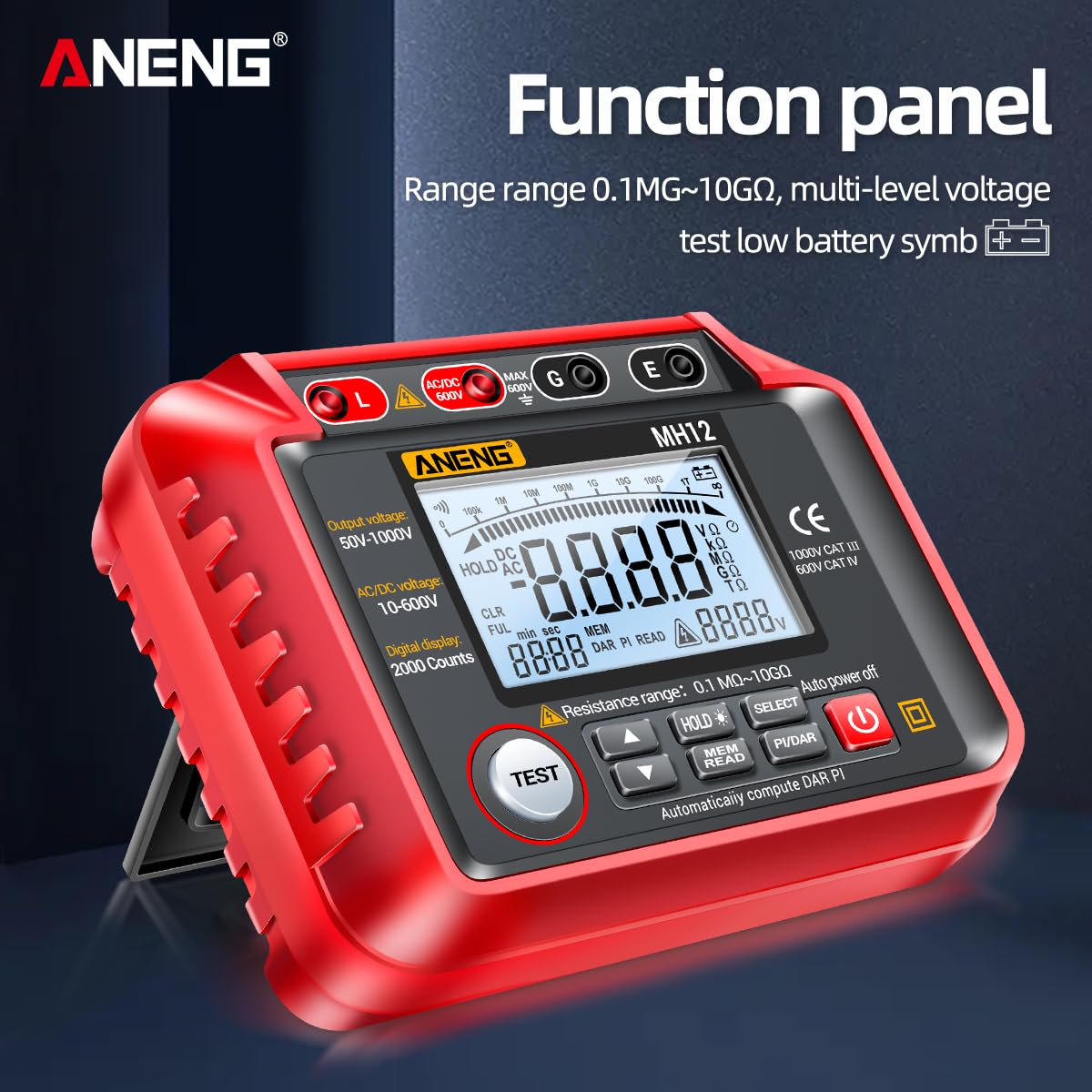
Figure 2: Detailed view of the ANENG MH12 function panel, highlighting the display, output voltage range, AC/DC voltage range, and digital display count.

Figure 3: The adjustable support frame of the ANENG MH12, allowing the device to be leaned on a table for convenient measurement and standing operation.
Setup
The ANENG MH12 is battery-powered for portability and ease of use. Before first use, or when the low battery indicator appears, ensure fresh batteries are installed.
- Open the battery compartment cover on the back of the device.
- Insert the required batteries, observing correct polarity.
- Close the battery compartment securely.
- Connect the test leads to the appropriate input terminals (L, G, E, AC/DC 600V) on the meter.
Operating Instructions
Insulation Resistance Measurement
This function is used to measure the insulation resistance of electrical equipment to determine if it is short-circuited or has insulation breakdown.
- Ensure the circuit under test is de-energized and safely discharged.
- Connect the test leads to the equipment under test.
- Select the desired output voltage (50V, 100V, 250V, 500V, 1000V) using the function buttons. The rated output voltage is variable.
- Press the TEST button to initiate the measurement. The test button will automatically discharge the circuit after measurement.
- Read the insulation resistance value displayed on the screen.

Figure 4: The ANENG MH12 performing an insulation resistance measurement on an electrical appliance.
AC/DC Voltage Measurement
The meter can also measure AC and DC voltages within the range of 10V to 600V.
- Press the SELECT key to switch between ACV (AC voltage) and DCV (DC voltage) modes.
- Connect the test leads to the circuit where voltage needs to be measured.
- Read the voltage value displayed on the screen.
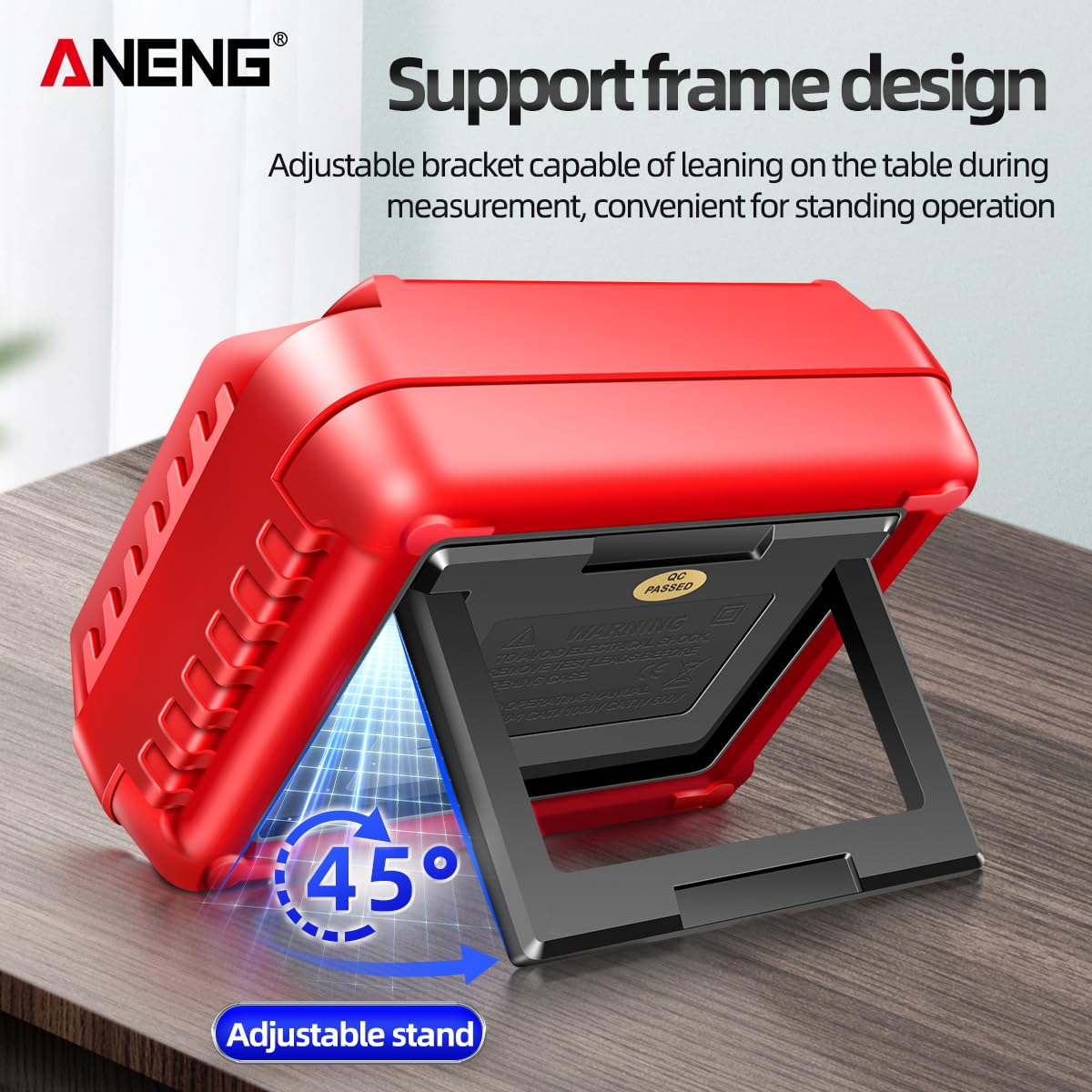
Figure 5: Examples of AC voltage measurement (left, household socket) and DC voltage measurement (right, car battery) using the ANENG MH12.
Data Storage and Recall
The ANENG MH12 supports storing up to 100 groups of measurement data.
- To save a measurement, press the HOLD button.
- To recall stored data, use the MEM READ button.
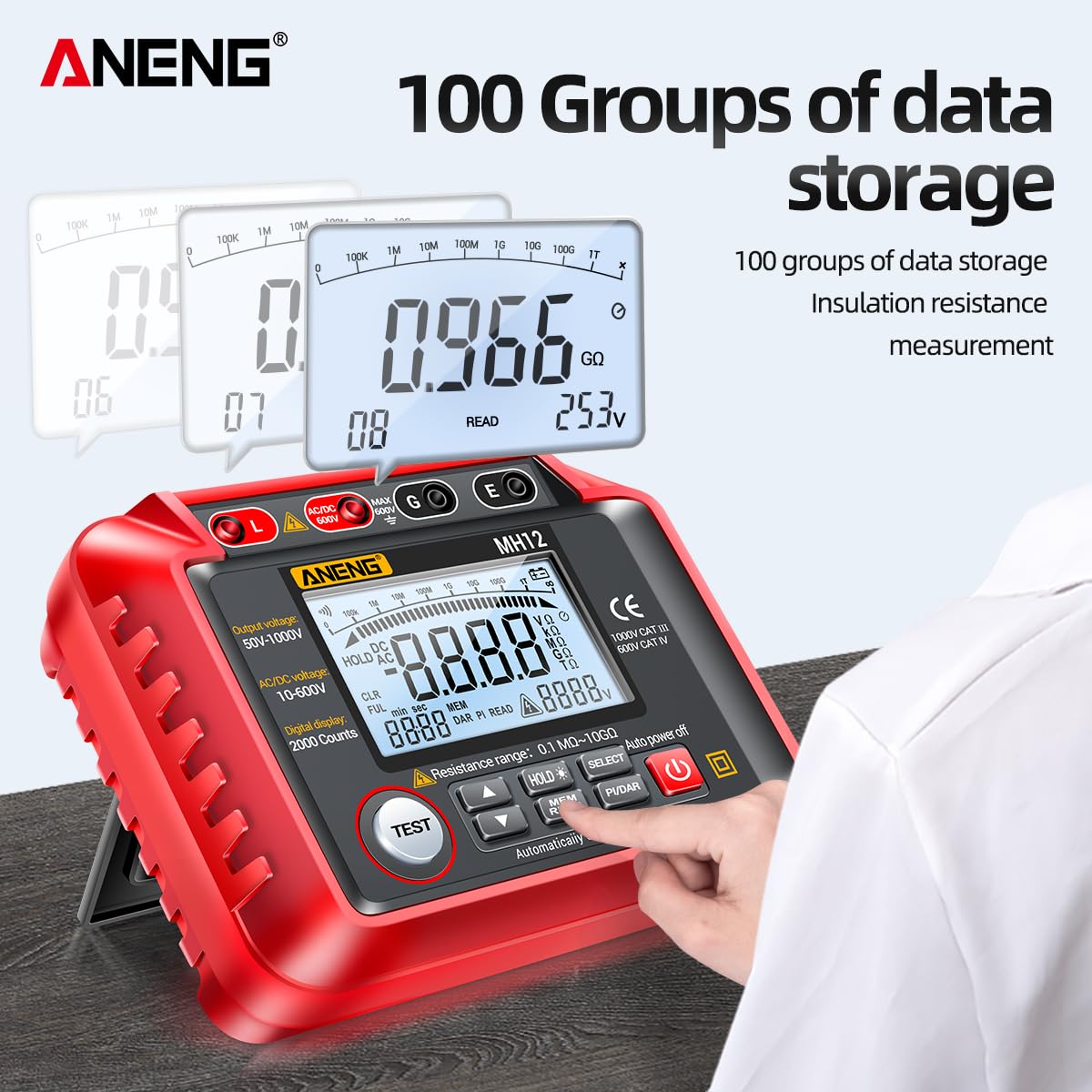
Figure 6: Illustration of the ANENG MH12's data storage capability, showing multiple stored readings.
Polarization Index (PI) and Dielectric Absorption Ratio (DAR) Measurement
The meter can automatically compute PI and DAR values, which are important indicators of insulation quality.
- Press the PI/DAR button to initiate the measurement for these values.
- The device will perform measurements at specific time intervals (e.g., 1 minute and 10 minutes for PI) and calculate the ratio.
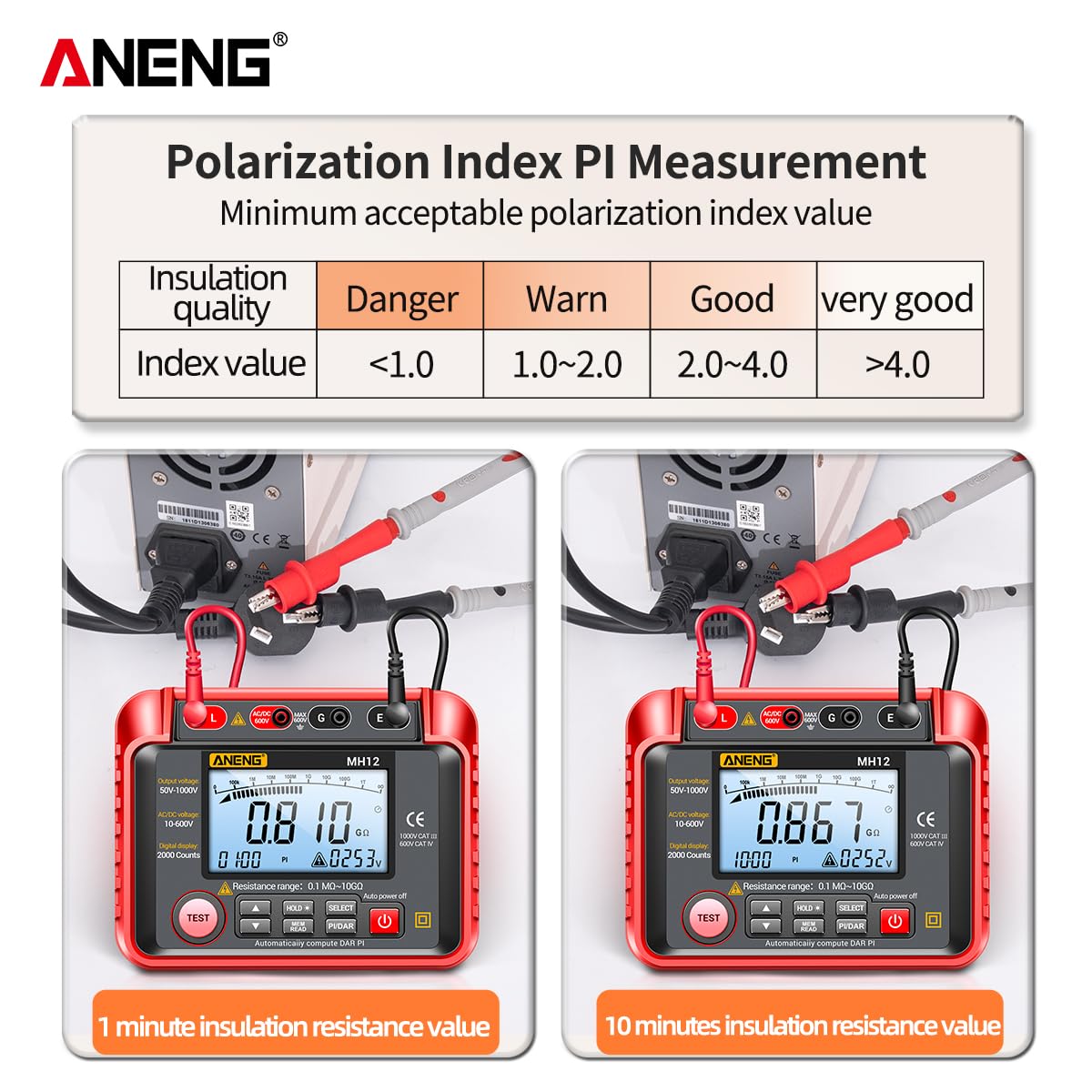
Figure 7: Table showing acceptable Polarization Index (PI) values and corresponding insulation quality ratings (Danger, Warn, Good, Very Good).
Maintenance
Proper maintenance ensures the longevity and accuracy of your ANENG MH12.
- Cleaning: Wipe the meter with a damp cloth and mild detergent. Do not use abrasives or solvents.
- Storage: Store the device in a cool, dry place away from direct sunlight and extreme temperatures. If storing for extended periods, remove the batteries.
- Silicone Shock Protection: The device is designed with a silicone casing for effective anti-shedding and hardware protection. While durable, avoid excessive drops or impacts.

Figure 8: The ANENG MH12 featuring its silicone shock protection, designed for groove fitting and effective anti-shedding, providing robust hardware protection.
Troubleshooting
If you encounter issues with your ANENG MH12, try the following:
- No Display/Power: Check battery installation and ensure batteries are not depleted. Replace if necessary.
- Inaccurate Readings: Ensure test leads are securely connected. Verify the correct measurement mode is selected.
- High Voltage Indication (Red LED): This is normal during insulation resistance tests. Ensure no contact with test leads or circuit.
- Meter Not Responding: Turn the meter off and then on again. If the issue persists, remove and reinsert batteries.
Specifications
| Feature | Specification |
|---|---|
| Brand | ANENG |
| Model | MH12 |
| Output Voltage | 50V, 100V, 250V, 500V, 1000V (Switchable) |
| AC/DC Voltage Range | 10V - 600V |
| Resistance Range | 0.1 MΩ - 10 GΩ |
| Digital Display | 2000 Counts |
| Power Source | Battery Powered |
| Product Dimensions (LxWxH) | 20 x 18 x 8 cm |
| Color | Red |
| Safety Rating | 1000V CAT III, 600V CAT IV |
Warranty and Support
For warranty information or technical support, please refer to the product packaging or contact the retailer from whom the ANENG MH12 was purchased. Keep your proof of purchase for any warranty claims.


