
HIWONDER RM-HIWO-020
HIWONDER JetMax Jetson Nano AI Robot Arm User Manual
Model: RM-HIWO-020
1. Introduction
The HIWONDER JetMax Jetson Nano AI Robot Arm is an open-source robotic arm designed for artificial intelligence, deep learning, and computer vision applications. Powered by the Jetson Nano control system, it offers extensive capabilities for precise object manipulation, recognition, and autonomous interaction. This manual provides essential information for setting up, operating, and maintaining your JetMax robot arm.
2. Setup and Assembly
This section guides you through the initial setup and assembly of your JetMax AI Robot Arm.
2.1 Unboxing and Package Contents
Carefully unbox your JetMax robot arm and verify all components against the packing list. The kit includes the main robot arm assembly, power adapter, various end effectors, and accessories.
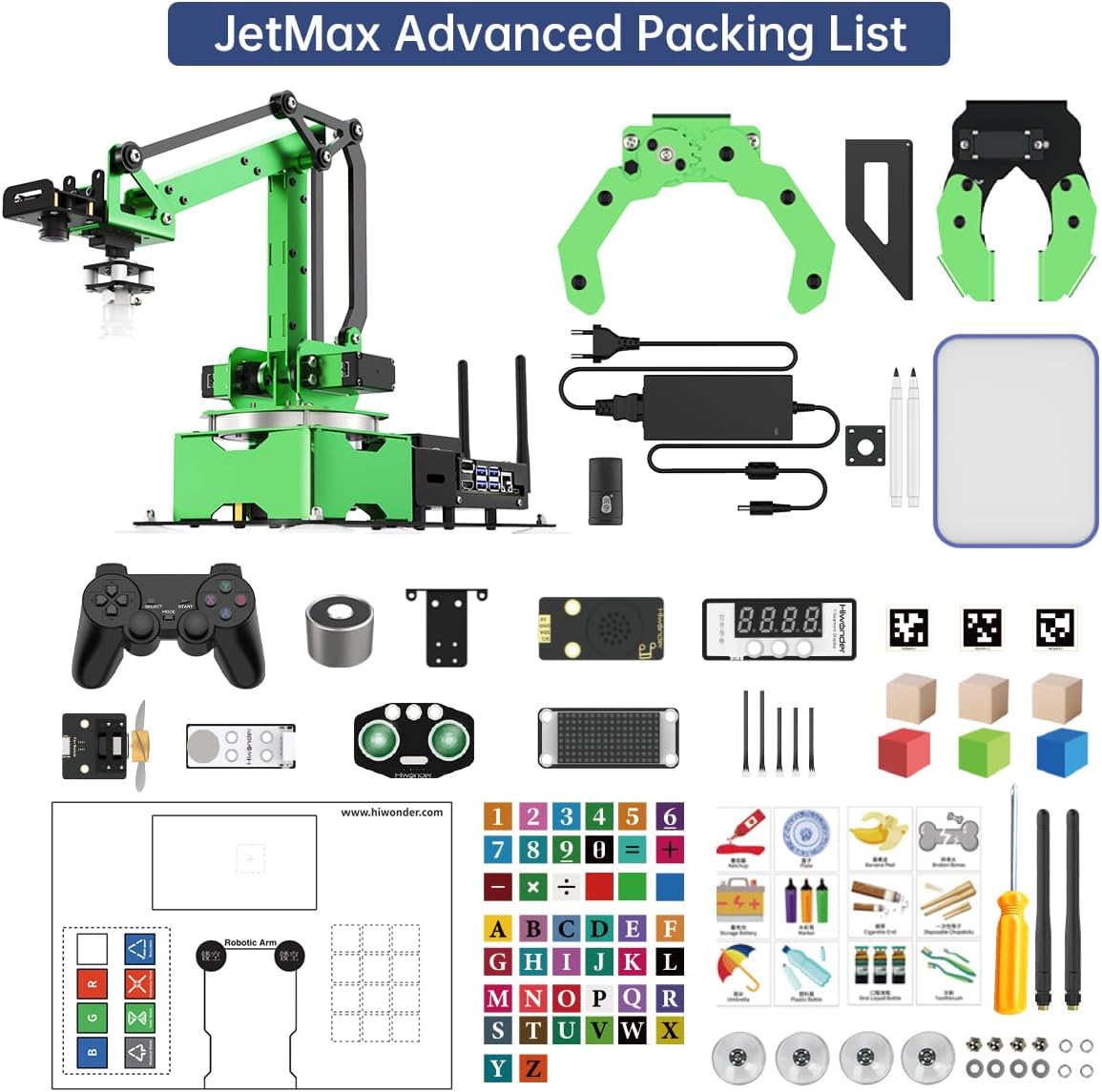
Image: JetMax Advanced Packing List. This image displays all components included in the JetMax Advanced Kit, such as the robot arm, various grippers, suction cups, power supply, control handle, and small parts.
2.2 Hardware Overview
Familiarize yourself with the main structural components and electronic modules of the JetMax robot arm.

Image: JetMax Product Structure Diagram. This diagram labels key components such as the anodized metal bracket, carbon fiber bracket, HTS-35H Smart Bus Servo, HD wide-angle camera, suction nozzle, suction cup, cooling fan, expansion board, Jetson Nano B01, air pump, and metal baseplate.
The robot arm is built with durable metal and carbon fiber components, featuring HTS-35H smart bus servos for precise movements. It integrates a Jetson Nano B01 board and an expansion board for AI processing and connectivity.
2.3 Initial Power-Up and Calibration
Connect the power adapter to the robot arm. Ensure all connections are secure before powering on. Refer to the detailed tutorials for initial calibration steps and software installation on the Jetson Nano.
Video: JetMax AI Robot Arm Building Kit for Jetson Nano Robot. This video demonstrates the assembly process and initial setup of the JetMax robot arm, including connecting components and powering it on.
3. Operating the JetMax Robot Arm
The JetMax robot arm offers various control methods and advanced AI capabilities.
3.1 Control Methods
You can control the JetMax using multiple interfaces:
- WonderAi App: Compatible with iOS and Android devices for remote control.
- Wireless Handle: Use the provided wireless controller for direct manipulation.
- PC Software: Control the arm via a dedicated PC application.
- Robot Operating System (ROS) & Mouse: For advanced programming and precise control.

Image: JetMax PC Software and App Control. This image illustrates the different control methods available for the JetMax robot arm, including PC software, iOS/Android app, wireless handle, and mouse control.
3.2 AI Vision and Deep Learning
The integrated HD camera and Jetson Nano enable advanced AI vision features:
- Object Recognition: Identify various objects using YOLO models.
- Color, Face, and Gesture Recognition: Real-time detection and tracking.
- Inverse Kinematics: Precise target tracking, gripping, sorting, and stacking.

Image: JetMax AI Vision Deep Learning Capabilities. This image showcases the robot arm's ability to perform color recognition, tag recognition, gesture recognition, YOLO object recognition, number recognition, and waste sorting.

Image: JetMax Color Sorting. The robot arm sorts blocks by recognizing their colors, including customized colors.

Image: JetMax Intelligent Stacking. The robot arm recognizes AprilTags and locates them for intelligent stacking.

Image: JetMax Target Tracking. The robot arm positions and tracks designated objects, utilizing machine learning for trained objects.
3.3 End Effector Options
The JetMax supports various end effectors for different tasks:
- Suction Cup
- Big Gripper
- Small Gripper
- Electromagnet
- Pen Holder

Image: JetMax Multiple End Extension Forms. This image displays the various end effectors that can be attached to the robot arm, including suction cup, big gripper, small gripper, electromagnet, and pen holder.
4. Maintenance
Regular maintenance ensures the longevity and optimal performance of your JetMax robot arm.
- Keep the robot arm clean and free from dust and debris.
- Periodically check all screws and connections for tightness.
- Ensure the camera lens is clean for accurate vision tasks.
- Avoid exposing the robot arm to extreme temperatures or moisture.
5. Troubleshooting
If you encounter issues with your JetMax robot arm, consider the following:
- Power Issues: Verify the power adapter is correctly connected and the power source is active.
- Connectivity Problems: Check Wi-Fi/Ethernet connections and ensure the control app/software is properly configured.
- Movement Errors: Recalibrate the robot arm. Ensure no physical obstructions are impeding movement.
- Vision Recognition Failures: Clean the camera lens. Ensure adequate lighting in the operating environment.
- For more detailed troubleshooting, refer to the extensive online tutorials provided by HIWONDER.
6. Specifications
| Feature | Detail |
|---|---|
| Product Dimensions | 15 x 11 x 7.5 inches |
| Item Weight | 9.2 pounds |
| Item Model Number | RM-HIWO-020 |
| Manufacturer | Hiwonder |
| Recommended Age | 16 years and up |

Image: JetMax Robot Arm Specifications and Comparison. This image provides a detailed table of specifications for the JetMax robot arm, including dimensions, weight, materials, end effectors, DOF, power supply, hardware, software, payload, servo type, control method, programming language, communication, and storage. It also includes a comparison table with other robot models.
7. Tutorials and Expansion
HIWONDER provides extensive resources to maximize your JetMax experience.
7.1 Extensive Tutorials
Access over 211 tutorials in dual languages covering topics such as Linux operating system, ROS, OpenCV, deep learning, and more. These resources are designed to help users of all skill levels.

Image: JetMax Abundant Learning Materials. This image displays a collection of folders representing the extensive tutorials available for the JetMax robot arm, covering various programming and operational aspects.
7.2 Mobile Chassis Expansion
The JetMax can be expanded with a Mecanum wheel chassis, transforming it into a versatile mobile robot capable of navigation and human-machine interactions.

Image: JetMax Mobile Chassis Expansion. This image demonstrates the JetMax robot arm integrated with a Mecanum wheel chassis, showcasing its mobile capabilities and various control methods like app, wireless handle, fingertips control, and target tracking.
Video: Hiwonder JetMax Pro Jetson Nano Robot Arm. This video highlights the JetMax Pro's capabilities, including its integration with a mobile chassis for various tasks like waste sorting and object manipulation.
8. Warranty and Support
For warranty information, technical support, and additional resources, please visit the official HIWONDER store or contact customer service. You can find more information at the HIWONDER Store on Amazon.
Ask a question about this manual
Ask about setup, troubleshooting, compatibility, parts, safety, or missing instructions. Manuals+ will review the question and use this page’s manual context to help answer it.