
KAIY C25
KAIY C25 Bluetooth 5.3 Transmitter Receiver 2-in-1 User Manual
Model: C25 | Brand: KAIY
Introduction
The KAIY C25 is a versatile Bluetooth 5.3 Transmitter and Receiver, designed to add wireless audio capabilities to a wide range of devices. This 2-in-1 adapter allows you to transmit audio from non-Bluetooth sources (like airplane entertainment systems, TVs, or PCs) to your Bluetooth headphones, or receive audio wirelessly from your smartphone to non-Bluetooth speakers (like home stereos or car audio systems). Its compact design and long battery life make it ideal for travel, home, and on-the-go use.
Product Overview
Familiarize yourself with the components and features of your KAIY C25 adapter.

Figure 1: KAIY C25 Component Diagram. This image displays the KAIY C25 adapter with labels pointing to its various parts, including the AUX input/output, multiple function keys, microphone, status lights (RX/TX), charging light, previous/next song/volume buttons, and the TX/RX mode switch.
Key Features:
- Bluetooth 5.3 Technology: Ensures stable connections and wide compatibility.
- 2-in-1 Functionality: Operates as both a Bluetooth transmitter (TX) and receiver (RX).
- Long Battery Life: Up to 15 hours of continuous use on a single charge.
- Built-in Microphone: For hands-free calls in receiver mode.
- Wide Compatibility: Works with 3.5mm audio ports on various devices, including TVs, PCs, gym equipment, airplane entertainment systems, home stereos, and car audio systems.
- Compact and Portable Design: Easy to carry for travel and daily use.
Getting Started
Package Contents:
- KAIY C25 Bluetooth Adapter
- USB-C Charging Cable
- User Manual
Charging the Device:
Before first use, fully charge the KAIY C25 adapter. Connect the provided USB-C charging cable to the charging port on the adapter and a suitable USB power source (e.g., computer USB port, wall adapter). The charging light will indicate charging status.

Figure 2: Charging the KAIY C25. The image shows the KAIY C25 adapter connected to a USB-C charging cable, highlighting its charging port and indicating its long battery life.
Initial Setup and Pairing:
Follow these general steps to connect your KAIY C25 adapter:

Figure 3: Quick Connection Guide. This visual guide outlines the four main steps for connecting the KAIY C25: plugging it in, selecting the mode, pairing via Bluetooth, and enjoying the audio.
Operating Modes
The KAIY C25 features two primary operating modes: Transmitter (TX) and Receiver (RX). Use the TX/RX mode switch on the side of the device to select the desired mode.
1. Transmitter (TX) Mode
In TX mode, the adapter transmits audio from a non-Bluetooth device to your Bluetooth headphones or speakers. The TX mode light will illuminate.
- Switch to TX Mode: Slide the TX/RX switch to the "TX" position. The TX indicator light will turn on.
- Connect to Audio Source: Plug the 3.5mm audio jack of the KAIY C25 into the audio output port of your non-Bluetooth device (e.g., airplane entertainment system, TV, PC, gym equipment).
- Pair with Bluetooth Headphones/Speakers:
- Put your Bluetooth headphones or speakers into pairing mode.
- The KAIY C25 will automatically search for nearby Bluetooth devices. Once found, they will pair. The TX indicator light may change to indicate a successful connection.
- For specific pairing tips for AirPods, refer to the "Pairing Instructions" section.
- Enjoy Audio: Once paired, audio from your source device will be transmitted to your Bluetooth headphones/speakers.
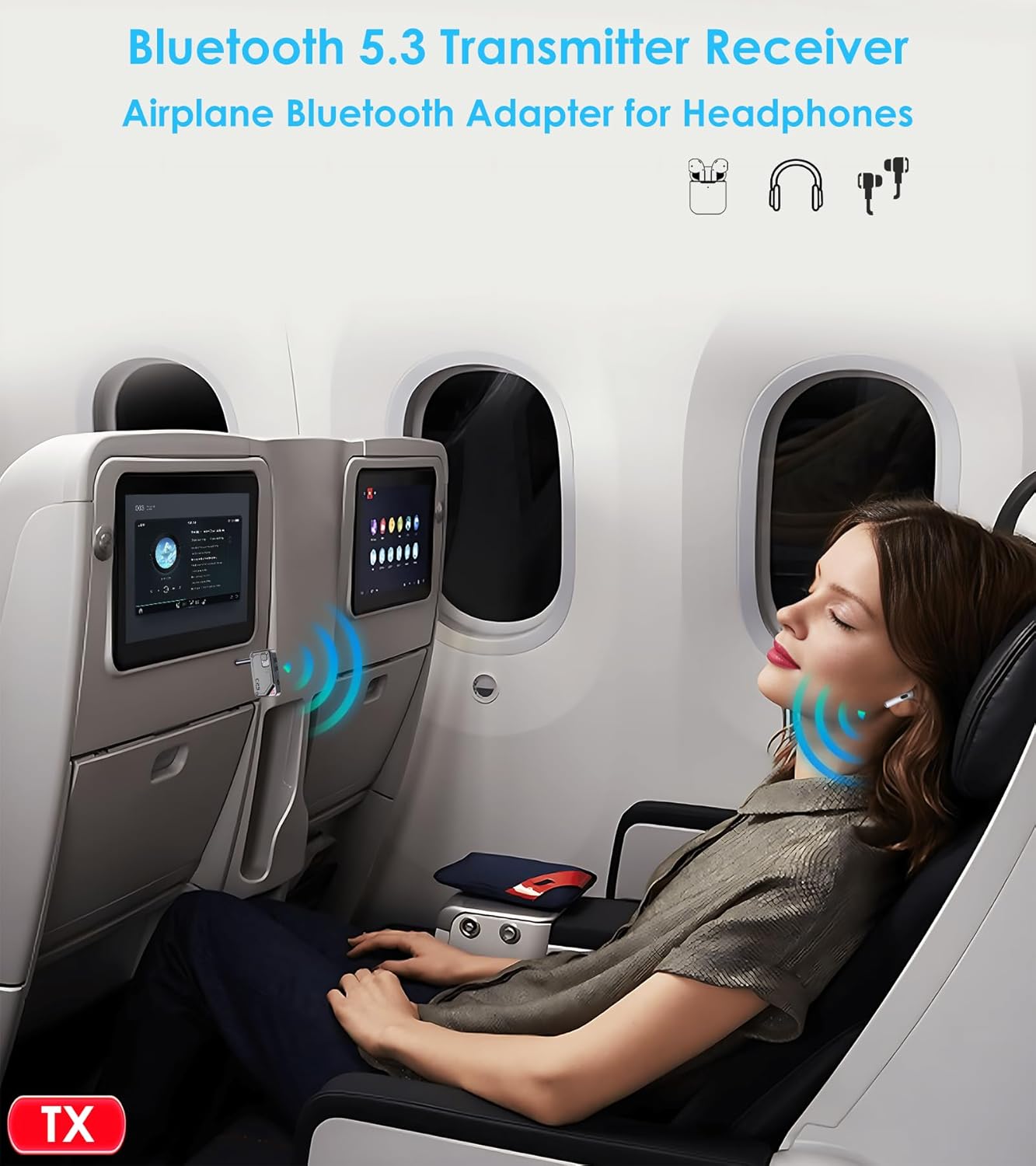
Figure 4: Using TX Mode in an Airplane. This image shows the KAIY C25 adapter plugged into an airplane's in-flight entertainment system, wirelessly transmitting audio to a user's AirPods.
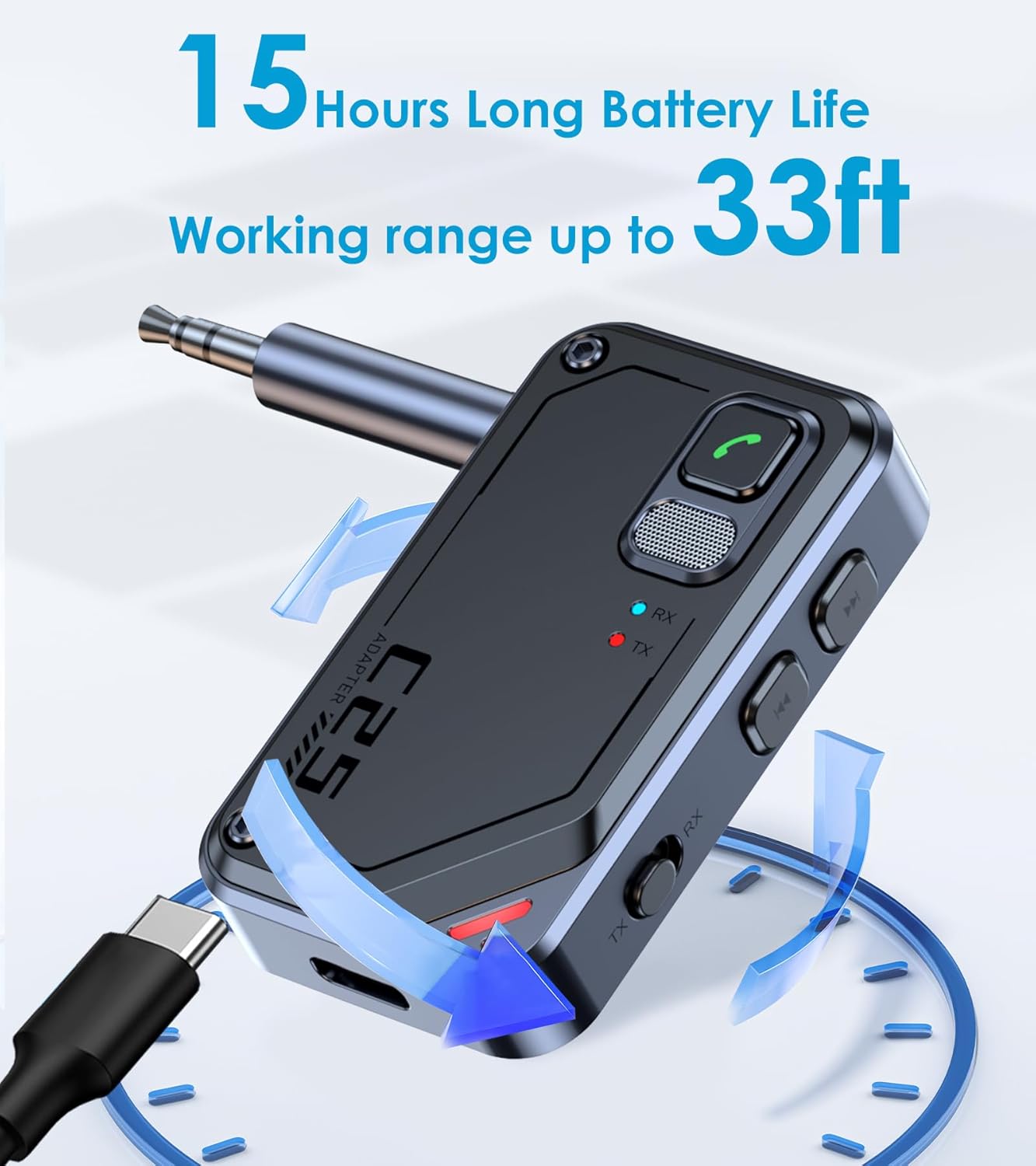
Figure 5: Using TX Mode with a TV. The KAIY C25 adapter is shown connected to a television, enabling wireless audio transmission to Bluetooth headphones for private listening.
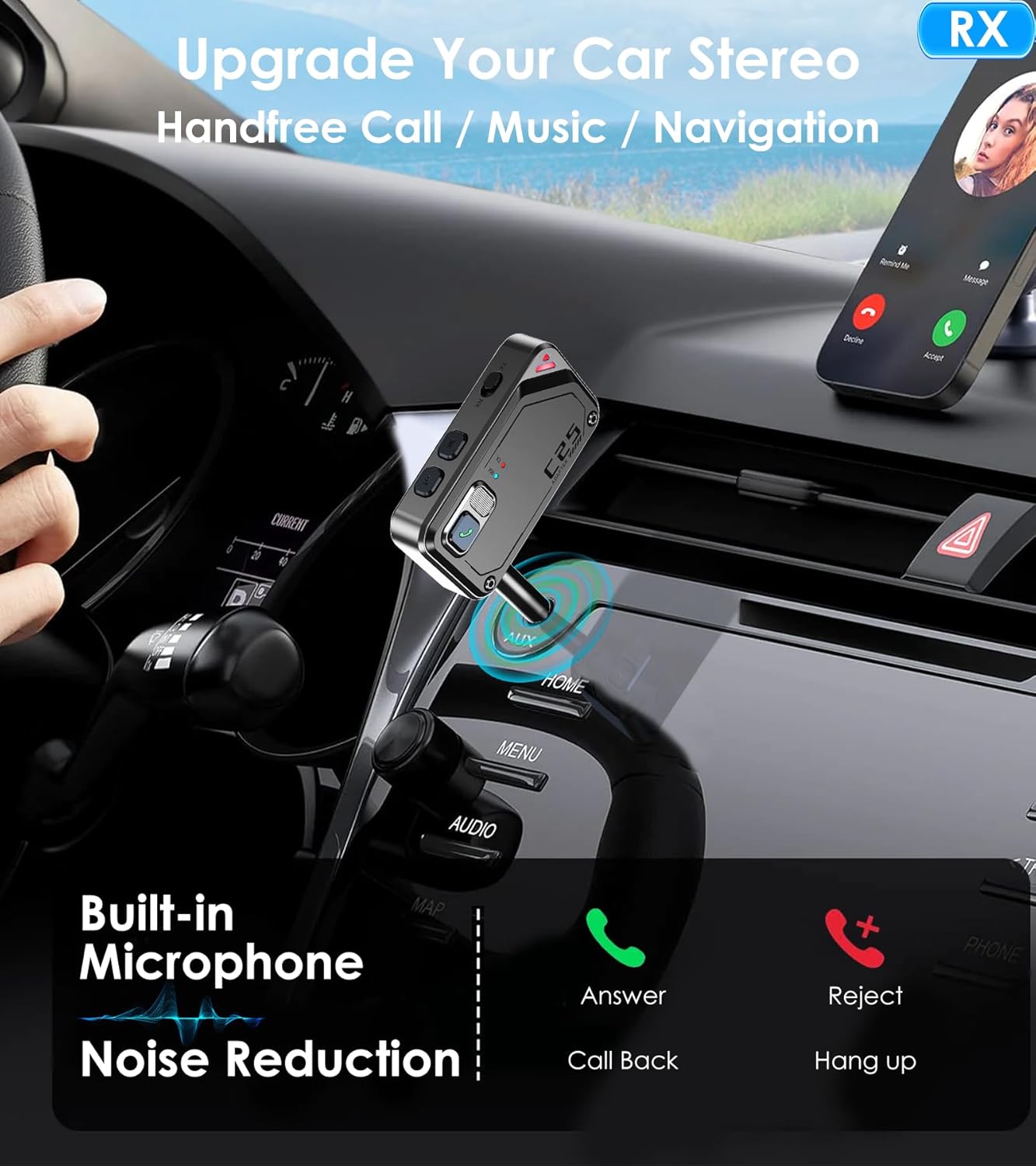
Figure 6: Using TX Mode with a PC. This image illustrates the KAIY C25 adapter plugged into a desktop computer, allowing a user to connect Bluetooth headphones for wireless audio.
2. Receiver (RX) Mode
In RX mode, the adapter receives audio wirelessly from your Bluetooth-enabled smartphone or tablet and outputs it to a non-Bluetooth speaker system. The RX mode light will illuminate.
- Switch to RX Mode: Slide the TX/RX switch to the "RX" position. The RX indicator light will turn on.
- Connect to Audio Output Device: Plug the 3.5mm audio jack of the KAIY C25 into the AUX input port of your non-Bluetooth speaker system (e.g., home stereo, car audio system, old speaker).
- Pair with Bluetooth Source Device:
- Enable Bluetooth on your smartphone or tablet.
- Search for "KAIY C25" (or similar name) in the list of available Bluetooth devices and select it to pair. The RX indicator light may change to indicate a successful connection.
- Enjoy Audio: Once paired, audio from your smartphone/tablet will play through your connected speaker system.
- Hands-free Calling (Car Mode): When connected to a car audio system in RX mode, the built-in microphone allows for hands-free calls. Press the phone button to answer/end calls.
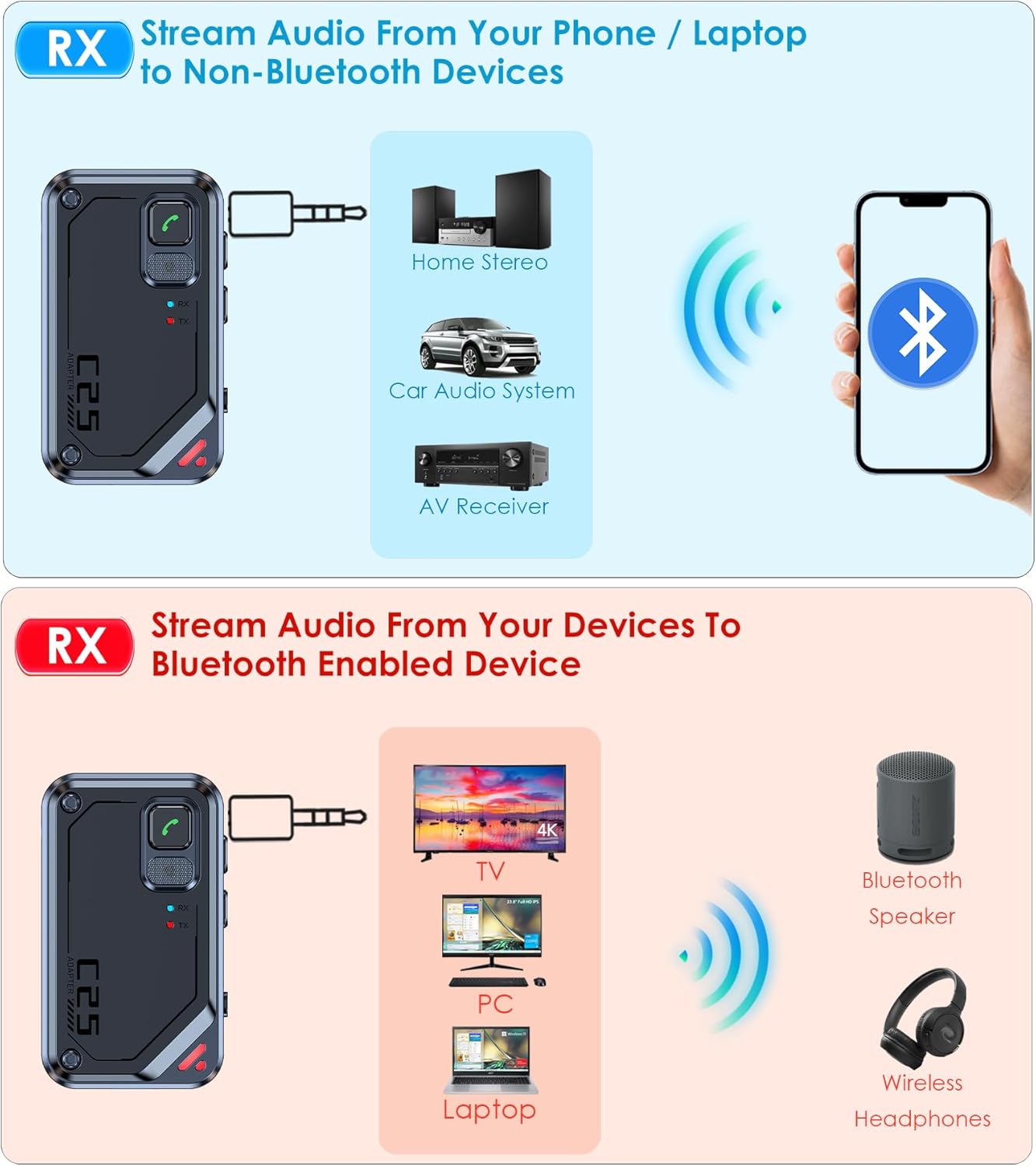
Figure 7: Using RX Mode with Home/Car Audio. This diagram illustrates the KAIY C25 adapter in receiver mode, connecting a smartphone to a home stereo, car audio system, or AV receiver via the 3.5mm AUX input.

Figure 8: Using RX Mode in a Car. The image shows the KAIY C25 adapter plugged into a car's AUX port, enabling hands-free calls, music streaming, and navigation audio from a smartphone.

Figure 9: Using RX Mode with a Home Stereo. This image depicts the KAIY C25 adapter connected to a traditional home stereo speaker, allowing wireless music streaming from a mobile device.
Pairing Instructions
The KAIY C25 adapter generally pairs automatically with devices in pairing mode. For specific headphones like AirPods, follow these steps:
- AirPods 1/2/3/Pro: Place your AirPods in their charging case. Open the lid and hold the back button on the case until the status light flashes white.
- AirPods 4: Double-tap the front of the AirPods case. The light will flash white.
- AirPods Max: Hold the noise control button for 5 seconds until the status light flashes.
Once your AirPods are in pairing mode, ensure the KAIY C25 is in the correct TX mode and it will connect automatically. If you encounter issues, consult your headphone's specific pairing instructions or perform a quick online search for your headphone model.
Troubleshooting
- Device not powering on: Ensure the device is fully charged. Connect it to a power source using the USB-C cable.
- Cannot pair with headphones/speakers:
- Ensure the KAIY C25 is in the correct TX or RX mode.
- Make sure your headphones/speakers are in pairing mode.
- Bring the devices closer together (within 33 feet / 10 meters).
- Turn off and on both the KAIY C25 and the target device, then try pairing again.
- Clear previous Bluetooth connections on both devices if possible.
- No audio:
- Check if the 3.5mm audio cable is securely connected to both the KAIY C25 and the audio source/output device.
- Ensure volume levels are adjusted on both the KAIY C25 and the connected audio devices.
- Verify that the KAIY C25 is successfully paired.
- Poor audio quality or disconnections:
- Ensure there are no significant obstacles between the KAIY C25 and the paired device.
- Move away from other wireless devices that might cause interference.
- Re-pair the devices.
Specifications
| Feature | Detail |
|---|---|
| Model Number | C25 |
| Bluetooth Version | 5.3 |
| Connectivity | AUX, Bluetooth |
| Operating Modes | Transmitter (TX), Receiver (RX) |
| Battery Life | Up to 15 hours (typical) |
| Charging Port | USB-C |
| Operating Range | Up to 33 feet (10 meters) |
| Dimensions | 1.29 x 0.58 x 2.24 inches |
| Weight | 1 ounce |
| Material | Metal, Plastic |
Safety Information
Please read and follow these safety guidelines for proper use and to prevent damage or injury:
- Keep the device away from water and moisture.
- Keep out of reach of children.
- Handle batteries with care. Do not attempt to replace the internal battery.
- Avoid extreme temperatures (hot or cold).
- Do not disassemble, repair, or modify the device.
- This device may experience interference with other wireless devices using Bluetooth technology.
- Always follow manufacturer instructions for battery handling and disposal.
Official Product Video
Video 1: KAIY AUX Bluetooth Adapter Overview. This video provides a visual demonstration of the KAIY C25 Bluetooth adapter, showcasing its features, components, and various use cases in both transmitter and receiver modes, including car, TV, and airplane scenarios.
Ask a question about this manual
Ask about setup, troubleshooting, compatibility, parts, safety, or missing instructions. Manuals+ will review the question and use this page’s manual context to help answer it.