
1. Introduction
The AJAZZ AK680 is a compact 65% wired mechanical gaming keyboard designed for efficiency and performance. Featuring 68 keys, hot-swappable switches, and customizable backlighting, it offers a versatile typing and gaming experience. This manual provides essential information for setting up, operating, maintaining, and troubleshooting your keyboard.

Image 1.1: Overview of the AJAZZ AK680 keyboard highlighting its compact design and key features.
Key Features:
- Compact 68-Key Layout: Saves desk space and enhances portability.
- Full Key Hot-Swappable: Compatible with most 3-pin mechanical switches for easy customization without soldering.
- Anti-Ghosting & N-Key Rollover: Ensures all key presses are registered accurately, even during rapid input.
- EVA Sandwich Design: Reduces typing noise and provides a more solid feel.
- Mixed Color Backlighting: Features 19 different customizable lighting effects.
- Programmable Software: Allows for macro editing, light effect customization, and key redefinition.
- Ergonomic Design: Provides comfort during extended use.
2. Setup
2.1 Package Contents
- AJAZZ AK680 Mechanical Keyboard
- USB Cable
- Keycap Puller / Switch Puller (may be combined)
- User Manual
2.2 Connecting the Keyboard
- Locate the USB-C port on the keyboard and the USB-A port on your computer.
- Connect the USB-C end of the provided cable to the keyboard.
- Connect the USB-A end of the cable to an available USB port on your computer.
- The keyboard will be automatically recognized by your operating system. No additional drivers are typically required for basic functionality.
Compatibility: The AK680 keyboard is compatible with Windows Vista/XP/7/8/10/11, MAC, Android, and Linux operating systems.
3. Operating Instructions
3.1 Basic Key Functions
The AK680 features a 68-key layout. Many functions are accessed via the Fn key combined with other keys.

Image 3.1: The compact 65% layout of the AK680 keyboard, showing its dimensions and some Fn key functions.
3.2 Backlight Control
The keyboard features mixed color backlighting with multiple effects.
- Press Fn + | to cycle through 19 different backlight modes and color designs.
- Specific key combinations for brightness and speed adjustment may vary; refer to the included quick guide or software for detailed controls.
3.3 Programmable Software
To unlock the full customization potential of your AK680 keyboard, download and install the official AJAZZ software from the manufacturer's website. The software allows you to:
- Macro Editing: Create and assign complex key sequences to a single key.
- Light Effect Customization: Fine-tune backlight patterns, colors, and speeds.
- Key Redefinition: Remap individual keys to perform different functions.
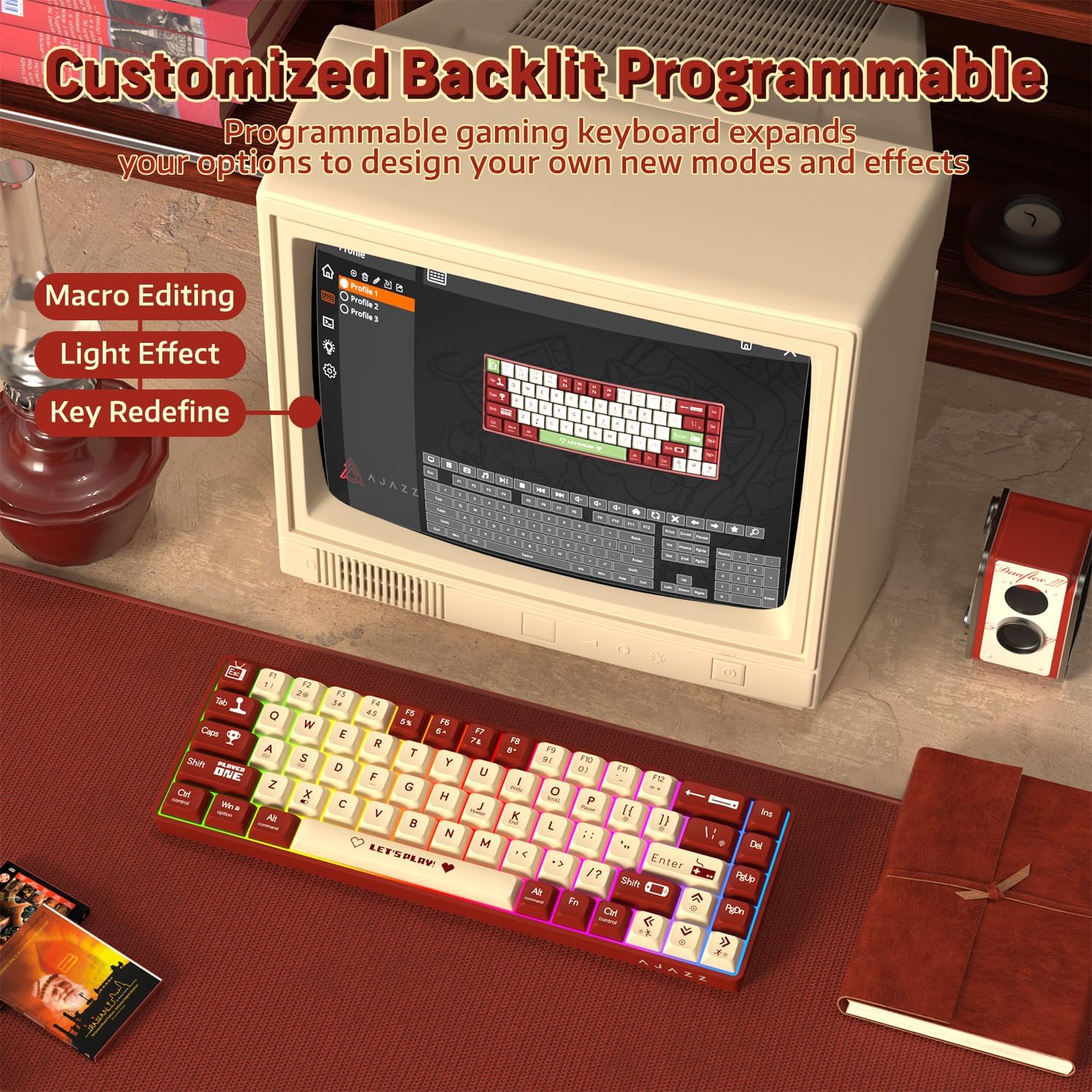
Image 3.2: The programmable software interface for customizing key functions and lighting effects.
4. Maintenance
4.1 Cleaning the Keyboard
- Disconnect the keyboard from your computer before cleaning.
- Use a soft, lint-free cloth slightly dampened with water or a mild cleaning solution to wipe the keycaps and chassis.
- For dust and debris between keycaps, use compressed air or a small brush.
- Avoid spraying liquids directly onto the keyboard.
4.2 Replacing Switches
The AK680 features hot-swappable sockets, allowing you to change switches without soldering.
- Use the provided keycap puller to carefully remove the desired keycap.
- Use the provided switch puller to gently grip the top and bottom clips of the switch.
- Pull the switch straight up to remove it from the PCB.
- Align the pins of the new 3-pin switch with the holes on the PCB.
- Press the new switch firmly into place until it clicks. Ensure the pins are not bent.
- Reattach the keycap.

Image 4.1: Illustration of the hot-swappable switch mechanism and how to replace switches.
5. Troubleshooting
5.1 Keyboard Not Responding
- Ensure the USB cable is securely connected to both the keyboard and the computer.
- Try connecting the keyboard to a different USB port on your computer.
- Test the keyboard on another computer to rule out system-specific issues.
- Restart your computer.
5.2 Backlight Not Working or Incorrect
- Ensure the keyboard is properly connected and receiving power.
- Press Fn + | to cycle through backlight modes.
- Check the programmable software for any disabled lighting effects or brightness settings.
5.3 Keys Not Registering or Double-Typing
- This could indicate a faulty switch. Try replacing the affected switch as described in Section 4.2.
- Ensure the switch is fully seated in its socket.
- Clean around the affected keycap and switch to remove any debris.

Image 5.1: The AK680 features full anti-ghosting to prevent key conflicts during rapid typing.
6. Specifications
| Feature | Detail |
|---|---|
| Brand | AJAZZ |
| Model Number | AK680 |
| Layout | 65% (68 Keys) |
| Connectivity | Wired (USB) |
| Switch Type | Mechanical (Red Switches, Hot-swappable 3-pin) |
| Backlight | Mixed Color / Rainbow RGB |
| Anti-Ghosting | Full Key Anti-Ghosting |
| Compatibility | Windows, macOS, Android, Linux |
| Material | Plastic chassis, ABS keycaps |
| Dimensions (approx.) | 32.7 x 13.8 x 4.4 cm (12.87 x 5.43 x 1.73 inches) |
| Weight (approx.) | 270 g (0.6 lbs) |
7. Warranty and Support
7.1 Warranty Information
Please refer to the specific warranty terms provided by your retailer or the manufacturer at the time of purchase. Warranty periods and coverage may vary by region and seller. Typically, manufacturing defects are covered for a limited period.
7.2 Customer Support
For technical assistance, product inquiries, or warranty claims, please contact the seller or visit the official AJAZZ website for support resources and contact information.


