
1. Introduction
This manual provides comprehensive instructions for the LiTime 48V 100Ah LiFePO4 Lithium Golf Cart Battery. This battery is engineered for golf cart applications, featuring a robust 200A Battery Management System (BMS), Bluetooth 5.0 connectivity for real-time monitoring, and integrated low-temperature protection. Please read this manual thoroughly before installation and operation to ensure safe and optimal performance of your battery system.
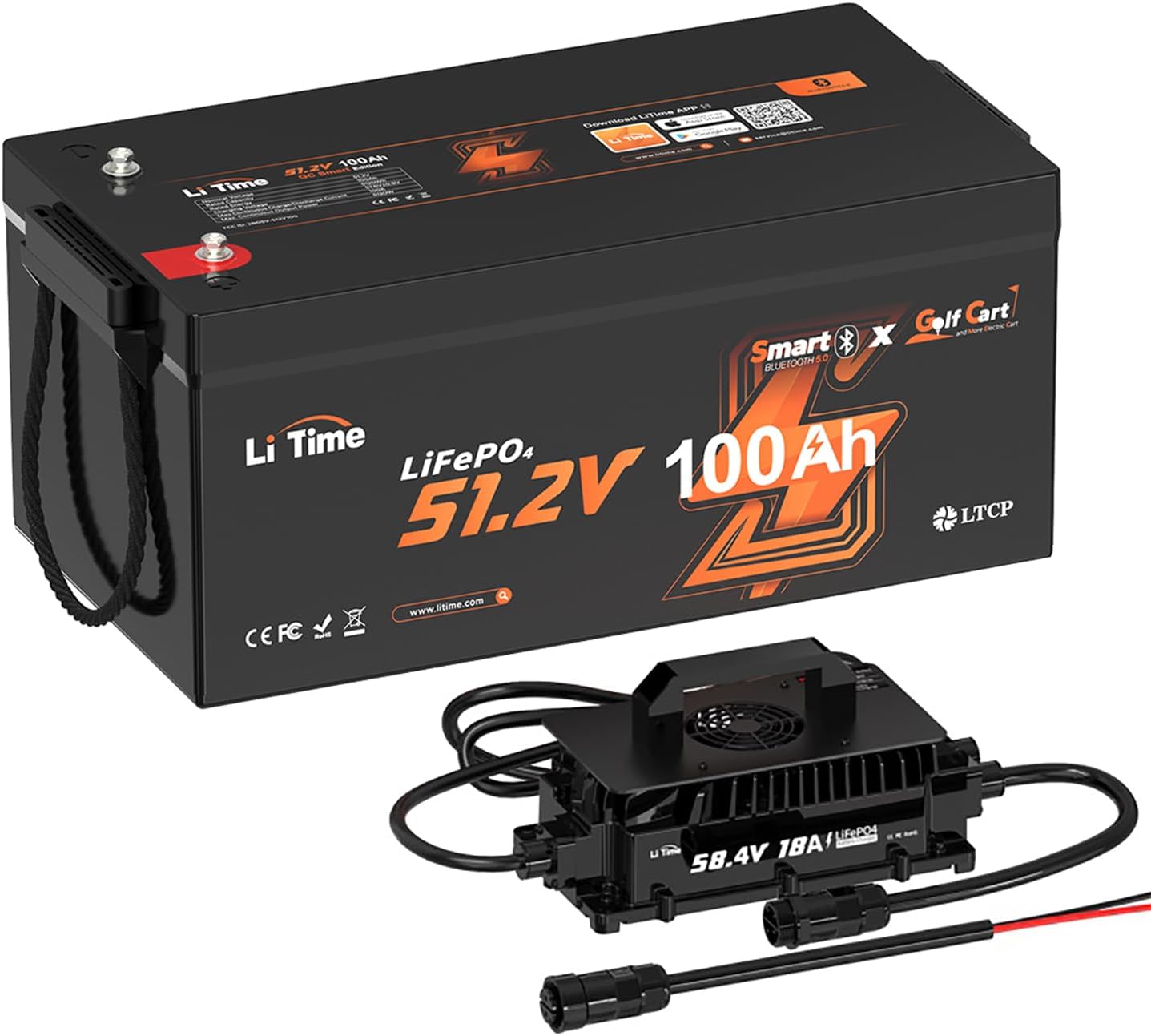
Figure 1: LiTime 48V 100Ah LiFePO4 Golf Cart Battery with included 18A charger.
2. Safety Information
Adhering to safety guidelines is crucial when handling and operating lithium batteries. Failure to follow these instructions can result in property damage, injury, or death.
- Read All Instructions: Familiarize yourself with the entire manual before use.
- Proper Installation: Ensure the battery is installed by a qualified professional or someone with adequate knowledge of electrical systems.
- Ventilation: Install the battery in a well-ventilated area.
- Avoid Short Circuits: Do not short-circuit the battery terminals. Use insulated tools.
- Charging: Only use chargers specifically designed for LiFePO4 batteries with the correct voltage and current ratings.
- Temperature: Operate and charge the battery within specified temperature ranges. The battery features low-temperature cut-off protection to prevent charging below 0°C (32°F) and discharging below -20°C (-4°F). Charging resumes at 5°C (41°F).
- Physical Damage: Do not puncture, drop, or expose the battery to severe impact.
- Water Exposure: Keep the battery dry and away from water or excessive moisture.
- Disposal: Dispose of batteries according to local regulations. Do not incinerate.
3. Product Overview and Features
The LiTime 48V 100Ah LiFePO4 battery is designed to provide reliable and efficient power for golf carts. Key features include:
- Advanced Cell Technology: Utilizes A+ Grade Automotive Square Aluminum Cells, supporting 2C continuous discharge current and offering superior heat dissipation.
- High Power Output: Capable of a 600A (1s) peak discharge current and 100A continuous discharge, providing ample power for golf cart motors up to 5kW.
- Smart BMS with Bluetooth 5.0: Integrated Battery Management System protects against over-charging, over-discharging, over-current, high temperature, and short-circuits. Bluetooth connectivity allows real-time monitoring via the LiTime APP.
- Low-Temperature Protection: Features an upgraded low-temperature cut-off function, ensuring safe operation in cold environments by preventing charging below 0°C (32°F) and discharging below -20°C (-4°F).
- Lightweight and Compact: Approximately 25% smaller and 35% lighter than traditional lead-acid batteries, improving golf cart handling and performance.
- Extended Lifespan: Offers up to 15,000 cycles and a 10-year lifespan, significantly outlasting lead-acid alternatives.
- Efficient Energy Use: Low self-discharge rate (approximately 3% per month) compared to lead-acid batteries (15-30%).

Figure 2: Golf cart ascending an incline, illustrating the battery's continuous strong power output.

Figure 3: Golf course map indicating a maximum range of 50 miles or 9 laps per full charge.
4. Setup and Installation
This section outlines the general steps for installing your LiTime LiFePO4 battery. Professional installation is recommended.
- Preparation: Ensure the golf cart is turned off and the ignition key is removed. Disconnect the negative terminal of the existing battery system first, then the positive.
- Remove Old Batteries: Carefully remove the old lead-acid batteries. Note their configuration if you are replacing multiple batteries.
- Positioning the LiTime Battery: Place the LiTime 48V 100Ah battery in the battery compartment. Its compact size and lighter weight facilitate easier placement. Ensure it is securely fastened to prevent movement during operation.
- Wiring: Connect the battery terminals. Connect the positive terminal first, then the negative. Ensure all connections are tight and secure. Refer to your golf cart's specific wiring diagram for correct polarity and series/parallel connections if applicable.
- Initial Activation: After installation, the battery requires activation. Connect the included 18A charger or a compatible lithium-activation charger (or an MPPT charger) to the battery. Charge the battery until it is fully charged. This process activates the Bluetooth function.
- Compatibility: This battery is suitable for various golf cart models, including Club Car (Onward, Precedent), EZ-GO (TXT, RXV), ICON, and Yamaha (Drive, Drive 2).

Figure 4: LiTime battery securely installed within a golf cart's battery compartment.

Figure 5: Visual representation of the battery's compatibility with various golf cart brands and models.
5. Operation
The LiTime battery features Bluetooth connectivity for enhanced monitoring and control.
5.1 Bluetooth Monitoring via LiTime APP
After initial activation, download the LiTime APP to your smartphone or tablet. The Bluetooth 5.0 module allows you to monitor critical battery information in real-time.
- Connection: Open the LiTime APP and follow the on-screen instructions to connect to your battery via Bluetooth.
- Real-time Data: Monitor parameters such as State of Charge (SOC), voltage, current, power remaining, battery temperature, and cycle count.
- Smart Control: The app may offer control features such as turning the battery on/off.

Figure 6: Monitoring battery status using the LiTime smartphone application and an optional in-cart display.
6. Maintenance
LiFePO4 batteries require minimal maintenance compared to lead-acid batteries, but proper care ensures longevity.
- Regular Charging: Charge the battery after each significant use. Use the provided 18A charger or a compatible LiFePO4 charger.
- Storage: If storing the battery for an extended period, ensure it is charged to approximately 50% State of Charge (SOC) and stored in a cool, dry place.
- Self-Discharge: The battery has a very low self-discharge rate (approximately 3% per month), meaning it retains charge well during periods of inactivity.
- Terminal Inspection: Periodically check battery terminals for corrosion or loose connections. Clean and tighten as necessary.
7. Troubleshooting
If you encounter issues with your LiTime battery, consider the following common troubleshooting steps:
- Battery Not Activating: Ensure the battery has been charged with a lithium-activation charger or MPPT charger after initial receipt or if it has been switched off.
- No Power Output:
- Check all cable connections for tightness and correct polarity.
- Verify the battery's State of Charge (SOC) via the LiTime APP.
- The BMS may have triggered a protection mode (e.g., over-discharge, over-current). Disconnect the load, wait a few minutes, and attempt to restart or charge the battery.
- Charging Issues:
- Ensure the charger is correctly connected and functioning.
- Check ambient temperature; charging will cease below 0°C (32°F) due to low-temperature protection.
- Bluetooth Connectivity Problems:
- Ensure the battery has been activated by an initial charge.
- Confirm Bluetooth is enabled on your device and the LiTime APP has necessary permissions.
- Try restarting the app or your device.
For persistent issues, refer to the "Warranty & Support" section for contact information.
8. Specifications
| Feature | Specification |
|---|---|
| Brand | LiTime |
| Model Number | L51.2V100-200-GC-BT-16-A250 |
| Nominal Voltage | 51.2V |
| Capacity | 100Ah |
| Battery Cell Composition | Lithium Iron Phosphate (LiFePO4) |
| Continuous Discharge Current | 100A (2C) |
| Peak Discharge Current (1s) | 600A |
| BMS | 200A Smart BMS with Bluetooth 5.0 |
| Low-Temperature Protection | Charging cut-off below 0°C (32°F), Discharging cut-off below -20°C (-4°F) |
| Dimensions (L x W x H) | 20.47 x 10.59 x 8.66 inches (52 x 26.9 x 22 cm) |
| Lifespan | Up to 15,000 cycles |
| Charger Included | 18A LiFePO4 Charger |

Figure 7: Contents of the product package, including the battery, terminal bolts, caps, washers, and the user manual.
9. Warranty and Support
LiTime is committed to providing excellent customer service and technical support.
- Technical Support: Professional technical support is available for any product-related issues or questions.
- Online Customer Service: Expect fast feedback within 24 hours from the LiTime support team.
- Contact: If you have any concerns, please reach out to LiTime directly through their official channels or the platform where the product was purchased.
For warranty details, please refer to the warranty card included with your product or visit the official LiTime website.


