
1. Introduction
This user manual provides essential information for the safe and efficient operation of your TIQ mini Qin 2 Pro Android 9 smartphone. Please read this manual thoroughly before using your device to ensure proper functionality and to understand its features.
The Qin 2 Pro features a simple and classic design with a body thickness of 8.6 mm and a 5.05-inch display, offering a comfortable grip. It operates on Android 9, powered by an 8-core ARM Cortex-A55 processor, providing enhanced performance compared to previous generations.
2. Product Overview
2.1. Design and Display
The device features a sleek design with a body thickness of 8.6 mm and a 22.5:9 screen ratio. The 5.05-inch display offers a resolution of 576 x 1440 pixels, providing a clear visual experience. The rounded R-angle design contributes to a comfortable hold.
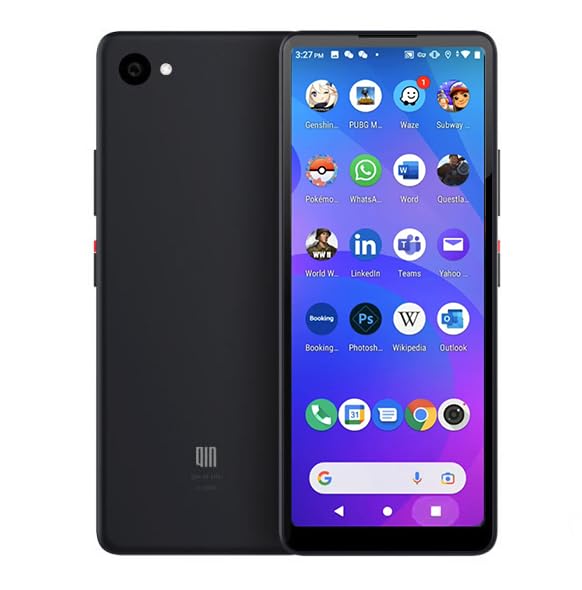
Figure 1: Front view of the TIQ mini Qin 2 Pro smartphone, showcasing its 5.05-inch display and compact design.
3. Setup
3.1. Initial Power On
- Press and hold the power button located on the side of the device until the screen illuminates.
- Follow the on-screen prompts to select your language, connect to a Wi-Fi network, and set up your Google account.
3.2. SIM Card Installation
Locate the SIM card tray on the side of the device. Use the provided SIM ejector tool to open the tray. Insert your Nano-SIM card into the tray with the gold contacts facing down. Carefully push the tray back into the device until it clicks into place.
3.3. Charging the Device
Connect the USB Type-C cable to the charging port at the bottom of the phone and plug the other end into a compatible USB power adapter. The device supports fast charging. A full charge is recommended before first use.
4. Operating Instructions
4.1. Processor and Performance
The Qin 2 Pro is equipped with an 8-core ARM Cortex-A55 processor and runs on Android 9. It features 4GB of RAM and 64GB of internal storage, ensuring smooth operation for daily tasks and providing ample space for applications and data.
4.2. Camera Functionality
The device includes an 8MP rear camera for capturing photos and videos. To use the camera, open the camera application from the home screen or app drawer. Tap the screen to focus and press the shutter button to take a picture. Note: This device does not feature a front-facing camera.
4.3. Battery and Charging
The Qin 2 Pro has a built-in 2400mAh battery. While the battery capacity is modest, the simplified system functions contribute to efficient power management, resulting in good battery life. Charging is performed via a USB Type-C interface, supporting rapid charging.
5. Maintenance
5.1. Cleaning the Device
Use a soft, lint-free cloth to gently wipe the screen and body of the phone. Avoid using harsh chemicals or abrasive materials, as these can damage the display or finish. Do not expose the device to excessive moisture.
5.2. Software Updates
Regularly check for software updates to ensure your device has the latest features and security patches. Navigate to Settings > System > System update to check for and install available updates.
5.3. Battery Care
To prolong battery life, avoid extreme temperatures. Do not leave the device fully charged or fully discharged for extended periods. It is recommended to keep the battery level between 20% and 80% for optimal longevity.
6. Troubleshooting
- Device not powering on: Ensure the battery is charged. Connect the device to a charger and wait a few minutes before attempting to power it on again.
- Screen unresponsive: Try restarting the device by holding the power button for approximately 10-15 seconds until it reboots.
- Applications crashing: Clear the cache of the problematic application via Settings > Apps & notifications > [App Name] > Storage & cache > Clear cache. If the issue persists, consider reinstalling the app.
- Poor network connectivity: Check if your SIM card is properly inserted. Try toggling Airplane Mode on and off. If issues persist, contact your network provider.
7. Specifications
| Feature | Detail |
|---|---|
| Model Name | Qin 2 Pro |
| Brand | TIQ mini |
| Operating System | Android 9.0 |
| Processor | 8-core ARM Cortex-A55 |
| RAM | 4 GB |
| Internal Storage | 64 GB |
| Display Type | IPS |
| Display Size | 5.05 inches |
| Display Resolution | 576 x 1440 pixels |
| Rear Camera | 8 MP |
| Front Camera | None |
| Battery Capacity | 2400 mAh |
| Charging Port | USB Type-C |
| Connectivity | USB |
| Color | Black |
8. Warranty and Support
For warranty information and customer support, please refer to the documentation included with your purchase or visit the official TIQ mini website. Keep your proof of purchase for warranty claims.
If you encounter issues not covered in the troubleshooting section, please contact customer service for assistance. You can often find support contact details on the manufacturer's website or through your retailer.