
WOLFBOX E50
WOLFBOX Level 2 EV Charger 50 Amp User Manual
Model: E50
Brand: WOLFBOX
1. Introduction
This manual provides essential information for the safe and efficient operation of your WOLFBOX Level 2 EV Charger (Model E50). Please read this manual thoroughly before installation and use to ensure proper functionality and to prevent damage or injury. Keep this manual for future reference.
The WOLFBOX Level 2 EV Charger is a high-power electric vehicle charging station designed for residential and commercial use. It features a smart display, RFID card access, Wi-Fi connectivity for app control, and a durable, weather-resistant design suitable for both indoor and outdoor installations.
2. Safety Information
WARNING: Installation and servicing of this equipment must be performed by qualified, licensed personnel only. Improper installation or use can result in electric shock, fire, or serious injury.
- Always disconnect power before installing or servicing the charger.
- Ensure the electrical circuit meets the specified requirements (200-240V AC, 70A or greater circuit breaker).
- Do not operate the charger if it is damaged, wet, or shows signs of malfunction.
- Keep children and pets away from the charging area during operation.
- Do not use extension cords or adapters with this charger.
- The charger is designed for electric vehicles only. Do not use it for other purposes.
- Ensure proper grounding as per local electrical codes.
3. Package Contents
Verify that all items are present and undamaged upon opening the package:

Image: Components included in the WOLFBOX Level 2 EV Charger package.
- WOLFBOX Level 2 EV Charger Unit (Model E50)
- Charging Cable (25 feet) with J1772 Connector
- Wall Mount Bracket
- Connector Holder
- Management Card (1 PC)
- RFID Blocking Card (2 PCS)
- User Manual
- Amperage Label
- Plastic Expansion Bolts M10 (2 PCS)
- Plastic Expansion Bolts M6 (5 PCS)
- Self-tapping Screw M6*50mm (2 PCS)
- Self-tapping Screw M4*40mm (5 PCS)
- Machine Screw M4*6mm (3 PCS)
4. Product Features and Components
The WOLFBOX E50 charger integrates advanced features for a convenient and efficient charging experience.
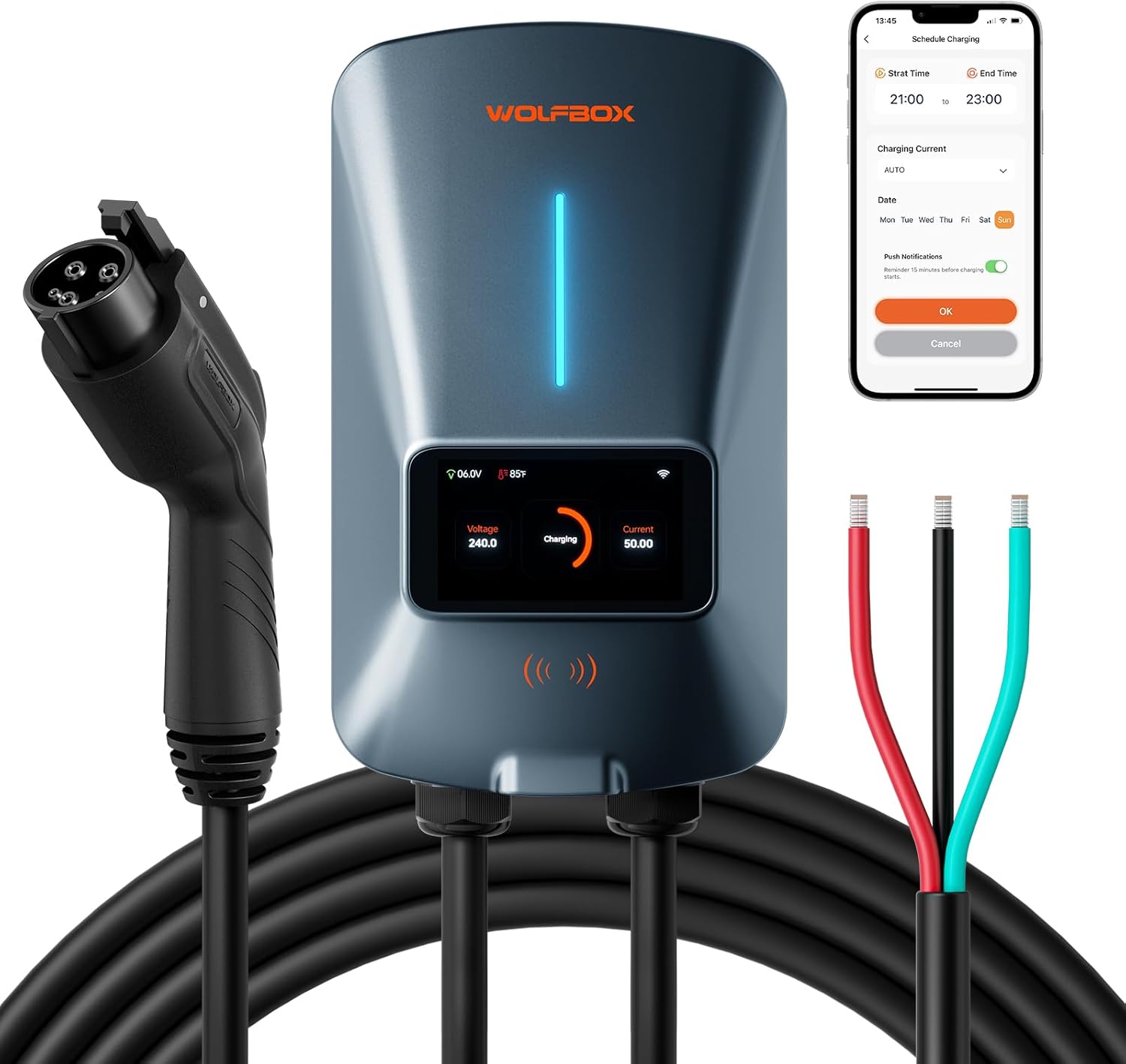
Image: Overview of the WOLFBOX Level 2 EV Charger, showing the main unit, charging cable, hardwire connections, and a smartphone displaying the app interface.
4.1. Main Unit
- 4.3-inch Smart LCD Display: Provides real-time charging data including voltage, current, power, temperature, and charging duration.
- LED Flowing Light Strip: Indicates charging status visually.
- RFID Reader: For secure access and activation using RFID cards.
- Wi-Fi Module: Enables smart control and monitoring via the dedicated mobile application.
- Durable Casing: NEMA 4 protection and IP66 rating ensure resistance to water, dust, extreme cold (-22°F), and high heat (122°F), suitable for outdoor installation.

Image: Close-up view of the WOLFBOX EV Charger's 4.3-inch smart LCD display and the LED flowing light strip.
4.2. Charging Cable and Connector
- 25-foot Cable: Provides ample reach for various parking situations.
- J1772 Connector: Standard connector compatible with most electric vehicles in North America.
4.3. Safety and Protection Features
- Ground Fault Protection
- Over-Current Protection
- Leakage Current Protection
- Thermal Protection
- High Voltage Protection
- Low Voltage Protection
- Over Charge Protection
- Lightning Protection
- Integrated Surge Protection

Image: Visual representation of the various electrical protection features integrated into the WOLFBOX EV Charger.
5. Setup and Installation
The WOLFBOX Level 2 EV Charger is designed for hardwired installation. It is strongly recommended that installation be performed by a certified electrician to ensure compliance with all local electrical codes and safety standards.

Image: An electrician performing the hardwired installation of an EV charger, emphasizing the need for professional setup.
5.1. Pre-Installation Checklist
- Power Supply: Ensure a dedicated 200-240V AC circuit is available.
- Circuit Breaker: A 70A or greater circuit breaker is required.
- Location: Choose a suitable indoor or outdoor location, considering cable reach (25ft) and protection from direct impact. The unit is waterproof and dustproof (NEMA 4, IP66).
- Tools: Gather necessary tools for electrical work and mounting.
5.2. Mounting the Charger
- Select a sturdy wall surface capable of supporting the charger's weight.
- Use the provided wall mount bracket as a template to mark drilling points.
- Drill holes and insert appropriate expansion bolts.
- Securely attach the wall mount bracket to the wall.
- Mount the charger unit onto the bracket.
- Install the connector holder next to the charger for convenient cable storage.
5.3. Electrical Connection (Hardwired)
This step must be performed by a qualified electrician.
- Turn off the main power supply at the circuit breaker.
- Connect the charger's input wires (L1, L2, Ground) to the corresponding terminals in your electrical panel.
- Ensure all connections are tight and secure.
- Verify proper grounding.
- Once connections are complete, restore power to the circuit.
6. Operating Instructions
The WOLFBOX EV Charger offers flexible charging options:

Image: Three methods of charging with the WOLFBOX EV Charger: Direct Charge, App Plan Charging, and RFID Card usage.
6.1. Plug and Play (Direct Charge)
- Ensure the charger is powered on.
- Plug the J1772 connector firmly into your electric vehicle's charging port.
- The charger will automatically initiate charging. The LCD display will show real-time charging data.
- To stop charging, unplug the connector from your vehicle.
6.2. RFID Card Activation
The RFID card provides secure access, preventing unauthorized use.
- Plug the J1772 connector into your electric vehicle's charging port.
- Hold the provided RFID card near the RFID reader area on the charger unit.
- The charger will activate and begin charging.
- To stop charging, tap the RFID card again or unplug the connector.
6.3. Adjustable Current
The charger supports adjustable current output from 16A to 50A. This can be adjusted via the mobile application to suit your vehicle's needs or to manage power consumption.

Image: A user adjusting the charging current settings on the WOLFBOX mobile application, demonstrating flexible power management.
7. App Management
The WOLFBOX EV Charger can be controlled and monitored remotely using its dedicated mobile application, available for both iOS and Android devices. Connect the charger to your home Wi-Fi network (2.4 GHz 802.11 b/g/n) for full functionality.

Image: A smartphone screen displaying the WOLFBOX app interface, highlighting features like scheduling, current adjustment, remote monitoring, and real-time notifications.
7.1. Key App Features
- Schedule Charging: Set specific start and end times for charging sessions to take advantage of off-peak electricity rates.
- Current Adjustment: Easily select your desired charging current (16A-50A).
- Remote Monitoring: View real-time charging status, power, voltage, current, and temperature from anywhere.
- Real-time Notifications: Receive alerts regarding charging status, completion, or any issues.
- Comprehensive Charging Data: Access detailed charging statistics and graphs over time for energy management.
- Personalized Settings: Customize temperature and cost units, input vehicle details for tailored insights, and control the indicator light.
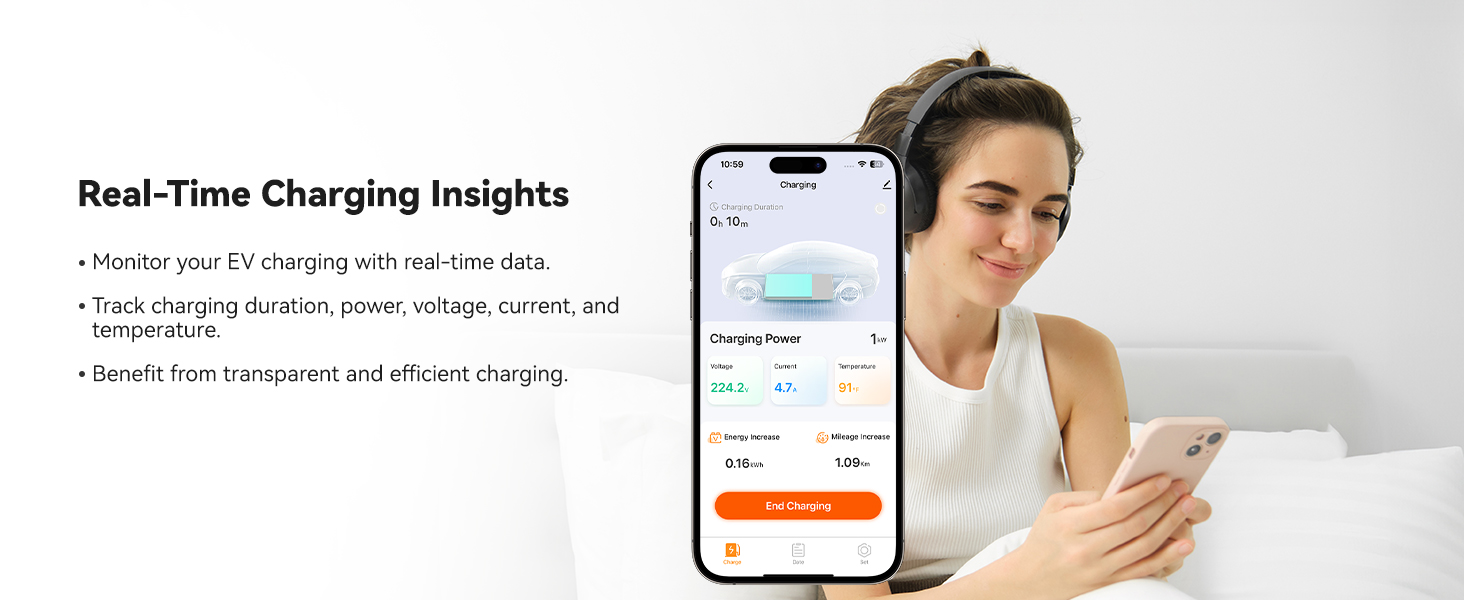
Image: A user viewing real-time charging insights on the WOLFBOX mobile app, showing data like charging duration, power, voltage, and temperature.
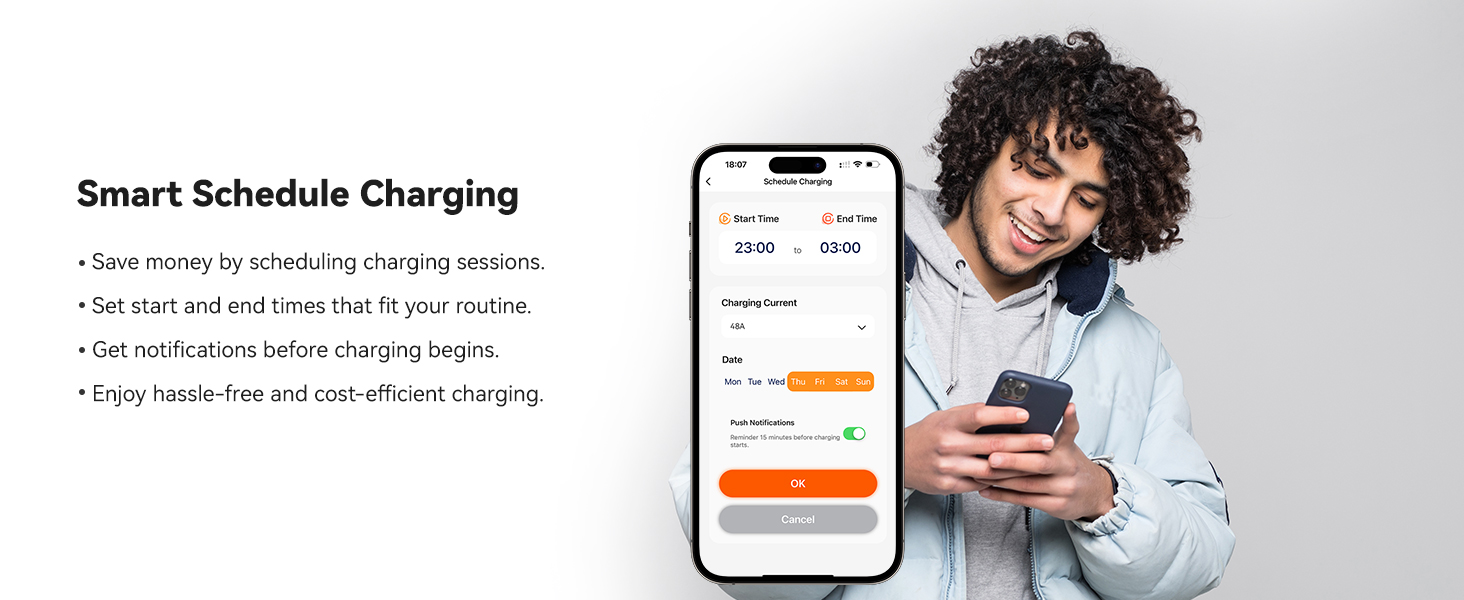
Image: A user setting up a smart charging schedule on the WOLFBOX mobile app, demonstrating the ability to define start and end times for charging sessions.
8. Maintenance
Regular maintenance ensures the longevity and optimal performance of your WOLFBOX EV Charger.
- Cleaning: Wipe the charger unit and cable with a soft, damp cloth. Do not use abrasive cleaners or solvents. Ensure the unit is dry before use.
- Cable Inspection: Periodically inspect the charging cable and connector for any signs of wear, cuts, or damage. If damage is found, discontinue use and contact customer support.
- Connector Care: Keep the J1772 connector clean and free of debris. Store it in the provided holder when not in use to protect it from elements.
- Firmware Updates: Ensure the charger's firmware is up-to-date via OTA (Over-The-Air) updates through the mobile app for improved performance and new features.
9. Troubleshooting
If you encounter issues with your WOLFBOX EV Charger, refer to the following common troubleshooting steps:
| Problem | Possible Cause | Solution |
|---|---|---|
| Charger not powering on | No power from circuit breaker; Loose electrical connections; Internal fault. | Check circuit breaker; Verify electrical connections (consult electrician); Contact customer support. |
| Charging not starting | Connector not fully inserted; Vehicle not ready to charge; RFID card not recognized; App scheduling conflict. | Ensure connector is fully seated; Check vehicle's charging status; Re-tap RFID card; Verify app schedule settings. |
| Slow charging speed | Amperage setting too low in app; Vehicle's charging limit; Power supply issue. | Adjust amperage setting in the app to a higher value (up to 50A); Check vehicle's charging settings; Consult electrician for power supply verification. |
| Wi-Fi connectivity issues | Incorrect Wi-Fi password; Router too far; 5GHz network selected. | Re-enter Wi-Fi password; Move router closer or use a Wi-Fi extender; Ensure you are connecting to a 2.4 GHz network. |
| Display shows "Stop Reason" with a code | Internal error or protection activation. | Unplug and re-plug the charger from the vehicle. If the issue persists, power cycle the charger by turning off and on its dedicated circuit breaker. Note the specific code and contact customer support if the problem continues. |
| Charger is hot to the touch | Normal operation under heavy load; Poor ventilation; Overload. | Some heat is normal. Ensure adequate airflow around the unit. If excessively hot or accompanied by unusual smells, immediately disconnect power and contact customer support. |
For issues not listed here or if troubleshooting steps do not resolve the problem, please contact WOLFBOX Customer Support.
10. Specifications
Detailed technical specifications for the WOLFBOX Level 2 EV Charger (Model E50):

Image: A table summarizing the technical specifications of the WOLFBOX EV Charger.
| Feature | Specification |
|---|---|
| Model Number | E50 |
| Power Output | Up to 12 kW |
| Current Output | 16A/24A/32A/40A/48A/50A (Adjustable) |
| Voltage | 200-240 V AC |
| Circuit Breaker Rating | 70A or Greater |
| Safety Certifications | CSA, FCC, Energy Star |
| Protection Rating | NEMA 4 protection, IP66 |
| Mounting Type | Wall mount |
| Compatibility | SAE J1772-A11 EVs/PHEVs in NA (Tesla requires an adapter) |
| Installation | Indoor/Outdoor, Hardwired |
| Cable Length | 25 feet |
| Dimensions (H x W x D) | 12.68" x 7.46" x 4.76" |
| Weight | 13.45 pounds |
| Wi-Fi | 2.4 Ghz 802.11 b/g/n |
| Upgrade Capability | OTA (Over-The-Air updates) |
11. Compatibility
The WOLFBOX Level 2 EV Charger is compatible with all electric vehicles (EVs) and plug-in hybrid electric vehicles (PHEVs) that use the SAE J1772 charging standard in North America.

Image: Illustrates the compatibility of the WOLFBOX EV Charger with various electric vehicle brands, including Tesla, Ford, Chevrolet, Hyundai, Nissan, Benz, Audi, KIA, Toyota, Jeep, Volvo, and BMW.
11.1. Tesla Vehicles
For Tesla owners, an adapter is required to connect the J1772 charging cable to your vehicle. Please contact WOLFBOX customer service to inquire about obtaining a compatible Tesla adapter (e.g., Adapter ASIN: B0CLLTWG2S).

Image: A Tesla adapter shown with a WOLFBOX EV Charger, indicating the need for an adapter for Tesla vehicles.
12. Warranty and Support
WOLFBOX is committed to providing reliable products and excellent customer service.
- Warranty: The WOLFBOX Level 2 EV Charger comes with a 36-month warranty.
- Customer Support: Dedicated 24/7 customer support is available to assist you with any questions or issues.
- Lifetime Assistance: WOLFBOX offers lifetime assistance for the product.
- OTA Updates: Benefit from continuous improvements and new features through Over-The-Air firmware updates.
For support, please refer to the contact information provided in your product packaging or visit the official WOLFBOX website.
Related documentsE50


Ask a question about this manual
Ask about setup, troubleshooting, compatibility, parts, safety, or missing instructions. Manuals+ will review the question and use this page’s manual context to help answer it.