Introduction
This manual provides comprehensive instructions for the setup, operation, and maintenance of your Sachtler Ace XL MK II Fluid Head with 75/2 CF MK II Carbon Fiber Tripod and SP 75 Ground Spreader. This system is engineered for precision and stability, offering smooth camera movements and robust support for professional video and photography applications.
The Ace XL MK II Fluid Head features advanced counterbalance and drag adjustments, designed to provide unparalleled finesse in every shot. Coupled with the lightweight yet strong carbon fiber tripod, this system ensures consistent performance across various environments.
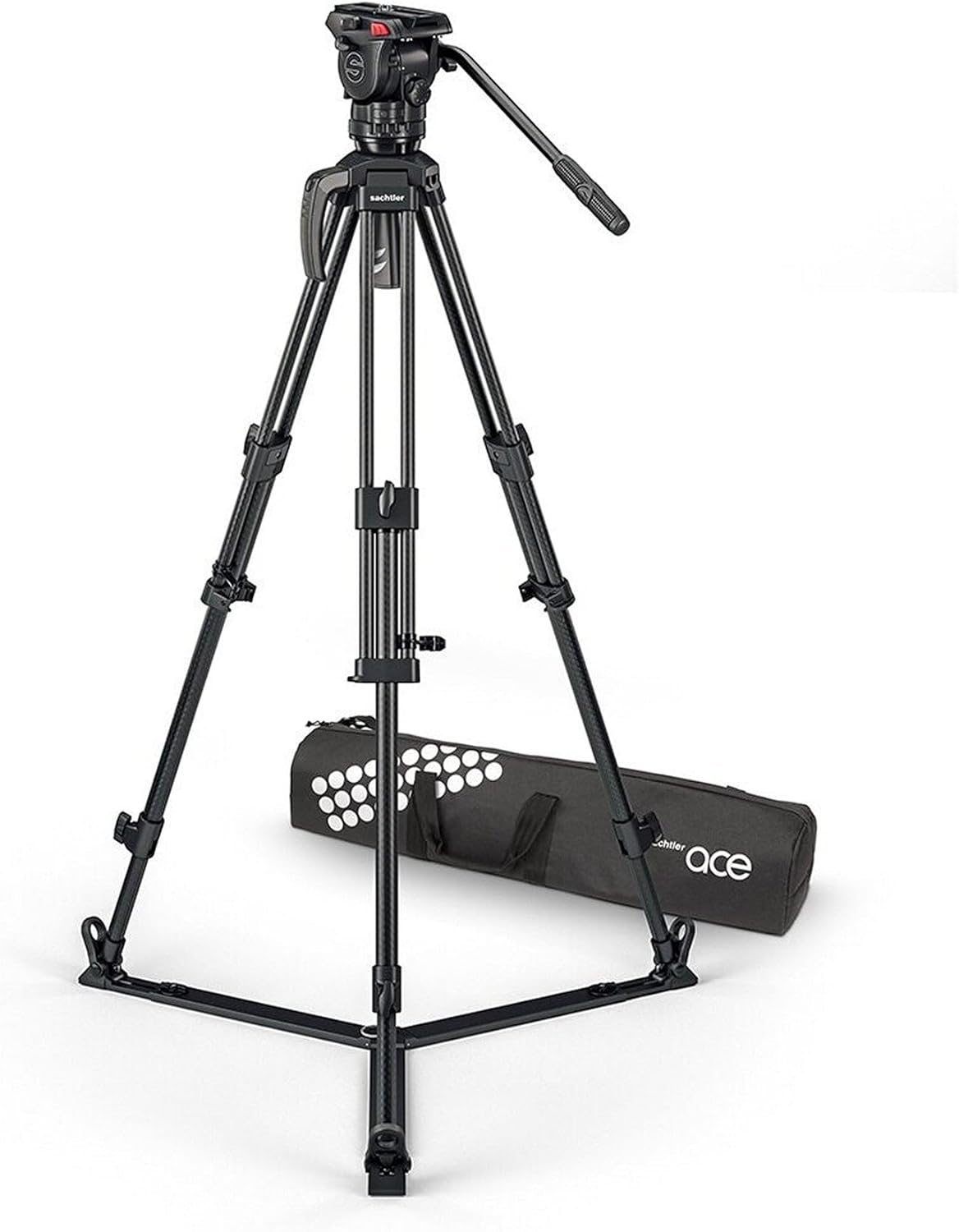
Figure 1: The Sachtler Ace XL MK II Fluid Head system, including the fluid head, carbon fiber tripod legs, and ground spreader.
Included Components
Your Sachtler Ace XL MK II system package should contain the following items:
- Sachtler Ace XL MK II Fluid Head
- Sachtler 75/2 CF MK II Carbon Fiber Tripod Legs
- Sachtler SP 75 Ground Spreader
- Pan Bar
- Camera Plate
- Transport Bag
Setup Instructions
- Unpack the System: Carefully remove all components from the transport bag.
- Attach the Ground Spreader:
Unfold the 75/2 CF MK II Carbon Fiber Tripod legs. Attach the SP 75 Ground Spreader to the lower section of the tripod legs. Ensure all three spreader arms are securely clipped into place on each leg.

Figure 2: The Sachtler carbon fiber tripod with the ground spreader deployed.
- Mount the Fluid Head:
Place the Ace XL MK II Fluid Head onto the 75mm bowl of the tripod. Tighten the bowl clamp securely to prevent any rotation or movement of the head.
- Attach the Pan Bar:
Insert the pan bar into the designated receptacle on the fluid head and tighten its locking screw. The pan bar can be mounted on either the left or right side of the head.
- Mount the Camera:
Attach your camera to the provided camera plate. Slide the camera plate into the fluid head's quick-release mechanism until it clicks into place. Ensure the safety lock is engaged. The 104mm (4.1in) balance plate sliding range allows for precise positioning of accessorized cameras.

Figure 3: Detail of the Ace XL MK II Fluid Head's camera plate and quick release system.
- Level the Head:
Use the illuminated level bubble on the fluid head to ensure the system is perfectly level. Adjust the tripod legs as needed until the bubble is centered. The illumination can be activated for low-light conditions.
Operating Instructions
Counterbalance Adjustment
The Ace XL MK II Fluid Head offers 9 steps of counterbalance adjustment. This feature allows you to precisely match the weight of your camera rig, ensuring smooth tilt movements and preventing the camera from tipping forward or backward when unlocked. Rotate the counterbalance knob to select the appropriate setting for your payload (up to 8kg / 17.6lbs).
Drag Adjustment (Pan & Tilt)
The fluid head provides 3 levels of drag for both pan and tilt movements, plus a '0' (free) setting. These settings allow you to control the resistance of the head's movement, enabling smooth, cinematic pans and tilts. Adjust the pan and tilt drag knobs to your desired level of resistance. The Sachtler drag system ensures consistent performance across a wide temperature range.

Figure 4: The counterbalance and drag adjustment controls on the Ace XL MK II Fluid Head.
Height Adjustment
The 75/2 CF MK II Carbon Fiber Tripod legs feature two stages, allowing for a versatile height range from 22.8 inches (58 cm) to 68.1 inches (173 cm). Unlock the leg clamps, extend the legs to the desired height, and then securely lock the clamps. Ensure all leg sections are fully extended or retracted evenly for optimal stability.
Pan and Tilt Locks
Separate locking mechanisms are provided for pan and tilt movements. Engage these locks to secure the camera in a fixed position. Always disengage the locks before attempting to pan or tilt the camera to avoid damage to the fluid head.
Maintenance
- Cleaning:
Wipe down the tripod legs and fluid head with a soft, damp cloth after each use, especially if used in dusty or wet environments. Avoid using harsh chemicals or abrasive materials that could damage the finish or internal components. For the carbon fiber legs, a mild soap solution can be used if necessary, followed by thorough drying.
- Storage:
Store the system in its transport bag in a clean, dry environment when not in use. Avoid extreme temperatures and high humidity.
- Temperature Range:
The system is designed to operate reliably in temperatures ranging from -22°F to +140°F (-30°C to +60°C). While the fluid head's drag system is optimized for this range, extreme temperature fluctuations can affect performance. Allow the system to acclimate to the ambient temperature before critical use.
- Regular Inspection:
Periodically check all screws, clamps, and connections to ensure they are secure. Do not attempt to disassemble the fluid head or tripod legs beyond routine cleaning.
Troubleshooting
| Problem | Possible Cause | Solution |
|---|---|---|
| Stiff or Jerky Pan/Tilt Movement | Drag settings too high; Head not level; Internal fluid issue. | Reduce drag settings. Ensure the head is perfectly level using the bubble. If problem persists, contact Sachtler support. |
| Camera Tips Forward/Backward | Incorrect counterbalance setting; Camera not balanced on plate. | Adjust counterbalance to match camera weight. Slide camera plate forward or backward to find the center of gravity. |
| Tripod Instability | Leg locks not fully engaged; Spreader not properly attached; Uneven ground. | Ensure all leg locks are securely tightened. Verify the ground spreader is correctly attached. Adjust leg lengths to compensate for uneven terrain. |
| Illuminated Level Bubble Not Working | Battery depleted; Electrical contact issue. | Check and replace the battery if necessary. Ensure contacts are clean. |
Specifications
| Brand | Sachtler |
| Model Number | 1019CM |
| Product Dimensions | 37 x 8.05 x 8 inches |
| Item Weight | 9.02 pounds (4.1 Kilograms) |
| Material | Carbon Fiber |
| Weight Limit | 17.6 pounds (8 kg) |
| Maximum Height | 68.1 inches (173 Centimeters) |
| Minimum Height | 22.8 inches (58 Centimeters) |
| Transport Length | 34.3 inches (87 cm) |
| Tripod Head Type | Pan Heads |
| Counterbalance Steps | 9 |
| Drag Settings (Pan/Tilt) | 3 + 0 (free) |
| Compatible Devices | Camera |
| Color | Black |
| Special Features | Lightweight, Portable, Telescopic, Illuminated Level Bubble, Detachable Bowl |
| Operating Temperature | -22°F to +140°F (-30°C to +60°C) |
Warranty and Support
Sachtler products are manufactured to high standards and come with a manufacturer's warranty. Specific warranty terms and conditions are typically provided with your purchase documentation or can be found on the official Sachtler website. Please retain your proof of purchase for warranty claims.
For technical support, service, or spare parts, please contact Sachtler customer service or an authorized Sachtler service center. Visit the official Sachtler website for the most up-to-date contact information and support resources.
You can visit the Sachtler Store on Amazon for more information: Sachtler Store


