
1. Introduction and Overview
The Ditec RM-L 1370 is a universal replacement remote control designed for a wide range of Sony Bravia televisions. This remote offers direct compatibility with various Sony LCD, LED, UHD, OLED, and QLED 4K Ultra HD Smart Android TV models, eliminating the need for complex programming or pairing. It features dedicated hotkeys for popular streaming services like YouTube and Netflix for convenient access.

Image: The Ditec RM-L 1370 remote control, highlighting its compatibility as a single remote solution for Sony TVs.
2. Setup and Initial Use
This remote control is designed for immediate use without any setup or programming. Simply insert the required batteries, and it will be ready to operate your compatible Sony TV.
2.1 Battery Installation
- Locate the battery compartment on the back of the remote control.
- Slide open the battery compartment cover.
- Insert two (2) AAA batteries (not included), ensuring correct polarity (+ and - terminals).
- Close the battery compartment cover securely.

Image: Rear view of the remote control, illustrating the battery compartment location.
2.2 First Use
Once batteries are installed, point the remote control towards your Sony TV and press the Power button. The remote should operate your TV without any further configuration.
3. Operating Instructions
The Ditec RM-L 1370 remote control provides all standard functions for your Sony Bravia TV, along with convenient shortcut buttons.
3.1 Basic Functions
- Power Button: Turns the TV on or off.
- Number Buttons (0-9): For direct channel selection.
- Volume Up/Down: Adjusts the TV volume.
- Channel Up/Down: Changes TV channels.
- Navigation Pad (Up/Down/Left/Right/Enter): For menu navigation and selection.
- Home Button: Accesses the TV's Smart Home screen or main menu.
- Return/Back Button: Returns to the previous screen or menu.
- Options Button: Displays context-sensitive options.
3.2 Special Features
- YouTube Hotkey: Directly launches the YouTube application.
- Netflix Hotkey: Directly launches the Netflix application.
The remote features an enhanced infrared sensor for a farther transmitting distance, allowing effective control up to 50 feet.

Image: The remote control demonstrating its farther distance sensor, capable of operating up to 50 feet.
4. Compatibility
The Ditec RM-L 1370 universal remote is compatible with a wide range of Sony Bravia LCD, LED, UHD, OLED, and QLED 4K Ultra HD Smart Android TVs. It is designed to replace many original Sony remote models, including but not limited to:
- RMT-TX100U, RMT-TX102U
- RMF-TX200U, RMF-TX201U, RMF-TX220U
- RMT-TX300U, RMF-TX310U
- RMT-TX500U, RMF-TX520U, RMF-TX600U
- And many other Sony TV remote models.
For a comprehensive list of compatible Sony TV remote models, please refer to the image below:
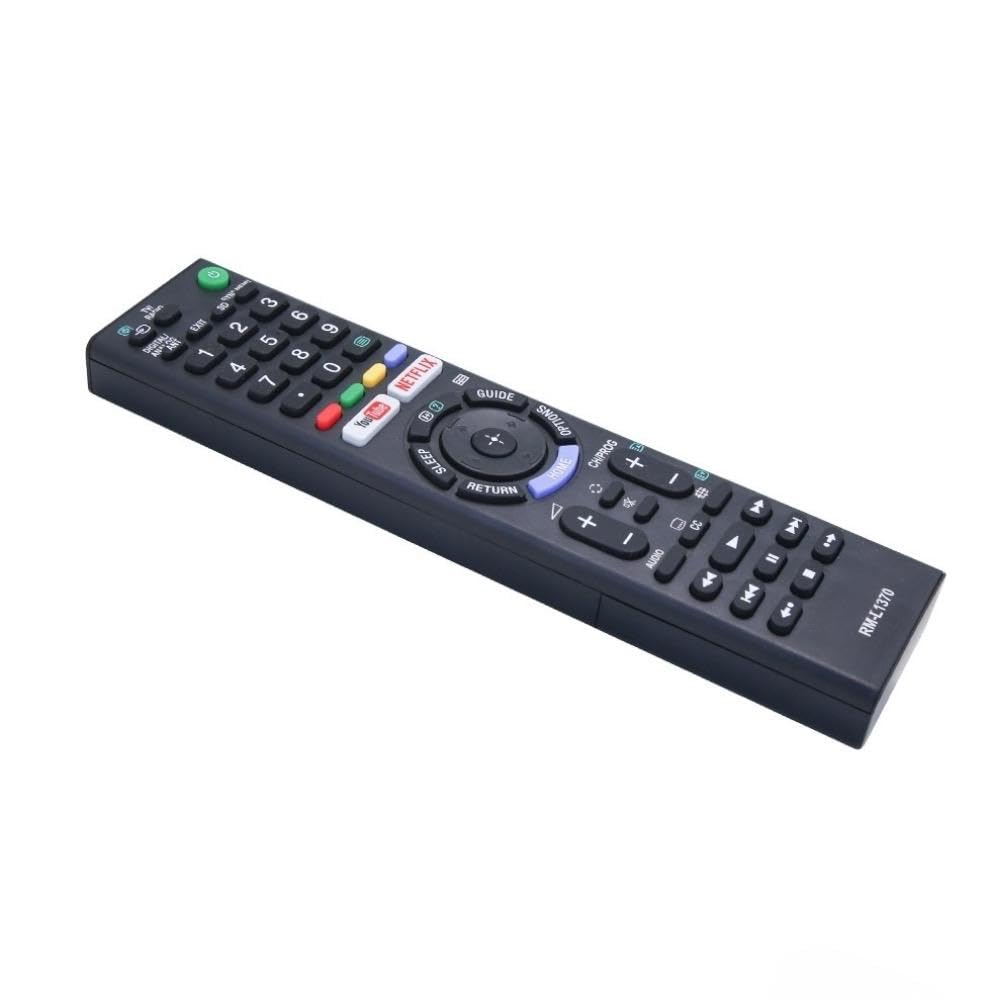
Image: A detailed list of Sony TV remote models that are compatible with the Ditec RM-L 1370.
It is recommended to compare the appearance of this remote with your original remote for visual confirmation of compatibility.
5. Maintenance
5.1 Battery Replacement
When the remote control's performance degrades or it stops responding, replace the batteries with two new AAA alkaline batteries. Always replace both batteries at the same time. Do not mix old and new batteries or different types of batteries.
5.2 Cleaning
To clean the remote control, use a soft, dry cloth. Do not use liquid cleaners, sprays, or abrasive materials, as these may damage the remote's surface or internal components.
6. Troubleshooting
- Remote not responding:
- Check if the batteries are inserted correctly with the correct polarity.
- Replace old batteries with new ones.
- Ensure there are no obstructions between the remote control and the TV's infrared receiver.
- Make sure you are within the effective operating range (up to 50 feet).
- Specific buttons not working:
- Some advanced functions or TV-specific features might not be supported by a universal replacement remote.
- Ensure the TV is powered on and functioning correctly.
7. Specifications
| Feature | Detail |
|---|---|
| Brand | Ditec |
| Model | RM-L 1370 |
| Compatible Devices | Sony Bravia LCD, LED, UHD, OLED, QLED 4K Ultra HD Smart Android TVs |
| Connector Type | Infrared (IR) |
| Batteries Required | 2 x AAA (not included) |
| Special Features | Ergonomic design, YouTube & Netflix Hotkeys |
| Product Dimensions | 3 x 3 x 12 cm |
| Item Weight | 80 g |
| Country of Origin | China |
8. Support
For assistance with compatibility or any questions regarding your Ditec RM-L 1370 remote control, you may contact support by sending a picture of your old remote or your device's brand name and model number to +91 9924350801. This will help in verifying compatibility or addressing specific queries.

Image: Information on how to contact support for compatibility checks or questions.