1. Introduction
Thank you for choosing the GOXAWEE Cordless Electric Scissors. This versatile tool is designed for efficient cutting of various materials, including cardboard, paper, fabric, leather, and more. Featuring a powerful 12000 RPM motor, two interchangeable cutting heads, and a long-lasting battery, it is ideal for crafts, DIY projects, and industrial textile applications. Please read this manual carefully before use to ensure safe and optimal operation.

Image 1: GOXAWEE Electric Scissors with two interchangeable cutting heads and charger.
2. Safety Instructions
- Always keep the work area clean and well-lit. Cluttered or dark areas invite accidents.
- Do not operate power tools in explosive atmospheres, such as in the presence of flammable liquids, gases, or dust. Power tools create sparks which may ignite the dust or fumes.
- Keep children and bystanders away while operating a power tool. Distractions can cause you to lose control.
- Avoid accidental starting. Ensure the switch is in the off-position before connecting to battery pack, picking up or carrying the tool.
- Do not overreach. Keep proper footing and balance at all times. This enables better control of the power tool in unexpected situations.
- Dress properly. Do not wear loose clothing or jewelry. Keep your hair and clothing away from moving parts. Loose clothes, jewelry or long hair can be caught in moving parts.
- Always use the safety lock before handling or storing the tool to prevent accidental activation.
- Use only the charger specified by the manufacturer. A charger that is suitable for one type of battery pack may create a risk of fire when used with another battery pack.
- Do not expose the tool to rain or wet conditions. Water entering a power tool will increase the risk of electric shock.
- Store idle tools out of the reach of children and do not allow persons unfamiliar with the power tool or these instructions to operate the power tool.
3. Product Components
The GOXAWEE Electric Scissors package includes the following components:
- GOXAWEE Cordless Electric Scissors Unit
- Tungsten Steel Cutting Head (for hard materials)
- Alloy Resistant Cutting Head (for flexible fabrics)
- Power Adapter/Charger
Key Features and Parts

Image 2: Product diagram of the GOXAWEE Electric Scissors, labeling the cutting head, blade lock button, decorative button, and main switch, with an overall length of 235mm.
- Cutting Head: The interchangeable blade assembly for cutting materials.
- Blade Lock Button: Used to secure or release the cutting head for replacement.
- Main Switch: Activates and deactivates the motor.
- Safety Lock: Prevents accidental activation of the main switch.
- Charging Indicator: Light that shows charging status (red while charging, green when fully charged).
4. Setup
4.1 Charging the Battery
Before first use, fully charge the electric scissors. The 2000mAh battery provides 3-4 hours of continuous use on a full charge.
- Connect the power adapter to the charging port on the electric scissors.
- Plug the adapter into a standard 110-127V electrical outlet.
- The charging indicator light will illuminate red, indicating that the device is charging.
- Once fully charged, the indicator light will turn green. Disconnect the charger.
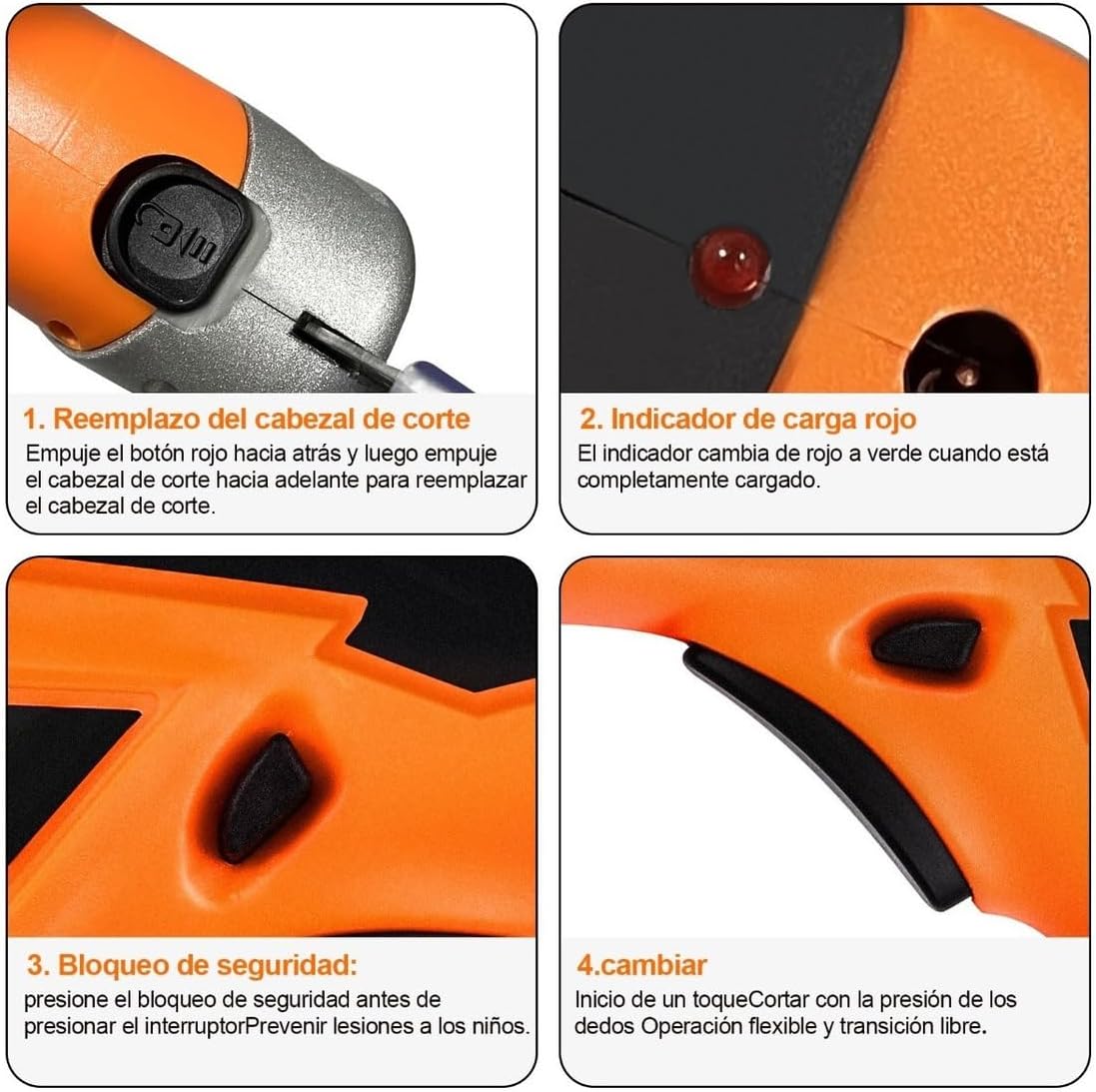
Image 3: Close-up of the charging indicator (top right) and other controls.
4.2 Attaching/Replacing Cutting Heads
The electric scissors come with two interchangeable cutting heads for different material types.
- Ensure the device is turned off and the safety lock is engaged.
- Locate the blade lock button (refer to Image 3, top left). Push the red button backward.
- While holding the button, push the current cutting head forward to remove it.
- Select the desired cutting head: the tungsten steel head for hard materials (plastic, leather) or the alloy resistant head for flexible fabrics.
- Align the new cutting head with the slot and push it firmly backward until it clicks into place. Release the blade lock button.
- Gently pull on the head to ensure it is securely attached.
5. Operating Instructions
5.1 General Operation
- Ensure the correct cutting head is installed for your material.
- Disengage the safety lock (refer to Image 3, bottom left).
- Press the main switch (refer to Image 3, bottom right) to start the motor. The scissors will begin cutting with a smooth, continuous motion.
- Guide the scissors along the desired cutting line. The integrated LED light provides illumination for precision.
- After cutting, release the main switch and engage the safety lock.

Image 4: Demonstrating smooth and efficient cutting on carpet.
5.2 Material Compatibility and Cutting Capacity
The GOXAWEE Electric Scissors are designed to cut a wide range of materials efficiently.
- Cardboard: Up to 1.5mm thickness.
- Paper: Various types and thicknesses.
- Fabric: Up to 8mm thickness (e.g., cotton, felt, carpet).
- Leather: Suitable for various leather types.
- Plastic PVC: Thin sheets.
- Aluminum Foil: Thin sheets.
- Fiberglass: Thin sheets.
- Plant Stems: Small, soft stems.

Image 5: Tungsten steel cutting head and examples of compatible materials.
6. Maintenance
6.1 Cleaning
Regular cleaning ensures optimal performance and extends the life of your electric scissors.
- Always ensure the device is off and the safety lock is engaged before cleaning.
- Use a soft, dry cloth to wipe down the body of the scissors.
- Remove any material debris from the cutting head using a small brush or compressed air.
- Do not use harsh chemicals or abrasive cleaners.
6.2 Blade Care
The cutting heads are made of durable tungsten steel and designed for longevity. The 85-degree blade angle provides efficient and clean cuts.

Image 6: Blade protection and 85-degree cutting angle.
- Inspect blades regularly for wear or damage. Replace cutting heads if they become dull or damaged to maintain cutting performance.
- Avoid cutting extremely hard or abrasive materials that exceed the tool's capacity, as this can dull the blades prematurely.
7. Troubleshooting
If you encounter issues with your GOXAWEE Electric Scissors, please refer to the following common solutions:
- Tool not turning on: Ensure the battery is fully charged. Check that the safety lock is disengaged and the main switch is pressed firmly.
- Poor cutting performance: Verify that the correct cutting head is installed for the material. The blades might be dull and require replacement. Ensure the material thickness does not exceed the tool's capacity.
- Charging indicator not working: Check the connection of the power adapter to both the tool and the electrical outlet. Ensure the outlet is functional.
If the problem persists after attempting these solutions, please contact GOXAWEE customer support for further assistance.
8. Specifications
| Feature | Specification |
|---|---|
| Brand | GOXAWEE |
| Model | Electric Scissors |
| Motor Speed | 12000 RPM |
| Battery Capacity | 2000mAh |
| Continuous Use Time | 3-4 hours |
| Charging Voltage | 110-127 V |
| Cutting Heads | 2 (Tungsten Steel, Alloy Resistant) |
| Features | Cordless, LED Light, Safety Lock |
| Dimensions (Package) | 26.2 x 10 x 5.4 cm |
| Weight (Product) | 430 g |
| Hand Orientation | Ambidextrous |
9. Warranty and Support
The GOXAWEE Electric Scissors come with a 1-year warranty from the date of purchase. This warranty covers manufacturing defects and ensures reliable performance under normal use.
For warranty claims, technical support, or any questions regarding your product, please contact GOXAWEE customer service through the retailer where you purchased the item or visit the official GOXAWEE website for contact information.


