
BAOFENG Baofeng 5RX
BAOFENG 5RX Ham Radio User Manual
Model: Baofeng 5RX
Introduction
The BAOFENG 5RX Ham Radio is an advanced multi-band receiving two-way radio, designed for reliable long-range communication. This manual provides comprehensive instructions for the setup, operation, maintenance, and troubleshooting of your device, ensuring optimal performance and longevity.
What's in the Box
Upon unboxing your BAOFENG 5RX, please verify that all components are present:
- 1 x BAOFENG 5RX Handheld Ham Radio
- 1 x Lithium Polymer Battery
- 1 x Standard Antenna
- 1 x TD-771 Long Antenna
- 1 x Desktop Charger
- 1 x Belt Clip
- 1 x Hand Strap
- 1 x Earpiece
- 1 x User's Manual (this document)

Image: The BAOFENG 5RX radio shown with its complete kit, including the radio unit, battery, standard antenna, TD-771 long antenna, desktop charger, belt clip, hand strap, and earpiece.
Product Features
The BAOFENG 5RX offers a robust set of features for enhanced communication:
- Multi-band Receiving: Supports FM (65-108MHz, 76-108MHz), AM (108-136MHz), VHF (136-174MHz, 200-260MHz), and UHF (400-480MHz, 480-520MHz).
- Transmitting Bands: VHF-1.25M-UHF.
- 128 Channels: Ample storage for your preferred frequencies.
- CTCSS/DCS Codes: 50 CTCSS and 210 DCS codes for private communication.
- Copy Frequency Function: Allows quick replication of nearby walkie-talkie frequencies.
- Dual Band, Dual Display, Dual Standby: Monitor two frequencies simultaneously.
- VOX (Voice Operated Exchange): Hands-free transmission.
- Scan Function: Automatically scans for active frequencies.
- SOS Emergency Function: For critical situations.
- Built-in Flashlight: Convenient for low-light conditions.
- Auto Keypad Lock: Prevents accidental key presses.
- NOAA Weather Radio: Access to weather alerts.

Image: Visual representation of the BAOFENG 5RX's key features, including multi-band capability, VOX, CTCSS/DCS, FM/AM reception, Copy Frequency, 128 channels, and NOAA Weather.
Setup Guide
1. Battery Installation
- Ensure the radio is powered off.
- Align the battery pack with the grooves on the back of the radio.
- Slide the battery upwards until it clicks securely into place.
- To remove, press the battery release latch (usually at the bottom of the battery) and slide the battery downwards.
2. Antenna Attachment
- Locate the antenna connector on the top of the radio.
- Screw the desired antenna (Standard or TD-771 Long Antenna) clockwise onto the connector until it is finger-tight. Do not overtighten.
3. Earpiece Connection
- Open the rubber cover on the side of the radio to expose the earpiece jacks.
- Insert the earpiece plugs firmly into the corresponding jacks.
4. Charging the Battery
- Connect the desktop charger to a power outlet.
- Place the radio (with battery installed) or the battery alone into the charging cradle.
- The charger's LED indicator will show the charging status (typically red for charging, green for fully charged).
- A full charge typically takes several hours.
Operating Instructions
Power On/Off and Volume Control
- To power on, rotate the volume knob (top-left) clockwise.
- Continue rotating clockwise to increase volume; rotate counter-clockwise to decrease.
- To power off, rotate the volume knob counter-clockwise until it clicks.
Channel/Frequency Selection
- Press the VFO/MR button to switch between Frequency Mode (VFO) and Channel Mode (MR).
- In Frequency Mode, use the keypad to directly enter frequencies.
- In Channel Mode, use the UP/DOWN arrow keys to navigate through stored channels.
- Press the A/B button to switch between the upper and lower display frequencies for dual watch.
Transmit and Receive (PTT)
- To transmit, press and hold the PTT (Push-To-Talk) button on the left side of the radio. Speak clearly into the microphone.
- Release the PTT button to receive.
Copy Frequency Function
The BAOFENG 5RX features a convenient one-key frequency match replication function:
- Step 1: Turn on the radio. Long press the BAND button to initiate the frequency matching process for UHF or VHF frequencies. The display will show "SEARCH UHF" or "SEARCH VHF".
- Step 2: The radio will monitor for incoming transmissions. When a nearby walkie-talkie transmits, the 5RX will display the detected frequency and CTCSS/DCS codes.
- Step 3: Press the MENU button to save the detected frequency and CTCSS/DCS to a channel.
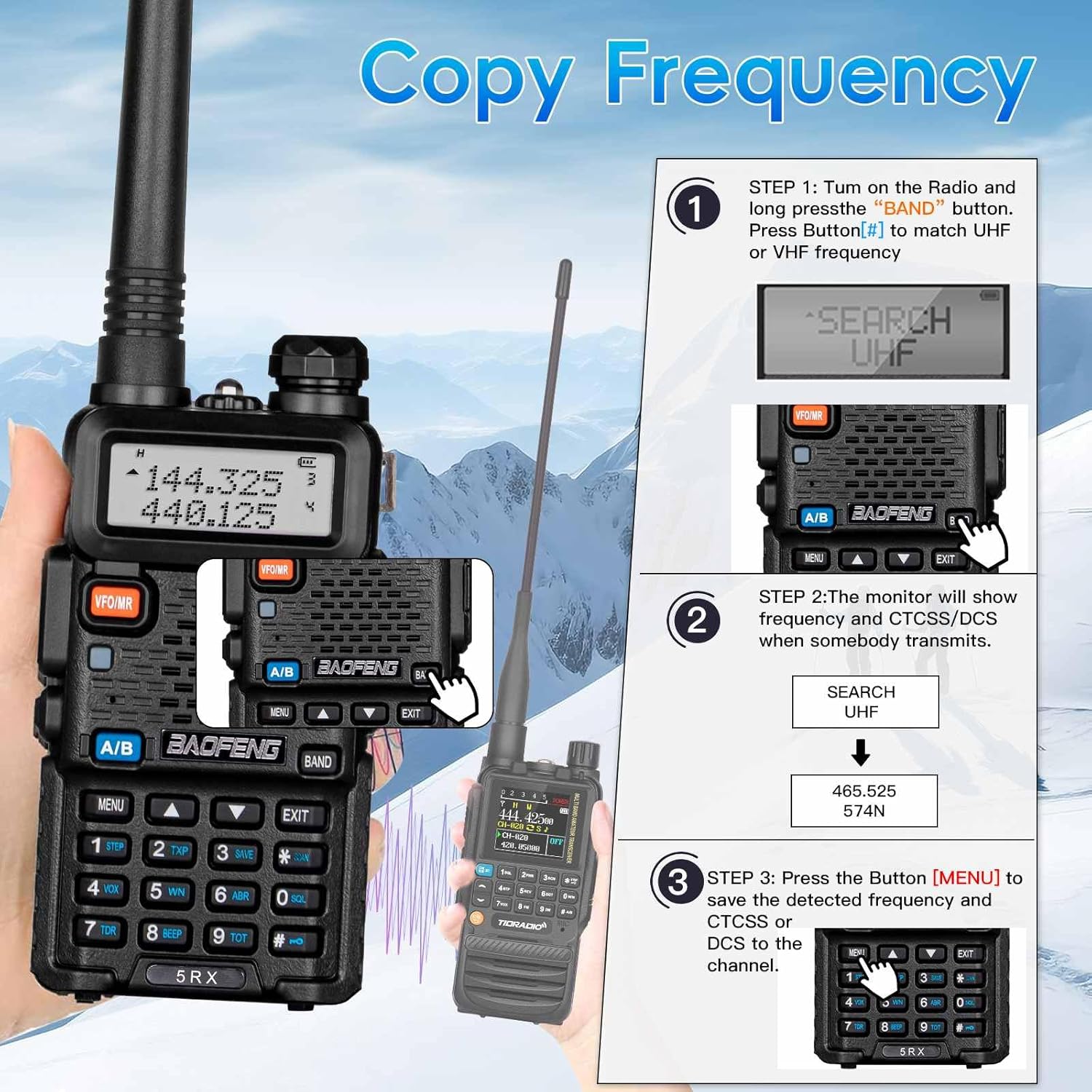
Image: A visual guide demonstrating the three steps to use the Copy Frequency function on the BAOFENG 5RX, showing the display prompts and button presses.
AM/FM Aviation Band Receiving
The BAOFENG 5RX is capable of receiving signals on the AM/FM aviation band (108-136MHz), allowing you to monitor air traffic communications.

Image: The BAOFENG 5RX radio displayed with an airport background, illustrating its capability for AM/FM aviation band reception.
Other Functions (VOX, Scan, SOS, Flashlight, Keypad Lock)
- VOX: Activate Voice Operated Exchange through the menu to enable hands-free transmission.
- Scan: Press the SCAN button (usually a dedicated button or a function key) to start scanning active frequencies or channels.
- SOS: The SOS emergency function can be activated via a dedicated button or menu option for distress signaling.
- Flashlight: Press the flashlight button (often on the side or top) to turn the built-in LED flashlight on or off.
- Auto Keypad Lock: This feature can be enabled in the menu to automatically lock the keypad after a period of inactivity, preventing accidental presses.
Maintenance
Cleaning
- Wipe the radio's surface with a soft, damp cloth. Do not use harsh chemicals or abrasive cleaners.
- Ensure the earpiece and charging ports are free of dust and debris.
Battery Care
- Avoid overcharging or completely draining the battery to prolong its lifespan.
- Store the battery in a cool, dry place when not in use.
Storage
- When storing the radio for extended periods, remove the battery.
- Store the radio and accessories in a dry, dust-free environment, away from direct sunlight and extreme temperatures.
Troubleshooting
| Problem | Possible Cause | Solution |
|---|---|---|
| Radio does not power on. | Battery is not installed correctly or is depleted. | Ensure battery is securely installed. Charge the battery fully. |
| Cannot transmit or receive. | Incorrect frequency/channel, antenna not connected, or low battery. | Verify frequency/channel settings. Check antenna connection. Charge battery. |
| Poor audio quality. | Weak signal, incorrect squelch level, or earpiece issue. | Adjust squelch level. Ensure good signal strength. Check earpiece connection or try without earpiece. |
| Keypad is unresponsive. | Keypad lock is active. | Disable keypad lock (refer to your radio's specific key combination, often a long press of the '#' key). |
Specifications
- Model Number: Baofeng 5RX
- FCC ID: 2AJGM-5RX
- Channels: 128
- CTCSS/DCS Codes: 50 CTCSS and 210 DCS
- Receiving Frequency Range:
- FM: 65-108MHz, 76-108MHz
- AM: 108-136MHz
- VHF: 136-174MHz, 200-260MHz
- UHF: 400-480MHz, 480-520MHz
- Transmitting Frequency Range: VHF-1.25M-UHF
- Battery Type: Lithium Polymer (included)
- Voltage: 7.4 Volts
- Item Weight: Approximately 1 pound
- Package Dimensions: 7.09 x 4.45 x 3.78 inches
- Country of Origin: China
- Water Resistance Level: Water Resistant

Image: The rear view of the BAOFENG 5RX radio, displaying regulatory markings including the FCC ID: 2AJGM-5RX.
Warranty and Support
Warranty Information
The BAOFENG 5RX Ham Radio comes with a 30-day warranty from the date of purchase. This warranty covers manufacturing defects and ensures a refund or replacement for eligible issues.
Technical Support
For any technical issues or questions regarding your BAOFENG 5RX radio, please contact our dedicated technical support team. As this is a new product, we are committed to providing professional assistance to resolve any problems you may encounter.
Please refer to the contact information provided with your purchase or visit the official BAOFENG website for support details.
Related documentsBaofeng 5RX


Ask a question about this manual
Ask about setup, troubleshooting, compatibility, parts, safety, or missing instructions. Manuals+ will review the question and use this page’s manual context to help answer it.