
1. Introduction
The Rythflo Wireless Lavalier Microphone System (Model LM02) is designed to provide high-quality audio recording for content creators using iPhone and Android devices. This system features dual microphones, versatile connectivity, and advanced noise cancellation for clear sound in various environments.
2. What's in the Box
- 2 x Microphone Transmitters
- 2 x Microphone Receivers (1 Lightning, 1 USB Type-C)
- 1 x Smart Charging Case
- 1 x Charging Cable
- 2 x Furry Windshields
- Other Accessories (e.g., magnetic clips)

Figure 2.1: Overview of the Rythflo Wireless Lavalier Microphone System components.
3. Setup
3.1. Charging the System
Before first use, ensure the charging case and microphones are fully charged. Connect the provided USB-C charging cable to the charging case and a power source. The LED display on the case indicates the battery level.
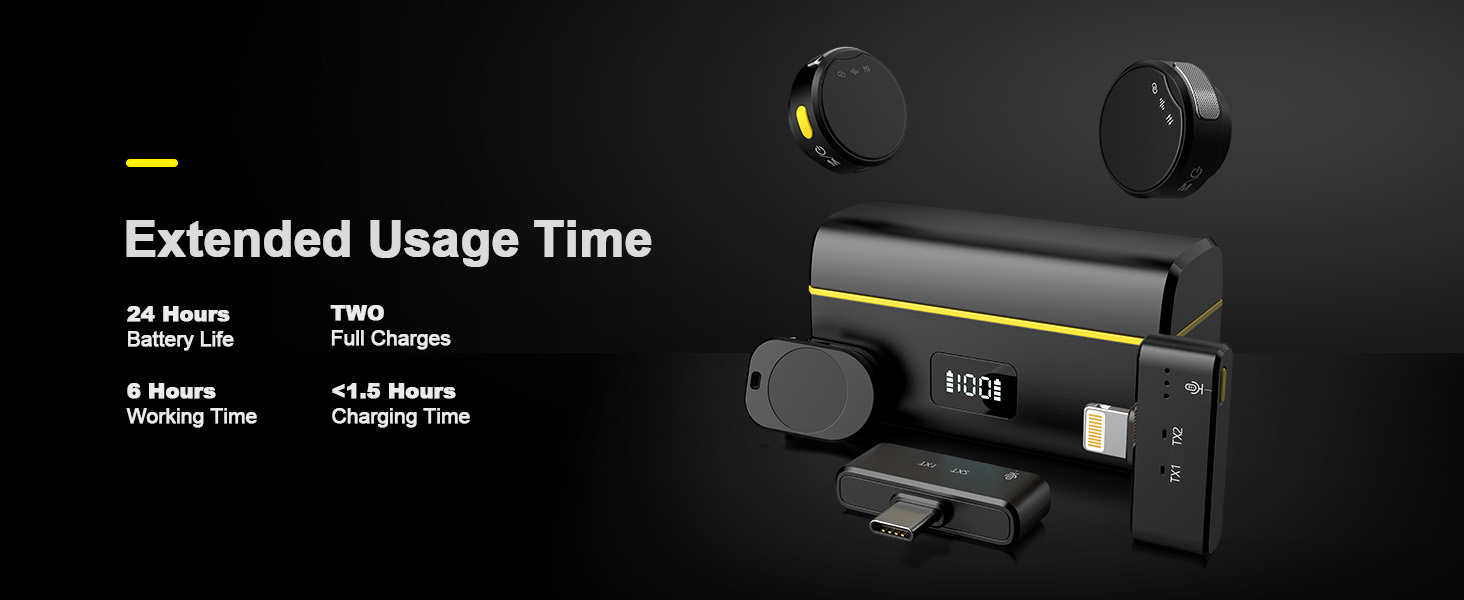
Figure 3.1: The charging case provides extended usage time and recharges the microphones.
3.2. Connecting Receivers
Select the appropriate receiver (Lightning for iPhone, USB Type-C for Android/other compatible devices) and plug it into your recording device's port. The system supports both connector types for broad compatibility.

Figure 3.2: The system includes both USB-C and Lightning receivers for universal device compatibility.
3.3. Automatic Pairing
The microphones and receivers are designed for plug-and-play convenience. Once the receiver is plugged into your device and the microphones are powered on, they will automatically pair within seconds. A blue indicator light on the microphone will confirm successful pairing.

Figure 3.3: The microphone's indicator lights provide status updates, including pairing confirmation.
3.4. Attaching Microphones
The microphones offer flexible attachment options:
- Magnetic Clip: Use the integrated magnetic clip to securely attach the microphone to clothing without causing damage.
- Back Clip: For traditional lapel microphone use, attach the provided back clip to the microphone and clip it onto your clothing.

Figure 3.4: The microphone can be attached using either a magnetic clip or a traditional back clip.
4. Operating Instructions
4.1. Power On/Off
Press and hold the power button on each microphone transmitter to turn it on or off. The indicator lights will illuminate upon powering on.
4.2. Noise Cancellation
Activate or deactivate the dual noise cancellation feature with a single press of the yellow side button on the microphone. This feature helps reduce ambient noise for clearer voice recordings.

Figure 4.1: The microphone features a dedicated button for activating noise cancellation.
4.3. Reverb Mode and Volume Control
The microphone offers a reverb mode and 3-level volume control for clear recordings. Use the side buttons to cycle through these modes and adjust settings as needed. Indicator lights will show the active mode (e.g., blue for noise cancellation, red for mute, specific patterns for reverb/volume).

Figure 4.2: Control various audio settings including reverb and volume levels.
4.4. Dual-Person Recording
With two microphone transmitters, the system supports simultaneous recording for two individuals, ideal for interviews, podcasts, or collaborative content creation.
4.5. Battery Life Monitoring
The smart charging case features an LED display to easily monitor the battery status of the case and individual microphones.
4.6. Usage Scenarios
This wireless microphone system is suitable for a wide range of applications, including:
- Streaming
- Video Recording
- Voice Recording
- Speech
- Video Conferences
- Vlogging
- Online Teaching
- Interviews
- Podcasting
5. Media Demonstrations
5.1. Product Overview and Features
Video 5.1: A detailed look at the Rythflo RY-LM02 Wireless Lavalier Microphone, showcasing its components and key features.
5.2. Unboxing and Usage Example
Video 5.2: An unboxing and demonstration of the Rythflo Wireless Lavalier Microphone, highlighting its ease of use for content creation.
6. Maintenance
6.1. Cleaning
Regularly clean the microphones and receivers with a soft, dry cloth. Use the provided furry windshields to protect the microphones from wind and dust, and clean them as needed.
6.2. Storage
When not in use, store the microphones and receivers in the smart charging case to protect them and ensure they remain charged for your next use.
7. Troubleshooting
- No Audio/Poor Quality: Ensure the receiver is fully plugged into your device and the microphones are powered on and paired (blue light solid). Check microphone placement and ensure noise cancellation is appropriately enabled or disabled for your environment.
- Pairing Issues: If microphones do not pair automatically, ensure both are charged and within range of the receiver. Try restarting both the microphones and the recording device.
- Battery Draining Quickly: Ensure the charging case is fully charged. Noise cancellation can consume more battery; consider disabling it if not needed.
8. Specifications
| Feature | Specification |
|---|---|
| Model Name | LM02 |
| Brand | Rythflo |
| Connectivity Technology | 2.4G Wireless |
| Connector Type | Lightning, USB Type-C |
| Audio Sensitivity | 42 Decibels |
| Signal-to-Noise Ratio | 65 dB |
| Frequency Response | 20 KHz |
| Polar Pattern | Omnidirectional |
| Battery Life (Microphone) | 6 hours |
| Battery Life (with Charging Case) | Up to 35 hours |
| Item Weight | 2.9 Ounces |
| Product Dimensions | 2.9 x 1.29 x 1.6 inches |
| Material | Acrylonitrile Butadiene Styrene |
| Compatible Devices | Laptop, Smartphone, Tablet, iPad, iPhone |
Figure 8.1: Key audio specifications for the Rythflo LM02 microphone.
9. Warranty and Support
Rythflo offers dependable service and technical support. For any questions or assistance, please reach out via Amazon messages or the service information provided in the manual. The product includes:
- 24/7 Quick Reply Support
- Free Replacement Policy
- Lifetime Product Quality Support
For more information, visit the Rythflo Store on Amazon.

