
Product Overview
The MONODEAL MD08 Air Conduction Headphones are designed for comfort and clear communication, featuring an open-ear design, Bluetooth 5.1 connectivity, and a noise-canceling microphone with a mute function. These headphones transmit sound through air conduction, providing an alternative to traditional in-ear or bone conduction devices, aiming to reduce pressure and discomfort during extended use.

Image: MONODEAL MD08 Air Conduction Headphones, showcasing the open-ear design and boom microphone.
What's in the Box
- Air Conduction Headphones (1 unit)
- USB-C Charging Cable (1 unit)
- User Manual (1 unit)
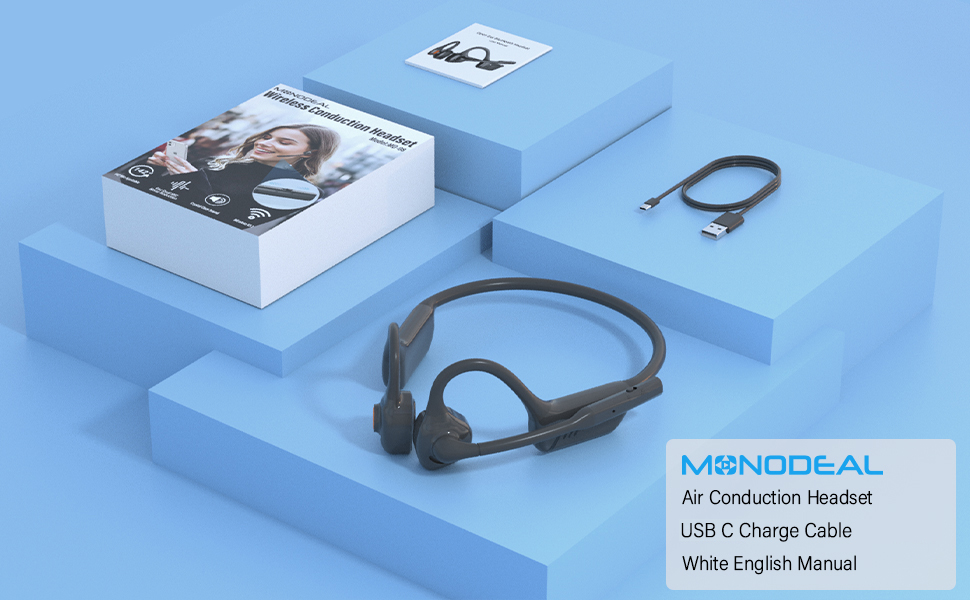
Image: The MONODEAL MD08 headphones, USB-C charging cable, and user manual laid out, representing the package contents.
Setup
1. Charging the Headphones
Before initial use, fully charge the headphones. Connect the provided USB-C charging cable to the charging port on the headphones and plug the other end into a compatible USB power source. A full charge typically takes approximately 2 hours.

Image: Diagram illustrating the charging process and battery life indicators: 8 hours usage, 36 hours standby, 2 hours charging time.
2. Bluetooth Pairing
To connect your MONODEAL MD08 headphones to a device:
- Ensure the headphones are powered off.
- Press and hold the multi-function button until the indicator light flashes red and blue, indicating pairing mode.
- On your device (smartphone, tablet, computer), enable Bluetooth and search for available devices.
- Select "MD08" from the list of found devices to connect. A voice prompt will confirm successful pairing.
3. Multi-Point Connection (Connecting to Two Devices Simultaneously)
The MD08 headphones support connecting to two Bluetooth devices at the same time. This allows you to seamlessly switch between audio sources, for example, listening to music on your tablet and answering calls on your phone.
- Step 1: Pair the headphones with the first device (e.g., your phone) as described in the Bluetooth Pairing section.
- Step 2: Once connected to the first device, turn off Bluetooth on the first device. This will put the headphones back into pairing mode.
- Step 3: Pair the headphones with the second device (e.g., your tablet).
- Step 4: Turn Bluetooth back on for the first device. The headphones should automatically reconnect to both devices.
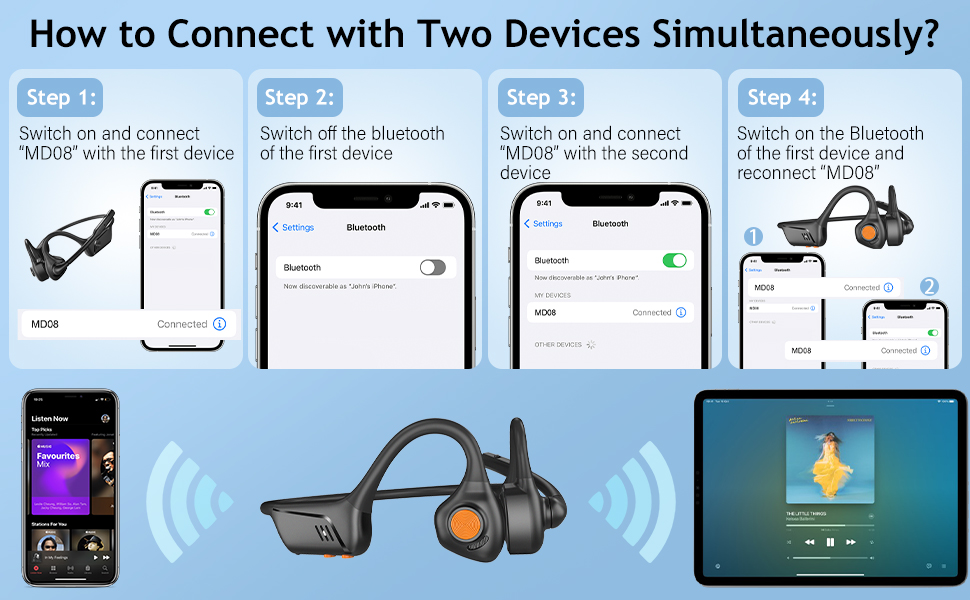
Image: Visual guide demonstrating the four steps to connect the MD08 headphones to two devices simultaneously, showing a phone and a tablet.
Operating Instructions
1. Wearing the Headphones
Position the headphones with the speakers resting gently in front of your ears, allowing the sound to be transmitted through air conduction. The flexible band should rest comfortably around the back of your head. The open-ear design ensures you remain aware of your surroundings.

Image: A man wearing the MD08 headphones, illustrating the open-ear design and comfortable fit, emphasizing its lightweight nature (40g) and stable design.
2. Basic Controls
The headphones feature a multi-functional button and volume controls for easy operation:
- Power On/Off: Press and hold the multi-function button.
- Play/Pause: Single press the multi-function button.
- Answer/End Call: Single press the multi-function button during an incoming call or active call.
- Reject Call: Press and hold the multi-function button during an incoming call.
- Volume Up/Down: Use the dedicated volume buttons.
- Next Track: Double press the multi-function button.
- Previous Track: Triple press the multi-function button.
- Activate Voice Assistant (Siri/Google Assistant): Press and hold the multi-function button for 2 seconds.

Image: A user demonstrating the controls of the MD08 headphones, with icons indicating functions like Play/Pause, Skip Track, Control Calls, Volume+/-, and Voice Assistant.
3. Microphone Mute Function
The MD08 headphones feature a dedicated mute button on the microphone boom. During a call, you can easily touch this button to mute or unmute your microphone, providing privacy when needed.

Image: A woman using the MD08 headphones, highlighting the microphone mute function and environmental noise reduction technology, showing 96% noise filtered during calls.
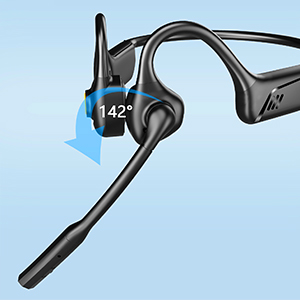
Image: Close-up of the MD08 microphone, showing its 142-degree rotation capability for optimal positioning.
Maintenance
- Cleaning: Use a soft, dry cloth to clean the headphones. Avoid using harsh chemicals or abrasive materials.
- Storage: Store the headphones in a cool, dry place away from direct sunlight and extreme temperatures.
- Charging: To prolong battery life, avoid fully discharging the battery frequently. Charge the headphones regularly, even if not in use for extended periods.
- Water Resistance: While designed for active use, avoid submerging the headphones in water.
Troubleshooting
| Problem | Solution |
|---|---|
| Headphones do not power on. | Ensure the headphones are fully charged. Connect to a power source and try again. |
| Cannot pair with a device. |
|
| No sound or low volume. |
|
| Microphone not working. |
|
| Intermittent connection. |
|
Specifications
| Feature | Detail |
|---|---|
| Model Name | MD08 |
| Connectivity Technology | Wireless (Bluetooth) |
| Bluetooth Version | 5.1 |
| Bluetooth Range | Up to 10 meters (33 feet) |
| Audio Driver Type | Air Conduction Driver |
| Battery Life (Music/Talk Time) | Up to 8 hours |
| Standby Time | Up to 36 hours |
| Charging Time | Approximately 2 hours |
| Charging Port | USB-C |
| Weight | 1.41 ounces (approx. 40g) |
| Ear Placement | Open Ear |
| Noise Control | Active Noise Cancellation (for microphone) |
| Special Features | Microphone Included, Multipoint Pairing, Rechargeable Battery, Volume Control, Mute Function |
Warranty and Support
MONODEAL products are designed and manufactured to high-quality standards. For warranty information, technical support, or customer service inquiries, please refer to the contact information provided with your purchase or visit the official MONODEAL website.
Manufacturer: MONODEAL
