
homeTro HM2
HOMETRO Foldable Walking Pad with Incline User Manual
Model: HM2 | Brand: homeTro
1. Safety Instructions
Please read all instructions carefully before using the HOMETRO Foldable Walking Pad. Retain this manual for future reference.
- Always place the treadmill on a flat, stable surface.
- Ensure adequate clear space around the treadmill (at least 2 meters behind and 0.6 meters on each side).
- Do not allow children or pets near the treadmill while it is in operation.
- The maximum user weight capacity for this treadmill is 265 pounds (120 kg). Do not exceed this limit.
- Always attach the safety key clip to your clothing before starting the treadmill. In case of an emergency, pulling the safety key will immediately stop the machine.
- Wear appropriate athletic footwear during use.
- Do not operate the treadmill if it has a damaged cord or plug, or if it is not working properly.
- Unplug the treadmill from the power outlet when not in use, before cleaning, or before performing any maintenance.
- Keep hands and feet clear of the running belt and moving parts.
2. Package Contents
Verify that all components are present in the package:
- User Manual (x1)
- Security Lock (Safety Key) (x1)
- Rotary Knob (x2)
- Power Cord (x1)
- Remote Control (x1)
- L-type Wrench (6#) (x1)
- Pad Holder (x1)

3. Setup
The HOMETRO Foldable Walking Pad is designed for minimal assembly, allowing for quick setup.
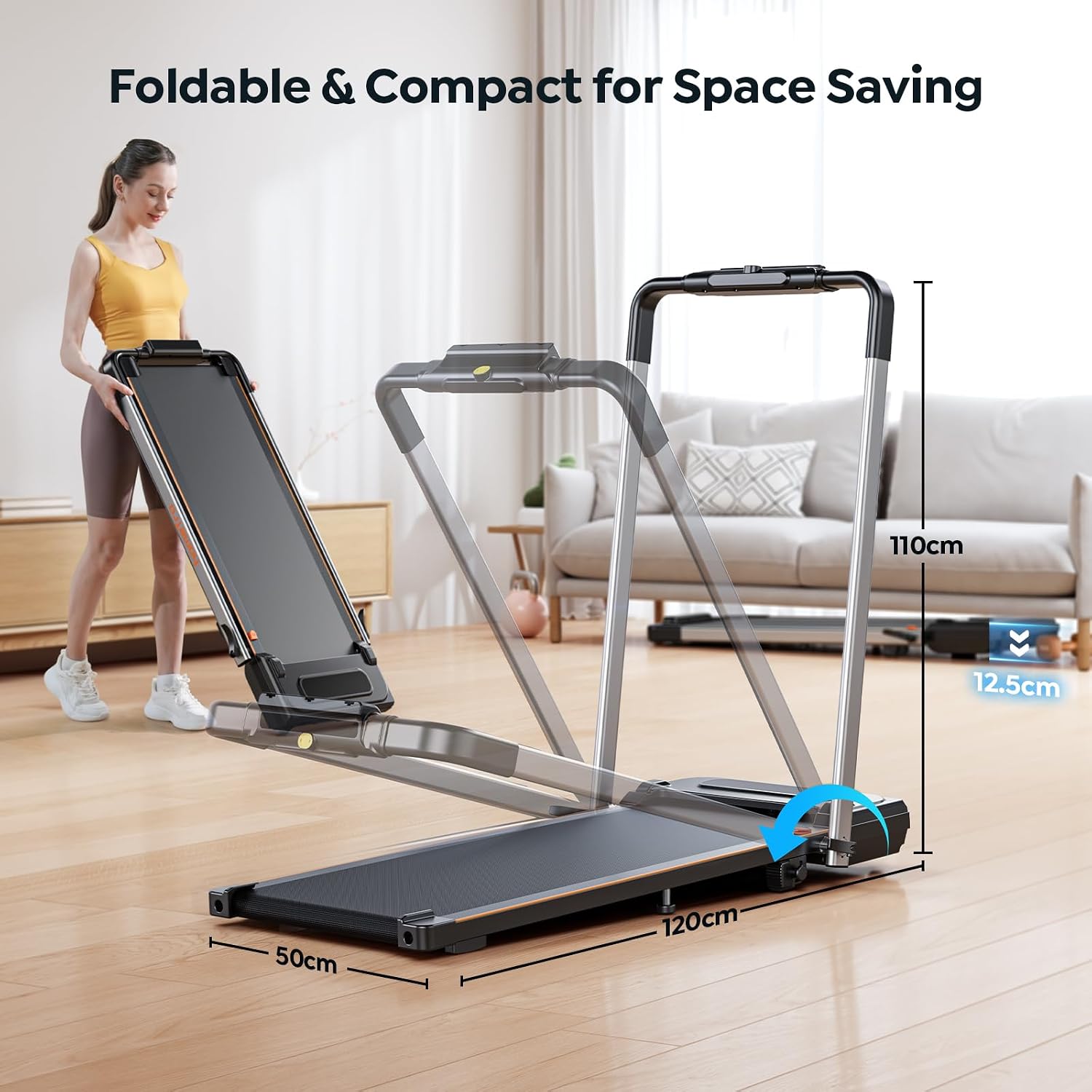
3.1 Unfolding the Treadmill
The treadmill comes pre-assembled. To prepare it for use:
- Carefully remove the treadmill from its packaging.
- Place the treadmill on a flat, stable surface.
- Lift the handrail upwards until it locks securely into place.
- Insert and tighten the two rotary knobs on the sides of the handrail to secure it.
- Adjust the supporting bolt in the middle of the treadmill to ensure it adheres firmly to the ground, providing a stable exercise experience.
3.2 Power Connection
Connect the power cord to the treadmill's power input and then plug it into a standard electrical outlet.
4. Operating Instructions
4.1 Power On/Off
Locate the power switch on the base of the treadmill and flip it to the 'ON' position. The LED display will illuminate.
4.2 Speed Adjustment
The treadmill offers a speed range of 0.6 to 7.5 mph (1.0 to 12.0 km/h).
- Remote Control: Use the '+' and '-' buttons on the remote control to increase or decrease the speed. The remote also features a dedicated pause button.
- Touch Control: The treadmill's console may feature touch-sensitive controls for speed adjustment.
- APP Control: Adjust speed via the connected Fitshow APP.


4.3 Incline Adjustment
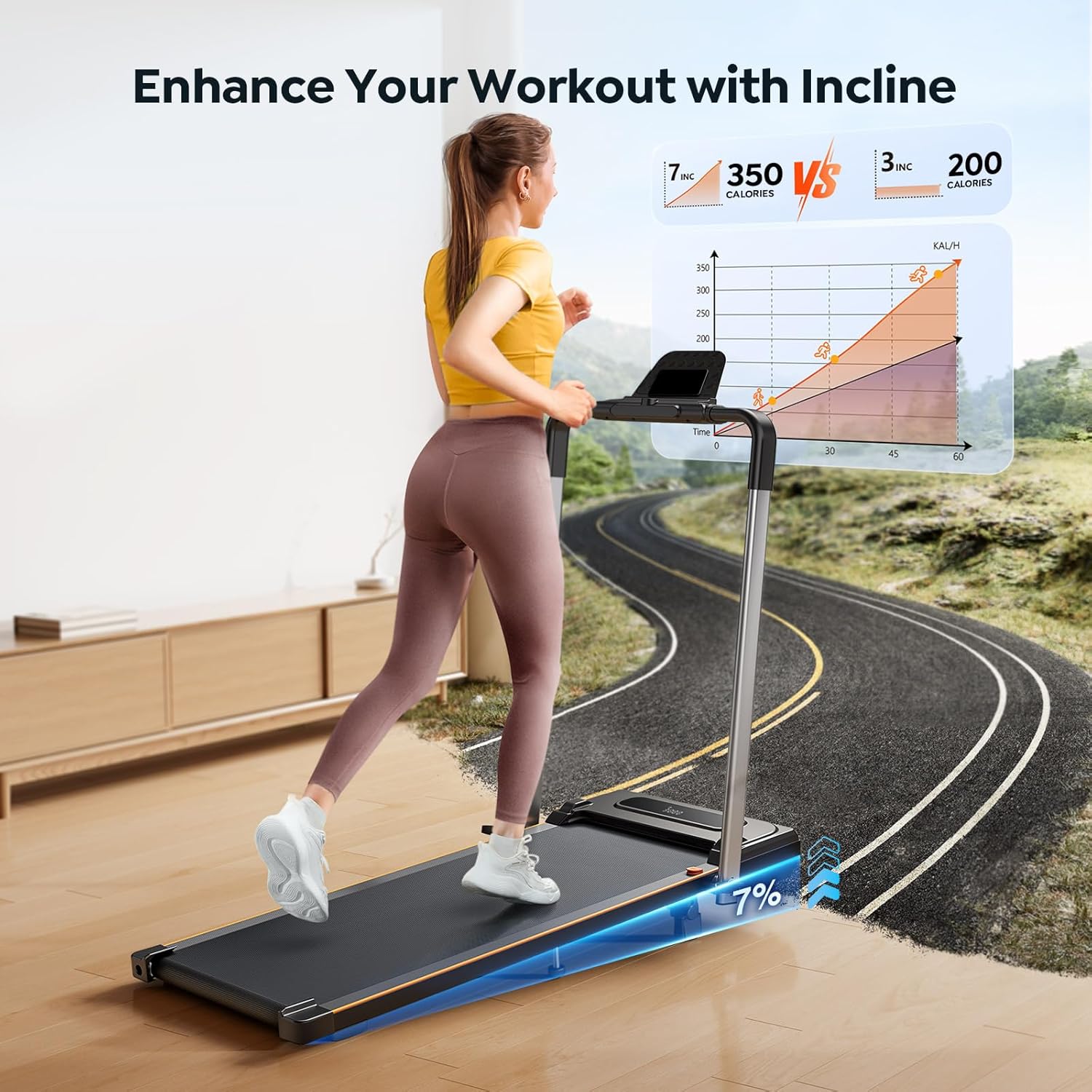
The treadmill features a fixed 7% incline to simulate climbing and enhance calorie burning. This incline is set manually by adjusting the supporting bolt in the middle of the treadmill base to ensure stability.

4.4 2-in-1 Functionality (Walking Pad & Treadmill)
The HOMETRO treadmill can be used in two modes:
- Walking Pad Mode: With the handrail folded down, the maximum speed is 5 mph. This mode is ideal for walking under a desk or in compact spaces.
- Treadmill Mode: With the handrail unfolded and secured, the maximum speed is 7.5 mph, suitable for jogging and running.

4.5 Smart APP Integration (Fitshow)
Connect your treadmill to the Fitshow APP via Bluetooth to track your exercise data, set goals, and share progress. The integrated device holder allows you to place your phone or tablet for entertainment during workouts.

4.6 Pause Function
The remote control includes a pause button. Pressing this button will temporarily stop the running belt while retaining your current workout data, allowing you to resume without losing progress.

4.7 LED Display
The integrated LED display provides real-time feedback on your workout metrics, including:
- Distance
- Speed
- Time
- Calories Burned

5. Maintenance
Regular maintenance ensures the longevity and optimal performance of your treadmill.
5.1 Lubrication
The treadmill features a unique lubricating hole for easy maintenance. It is recommended to lubricate the running belt with silicone-based treadmill lubricant periodically, typically every 3-6 months depending on usage. Refer to the specific instructions provided with your lubricant for exact application details.
5.2 Belt Centering and Tension
If the running belt begins to drift to one side or feels loose, it may need adjustment. Use the provided L-type wrench to adjust the rear rollers. Turn the bolt clockwise to move the belt to the right, counter-clockwise to move it to the left. Adjust tension by turning both bolts equally clockwise to tighten or counter-clockwise to loosen. Make small adjustments (quarter turns) and test the belt after each adjustment.
5.3 Cleaning
Wipe down the treadmill with a damp cloth after each use to remove sweat and dust. Do not use abrasive cleaners or solvents. Ensure the treadmill is unplugged before cleaning.
6. Troubleshooting
This section addresses common issues you might encounter with your HOMETRO Walking Pad.
| Problem | Possible Cause | Solution |
|---|---|---|
| Treadmill does not power on. | Power cord not plugged in; power switch off; safety key not in place. | Ensure power cord is securely plugged into both the treadmill and the outlet. Turn the power switch ON. Ensure the safety key is correctly inserted. |
| Running belt slips or hesitates. | Belt tension too loose; insufficient lubrication. | Adjust belt tension (refer to Section 5.2). Apply silicone lubricant to the running belt (refer to Section 5.1). |
| Running belt drifts to one side. | Belt not centered. | Adjust belt centering (refer to Section 5.2). |
| Unusual noise or burning smell from motor. | Motor overheating; internal component issue. | Immediately stop using the treadmill and unplug it. Allow it to cool down. If the issue persists, contact customer support. Do not attempt to repair yourself. |
| Remote control not responding. | Batteries low or dead; remote out of range; interference. | Replace remote control batteries. Ensure you are within range of the treadmill. Remove any potential sources of interference. |
7. Specifications
| Feature | Specification |
|---|---|
| Model Number | HM2 |
| Product Dimensions | 124D x 62W x 10H Centimetres (48.8 x 24.4 x 3.9 inches) |
| Item Weight | 22.68 kg (49.9 lbs) |
| Maximum Weight Capacity | 265 Pounds (120 kg) |
| Colour | Black and Silver |
| Frame Material | Alloy Steel |
| Motor Horsepower | 2.5 Horsepower |
| Speed Range | 0.6 - 7.5 miles per hour |
| Incline | 7% Manual Incline |
| Display Type | LED |
| Meter Displays | Calories Burned, Distance, Speed, Time |
| Special Features | Compact Design, Foldable, Manual Incline, Touch Screen, Wheeled |
| Power Source | Corded Electric |


8. Warranty and Support
For reliable and professional service, please contact homeTro customer support. To do so:
- Login to your Amazon account.
- Navigate to "Your orders".
- Find the order ID for your HOMETRO Walking Pad.
- Click on "Contact Seller".
Please have your purchase details and model number (HM2) ready when contacting support.
Ask a question about this manual
Ask about setup, troubleshooting, compatibility, parts, safety, or missing instructions. Manuals+ will review the question and use this page’s manual context to help answer it.