
Introduction
Thank you for choosing the Lamomo Motion Sensor Outdoor Light. This advanced light fixture is designed to enhance the safety and aesthetics of your outdoor spaces, including patios, front doors, and garages. Featuring upgraded dusk to dawn and motion sensor technology, it offers three versatile lighting modes to suit your needs. Constructed from 100% anti-rust aluminum and tempered glass, this light is built for durability and weather resistance, ensuring reliable performance in various conditions. This manual provides comprehensive instructions for installation, operation, and maintenance to help you get the most out of your new outdoor light.
Safety Information
- Always disconnect power at the circuit breaker before installation, maintenance, or changing bulbs.
- Ensure all wiring connections are secure and comply with local electrical codes. If unsure, consult a qualified electrician.
- Do not exceed the maximum wattage specified for the bulb (60W).
- Use only E26 base bulbs. Bulbs are not included with the fixture.
- This product is designed for outdoor use only.
- Avoid looking directly into the light source when illuminated to prevent eye strain.
Package Contents
- Lamomo Motion Sensor Outdoor Light Fixture
- User Manual
- Mounting Hardware (screws, wire nuts)
Specifications
| Feature | Specification |
|---|---|
| Brand | Lamomo |
| Model Number | LMM-0024-WU-SEUS |
| Color | Black |
| Material | Aluminum, Glass |
| Style | Retro/Vintage/Classic/Traditional |
| Light Fixture Form | Sconce |
| Product Dimensions | 5"L x 4"W x 2"H |
| Indoor/Outdoor Usage | Outdoor |
| Power Source | AC |
| Installation Type | Wall Mount |
| Special Features | Waterproof, Anti-Rust, Motion Sensor |
| Control Method | Touch |
| Light Source Type | Incandescent, LED |
| Bulb Base | E26 (Bulb NOT Included) |
| Wattage | 60 watts (Max) |
| Voltage | 120 Volts (AC) |
| Water Resistance Level | Waterproof |
| Motion Detection Range | 0 to 30 feet |
| Motion Detection Angle | 180 degrees |
Setup & Installation
Tools Required
- Screwdriver (Phillips and Flathead)
- Wire Strippers
- Pliers
- Electrical Tape
- Ladder (if necessary)
- Safety Glasses
Installation Steps
- Prepare for Installation: Turn off power at the circuit breaker to the light fixture location. Ensure the power is completely off before proceeding.
- Remove Old Fixture (if applicable): Carefully remove your existing light fixture, disconnecting all wires.
- Install Mounting Bracket: Attach the new mounting bracket to your junction box using the provided screws. Ensure it is securely fastened.
- Wire Connections: Connect the wires from the new fixture to your household wiring. Typically, connect the black wire (live) to the black wire, the white wire (neutral) to the white wire, and the ground wire to the ground wire using wire nuts. Ensure all connections are tight and secure.
- Mount the Fixture: Carefully align the fixture with the mounting bracket and secure it with the provided screws or nuts.
- Install Bulb: Insert an E26 base bulb (max 60W, not included) into the socket.
- Seal the Bottom: The bottom of the fixture is completely sealed to prevent bugs from entering.
- Restore Power: Turn the power back on at the circuit breaker.

Image: Lamomo Motion Sensor Outdoor Light Fixture, showcasing its classic design and integrated motion sensor.
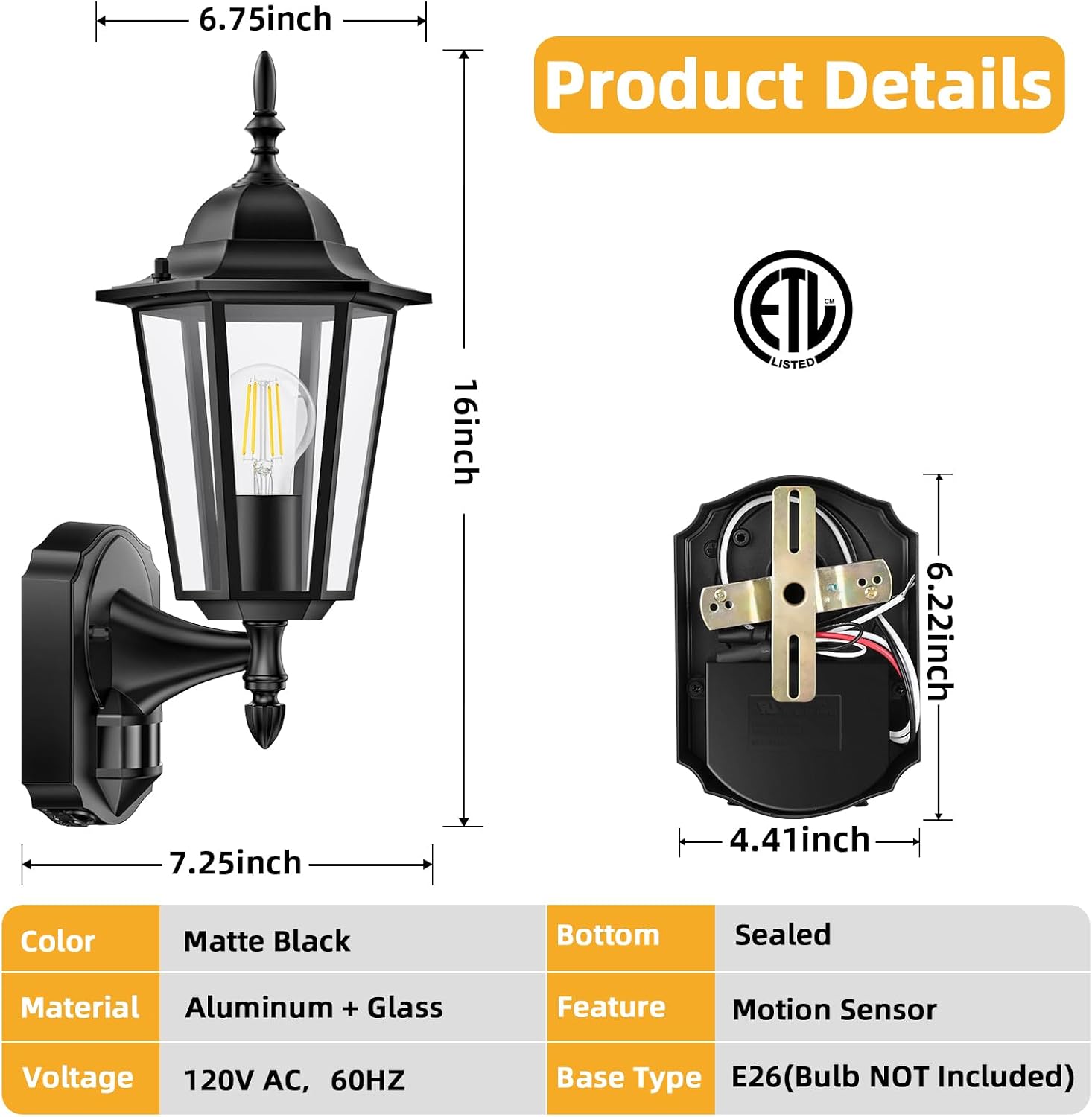
Image: Detailed product dimensions and material specifications, including matte black aluminum and glass construction.
Operating Modes
Your Lamomo Motion Sensor Outdoor Light offers three distinct lighting modes to provide optimal illumination and energy efficiency.
1. TEST Mode
This mode allows you to adjust the sensitivity of the motion detector. The light will turn on when motion is detected, regardless of ambient light conditions (day or night), and will automatically turn off after approximately 5 seconds when motion stops. This is ideal for testing the sensor's range and sensitivity during setup.
2. AUTO Mode
In AUTO Mode, the motion detector automatically turns the light on after sensing movement in its coverage area at dusk. The light stays on as long as motion is detected. When motion stops, the light will remain illuminated for a predetermined time (adjustable from 5 seconds to 3 minutes) before turning off automatically. This mode is perfect for energy-saving security lighting.
3. PC Mode (Dusk to Dawn)
PC Mode activates the light at dusk and turns it off at dawn automatically, regardless of the presence of motion. This mode provides continuous illumination throughout the night, making it suitable for constant ambient lighting.

Image: Visual representation of the three lighting modes: PC Mode (Dusk to Dawn), AUTO Mode (Motion Sensor), and TEST Mode (Motion Sensor for adjustment).

Image: Illustration of the advanced PIR motion sensor with a 30ft detection distance and 180-degree angle, showing its effective coverage area.
Video: Demonstrates the motion sensor functionality of the outdoor lights, showing how they illuminate when motion is detected in AUTO mode.
Maintenance
- Cleaning: To clean the fixture, wipe it with a soft, damp cloth. Do not use abrasive cleaners or solvents, as they may damage the finish or glass.
- Bulb Replacement: To replace the bulb, ensure power is off. Unscrew the fixing nuts at the bottom to access the bulb compartment. Replace the E26 bulb and re-tighten the nuts.
- Weather Resistance: The fixture is made of 100% heavy-duty die-cast aluminum alloy and solid tempered clear glass, designed to withstand various weather conditions including rain, snow, and extreme temperatures. Regular inspection for any damage is recommended.
- Anti-Rust: The aluminum construction provides excellent anti-rust properties, ensuring longevity and maintaining its aesthetic appeal.

Image: Highlighting the weather resistance of the light fixture, showing it enduring snowy conditions.
Troubleshooting
| Problem | Possible Cause | Solution |
|---|---|---|
| Light does not turn on. | No power, faulty bulb, incorrect wiring. | Check circuit breaker, replace bulb, verify wiring connections. |
| Motion sensor not detecting. | Sensor sensitivity too low, obstruction, incorrect mode. | Adjust sensitivity in TEST mode, clear obstructions, ensure AUTO mode is selected. |
| Light stays on continuously. | PC mode selected, continuous motion, sensor malfunction. | Switch to AUTO mode, check for constant motion in detection area, contact support if sensor is faulty. |
| Light flickers. | Loose wiring, incompatible bulb, power fluctuations. | Check wiring, try a different E26 LED bulb, consult electrician. |
Warranty & Support
Lamomo products are manufactured with high-quality materials and craftsmanship. This product comes with a standard manufacturer's warranty covering defects in materials and workmanship. For specific warranty details, claims, or technical support, please refer to the warranty card included in your package or contact Lamomo customer service through the retailer's platform where you purchased the product. Please have your model number (LMM-0024-WU-SEUS) and purchase date ready when contacting support.