
1. Important Safety Instructions
Please read all safety instructions carefully before operating the Omisoon X15 Car Refrigerator. Failure to follow these instructions may result in electric shock, fire, or serious injury.
- Electrical Safety: Ensure the power supply voltage matches the refrigerator's requirements (DC 12/24V or AC 100-240V). Do not use damaged power cords or plugs. Avoid operating the refrigerator in wet conditions.
- Ventilation: Always ensure adequate ventilation around the refrigerator. Do not block the ventilation openings. Insufficient airflow can lead to overheating and reduced cooling efficiency.
- Placement: Place the refrigerator on a stable, level surface. Avoid placing it in direct sunlight or near heat sources. The robust design allows for tilts up to 45 degrees, but prolonged operation at extreme angles is not recommended.
- Cleaning: Disconnect the power before cleaning. Use a soft, damp cloth for cleaning. Do not use abrasive cleaners or immerse the unit in water.
- Children: Keep children away from the refrigerator, especially when it is operating.
- Maintenance: Do not attempt to repair or modify the refrigerator yourself. Contact qualified service personnel for any repairs.
2. Product Overview
The Omisoon X15 Car Refrigerator is a portable cooling and freezing solution designed for travel, camping, and other outdoor activities. It features a 15.6-liter capacity, fast cooling capabilities, and quiet operation.
Key Features:
- Capacity: 15.6 Liters, capable of holding approximately 19 standard 330ml cans.
- Cooling Performance: Rapid cooling from 25°C to 0°C in approximately 30 minutes. Adjustable temperature range from -20°C to 20°C.
- Quiet Operation: Operates at a noise level below 45 dB, ensuring a comfortable environment.
- Durable Design: Robust construction resistant to shocks and tilts up to 45 degrees, suitable for various travel conditions.
- Dual Power Supply: Compatible with DC 12/24V for vehicle use and AC 100-240V for home or outdoor power stations.
Included Components:
- Omisoon X15 Car Refrigerator
- DC Power Cable (12/24V) for car socket
- AC Power Cable (100-240V)
- Multi-language Operating Instructions
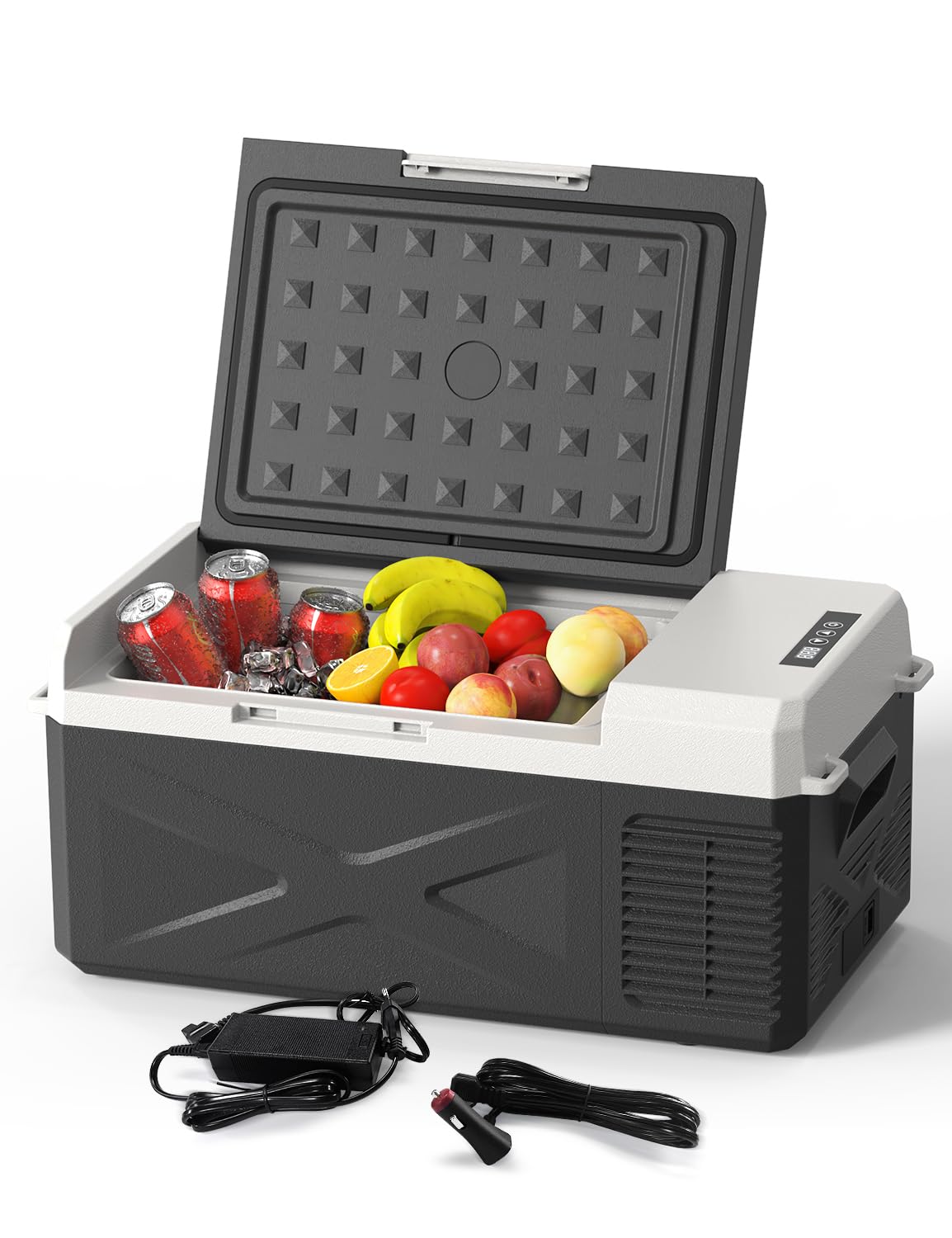
Figure 1: Omisoon X15 Car Refrigerator
3. Setup
3.1 Unpacking
Carefully remove the refrigerator from its packaging. Inspect the unit for any signs of damage during transit. Retain the packaging for future storage or transport.
3.2 Placement
Place the refrigerator in a location that allows for proper ventilation. Ensure there is at least 10 cm (4 inches) of space around all sides for air circulation. Avoid direct sunlight and heat sources. The unit is designed to operate in various environments, including vehicles, homes, and outdoor settings.

Figure 2: Multi-Scene Power Connections
3.3 Power Connection
The Omisoon X15 supports both DC and AC power inputs:
- DC Power (12/24V): Use the provided DC power cable to connect the refrigerator to your vehicle's cigarette lighter socket. Ensure the vehicle's engine is running or the battery has sufficient charge to prevent battery drain.
- AC Power (100-240V): Use the provided AC power cable to connect the refrigerator to a standard wall outlet or a portable power station.
Once connected, the LED display on the control panel will illuminate.
4. Operating Instructions
4.1 Control Panel Overview

Figure 3: Smart Touch Screen Control Panel
- LED Display: Shows the current internal temperature and set temperature.
- On/Off Button: Press to power the unit on or off.
- Temperature Control Buttons (Up/Down Arrows): Use these buttons to adjust the desired temperature.
4.2 Setting Temperature and Modes
After powering on the unit, the LED display will show the current internal temperature. Use the Up and Down arrow buttons to set your desired temperature. The temperature range is from -20°C to 20°C.
The refrigerator features two operating modes:
- ECO Mode (38W): This mode is designed for energy saving, ideal for prolonged use when power consumption is a concern.
- HH Mode (50W): This mode provides fast cooling, suitable for quickly reaching the desired temperature.
Switch between ECO and HH modes by pressing the appropriate button on the control panel (refer to Figure 3 for button location, typically indicated by a mode icon or text).

Figure 4: Cooling Performance Chart
4.3 Temperature Recommendations
To optimize freshness and cooling efficiency, consider the following temperature guidelines for different items:
- Fruits and Vegetables: 5-8°C
- Drinks: 5°C
- Meat: -18°C
- Ice Cream: -10°C

Figure 5: Recommended Food Temperatures

Figure 6: Storing Beverages

Figure 7: Storing Perishable Goods
5. Maintenance
5.1 Cleaning
Regular cleaning helps maintain the refrigerator's efficiency and hygiene.
- Interior: Disconnect power. Use a soft cloth dampened with mild detergent and warm water to wipe the interior surfaces. Rinse with a clean, damp cloth and dry thoroughly. Do not use abrasive cleaners or sharp objects.
- Exterior: Wipe the exterior with a soft, damp cloth. Avoid getting water into the control panel or ventilation openings.
- Ventilation Grilles: Periodically clean the ventilation grilles with a soft brush or vacuum cleaner to remove dust and debris, ensuring optimal airflow.
5.2 Defrosting
The Omisoon X15 features a manual defrosting system. Frost buildup can reduce cooling efficiency. To defrost:
- Disconnect the refrigerator from the power supply.
- Remove all contents.
- Leave the lid open to allow the frost to melt naturally. Place a towel inside to absorb water.
- Once defrosted, wipe the interior dry before reconnecting power.
5.3 Storage
When storing the refrigerator for an extended period, ensure it is clean and dry. Leave the lid slightly ajar to prevent odors and mold growth. Store in a dry, well-ventilated area.
6. Troubleshooting
If you encounter issues with your Omisoon X15 Car Refrigerator, refer to the following common problems and solutions:
| Problem | Possible Cause | Solution |
|---|---|---|
| Refrigerator does not turn on. | No power supply; Damaged power cord/adapter; Blown fuse. | Check power connection. Ensure the power outlet/car socket is functional. Inspect power cords for damage. Replace blown fuses (both internal and vehicle fuses if applicable). |
| Refrigerator is not cooling effectively. | Temperature setting too high; Blocked ventilation; Excessive frost buildup; Ambient temperature too high; Overloaded with warm items. | Lower the temperature setting. Ensure ventilation grilles are clear. Defrost the unit if necessary. Move to a cooler location. Allow warm items to cool before placing them inside. |
| Unusual noise during operation. | Unit not level; Fan obstruction; Compressor issue. | Ensure the refrigerator is on a stable, level surface. Check for any objects obstructing the fan. If the noise persists or is unusual, contact customer support. |
| LED display shows an error code. | Internal fault. | Note the error code and refer to the full manual (if available) or contact customer support for specific guidance. |
If the problem persists after attempting these solutions, please contact customer support for further assistance.
7. Specifications
Technical specifications for the Omisoon X15 Car Refrigerator:
| Feature | Specification |
|---|---|
| Model | X15 |
| Capacity | 15.6 Liters |
| Dimensions (L x W x H) | 60.2 x 32 x 26.9 cm |
| Weight | 8.5 kg |
| Voltage | DC 12V/24V, AC 100-240V |
| Rated Power | 50W (HH Mode), 38W (ECO Mode) |
| Temperature Range | -20°C to 20°C |
| Noise Level | Below 45 dB |
| Annual Energy Consumption | 44 kWh/year |
| Defrost System | Manual |
| Door Orientation | Reversible |
| Special Features | Fast and quiet cooling, Robust construction, Tilts up to 45 degrees |

Figure 8: Refrigerator Dimensions and Capacity

Figure 9: Low Noise Operation (Below 45 dB)
8. Warranty and Support
8.1 Warranty Information
The Omisoon X15 Car Refrigerator comes with a standard manufacturer's warranty. Please refer to the warranty card included in your packaging for specific terms, conditions, and duration. Keep your proof of purchase for warranty claims.
8.2 Customer Support
For technical assistance, troubleshooting beyond this manual, or warranty inquiries, please contact Omisoon customer support. Contact details can typically be found on the product packaging, the official Omisoon website, or through your retailer.