
1. Introduction
Welcome to your new ANCTOR Twin XL Bed Frame. This manual provides detailed instructions for assembly, operation, maintenance, and troubleshooting to ensure a safe and enjoyable experience with your new bed frame. This bed frame features a sturdy metal construction, a convenient storage headboard with integrated power outlets, and a design that eliminates the need for a box spring.
2. Safety Information
- Weight Limit: Do not exceed a total weight of 800 pounds on the bed frame. Exceeding this limit may cause structural damage or injury.
- Assembly Caution: Be cautious of sharp edges during assembly and handling. Wear gloves if necessary.
- Secure Fasteners: Ensure all screws and fasteners are securely tightened before using the bed frame. Periodically check and retighten as needed.
- Proper Placement: Place the bed frame on a level surface to ensure stability.
3. Package Contents
Please verify that all components listed below are present and undamaged before beginning assembly. If any parts are missing or damaged, please contact customer service.
- Metal Bed Frame Components (side rails, crossbars, support legs)
- Headboard with Integrated Shelf and Power Outlets
- Metal Slats for Mattress Support
- Hardware Kit (screws, bolts, washers, Allen wrench)
- Power Cord for Headboard Outlets
- Installation Manual
4. Setup and Assembly
Follow these steps carefully for a smooth assembly process. It is recommended to have two people for assembly.
- Unpack Components: Carefully remove all parts from the packaging. Lay them out on a clean, soft surface to prevent scratches. Verify all parts against the included parts list.
- Assemble the Main Frame: Connect the side rails and crossbars using the provided hardware. Ensure all connections are secure but do not fully tighten screws until the frame is fully assembled.
- Attach Support Legs: Install the central support legs to the frame. The frame features nine thick legs for enhanced stability.
- Install Slats: Place the metal slats across the frame. The slats are designed to provide sturdy support and eliminate the need for a box spring.
- Attach Headboard: Secure the headboard to the main frame using the designated screws.
- Connect Power Cord: Plug the power cord from the headboard into a functional wall outlet to activate the integrated charging station.
- Final Tightening: Once the entire frame is assembled, go back and fully tighten all screws and bolts to ensure maximum stability and a noise-free structure.
Assembly Tips
- Use the provided Allen wrench for tightening screws. A power tool with the correct bit can speed up the process, but exercise caution to avoid overtightening, which can strip screws or damage components.
- Ensure all parts are correctly oriented as shown in the diagrams within your included installation manual.
Visual Guide: Assembly

Figure 1: Overall dimensions and key components of the bed frame.

Figure 2: Detail of the easy-to-install connection points for the metal frame.
Video 1: Assembly demonstration for the ANCTOR Twin Bed Frame with Storage Headboard & Outlets.
Video 2: Easy assembly guide for LIKIMIO Twin Bed Frames, demonstrating the straightforward setup process.
5. Operating Instructions
Storage Headboard with Outlets
The integrated headboard features a convenient shelf, allowing you to easily store and access items like glasses, phones, and watches right by your side. It includes built-in 110V/12A AC outlets and 5V/2A USB ports for charging electronic devices overnight. Simply plug your devices into the available ports.

Figure 3: Storage headboard with integrated charging station.

Figure 4: Detailed view of the USB ports and AC outlets on the headboard.
Under-bed Storage
The bed frame offers 10.6 inches of clearance from the ground, providing ample space for under-bed storage. This allows you to keep your bedroom tidy and organized by storing boxes, bins, or other items beneath the bed.
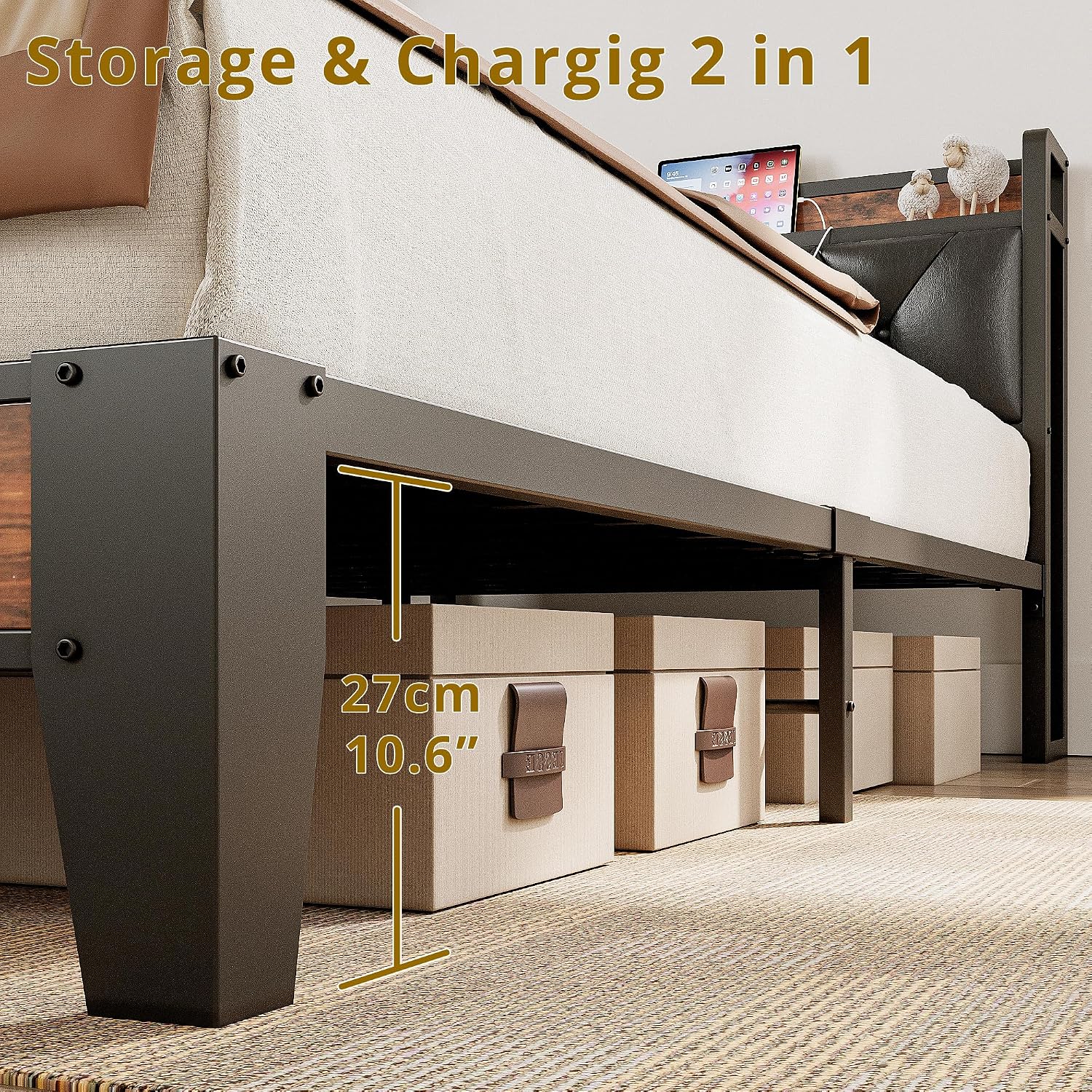
Figure 5: Under-bed storage space with 10.6 inches of clearance.
6. Maintenance
- Cleaning: Wipe metal and engineered wood surfaces with a soft, damp cloth. Avoid using abrasive cleaners or harsh chemicals that could damage the finish.
- Fastener Check: Periodically (e.g., every 3-6 months) check all screws, bolts, and connections to ensure they remain tight. Retighten any loose fasteners to maintain the bed frame's stability and prevent noise.
- Mattress Care: Rotate your mattress regularly according to the mattress manufacturer's recommendations to ensure even wear and prolong its lifespan.
- Power Outlets: Ensure the power outlets and USB ports are kept clean and free from dust or debris. Do not overload the outlets.
7. Troubleshooting
- Squeaking or Noise: If the bed frame makes noise, check all assembly points and ensure every screw and bolt is fully tightened. Loose connections are the most common cause of squeaking.
- Mattress Sliding: The bed frame is designed with grippy strips on the slats to help prevent mattress movement. If your mattress still slides, ensure it is properly centered on the frame.
- Power Outlets Not Working: Verify that the headboard's power cord is securely plugged into both the headboard's input and a functional wall outlet. Check the wall outlet with another device to confirm it has power.
- Difficulty Assembling: Refer to the detailed diagrams and instructions in your included installation manual. Ensure all parts are correctly identified and oriented before attempting to connect them.
8. Specifications
| Feature | Detail |
|---|---|
| Size | Twin XL |
| Product Dimensions | 86.6"L x 40.7"W x 40.6"H |
| Special Features | Fade Resistant, Squeak Resistant, USB Port |
| Color | Rustic Brown and Black |
| Finish Type | Laminated |
| Included Components | Bookcase, Headboard, Installation Manual, Slat |
| Compatible Mattress Size | Twin XL, 80x38 inch |
| Brand | ANCTOR |
| Furniture Finish | Black |
| Assembly Required | Yes |
| Ground To Item Distance | 10.6 Inches |
| Manufacturer | ANCTOR |
| Headboard Material | Polyurethane |
| Item Weight | 48 pounds |
| Material | Engineered Wood, Metal, Polyurethane |
| Style | Industrial |
9. Warranty and Support
For specific warranty information regarding your ANCTOR Twin XL Bed Frame, please refer to the documentation included with your purchase or visit the official ANCTOR website. For technical support, missing parts, or any other inquiries, please contact ANCTOR customer service directly. Contact details can typically be found on the product packaging or the brand's official website.