
BAOFENG UV-25
Contents
BAOFENG UV-25 Walkie Talkie User Manual
Model: UV-25
Introduction
The BAOFENG UV-25 is a powerful tri-band walkie talkie designed for amateur radio enthusiasts, offering robust communication capabilities and user-friendly features. This manual provides essential information for setting up, operating, and maintaining your UV-25 radio to ensure optimal performance and longevity.
Key features include tri-band frequency support, wireless frequency copy function, convenient USB-C charging, and both PC and manual programming options. It comes equipped with a high-gain goose tube antenna for extended range and a high-capacity 5200mAh battery for prolonged use.
What's in the Box
Upon unpacking your BAOFENG UV-25, please verify that all components listed below are present:
- 1 x Portable Radio (BAOFENG UV-25)
- 1 x Original Goose Tube Antenna
- 1 x Type-C Charger Cable
- 1 x US Charger Adapter
- 1 x Li-ion Battery (5200mAh capacity)
- 1 x Belt Clip
- 1 x Sling
- 1 x User’s Manual (this document)

Image: The complete package contents of the BAOFENG UV-25 walkie talkie, showing the radio unit, goose tube antenna, Li-ion battery, USB-C charging cable, US charger adapter, belt clip, and hand sling.
Setup
1. Battery Installation
- Ensure the radio is powered off.
- Align the battery pack with the grooves on the back of the radio.
- Slide the battery upwards until it clicks securely into place. To remove, press the release latch (if present) and slide the battery downwards.
2. Antenna Attachment
The BAOFENG UV-25 uses an SMA-Female antenna connector. The included goose tube antenna provides enhanced signal gain and flexibility.
- Screw the goose tube antenna clockwise onto the antenna connector at the top of the radio until it is finger-tight. Do not overtighten.
- The flexible design of the goose tube antenna allows for bending without damage, optimizing signal reception and transmission in various orientations.

Image: Illustration of the flexible goose tube antenna and its SMA-Female connector, highlighting its design for improved signal and durability.
3. Charging the Battery
The UV-25 features convenient USB-C charging, allowing you to charge it using various power sources like a car charger, power bank, or laptop.
- Connect the USB-C cable to the charging port on the side of the radio.
- Connect the other end of the USB-C cable to the US charger adapter, a power bank, or a compatible USB port on a computer.
- The charging indicator light will illuminate red during charging and turn green when the battery is fully charged.
- The radio's battery capacity is 5200mAh, providing extended operational time.

Image: Visual guide to USB-C charging for the BAOFENG UV-25, showing the red indicator for charging and green for fully charged, along with examples of power sources like wall adapters, laptops, and power banks.
Operating Instructions
1. Power On/Off
To power on the radio, rotate the volume knob clockwise until you hear a click. To power off, rotate it counter-clockwise until it clicks off.
2. Frequency Bands and Display
The UV-25 supports multiple frequency bands for reception and transmission, displayed on its 1.77-inch color large screen.
- FM: 65-108MHz (Receive only)
- AM: 108-136MHz (Receive only)
- VHF: 136-174MHz (Receive & Transmit)
- UHF: 400-520MHz (Receive & Transmit)
- Additional Receive Bands: 200-260MHz, 350-390MHz, 480-520MHz
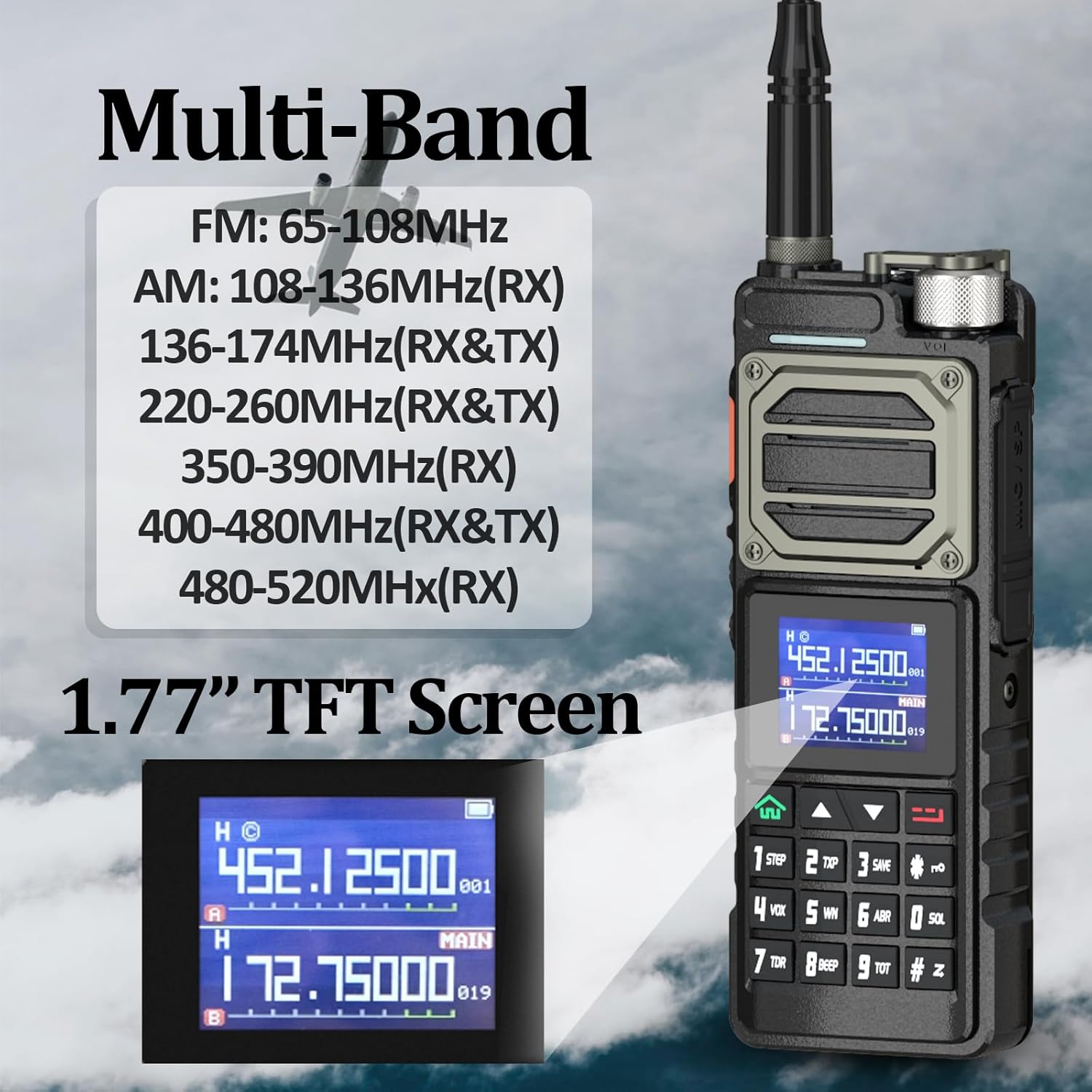
Image: Display of the multi-band frequency capabilities of the BAOFENG UV-25, including FM, AM, VHF, and UHF ranges, along with a clear view of the 1.77-inch TFT color screen.
3. Wireless Frequency Copy
The UV-25 features a convenient wireless frequency copy function, allowing for quick and efficient duplication of frequencies from another radio.
- Refer to the radio's on-screen menu or the full user manual for detailed steps on initiating and completing a wireless frequency copy.
- This feature streamlines the process of setting up communication with other compatible devices.
4. Programming the Radio
The BAOFENG UV-25 offers flexibility in programming, allowing both computer-based software programming and direct keypad programming.
- Keypad Programming: Most settings can be adjusted directly via the radio's keypad menu. This includes adding/deleting memory channels, managing scanning lists, and adjusting VOX, squelch, and power save levels.
- PC Software Programming: For advanced configuration and bulk channel management, the radio can be programmed using compatible computer software (e.g., CHIRP) and a programming cable (sold separately).
- The radio also supports wireless programming, which works with a dedicated wireless programmer (not included with the standard kit).

Image: Screenshot of a wireless programming application interface, demonstrating how the BAOFENG UV-25 can be configured wirelessly with a compatible programmer.
5. NOAA Weather Alarm
The UV-25 can receive NOAA weather alerts, providing timely notifications for extreme weather events.
- To activate and configure NOAA weather alerts, navigate to the relevant settings in the radio's menu.
- This feature is crucial for outdoor activities and emergency preparedness.

Image: Visual representation of the NOAA Weather Alarm feature on the BAOFENG UV-25, showing the radio emitting an alert signal with various weather conditions depicted in the background.
Maintenance
1. Battery Care
- Always use the provided charger and cable.
- Avoid overcharging or completely draining the battery.
- Store the battery in a cool, dry place when not in use for extended periods.
- The battery label may indicate 2800mAh, but the actual capacity is 5200mAh.
2. Cleaning
- Wipe the radio's surface with a soft, damp cloth.
- Do not use harsh chemicals or abrasive cleaners.
- Ensure the radio is dry before use or charging.
3. Storage
- Store the radio in a dry, dust-free environment.
- Avoid extreme temperatures and direct sunlight.
- If storing for a long time, remove the battery.
Troubleshooting
| Problem | Possible Cause / Solution |
|---|---|
| Radio does not power on. | Battery is not installed correctly or is depleted. Ensure battery is fully charged and properly seated. |
| Cannot transmit or receive. |
|
| PTT button activates unintentionally. | The PTT button is large and sensitive. Exercise caution when handling the radio to avoid accidental keying. Adjust grip to prevent pressure on the PTT button. |
| Certain frequencies are inaccessible or blocked. | The radio has defined lower and higher frequency ranges for transmission and reception. Some frequencies may be restricted by design or regulatory requirements. Refer to the specifications for supported frequency ranges. |
| Difficulty navigating menus. | Familiarize yourself with the menu structure by referring to this manual and practicing navigation. Many settings can be programmed via PC software for easier management. |
Specifications
| Feature | Detail |
|---|---|
| Model Number | UV-25 |
| Output Power | 9-10W |
| Battery Capacity | 5200mAh (Li-ion) |
| Water Resistance | Not Water Resistant |
| Material | Plastic |
| Storage Channels | 999 channels |
| Talking Range (Max) | 10km |
| Dimensions | 180mm x 70mm x 45mm (approx. 1.77"D x 2.76"W x 1.77"H) |
| Display | 1.77-inch Color Large Screen Display |
| Frequency Range | FM, VHF: 144-148MHz, UHF: 420-450MHz (Tri-Band) (Also supports RX: 65-108MHz FM, 108-136MHz AM, 200-260MHz, 350-390MHz, 480-520MHz) |
| Tuner Technology | UHF/VHF |
| Voltage | 3.7 Volts (DC) |
| Antenna Connector | SMA-Female |
| Headset/Programming Cable Port | K-port (2 Pin) |
Warranty and Support
The BAOFENG UV-25 comes with a 1-year warranty. This warranty is provided exclusively through "Shiqun Electronics Co., Ltd".
For any issues with compatible models or product support, please contact "Shiqun Electronics Co., Ltd" directly. Refer to your purchase documentation for specific contact information.
It is recommended to retain your proof of purchase for warranty claims.
Important Safety Information
- Do not disassemble or modify the radio or battery.
- Do not expose the radio to extreme temperatures, direct sunlight, or moisture.
- Use only approved accessories and chargers.
- Keep the radio away from medical devices that may be affected by radio frequency energy.
- Observe all local regulations regarding radio usage.
- Do not short-circuit the battery terminals.
- Dispose of batteries and electronic waste responsibly according to local regulations.
Documents and downloads
Ask a question about this manual
Ask about setup, troubleshooting, compatibility, parts, safety, or missing instructions. Manuals+ will review the question and use this page’s manual context to help answer it.