
1. Introduction
Thank you for choosing the Morpilot 20PSI Rechargeable SUP Pump. This wireless inflator and deflator is designed for convenience and efficiency, featuring a detachable battery, two-stage inflation, auto shut-off, and smart preset functions. It is ideal for inflating paddleboards, inflatable tents, boats, and other inflatables.
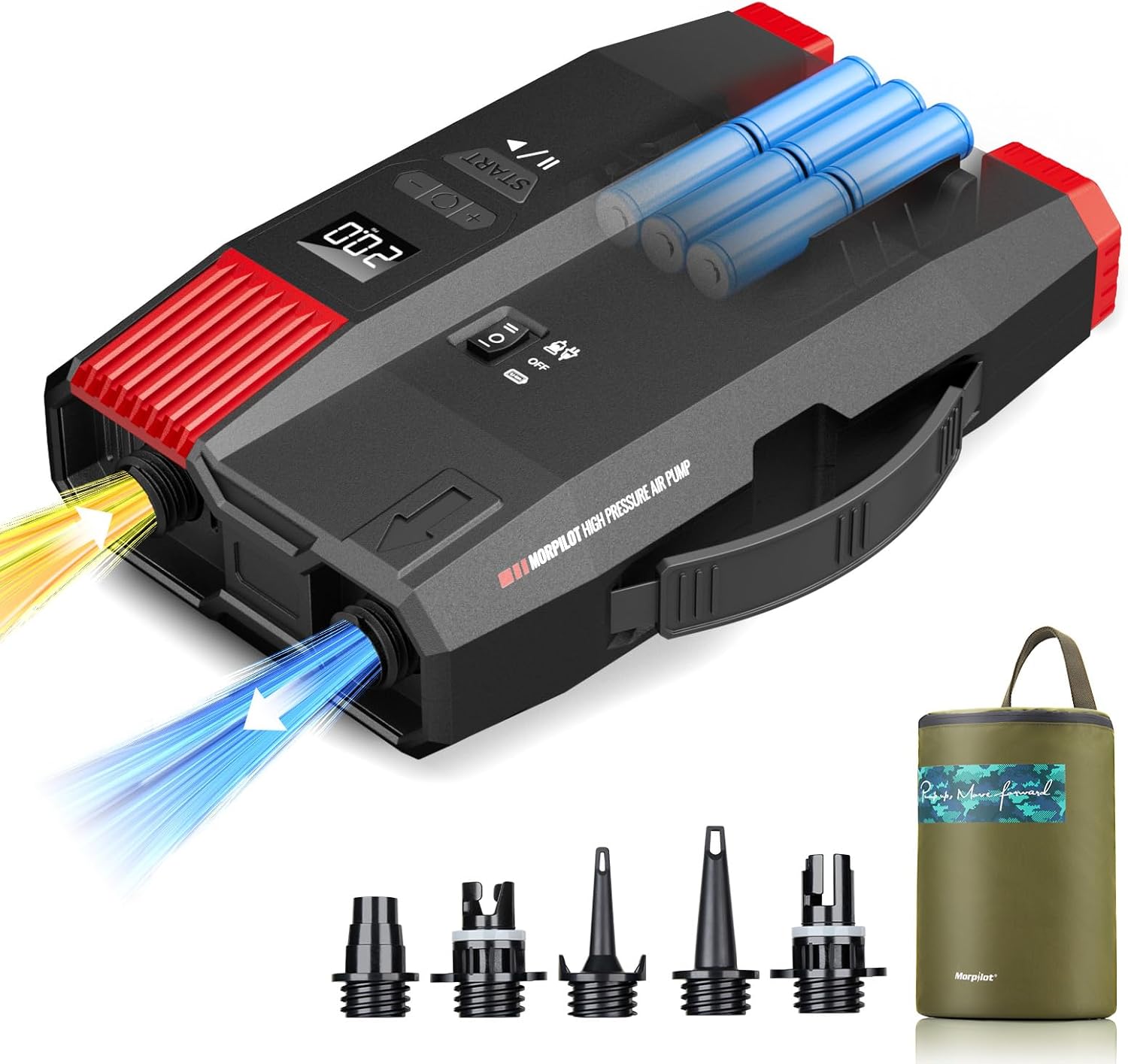
The Morpilot 20PSI Rechargeable SUP Pump, shown with its included accessories: multiple inflation nozzles and a portable carrying bag. The pump features a digital display and control buttons.
2. Package Contents
Please check the package contents to ensure all items are present and in good condition:
- Morpilot 20PSI SUP Pump Unit
- Air Hose
- Nozzle Bag with various adapters
- AC Adapter
- DC Car Charger
- Detachable Battery Pack
- Portable Carry Bag

This image displays all items included in the Morpilot 20PSI SUP Pump package: the main pump unit, air hose, nozzle bag, AC adapter, DC car charger, and a detachable battery pack. Various nozzles are shown for different inflatables like car beds, paddleboards, inflatable tents, sofas, and yoga balls.

A selection of five different nozzles designed for various inflatable items, including inflatable tents, boats, rafts, pool inflatables, and paddleboards. These nozzles ensure compatibility with a wide range of valves.
3. Safety Information
- Do not operate the pump in wet conditions or immerse it in water.
- Keep out of reach of children.
- Ensure the correct nozzle is used for your inflatable to prevent damage or air leakage.
- Do not exceed the recommended pressure for your inflatable item.
- Avoid blocking the air intake or exhaust ports during operation.
- Always disconnect the power source when not in use or during maintenance.
4. Product Overview
Key Features:
- Wireless and Portable with Detachable Battery: Enjoy true freedom with a removable battery for extended use and durability. Inflate anywhere, anytime, without cables.
- 3 Power Source Options: Use AC charging indoors, DC car charging on the go, or the detachable battery for wireless operation.
- Fast and Powerful 2-Stage Inflation: Experience rapid inflation with a first stage speed of 420 L/min and a second stage pressure of 90 L/min. Inflate a paddleboard from 0 to 15 PSI in approximately 7 minutes.
- Smart Preset and Auto Shut-Off: Set your desired pressure on the digital display. The pump will automatically stop when the target pressure is reached, saving time and effort.
- Leak-Proof Seal with Swivel Head: The inflator features a bi-directional swivel head and a sealing ring for a tight, secure, and leak-proof connection.
5. Setup
5.1 Charging the Battery
Before first use, ensure the detachable battery is fully charged. Connect the AC adapter to the pump and a wall outlet, or use the DC car charger in your vehicle.

The Morpilot SUP pump can be powered via an AC wall outlet for indoor charging or a DC car charger for on-the-go use, offering flexible power options.
5.2 Attaching the Air Hose and Nozzle
- Select the appropriate nozzle from the nozzle bag for your inflatable item.
- Attach the selected nozzle to the air hose.
- Connect the air hose to the pump's inflation port (usually marked 'Inflate' or with an arrow pointing outwards). Ensure a secure, leak-proof connection using the swivel head and seal ring.

A detailed view of the pump's bi-directional swivel head and seal ring, designed to create a tight, leak-proof connection with the inflatable valve, maximizing security and durability during inflation.
6. Operating Instructions
6.1 Inflation Process
- Select Power Mode: Ensure the battery is inserted or the pump is connected to an AC/DC power source.
- Install Nozzle: Attach the correct nozzle to the air hose and then to your inflatable's valve.
- Set Target PSI: Use the digital display and control buttons to set your desired pressure (e.g., 15 PSI for a paddleboard).
- Start Inflation: Press the START button. The pump will begin inflation in two stages: a high-volume stage followed by a high-pressure stage. It will automatically stop once the preset pressure is reached.

A visual guide showing the four steps for easy inflation: Step 1, selecting the power mode; Step 2, easy installation of the nozzle; Step 3, setting the target PSI; and Step 4, starting the inflation process.

A user is shown inflating a paddleboard by a lake, demonstrating the pump's efficient and precise inflation capability. The digital display clearly shows a target pressure of 15.0 PSI, highlighting the smart preset function.

A diagram showing the two-stage inflation process. The first stage provides a quick fill at 420 L/min, while the second stage pressurizes at 90 L/min, allowing a 15 PSI SUP to be inflated in approximately 7 minutes.

The Morpilot SUP pump in use outdoors, illustrating its intelligent preset and auto-off function. Users can set the desired pressure, and the pump will automatically stop once reached, providing hands-free operation.
6.2 Deflation Process
To deflate an item, connect the air hose to the pump's deflation port (usually marked 'Deflate' or with an arrow pointing inwards). Attach the appropriate nozzle to your inflatable's valve and turn on the pump. The pump will quickly extract air, making packing and storage easier.

The Morpilot SUP pump connected to a paddleboard, illustrating its deflation function. This feature allows for quick and efficient removal of air, simplifying packing and storage.

The Morpilot SUP pump highlighting its separate inflate and deflate ports. The system includes a reliable active cooling mechanism, enabling the inflation of up to 5 paddleboards consecutively.
7. Power Options
The Morpilot SUP pump offers versatile power options to suit your needs:
- Detachable Battery: For complete wireless freedom, use the included rechargeable battery pack.
- AC Charge Mode: Connect the pump to a standard wall outlet using the AC adapter for indoor use or charging.
- DC Car Charge Mode: Use the DC car charger to power the pump directly from your vehicle's 12V socket, perfect for outdoor adventures.
8. Maintenance and Storage
8.1 Cleaning
Wipe the pump exterior with a soft, dry cloth. Do not use harsh chemicals or abrasive cleaners. Ensure air intake and exhaust ports are free from dust and debris.
8.2 Battery Care
For optimal battery life, charge the battery regularly and avoid fully discharging it. If storing for extended periods, charge the battery to approximately 50% and store in a cool, dry place.
8.3 Storage
Store the pump and all accessories in the provided portable carry bag. Keep it in a dry place, away from direct sunlight and extreme temperatures.

The Morpilot SUP pump being stored in its waterproof portable storage bag, emphasizing ease of transport and protection for adventures.
9. Troubleshooting
| Problem | Possible Cause | Solution |
|---|---|---|
| Pump does not turn on | Low battery; No power connection; Power switch off | Charge the battery; Connect to AC/DC power; Ensure power switch is ON |
| Slow inflation or low pressure | Incorrect nozzle; Air leakage; Blocked air intake/exhaust | Use correct nozzle; Check hose and valve connections for leaks; Clear any obstructions |
| Pump stops prematurely | Target pressure reached; Overheating protection activated | Check set PSI; Allow pump to cool down before resuming operation |
| Inaccurate pressure reading | Sensor issue; Loose connection | Ensure connections are tight; Contact customer support if issue persists |
10. Specifications
| Feature | Detail |
|---|---|
| Brand | morpilot |
| Model | B0CZ6NKYPM |
| Material | Plastic |
| Power Source | Electric Cord (AC/DC), Detachable Battery |
| Air Flow Capacity (Stage 1) | 420 Liters per minute |
| Air Flow Capacity (Stage 2) | 90 Liters per minute |
| Maximum Pressure | 20 PSI (Pounds per Square Inch) |
| Operating Mode | Automatic |
| Package Dimensions | 33.3 x 20.5 x 16.5 cm |
| Weight | 2.96 kg |
| UPC | 810142345347 |
11. Warranty and Support
For warranty information or technical support, please refer to the contact details provided with your purchase or visit the official Morpilot website. Please have your model number (B0CZ6NKYPM) and proof of purchase ready when contacting support.

