
1. Introduction
Thank you for choosing the Cuifati Call Blocker. This device is designed to enhance your landline phone experience by effectively blocking unwanted calls. Featuring a large capacity for storing blocked numbers and an adjustable LCD screen, it provides a secure and user-friendly solution for managing incoming calls. Please read this manual carefully to ensure proper installation and operation.
2. Product Overview
The Cuifati Call Blocker is a compact device equipped with an LCD display and intuitive buttons for easy navigation and control. It supports both blacklist and whitelist modes to give you full control over your incoming calls.

Figure 2.1: Front view of the Cuifati Call Blocker, showing the LCD screen, 'BLOCK' button, 'NO CID /BACK' button, and arrow/DELETE buttons.
Key Features:
- Large Capacity: Stores up to 4,000 numbers in the blacklist.
- High Security: Utilizes advanced filtering and anti-harassment technology.
- Adjustable LCD Screen Brightness: Five levels of brightness adjustment for optimal viewing.
- Plug and Play Design: Simple installation without complex wiring.
- User-Friendly Interface: Easy operation with an LCD display and clear buttons.
3. Specifications
- Material: ABS
- Blacklist Quantity: 4,000 groups
- Call List Capacity: 100 entries
- Screen Brightness: 5 adjustable levels
- Item Weight: 8.1 ounces
- Package Dimensions: 5.91 x 4.72 x 1.97 inches
- Model Number: CUIFATI3itpur7qam
4. Package Contents
Upon opening your Cuifati Call Blocker package, please verify that all the following items are included:
- 1 x Cuifati Call Blocker Unit
- 1 x User Manual (this document)
- 1 x Telephone Line Cable

Figure 4.1: The Cuifati Call Blocker unit and the included telephone line cable.
5. Setup
The Cuifati Call Blocker features a plug-and-play design for quick and easy installation.
Installation Steps:
- Locate the telephone line coming from your wall jack.
- Disconnect your existing landline phone from the wall jack.
- Connect the provided telephone line cable to the LINE port on the back of the Cuifati Call Blocker.
- Connect the other end of the provided telephone line cable to your wall jack.
- Connect your landline phone to the TEL port on the back of the Cuifati Call Blocker using your phone's original telephone line cable.
- The device will power on automatically and display information on the LCD screen.

Figure 5.1: Rear view of the call blocker with 'TEL' and 'LINE' ports clearly visible for connection.
6. Operating Instructions
The Cuifati Call Blocker offers straightforward operation for managing unwanted calls.
Button Functions:
- BLOCK Button (Red): Used to block the currently displayed number or to add a number to the blacklist.
- NO CID /BACK Button: Used to block calls with no Caller ID or to go back to the previous menu/screen.
- Up/Down Arrow Buttons: Used to navigate through menus, call lists, or adjust settings.
- DELETE Button: Used to remove entries from lists or delete specific numbers.
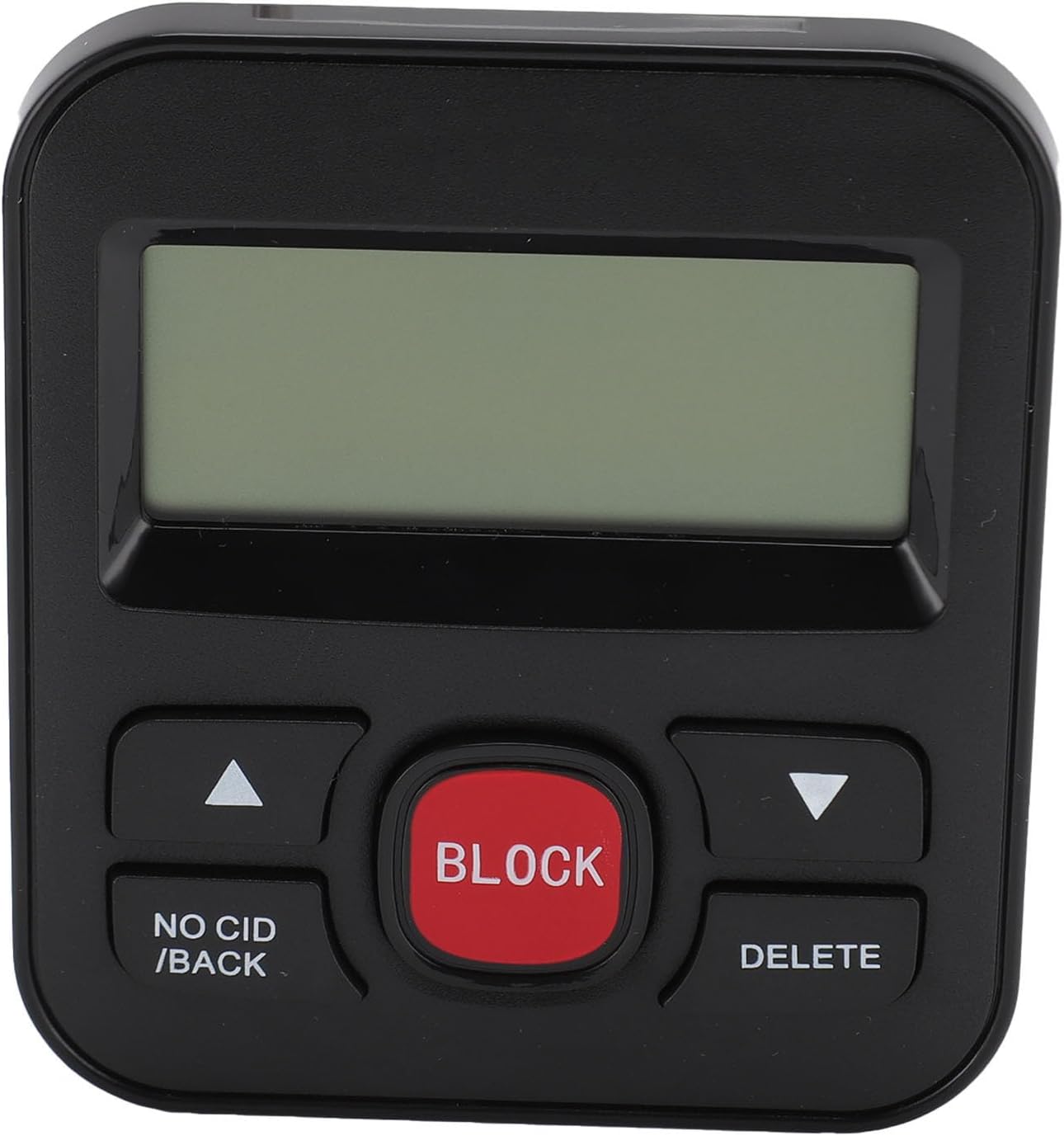
Figure 6.1: Detailed view of the call blocker's buttons for operation.
Blocking a Number:
- When an unwanted call comes in, or after reviewing your call list, press the BLOCK button.
- The number will be added to your blacklist, and future calls from this number will be blocked.
Blocking No Caller ID Calls:
To block calls that do not display Caller ID information, press the NO CID /BACK button. This will activate the No Caller ID blocking feature.
Adjusting Screen Brightness:
The LCD screen brightness can be adjusted to one of five levels for optimal visibility in various lighting conditions. Use the arrow buttons to navigate to the brightness setting in the menu, then select your desired level.
7. Maintenance
To ensure the longevity and optimal performance of your Cuifati Call Blocker, follow these simple maintenance guidelines:
- Cleaning: Use a soft, dry cloth to clean the device. Avoid using liquid cleaners or abrasive materials, as they may damage the surface or internal components.
- Environment: Keep the device in a dry place, away from direct sunlight, extreme temperatures, and high humidity.
- Handling: Handle the device with care. Avoid dropping it or subjecting it to strong impacts.
8. Troubleshooting
If you encounter any issues with your Cuifati Call Blocker, please refer to the following common problems and solutions:
- No Display on LCD Screen:
Solution: Ensure the telephone line cable is securely connected to both the wall jack and the 'LINE' port on the call blocker. The device draws power from the telephone line. - Calls are Not Being Blocked:
Solution: Verify that the number you wish to block is correctly entered into the blacklist. Ensure the blocking feature is activated. If using No Caller ID blocking, confirm it is enabled. - Cannot Hear Dial Tone:
Solution: Check that your landline phone is properly connected to the 'TEL' port on the call blocker. Ensure all cables are secure. - Buttons Are Unresponsive:
Solution: Try disconnecting and reconnecting the telephone line to restart the device. If the issue persists, contact customer support.
9. Warranty and Support
The Cuifati Call Blocker is covered by a standard manufacturer's warranty. For specific warranty details, please refer to the documentation provided at the time of purchase or contact your retailer.
For technical support, troubleshooting assistance beyond this manual, or warranty claims, please contact Cuifati customer service through the retailer where the product was purchased or visit the official Cuifati website for contact information.