1. Introduction
Welcome to the Incapto Aura Bean-to-Cup Coffee Machine user manual. This guide provides essential information for the safe and efficient operation, maintenance, and troubleshooting of your new coffee machine. Please read this manual thoroughly before first use and keep it for future reference.
The Incapto Aura is designed to deliver high-quality coffee with a 19-bar pressure pump, ensuring excellent extraction and a rich crema. Its compact and elegant design integrates seamlessly into any kitchen or office space. Enjoy customizable coffee options and convenient automatic cleaning features.
2. Important Safety Instructions
Always follow basic safety precautions when using electrical appliances to reduce the risk of fire, electric shock, and injury to persons.
- Read all instructions before operating the appliance.
- Do not touch hot surfaces. Use handles or knobs.
- To protect against fire, electric shock, and injury, do not immerse cord, plugs, or the appliance in water or other liquid.
- Close supervision is necessary when any appliance is used by or near children.
- Unplug from outlet when not in use and before cleaning. Allow to cool before putting on or taking off parts, and before cleaning the appliance.
- Do not operate any appliance with a damaged cord or plug or after the appliance malfunctions, or has been damaged in any manner.
- The use of accessory attachments not recommended by the appliance manufacturer may result in fire, electric shock, or injury to persons.
- Do not use outdoors.
- Do not let cord hang over edge of table or counter, or touch hot surfaces.
- Do not place on or near a hot gas or electric burner, or in a heated oven.
- Always attach plug to appliance first, then plug cord into the wall outlet. To disconnect, turn any control to "off", then remove plug from wall outlet.
- Do not use appliance for other than intended use.
- Use extreme caution when disposing of hot steam.
3. Product Overview
Familiarize yourself with the components of your Incapto Aura coffee machine.

Figure 3.1: Key Features Overview
This image highlights the main features of the Incapto Aura coffee machine, including the control panel, water tank, and coffee dispenser.
3.1 Components
- Bean Hopper: Located at the top, for whole coffee beans.
- Water Tank: Removable, typically located on the side or back, with a 1.5L capacity.
- Control Panel: Touch-sensitive interface for selecting drink types and settings.
- Coffee Dispenser: Adjustable height for various cup sizes, capable of dispensing two coffees simultaneously.
- Drip Tray: Removable for easy cleaning, collects excess liquid.
- Grounds Container: Collects used coffee grounds, easily removable.
- Grinder: Integrated, adjustable for different grind sizes.

Figure 3.2: Control Panel
A close-up view of the touch control panel, showing options for short coffee, long coffee, Americano, double espresso, hot water, and favorite coffee settings.
4. Setup
4.1 Unpacking
- Carefully remove the coffee machine and all accessories from the packaging.
- Remove all protective films and packaging materials.
- Check that all components are present and undamaged.
4.2 Initial Placement
- Place the machine on a stable, flat, and heat-resistant surface.
- Ensure adequate ventilation around the machine.
- Keep the machine away from water sources and direct heat.

Figure 4.1: Machine Dimensions
This image shows the compact dimensions of the Incapto Aura: 40.5 cm (depth) x 18.2 cm (width) x 31.5 cm (height), illustrating its suitability for various spaces.
4.3 Filling the Water Tank
- Remove the water tank from the machine.
- Fill the tank with fresh, cold drinking water up to the MAX level indicator.
- Replace the water tank securely.
4.4 Filling the Bean Hopper
- Open the lid of the bean hopper.
- Pour whole coffee beans into the hopper. Do not use ground coffee in the bean hopper.
- Close the lid securely.

Figure 4.2: Bean Hopper Access
A top-down view of the Incapto Aura, showing the location of the bean hopper for filling with whole coffee beans.
4.5 First Use / Rinsing Cycle
- Plug the machine into a grounded power outlet.
- Place a large container under the coffee dispenser.
- Turn on the machine. The machine will automatically perform a rinsing cycle to clean the internal circuits.
- Discard the water collected in the container. Your machine is now ready for use.
5. Operating Instructions
5.1 Making Coffee
- Ensure the water tank is filled and the bean hopper contains coffee beans.
- Place one or two cups under the coffee dispenser.
- Select your desired coffee type from the touch control panel:
- Short Coffee (Espresso)
- Long Coffee
- Americano
- Double Espresso (dispenses two servings simultaneously)
- The machine will automatically grind the beans, brew, and dispense your coffee.
- For hot water, select the hot water icon on the control panel.
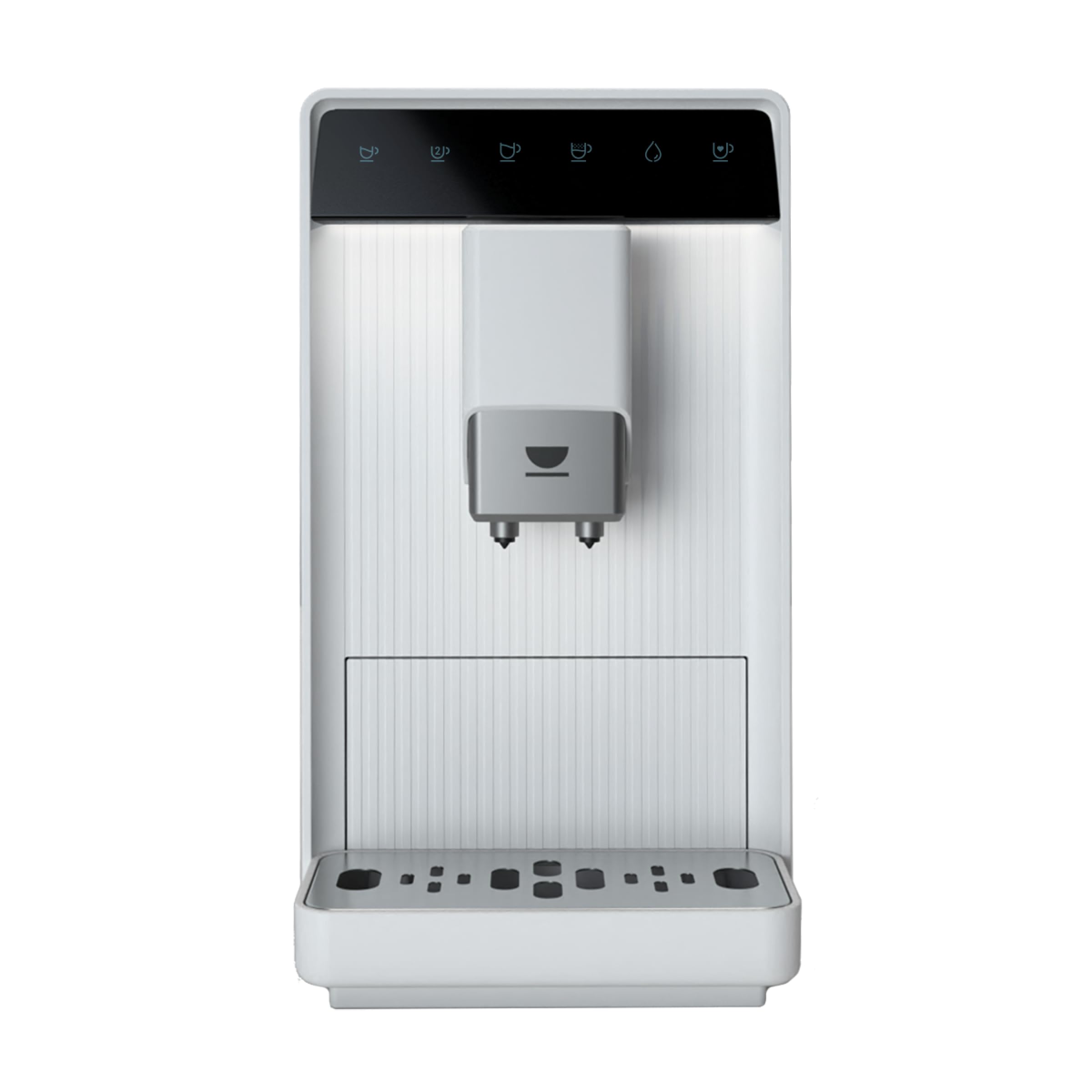
Figure 5.1: Dual Coffee Dispensing
The Incapto Aura coffee machine simultaneously dispensing two rich espressos into glass cups, showcasing its dual output capability.
5.2 Customizing Your Coffee
- Grind Adjustment: The integrated grinder allows for adjustment of grind fineness. Refer to the grinder adjustment mechanism (usually inside the bean hopper) for detailed instructions. A finer grind typically results in a stronger coffee.
- Volume Adjustment: You can customize the volume for each coffee type. Consult the machine's display or manual for specific steps to program your preferred volumes.
- Favorite Coffee: The machine allows you to save your preferred settings for a "favorite coffee" option, accessible via the control panel.

Figure 5.2: User Interaction
A user placing a cup under the dispenser, demonstrating the ease of use and interaction with the Incapto Aura coffee machine.
6. Maintenance and Cleaning
Regular cleaning and maintenance ensure optimal performance and extend the lifespan of your Incapto Aura coffee machine.
6.1 Automatic Cleaning Program
- The machine features an automatic cleaning program. Follow the instructions on the display or refer to the specific section in the full manual for activation.
- LED indicators will alert you when maintenance actions are required.
6.2 Daily Cleaning
- Drip Tray: Empty and rinse the drip tray daily. It is easily removable.
- Grounds Container: Empty the used coffee grounds container daily. Rinse with water.
- Water Tank: Rinse the water tank regularly and refill with fresh water.
- Coffee Dispenser: Wipe the coffee dispenser with a damp cloth to remove any coffee residue.
6.3 Descaling
- The machine will indicate when descaling is necessary.
- Use descaling powder sachets provided or recommended by Incapto.
- Follow the descaling procedure outlined in the machine's full manual or on the display.
6.4 Cleaning Accessories
- A brush is included for cleaning the grinder and coffee group.
- Use a soft cloth for wiping external surfaces.
7. Troubleshooting
This section addresses common issues you might encounter with your Incapto Aura coffee machine.
| Problem | Possible Cause | Solution |
|---|---|---|
| No coffee is dispensed. | Water tank is empty or not properly inserted. Bean hopper is empty. Coffee dispenser is blocked. | Fill the water tank and ensure it is correctly seated. Fill the bean hopper with fresh coffee beans. Clean the coffee dispenser. |
| Coffee is too weak. | Grind setting is too coarse. Insufficient coffee dose. | Adjust the grinder to a finer setting. Check if the coffee dose can be adjusted in settings. |
| Machine leaks water. | Water tank not properly seated. Drip tray is full. Internal component issue. | Ensure the water tank is correctly seated. Empty and clean the drip tray. If the problem persists, contact customer support. |
| Grinder is noisy or not grinding. | Foreign object in the grinder. Bean hopper is empty. | Unplug the machine and carefully check the grinder for obstructions. Fill the bean hopper. |
For issues not listed here, please refer to the complete product manual or contact Incapto customer support.
8. Specifications
| Feature | Detail |
|---|---|
| Brand | Incapto |
| Model Number | Aura |
| Dimensions (L x W x H) | 40.5 x 18.5 x 31.5 cm |
| Weight | 9 Kilograms |
| Capacity (Bean Hopper) | 150 Grams |
| Power | 1690 Watts |
| Voltage | 240 Volts |
| Pressure | 19 bars |
| Material | Acrylonitrile Butadiene Styrene |
| Special Features | Water filter, Automatic cleaning function, Integrated coffee grinder, Programmable, Removable water tank |
| Automatic Shut-off | Yes |
9. Warranty and Support
For warranty information, please refer to the documentation provided with your purchase or contact Incapto customer support directly. Information regarding spare parts availability is not provided in this document.
If you require technical assistance or have questions about your Incapto Aura coffee machine, please visit the official Incapto website or contact their customer service department.


