
ANCHEER TR040701
ANCHEER Treadmill with Incline User Manual
Model: TR040701
1. Introduction
Thank you for choosing the ANCHEER Treadmill with Incline. This innovative multi-purpose fitness equipment is designed for both walking and running, offering flexibility for use under a desk or as a traditional treadmill. Its compact, foldable design makes it ideal for home, gym, or office environments. Please read this manual thoroughly before operation to ensure safe and effective use.
Important Safety Information
- Always connect the safety key before operating the treadmill. The machine will not function without it.
- Ensure the treadmill is placed on a stable, level surface.
- Keep children and pets away from the treadmill during operation.
- Do not use the treadmill if you feel unwell or experience any pain.
- Regularly inspect the treadmill for any signs of wear or damage.
2. Product Features
The ANCHEER Treadmill offers a range of features designed for convenience and effective workouts:
- Innovative Multi-purpose Design: Functions as both an under-desk walking pad (0.6-4 mph) and a traditional treadmill (0.6-7.5 mph) when handles are raised.
- 2-Second Folding: No assembly required; folds quickly for easy storage.
- Compact and Portable: Only 4.5 inches thick when folded, with front transport wheels for easy movement.
- LED Touch Screen Display: Real-time tracking of speed, distance, time, and calories.
- Multiple Control Modes: Control via buttons on the riser, remote watch, or touch screen.
- Adjustable Incline: Features a 3% incline option for varied workouts.
- Effective Cushioning: Multilayer damping system for joint comfort.
- Quiet Operation: Noise level below 45 dB.

The ANCHEER Treadmill, showcasing its dual functionality as an upright running treadmill and a flat under-desk walking pad.

Illustration of the treadmill's versatile modes: Climbing, Running, Walking, and Working, adapting to various fitness and productivity needs.

Key advantages of the ANCHEER treadmill, highlighting its low noise operation, strong and durable build, 8-point shock absorption, comfortable running belt, and stable steel structure.

Visual representation of the treadmill's 3% incline capability and its robust 300 lbs maximum weight capacity, along with its effective cushioning system.
Official Product Video
An official video from the seller demonstrating the key features and benefits of the ANCHEER treadmill, including its multi-purpose design, quiet operation, and ease of use.
3. Package Contents
Upon unboxing, please ensure all the following components are present:
- User Manual x 1
- Remote Watch x 1
- Power Cord x 1
- Battery x 1
- Lubricant x 1
- Wrench x 1
- Safety Key x 1

Visual representation of all items included in the ANCHEER Treadmill package.
4. Setup
The ANCHEER Treadmill requires no assembly. It is ready for use directly out of the box. Follow these steps for initial setup:
- Carefully remove the treadmill and all components from the packaging.
- Place the treadmill on a flat, stable surface.
- If using in upright mode, ensure the handle is securely locked in the raised position.
- Connect the power cord to the treadmill and then to a grounded electrical outlet.
- Attach the safety key to the designated slot on the armrest console. The treadmill will not operate without the safety key in place.
- For incline walking, locate the adjustable feet at the front of the treadmill. Remove the pin, unfold the leg to the desired incline level (3%), and reinsert the pin to secure.

Visual guide to the treadmill's quick folding, transport wheels, and compact storage options.
5. Operating Instructions
The ANCHEER Treadmill offers intuitive controls for a seamless workout experience:
Control Modes
- Armrest Console Buttons: When the handle is raised, use the buttons on the armrest console to turn the treadmill on/off, adjust speed (+/-), or stop running.
- Remote Watch: The included remote watch allows for easy speed changes and stopping while walking or running.
- LED Touch Screen Display: The display on the running board provides real-time data (speed, distance, time, calories) and allows for program control via touch.
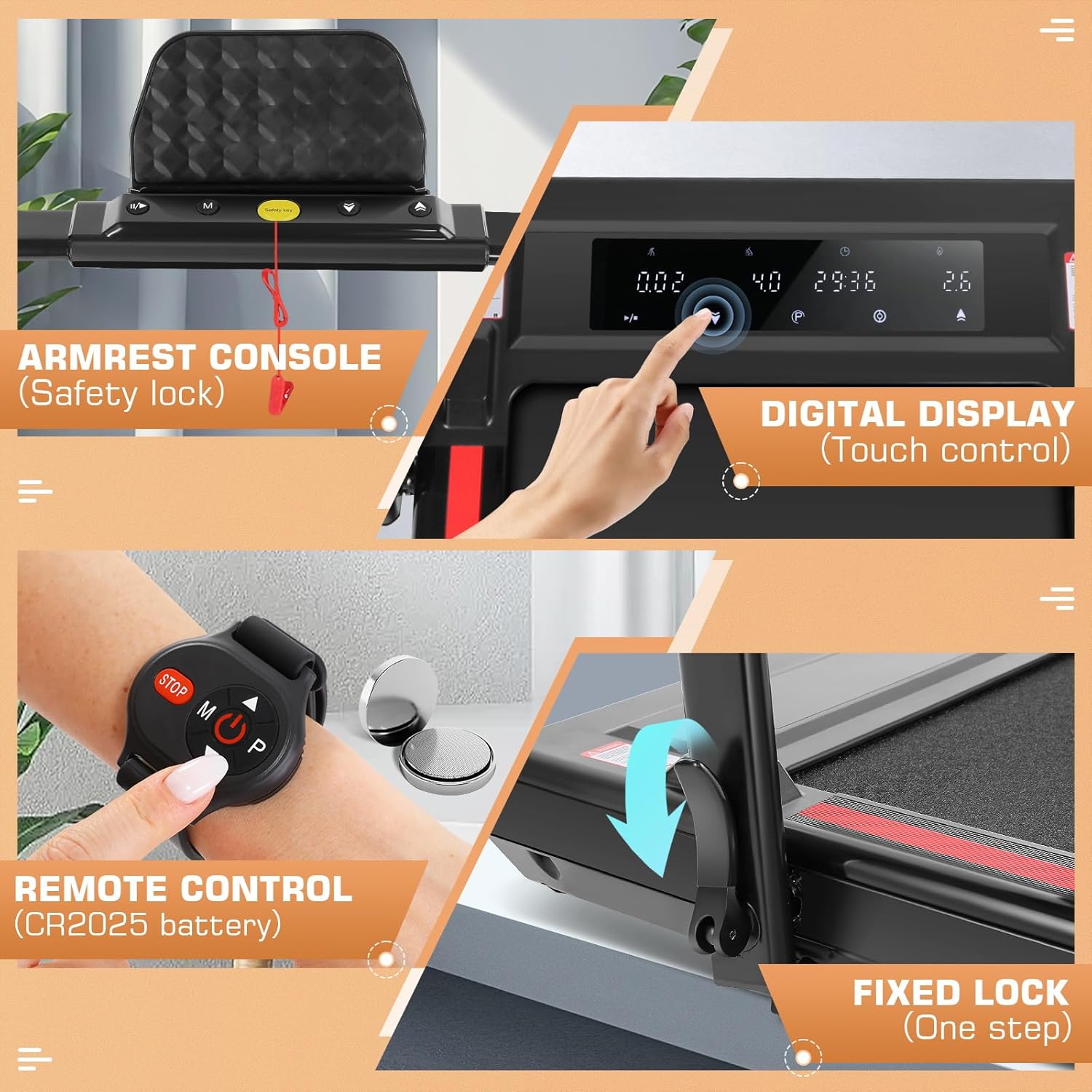
Detailed view of the treadmill's control interfaces: armrest console, digital display, and remote watch.
Using the Treadmill
- Power On: Ensure the safety key is attached. Press the power button on the console or remote.
- Select Mode/Speed:
- Under-Desk Walking Pad Mode: With the handle lowered, the speed range is 0.6-4 mph. Use the remote watch or touch screen to adjust.
- Traditional Treadmill Mode: With the handle raised, the speed range is 0.6-7.5 mph. Use the armrest console buttons, remote watch, or touch screen to adjust.
- Monitor Progress: The LED display will show your speed, distance, time, and calories burned.
- Stopping: Press the stop button on the console or remote, or remove the safety key for an emergency stop.

Overview of the treadmill's powerful and quiet running system.
6. Maintenance
Regular maintenance ensures the longevity and optimal performance of your treadmill:
- Lubrication: Apply the included silicone oil to the underside of the running belt regularly. It is recommended to apply lubricant before first use and then every 7 hours of use, or as needed if the belt feels dry or makes unusual noises. Lift the belt slightly and apply a thin line of lubricant down the center of the deck.
- Cleaning: Wipe down the treadmill with a damp cloth after each use to remove sweat and dust. Do not use abrasive cleaners.
- Belt Adjustment: If the running belt shifts to one side, use the provided wrench to adjust the tension bolts at the rear of the treadmill until the belt is centered.
- Storage: When not in use, fold the treadmill and store it in a cool, dry place away from direct sunlight and moisture.
7. Troubleshooting
Here are solutions to common issues you might encounter:
- Treadmill Not Starting: Ensure the power cord is securely plugged in and the safety key is correctly inserted into its slot.
- Squeaking Noise: This often indicates a need for lubrication. Apply silicone oil to the running belt as described in the Maintenance section. Check that all bolts are tightened.
- Handle Instability: Ensure the fixed lock mechanism for the handle is fully engaged and tightened. If the issue persists, inspect the locking pins for wear.
- Belt Slipping or Sticking: The running belt may require lubrication or tension adjustment. Refer to the Maintenance section for instructions.
- Display Not Working: Check the power connection. If the issue persists, contact customer support.
8. Specifications
| Feature | Specification |
|---|---|
| Brand | ANCHEER |
| Model Name | TR040701 |
| Product Dimensions (LxWxH) | 47"D x 26"W x 45"H |
| Item Weight | 24 Kilograms |
| Material | Alloy Steel |
| Maximum Speed | 7.5 Miles per Hour |
| Maximum Horsepower | 2.5 Horsepower |
| Maximum Incline Percentage | 3% |
| Maximum Weight Recommendation | 300 Pounds |
| Display Type | LED |
| Power Source | Corded Electric |
| Noise Level | Less than 45 dB |
9. Warranty and Support
ANCHEER is committed to providing the highest satisfactory after-sales service. Your treadmill comes with a 12-month warranty from the date of purchase.
If you have any questions, concerns, or require technical assistance, please do not hesitate to contact ANCHEER customer support. You can expect a response within 24-48 hours.
For support, please visit the official ANCHEER store or contact them through the platform where you purchased the product. Visit the ANCHEER Store on Amazon

Scan the QR code to access ANCHEER Sports resources and support.