
Bluevua ROPOT-Lite(UV) Blue
Bluevua RO100ROPOT-Lite(UV) Countertop Reverse Osmosis Water Filter System
Model: ROPOT-Lite(UV) Blue | Brand: Bluevua
Introduction
The Bluevua RO100ROPOT-Lite(UV) is an advanced 7-stage countertop reverse osmosis water filter system designed to provide pure, mineral-enriched drinking water. This user manual provides essential information for setting up, operating, maintaining, and troubleshooting your new water purifier, ensuring optimal performance and longevity.
Safety Information
- Always use the provided power adapter.
- Do not immerse the main unit in water.
- Ensure the unit is placed on a stable, flat surface.
- Keep out of reach of children.
- Do not use with water temperatures outside the specified range (41-100°F).
- Unplug the unit before cleaning or performing maintenance.
Product Overview
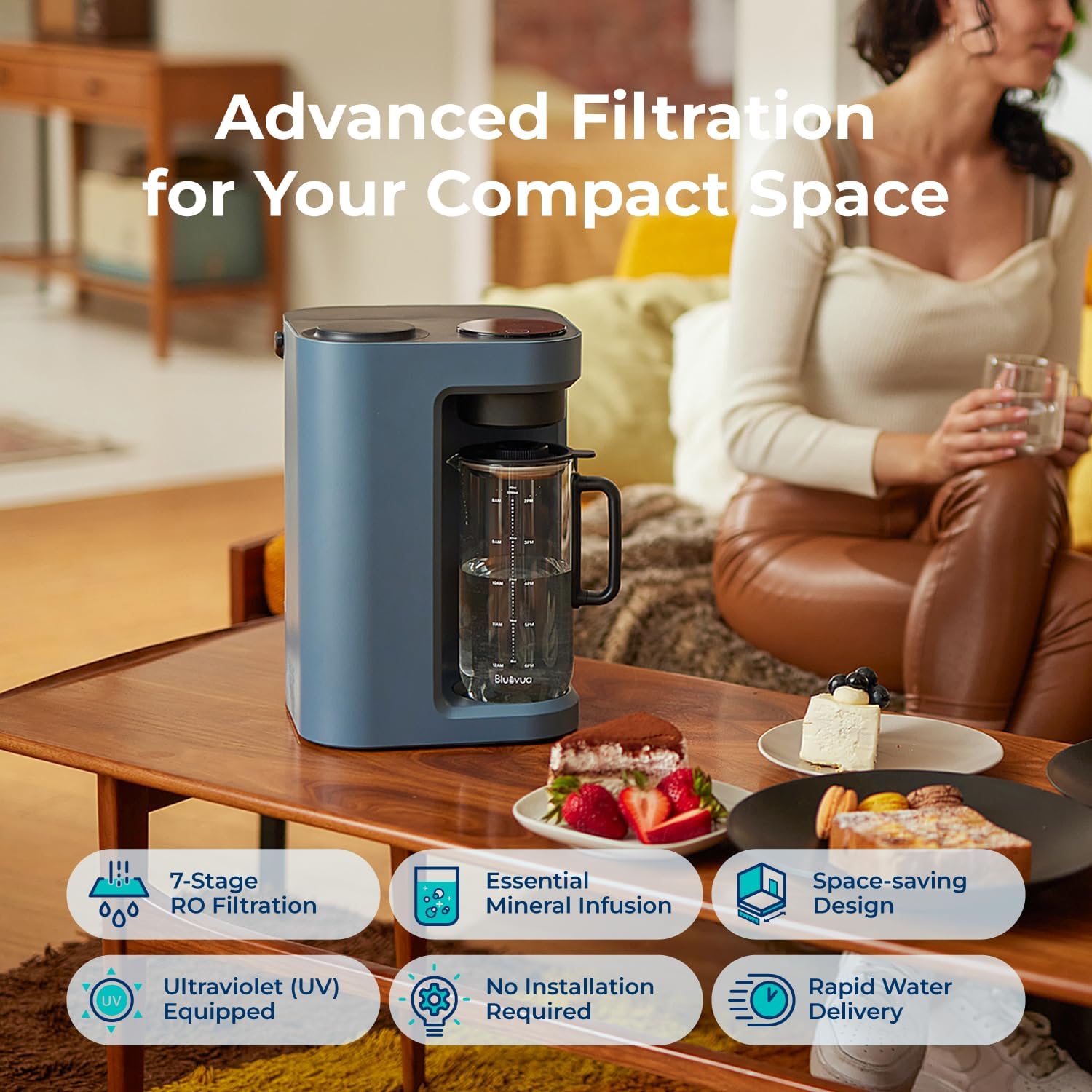
This countertop system offers a comprehensive 7-stage purification process, including UV sterilization and remineralization, to deliver high-quality drinking water. Its compact design and plug-and-play functionality make it ideal for various living spaces.
Key Features:
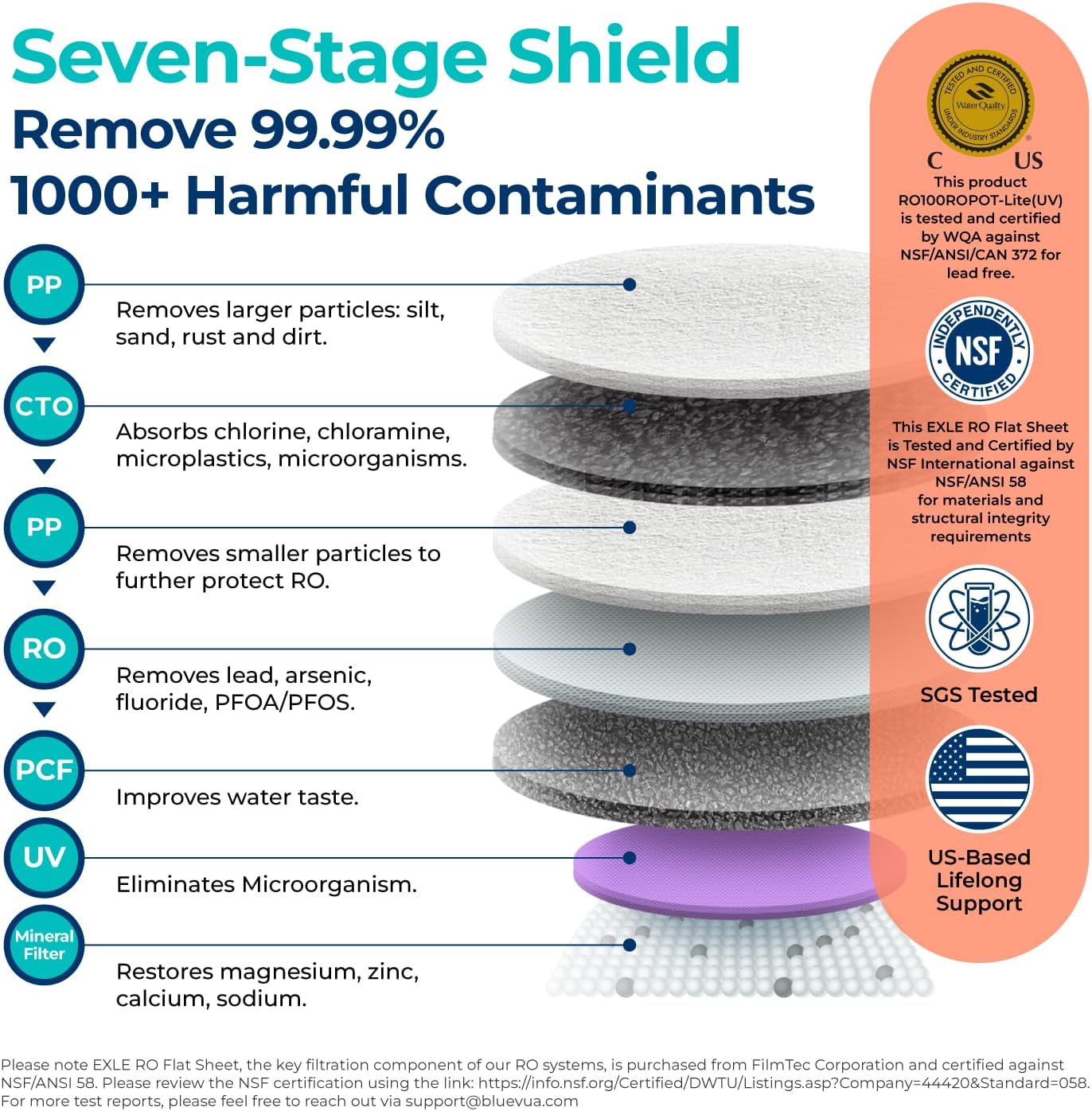
- 7-Stage Advanced Filtration: Includes PP, CTO, RO, PCF, UV, and Remineralization filters for comprehensive purification.
- UV Sterilization: Eliminates microorganisms for enhanced water safety.
- Remineralization: Adds essential minerals back into the water for improved taste and health benefits.
- Countertop Design: No installation or plumbing required, offering portability and convenience.
- High Borosilicate Glass Carafe: Ensures safe, pollutant-free water storage.
- One-Touch LED Control Panel: Easy operation with smart display for monitoring and alerts.
- Real-time TDS Monitor: Provides instant water quality readings.
- Filter Life Monitor: Tracks filter lifespan for timely replacement.
- Auto Self-cleaning: Maintains system hygiene.
- Efficient Water Delivery: Features a 3:1 pure to drain ratio, reducing water waste.
- Fruit-Infused Water Feature: Includes a glass infuser for customized beverages.
Components:
The system includes the main unit, a high borosilicate glass carafe, a 5-in-1 RO filter, a glass infuser, and a filter wrench.



Setup
The Bluevua RO100ROPOT-Lite(UV) system is designed for quick and easy setup, requiring no plumbing or complex installation. Simply follow these steps:
- Unpack the Unit: Carefully remove all components from the packaging.
- Place the Unit: Position the main unit on a stable, flat countertop near a power outlet.
- Install the Filter: Open the filter compartment (usually on the side or top, refer to diagram). Insert the 5-in-1 RO filter and twist to secure it.
- Fill the Water Tank: Remove the raw water tank from the back of the unit. Fill it with tap water up to the MAX line.
- Place Carafe: Ensure the glass carafe is correctly positioned in the dispensing area.
- Initial Flush: For first-time use, it is crucial to perform an initial flush to clean the system and filters. Fill the raw water tank and dispense water through the system completely, discarding the first few batches of purified water as per the quick operation guide. This ensures optimal water quality and removes any manufacturing residues.
Setup Video:
Official product video demonstrating the simple setup process of the Bluevua RO100ROPOT-Lite(UV) system, including filling the water tank and initial operation. This video is provided by the seller.
Operating Instructions
Using your Bluevua water filter is straightforward thanks to its intuitive LED control panel.
- Power On: Press the power button on the control panel.
- Select Volume: Use the volume selection button to choose your desired water quantity (e.g., full carafe, half carafe).
- Dispense Water: Press the water drop icon to start dispensing purified water into the carafe. The system will automatically stop when the selected volume is reached.
- Monitor Water Quality: The real-time TDS (Total Dissolved Solids) monitor displays the water purity level. Lower TDS indicates purer water.
- Monitor Filter Life: The filter life indicators on the display show the remaining lifespan of your filters.
Operating Video:
Official product video demonstrating the simple operation of the Bluevua RO100ROPOT-Lite(UV) system, including dispensing water and using the smart display. This video is provided by the seller.
Maintenance
Regular maintenance ensures your Bluevua water filter continues to provide high-quality water.
Filter Replacement:
The 5-in-1 RO filter typically requires replacement once a year, depending on usage and water quality. The filter life monitor will indicate when a replacement is needed.
- Power Off: Unplug the unit from the power outlet.
- Remove Old Filter: Open the filter compartment. Use the provided filter wrench to twist and remove the old filter.
- Install New Filter: Insert the new 5-in-1 RO filter and twist it into place until secure.
- Flush New Filter: After replacing the filter, perform an initial flush cycle as described in the Setup section to prepare the new filter for use.
Cleaning:
- Carafe and Reservoir: Regularly clean the glass carafe and raw water reservoir with mild soap and water. Rinse thoroughly.
- Exterior: Wipe the exterior of the unit with a soft, damp cloth. Do not use abrasive cleaners.
- Auto Self-cleaning: The system features an auto self-cleaning function. Refer to the control panel for initiating this cycle.
Troubleshooting
If you encounter any issues with your Bluevua water filter, refer to the common problems and solutions below:
- No Water Dispensing: Check if the unit is plugged in, the water tank is filled, and the carafe is correctly positioned. Ensure filters are properly installed.
- Unusual Taste/Odor: Perform an additional flush cycle. Ensure filters are not expired and replace if necessary.
- High TDS Reading: This indicates filters may need replacement. Check the filter life monitor.
- Leakage: Ensure all components, especially filters and tanks, are securely seated.
- Error Codes: Refer to the detailed troubleshooting section in the full product manual for specific error code meanings and solutions.
Specifications
| Attribute | Value |
|---|---|
| Brand | Bluevua |
| Model Number | ROPOT-Lite(UV) Blue |
| Product Dimensions | 9.7"L x 9.5"W x 14.1"H |
| Item Weight | 17.96 pounds |
| Installation Type | Countertop |
| Maximum Flow Rate | 0.26 Liters Per Minute |
| Operating Pressure Range | 0-30 PSI |
| Lower Temperature Rating | 41 Degrees Fahrenheit |
| Upper Temperature Rating | 100 Degrees Fahrenheit |
| UPC | 198168191057 |
Warranty and Support
Bluevua stands behind the quality of its products. The RO100ROPOT-Lite(UV) system comes with a 1-Year Warranty. For any questions, technical assistance, or warranty claims, please contact Bluevua customer support. You can find contact information on the official Bluevua website or through your purchase platform.
Bluevua is committed to providing exceptional service and ensuring customer satisfaction.
Related documentsROPOT-Lite(UV) Blue


Ask a question about this manual
Ask about setup, troubleshooting, compatibility, parts, safety, or missing instructions. Manuals+ will review the question and use this page’s manual context to help answer it.