
1. Product Overview
The TELESIN S2 Quick Release 360 Flexible Mount Wrap Band is an innovative accessory designed for securely attaching action cameras to various objects. Its flexible silicone construction and 360-degree quick-release adapter provide versatile mounting options for capturing dynamic footage.

Figure 1: TELESIN S2 Quick Release 360 Flexible Mount Wrap Band.
2. Key Features
- Innovative Quick Release Design: Features a 360-degree quick mount adapter for fast attachment and detachment of your camera.
- Flexible Silicone Construction: Made from high-quality, stretchable silicone for secure and adaptable mounting on various shapes and sizes.
- Dual Locking Holes: Includes two holes to accommodate different object diameters: a small hole for 22-38mm objects and a larger hole for 45-60mm objects.
- 360-Degree Rotation: Allows for full rotation of the mounted camera, enabling diverse shooting angles.
- Wide Compatibility: Compatible with a broad range of action cameras including GoPro (Hero 3-13, Max), Insta360 (One R/RS, X2/X3/X4, Go2/Go3, Ace/Ace&Pro), DJI Action (3, 4, 5 Pro), Osmo Pocket (2, 3), AKASO, and other wearable cameras.
- Versatile Mounting: Ideal for mounting on bike/motorcycle handlebars, roll bars, tubes, poles, fishing rods, selfie sticks, gym equipment, trees, and more.
3. Package Contents
The TELESIN S2 Quick Release 360 Flexible Mount Wrap Band package typically includes:
- 1 x TELESIN S2 Flexible Mount Wrap Band
- 1 x Quick Release Mount Adapter (pre-attached)
- 1 x Thumbscrew (for camera attachment)
- 1 x Screw Thread Adapter (for cameras with screw mounts)
4. Setup and Installation
4.1 Attaching the Mount to an Object
- Identify the object you wish to mount your camera on (e.g., handlebar, pole).
- Wrap the flexible silicone band around the object.
- Secure the band by looping the end through one of the two available holes. Use the smaller hole for tighter grip on thinner objects (22-38mm) and the larger hole for thicker objects (45-60mm). Ensure the band is snug and secure.
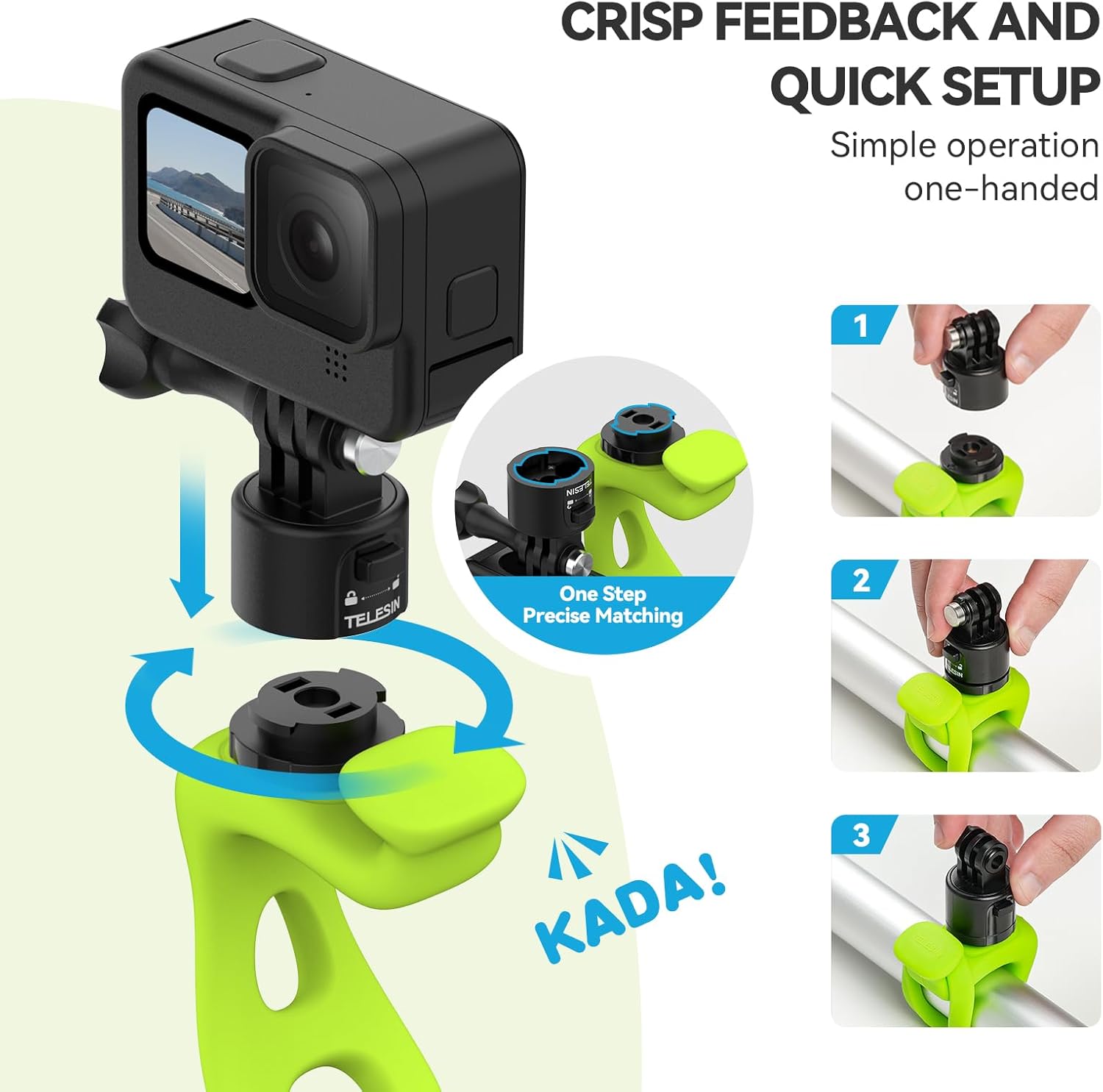
Figure 2: Quick setup of the mount on a bar, demonstrating the looping mechanism.
4.2 Attaching Your Camera
- Ensure your action camera is compatible with a standard 3-prong mount or a 1/4"-20 screw mount.
- For 3-prong cameras (e.g., GoPro): Align the camera's mounting fingers with the quick-release adapter on the flexible band. Insert the thumbscrew and tighten it securely.
- For 1/4"-20 screw mount cameras (e.g., some Insta360, DJI Pocket): Attach the provided screw thread adapter to the quick-release adapter. Then, screw your camera onto the adapter until it is firm.
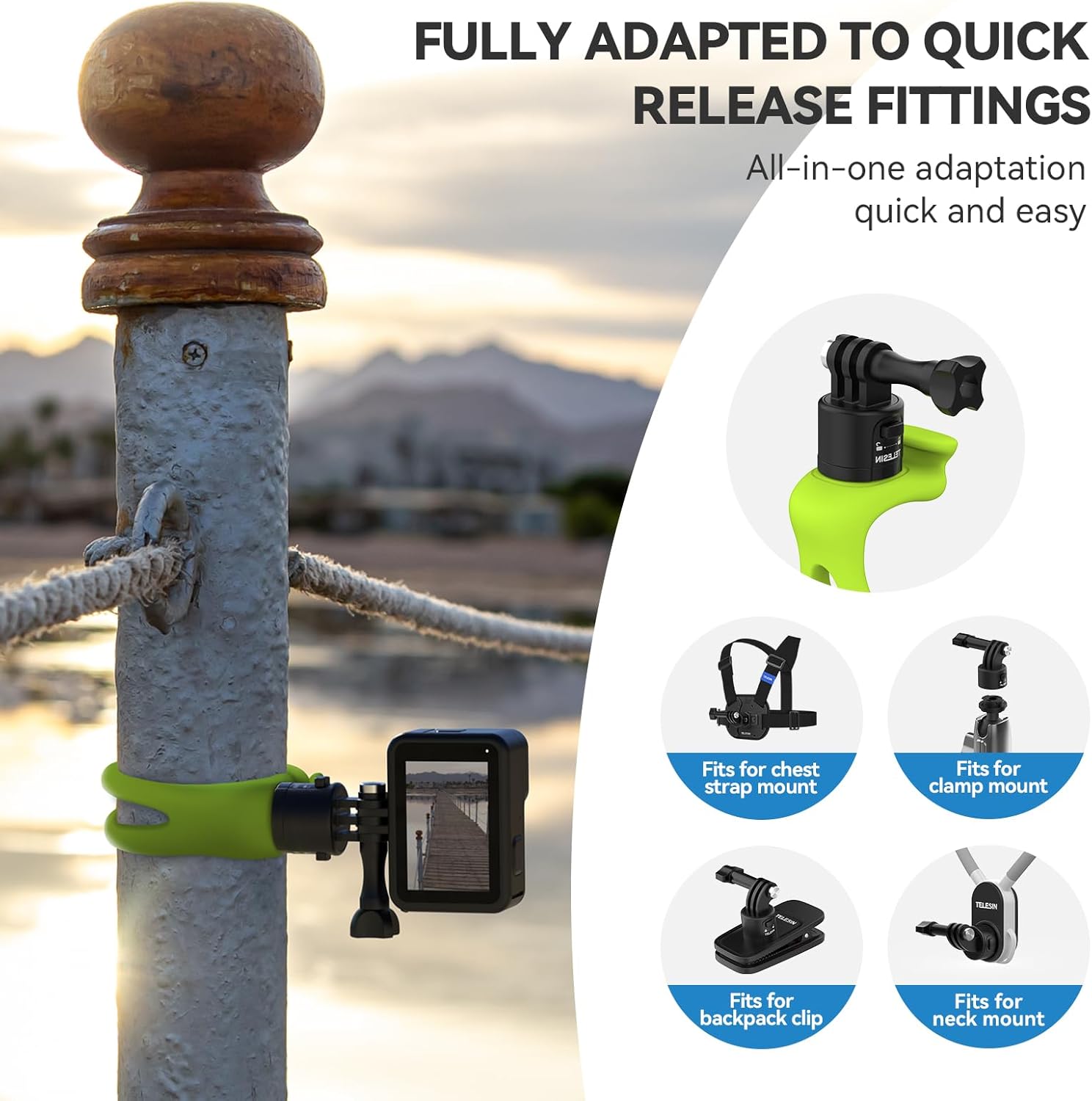
Figure 3: The quick release system allows for easy attachment and detachment of cameras.
4.3 Video Demonstration: TELESIN Camera 360 Strap Mount
Video 1: This video demonstrates the installation and usage of the TELESIN S2 Quick Release 360 Camera Band Strap Mount, showcasing its flexibility and quick attachment features.
5. Operation and Usage
5.1 Adjusting Camera Angle
The quick-release adapter allows for 360-degree rotation of your camera. Once mounted, you can easily swivel the camera to achieve the desired shooting angle without needing to re-position the entire mount. The fit is designed to be firm enough to hold its position during use.

Figure 4: The mount offers 360-degree rotation and 180-degree tilt for flexible camera positioning.
5.2 Versatile Applications
The flexible silicone band and robust quick-release mechanism make this mount suitable for a wide array of activities and environments. Its strong stretch capability ensures a secure hold on various objects.

Figure 5: The high-stretch silicone material allows for secure mounting on objects with varying circumferences.

Figure 6: Examples of the mount's use in diverse settings, including sports and outdoor activities.
6. Maintenance
To ensure the longevity and optimal performance of your TELESIN S2 mount, follow these maintenance guidelines:
- Cleaning: Wipe the silicone band and plastic components with a damp cloth to remove dirt and debris. Avoid harsh chemicals that may degrade the material.
- Storage: Store the mount in a cool, dry place away from direct sunlight and extreme temperatures to prevent material degradation.
- Inspection: Periodically inspect the silicone band for any signs of wear, tears, or damage. Check the quick-release mechanism and thumbscrew for proper function and tightness.
7. Troubleshooting
- Camera Wobbles After Mounting:
- Ensure the silicone band is tightly secured around the object, utilizing the appropriate locking hole for the object's diameter.
- Verify that the camera's thumbscrew or screw thread adapter is fully tightened.
- While the silicone provides flexibility, excessive movement on very thin or unstable objects may still occur. Consider a more rigid mount for high-vibration environments if stability is paramount.
- Difficulty Attaching/Detaching Camera:
- Ensure the quick-release mechanism is properly aligned.
- Do not force components. If resistance is met, re-align and try again.
8. Specifications
| Feature | Detail |
|---|---|
| Brand | TELESIN |
| Model | S2 Quick Release 360 Flexible Mount Wrap Band |
| Material | High-quality Silicone |
| Mounting Type | Handlebar, Pole, Tube, etc. |
| Rotation | 360 degrees |
| Compatible Object Diameter (Small Hole) | 22-38mm |
| Compatible Object Diameter (Large Hole) | 45-60mm |
| Item Weight | 3.17 ounces |
| Package Dimensions | 3.5 x 2.52 x 1.69 inches |
9. Warranty and Support
For warranty information and customer support, please refer to the official TELESIN website or contact the retailer where the product was purchased. Keep your proof of purchase for any warranty claims.