
1. Introduction
The TELESIN S2 POV Neck Mount is designed to provide a hands-free solution for capturing point-of-view footage with action cameras and compatible smartphones. Featuring a quick-release magnetic system and an optional chest strap for enhanced stability, this mount offers versatility for various activities. This manual provides detailed instructions for proper setup, operation, and maintenance of your S2 Neck Mount.
2. Product Overview and Components
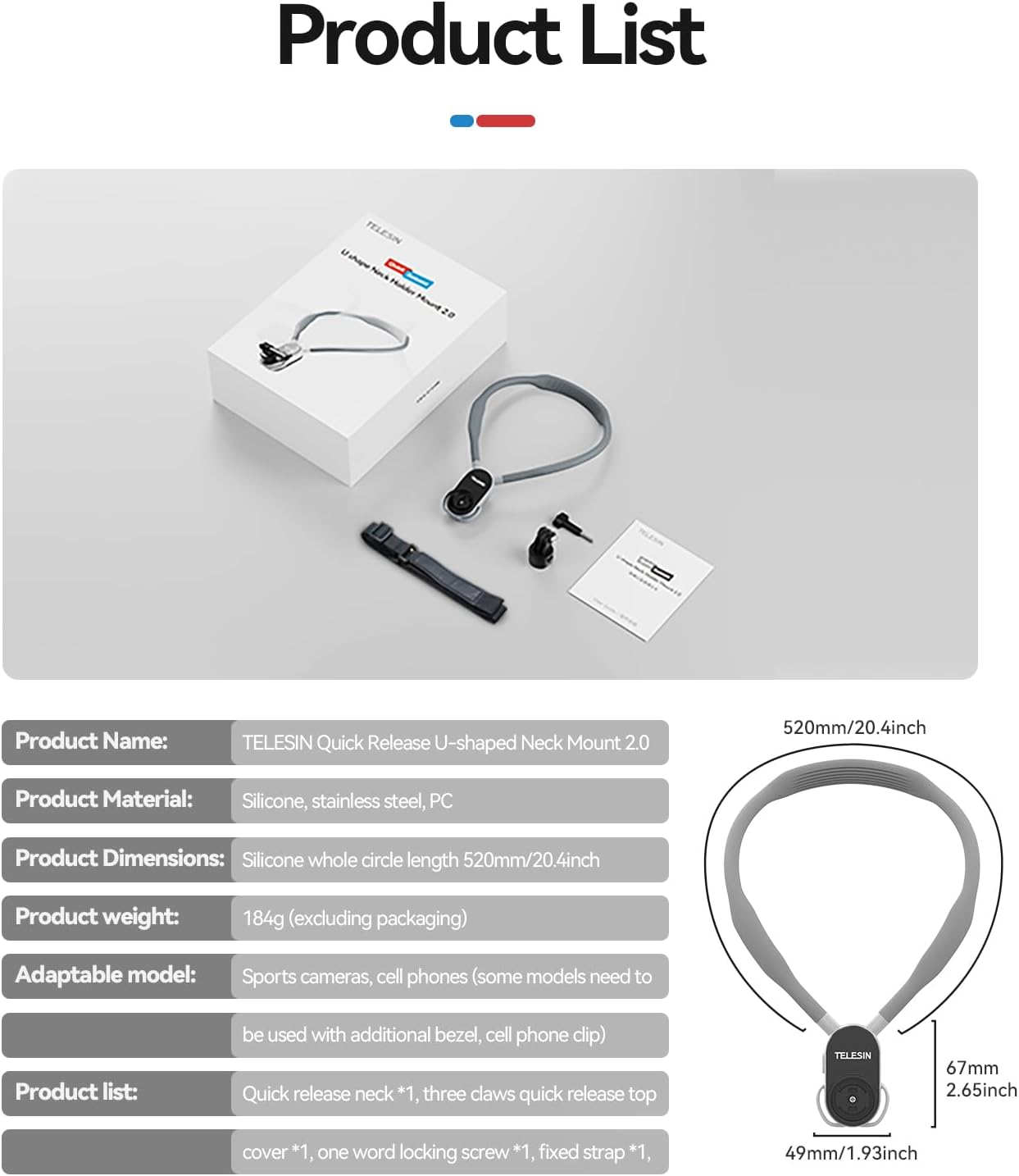
The TELESIN S2 Neck Mount consists of a flexible silicone neckband with an integrated magnetic quick-release base, a camera mounting adapter, and an adjustable chest strap for additional stability.
Key Features:
- Quick Release System: Magnetic design allows for rapid attachment and detachment of your camera. The quick mount is compatible with other TELESIN quick-release accessories.
- Enhanced Stability: Includes a chest strap to minimize camera shake during active use, ensuring stable shooting.
- Adjustable Angles: Supports both horizontal and vertical shooting, with 45-degree up/down adjustment for multiple POV angles.
- Comfortable Design: Made from highly elastic and flexible silicone, providing a soft and comfortable wearing experience.
- Durable Construction: Features an inner stainless steel core to prevent deformation, cracking, and breakage.
- Wide Compatibility: Compatible with various action cameras and smartphones (with additional adapters, not included).

3. Setup Instructions
Follow these steps to properly set up your TELESIN S2 Neck Mount and attach your camera.
- Wear the Neck Mount: Place the silicone collar around your neck. Ensure the magnetic base is positioned centrally on your chest.
- Attach Camera to Adapter: Secure your action camera to the provided quick-release mounting adapter using the camera's standard mounting screw.
- Connect Camera to Neck Mount: Align the quick-release adapter (with camera attached) with the magnetic base on the neck mount. Push until you hear a distinct "click" sound, indicating a secure magnetic lock.
- Secure with Chest Strap (Optional but Recommended for Stability): If using the chest strap, attach it to the designated loops on the neck mount and adjust the buckles for a snug, comfortable fit around your torso. This minimizes movement during dynamic activities.

4. Operating Instructions
Once the mount is set up, you can begin capturing footage. The S2 Neck Mount offers flexibility in camera positioning.
- Angle Adjustment: The camera can be rotated to achieve both horizontal and vertical shooting orientations. Additionally, the mount allows for 45-degree up and down angle adjustments to fine-tune your perspective.
- Stability During Movement: For activities involving significant movement, ensure the chest strap is securely fastened to minimize camera wobble and maintain stable footage.
- Quick Release Function: To remove the camera, simply press the release button on the magnetic base and detach the camera with its adapter.


5. Maintenance
To ensure the longevity and optimal performance of your TELESIN S2 Neck Mount, follow these maintenance guidelines:
- Cleaning: Wipe the silicone neckband and plastic components with a soft, damp cloth. Avoid using harsh chemicals or abrasive cleaners.
- Drying: Ensure all components are completely dry before storage, especially after exposure to water or sweat.
- Storage: Store the mount in a cool, dry place away from direct sunlight and extreme temperatures.
- Inspection: Periodically check the magnetic connection and the chest strap for any signs of wear or damage. Replace components if necessary.
6. Troubleshooting
If you encounter issues with your TELESIN S2 Neck Mount, refer to the following common problems and solutions:
- Camera Wobbles During Activity:
- Ensure the chest strap is properly attached and adjusted snugly.
- Verify the camera is securely clicked into the magnetic base.
- Difficulty Attaching/Detaching Camera:
- Ensure the quick-release adapter is correctly aligned with the magnetic base.
- Press the release button firmly when detaching.
- Check for any debris obstructing the magnetic connection.
- Neck Mount Feels Uncomfortable:
- Adjust the position of the neckband. The silicone material is designed for comfort, but individual fit may vary.
- Ensure the chest strap is not too tight or too loose.
For further assistance, please contact TELESIN customer support.
7. Specifications
| Feature | Detail |
|---|---|
| Product Name | TELESIN Quick Release U-shaped Neck Mount 2.0 |
| Model Number | S2 |
| Product Material | Silicone, Stainless Steel, PC |
| Neckband Length | 520mm (20.47 inches) |
| Item Weight | 184g (excluding packaging) / 9.6 ounces (product) |
| Mounting Type | Neck Mount, Magnetic Quick Release |
| Special Features | Comfortable Wearing, Bendable, Durable, Hands-Free POV, Magnetic Mount, One-Step Quick Release |
8. Compatibility
The TELESIN S2 Neck Mount is compatible with a wide range of action cameras and can also be used with smartphones (additional adapters required, not included).
Compatible Action Cameras:
- GoPro: Max, Hero 13, 12, 11, 10, 9, 8, 7, 6, 5 Black, Hero 4, 3+, Fusion, Session
- DJI: Action 5 Pro, 3, 4, Osmo Nano, Osmo 360, Osmo Pocket 3
- Insta360: Ace Pro 2, X3, X4, X5, Go3
- Other Wearable Cameras: AKASO, Dragon Touch, APEMAN, Crosstour, XiaoYi, Apexcam, VEMONT, AKAIRIO, etc.
Compatible Smartphones:
iOS iPhone, Samsung Android, and other smartphones (requires an extra phone holder and 1/4 adapter, which are NOT included in the package).
9. Safety Information
Please read and follow these safety precautions to prevent injury or damage to the product:
- Do not use the neck mount in situations where it could become entangled or cause a choking hazard.
- Ensure the camera is securely attached before engaging in any activity.
- Avoid exposing the product to extreme forces or sharp objects that could damage the silicone or internal components.
- Keep out of reach of small children.
10. Warranty and Support
TELESIN products are designed for quality and durability. For warranty information or technical support, please visit the official TELESIN website or contact their customer service department. Please retain your proof of purchase for any warranty claims.
Official Website: www.telesin.cn