
1. Product Overview
The Stalwart Electronic Digital Safe is designed to provide secure storage for your valuables. Constructed from durable cold-rolled steel, it features a dual-entry system, allowing access via a programmable digital keypad or traditional override keys. This safe is suitable for securing personal items such as documents, jewelry, and other small valuables in your home or office.
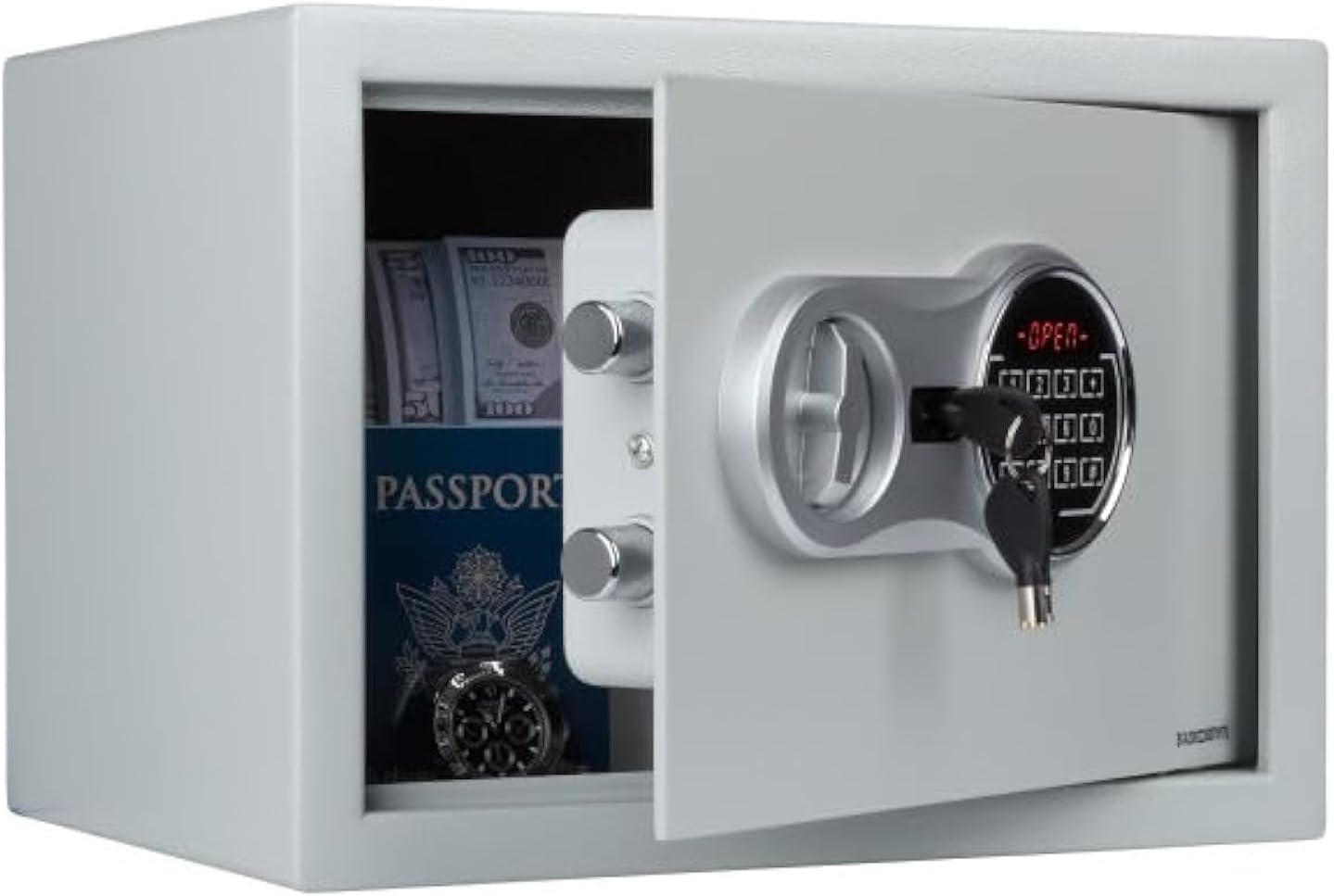
The Stalwart Electronic Digital Safe provides secure storage for personal items. It features a dual-entry system, allowing access via a programmable digital keypad or a traditional override key. The interior is designed to accommodate various valuables.
2. Package Contents
Please verify that all items listed below are included in your package:
- Stalwart Electronic Digital Safe
- Override Keys (2)
- Mounting Hardware (Fixing Bolts)
- Instruction Manual
Note: Four AA batteries are required for operation and are not included in the package.
3. Safety Information
- Keep Override Keys Secure: Store the override keys in a safe location, separate from the safe itself, and away from unauthorized access. Do not store them inside the safe.
- Mounting: For enhanced security, it is highly recommended to mount the safe to a wall or floor using the provided hardware.
- Battery Care: Ensure batteries are installed with correct polarity. Replace batteries promptly when the low battery indicator appears to avoid being locked out.
- Avoid Moisture: This safe is not water-resistant. Do not expose it to water or high humidity.
4. Setup
4.1 Initial Opening
- Locate the keyhole cover on the electronic keypad.
- Gently remove the cover to expose the keyhole.
- Insert one of the provided override keys into the keyhole and turn it clockwise.
- While the key is turned, rotate the knob on the safe door clockwise to open the safe.

To open the safe for the first time, insert one of the override keys into the lock on the keypad and turn. This allows access to the interior and the battery compartment.
4.2 Battery Installation
Batteries are required to power the electronic keypad.
- With the safe door open, locate the battery compartment on the inside of the door panel.
- Open the battery compartment cover.
- Insert four (4) AA batteries (not included), ensuring correct polarity (+/-).
- Close the battery compartment cover securely.

The battery compartment is located on the inside of the safe door. Install four AA batteries, ensuring correct polarity. The reset button is also located near the battery compartment.
4.3 Mounting the Safe (Optional)
For maximum security, it is recommended to permanently mount the safe to a floor or wall.
- Choose a suitable location for mounting.
- Mark the drilling points through the pre-drilled holes inside the safe.
- Drill pilot holes into the wall or floor.
- Align the safe with the drilled holes and secure it using the provided fixing bolts.
- Ensure the safe is firmly attached and cannot be easily removed.

The safe includes fixing bolts for secure mounting to a floor or wall. This prevents unauthorized removal of the safe.
5. Operating Instructions
5.1 Setting Your Personal Code
You can program a 4-digit personal identification number (PIN) for electronic access.
- With the safe door open, press the red reset button located inside the safe, near the battery compartment. You will hear a beep.
- On the keypad, enter your desired 4-digit code.
- Press the 'E' or '#' button to confirm your new code. You will hear a confirmation beep.
- Test the new code with the door open before closing it.
5.2 Opening the Safe with Your Code
- Enter your 4-digit personal code on the keypad.
- Press the 'E' or '#' button. The green 'OPEN' light will illuminate.
- Within 5 seconds, turn the knob clockwise to open the safe door.
5.3 Using Override Keys
The override keys provide manual access to the safe, useful in cases of forgotten codes or dead batteries.
- Remove the keyhole cover on the keypad.
- Insert an override key into the keyhole and turn it clockwise.
- While the key is turned, rotate the knob clockwise to open the safe door.
- Once open, you can replace the batteries if needed or reset the code.
6. Maintenance
6.1 Battery Replacement
When the low battery indicator lights up, or if the keypad becomes unresponsive, it is time to replace the batteries.
- Open the safe using either your code or an override key.
- Locate and open the battery compartment on the inside of the door.
- Remove the old batteries and dispose of them properly.
- Insert four new AA batteries, ensuring correct polarity.
- Close the battery compartment.
6.2 Cleaning
To clean the exterior of your safe:
- Use a soft, damp cloth.
- Avoid abrasive cleaners or harsh chemicals, as these can damage the finish.
- Do not spray cleaning solutions directly onto the keypad or lock mechanism.
7. Troubleshooting
- Safe will not open with code:
a. Check if the batteries are low or dead. Replace them if necessary.
b. Ensure you are entering the correct 4-digit code followed by 'E' or '#'.
c. If the code is forgotten, use an override key to open the safe and reset the code. - Keypad is unresponsive:
a. This usually indicates dead batteries. Replace all four AA batteries. - Override keys are lost:
a. If both override keys are lost and you cannot open the safe electronically, please contact Stalwart customer support for assistance. - Door does not close properly:
a. Ensure there are no obstructions preventing the door from closing fully.
b. Check that the deadbolts are retracting completely when the door is open.
8. Specifications

This image illustrates the precise measurements of the safe, including its exterior dimensions of 13.75 inches deep, 10 inches wide, and 10 inches high, and interior dimensions of 13.6 inches long, 7.87 inches wide, and 9.68 inches high.
| Feature | Detail |
|---|---|
| Brand | Stalwart |
| Model | 65-LCNK-25-1 |
| Material | Cold-rolled steel, Alloy Steel |
| Lock Type | Electronic Combination Lock, Key Override |
| Exterior Dimensions (D x W x H) | 13.75" x 10" x 10" |
| Interior Dimensions (L x W x H) | 13.6" x 7.87" x 9.68" |
| Power Source | 4 x AA R6 Batteries (not included) |
| Item Weight | 21.5 pounds |
| Color | Gray |
| Special Features | Portable, Floor Mountable, Removable Shelf, Concealed Hinges |
9. Warranty and Support
This Stalwart product is covered by a manufacturer's warranty against defects in materials and workmanship. For specific warranty terms, claims, or technical support, please refer to the warranty information provided at the time of purchase or visit the official Stalwart website.
For further assistance, please contact Stalwart customer service.