
Gerrit Z79
Gerrit Z79 Max Smartwatch User Manual
Model: Z79 Max
Introduction
This manual provides comprehensive instructions for the Gerrit Z79 Max Smartwatch. It covers essential information regarding setup, operation, maintenance, and troubleshooting to ensure optimal performance and user experience. The Z79 Max is a feature-rich smartwatch designed for daily use, fitness tracking, and communication.

Figure 1: Gerrit Z79 Max Smartwatch (Yellow band variant)
Package Contents
Upon unboxing your Gerrit Z79 Max Smartwatch, please verify that all components are present:
- Gerrit Z79 Max Smartwatch (with pre-installed band)
- Charging Cable (Magnetic)
- Additional Band (if included in specific package)
- User Manual (this document)
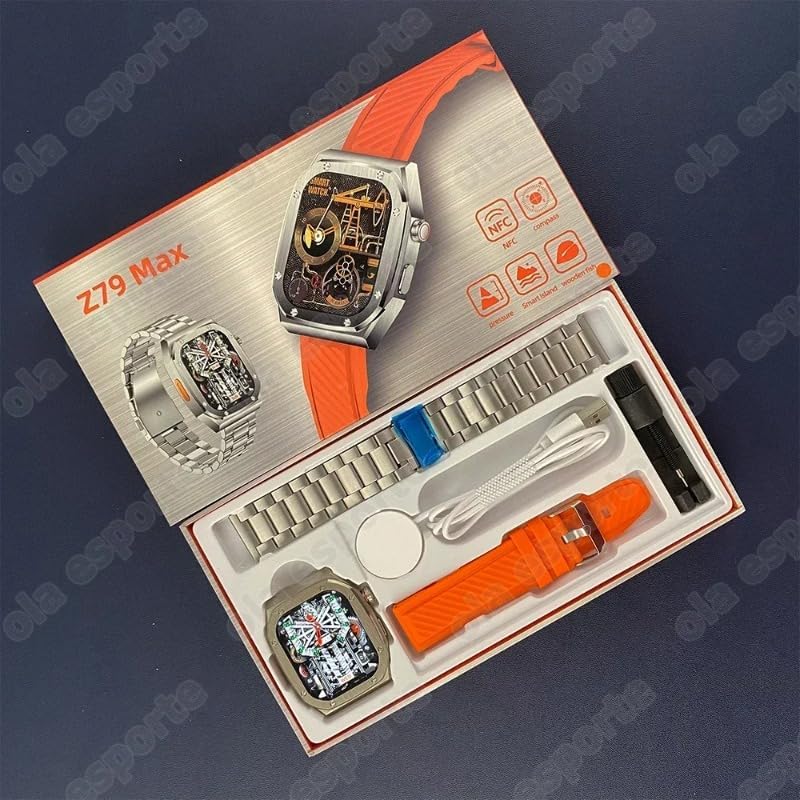
Figure 2: Smartwatch and included accessories in packaging
Setup
1. Charging the Smartwatch
Before first use, fully charge the smartwatch. Connect the magnetic charging cable to the charging points on the back of the watch and plug the USB end into a compatible power adapter (not included) or a computer USB port. The watch display will indicate charging status.
2. Powering On/Off
- Power On: Press and hold the side button until the screen illuminates.
- Power Off: Press and hold the side button, then select "Power Off" on the screen.
3. Pairing with Your Smartphone
To unlock full functionality, pair your Z79 Max Smartwatch with your smartphone via Bluetooth.
- Download the companion application (APP) from your smartphone's app store. Refer to the watch screen or packaging for the specific app name or QR code.
- Ensure Bluetooth is enabled on your smartphone.
- Open the APP and follow the on-screen instructions to add a new device.
- Select "Z79 Max" from the list of available devices.
- Confirm the pairing request on both your smartphone and the smartwatch.
Once paired, the watch will synchronize time, date, and notifications from your phone.
Operating the Smartwatch
Navigation
The Z79 Max features a 2.1-inch high-definition touch screen for intuitive navigation. Swipe gestures and button presses control various functions.
- Swipe Up: Access quick settings/control center.
- Swipe Down: View notifications.
- Swipe Left/Right: Navigate through widgets and main functions (e.g., activity, heart rate, weather).
- Press Side Button: Return to the home screen or access the app menu.

Figure 3: The 2.1-inch high-definition display provides clear visuals.
Key Functions
- Bluetooth Calls: Make and receive calls directly from your watch when connected to your smartphone.
- NFC: Utilize NFC for compatible functions (e.g., access control, mobile payments, if supported by your region and service provider).
- Voice Assistant: Activate your smartphone's voice assistant through the watch for hands-free commands.
- Notifications: Receive alerts for calls, messages, and app notifications from your paired smartphone.
- Compass: Access a digital compass for navigation.
- Music Control: Control music playback on your smartphone.
- Remote Photography: Use the watch as a remote shutter for your smartphone camera.
- Lock Screen Password: Set a password for enhanced privacy.
- Calculator: Basic arithmetic functions available on the watch.
- Stopwatch & Countdown: Timing functions for various activities.
- Weather: View current weather conditions and forecasts.
Health Monitoring
The Z79 Max Smartwatch is equipped with multiple sensors to monitor various health metrics. These features are intended for general wellness and fitness purposes and should not be used for medical diagnosis or treatment.
- Heart Rate Monitoring: Continuously tracks your heart rate throughout the day.
- Blood Pressure Monitoring: Provides estimated blood pressure readings.
- Blood Oxygen (SpO2) Monitoring: Measures blood oxygen saturation levels.
- Sleep Monitoring: Analyzes sleep patterns, including deep sleep, light sleep, and wake times.
- ECG Testing: Supports electrocardiogram (ECG) testing for heart rate and electrocardiogram data.
- Stress Monitoring: Estimates stress levels based on heart rate variability.
For accurate readings, ensure the watch is worn snugly on your wrist, approximately one finger-width above the wrist bone. View detailed health data and trends within the companion APP.

Figure 4: Health monitoring features including heart rate and blood pressure.
Sports Modes and GPS
The Z79 Max Smartwatch offers multiple sports modes to track your physical activities and includes built-in GPS for outdoor exercises.
Available Sports Modes:
- Walking
- Running
- Hiking
- Cycling
- Skipping Rope
- Basketball
- Badminton
- Football
- Yoga
- And more...
Select the desired sports mode before starting your activity. The watch will record data such as duration, distance (with GPS), calories burned, and heart rate. Review your workout summaries in the companion APP.
GPS Functionality
The built-in GPS allows for accurate tracking of outdoor activities without needing your phone. Ensure a clear view of the sky for optimal GPS signal acquisition before starting a GPS-enabled workout.
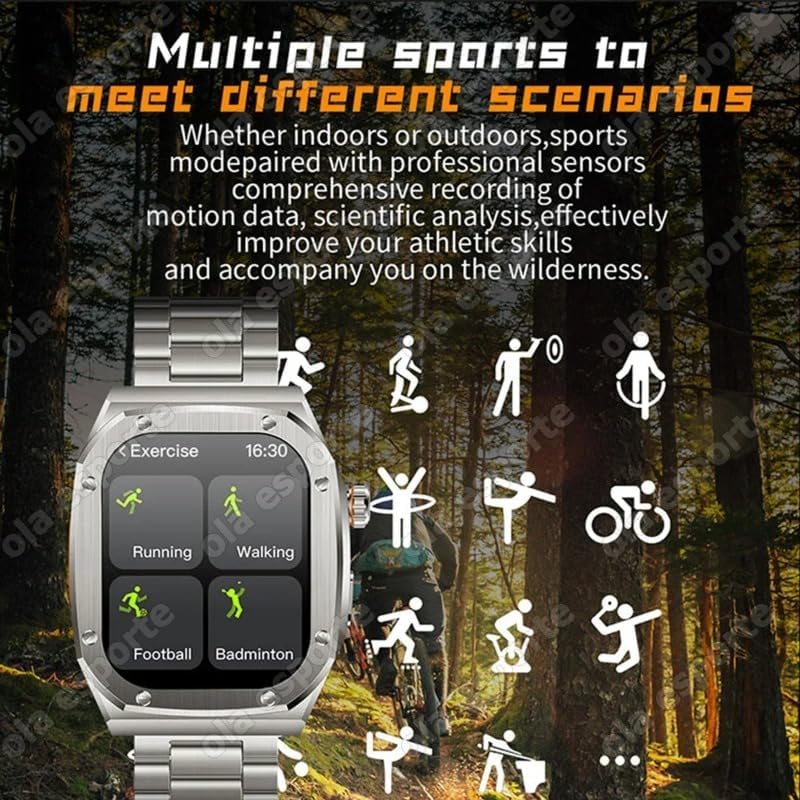
Figure 5: The smartwatch supports multiple sports modes for comprehensive activity tracking.
Maintenance
Proper care will extend the life of your Z79 Max Smartwatch.
- Cleaning: Wipe the watch and band regularly with a soft, damp, lint-free cloth. Avoid using harsh chemicals or abrasive materials.
- Water Resistance: The watch is rated IP68 waterproof. This means it is resistant to dust and can withstand immersion in water up to 1.5 meters for up to 30 minutes. Do not use it for swimming, diving, or in hot water/steam environments (e.g., sauna, hot showers) as this can compromise the seal.
- Storage: Store the watch in a cool, dry place when not in use.
- Charging: Use only the provided charging cable. Avoid exposing the charging contacts to water or corrosive liquids.
Troubleshooting
| Problem | Possible Solution |
|---|---|
| Watch does not power on. | Ensure the watch is fully charged. Connect to the charger for at least 30 minutes. |
| Cannot pair with smartphone. |
|
| Inaccurate health readings. |
|
| Notifications not received. |
|
Specifications
| Feature | Detail |
|---|---|
| Model Number | Z79 |
| Screen Size | 2.1 Inches |
| Operating System | Android (compatible with Android/iOS smartphones) |
| Connectivity | Bluetooth |
| GPS | Built-in GPS |
| Special Features | Multisport Tracker, GPS, Notifications, Bluetooth Calls, Compass, NFC, Voice Assistant, Health Monitoring (Heart Rate, Blood Pressure, SpO2, Sleep, ECG, Stress) |
| Water Resistance | IP68 |
| Compatible Devices | Smartphone |
| Band Colour | Yellow (as per product variant) |
Related documentsZ79


Ask a question about this manual
Ask about setup, troubleshooting, compatibility, parts, safety, or missing instructions. Manuals+ will review the question and use this page’s manual context to help answer it.