
Introduction
The BEEBEST A108OS is a robust 5-watt UHF two-way radio designed for reliable long-range communication. It features APP programming capabilities, a high-gain antenna, and a durable design suitable for various environments. This manual provides essential information for setting up, operating, and maintaining your device.
Key Features
- APP Programming: 16 preset channels with 122 privacy codes, configurable via a dedicated mobile application (FCC ID: 2BCYIA108OS; UHF: 430-440 MHz).
- High-Gain Antenna & Battery: Detachable 120mm antenna for enhanced signal. 2000mAh rechargeable battery offering up to 5 days standby and Micro USB charging.
- Quick-Sync Frequency Sharing: Simple button settings allow cloning frequencies from one radio to multiple units.
- Military Grade Noise Cancellation: Built-in companding technology filters ambient noise for clear audio.
- Grouping: Includes 3 different colored antenna rings (red, white, green) for easy group identification.
Package Contents
- BEEBEST A108OS Two-Way Radio
- Antenna
- Micro USB Charging Cable
- Belt Clip
- User Manual
- 2 Red, White, and Green Antenna Color Rings
Setup Guide
1. Antenna Installation
Rotate the antenna clockwise onto the threaded connector at the top of the radio until it is securely fastened. Ensure it is tight to optimize signal performance.

Image: BEEBEST A108OS Walkie Talkie with antenna installed.
2. Belt Clip Installation
Align the belt clip with the designated grooves on the back of the radio. Slide the clip downwards until it clicks firmly into place. To remove, push the upper lock of the belt clip outward, push the left thumb against the bottom of the belt clip and gently upward to remove the belt clip.

Image: Rear view of BEEBEST A108OS Walkie Talkie showing the belt clip mechanism.
3. Charging the Battery
Connect the provided Micro USB charging cable to the charging port located on the side of the radio. Plug the other end into a compatible USB power adapter or power bank. The 2000mAh rechargeable battery provides extended usage and standby time.

Image: BEEBEST A108OS Walkie Talkie showing the Micro USB charging port in use.
Video: Demonstrates antenna and belt clip installation, and Micro USB charging for the A108 Walkie Talkie.
Operating Instructions
1. Power On/Off and Volume
To power on the radio, rotate the top knob clockwise. Continue rotating to increase the volume. To power off, rotate the knob counter-clockwise until it clicks.

Image: Close-up of the channel/power knob on the BEEBEST A108OS Walkie Talkie.
2. Channel Selection
The radio features 16 preset channels. Rotate the channel knob on the top of the radio to select your desired channel. Ensure all radios in your group are set to the same channel for communication.

Image: BEEBEST A108OS Walkie Talkie displaying channel 16 on its screen.
3. Push-to-Talk (PTT)
To transmit your voice, press and hold the large orange PTT button located on the side of the radio. Speak clearly into the microphone. Release the button to stop transmitting and listen for incoming messages.
Image: Front view of the BEEBEST A108OS Walkie Talkie highlighting the orange PTT button.
4. VOX Function (Voice-Operated Exchange)
The VOX function enables hands-free transmission, activating when you speak. To activate VOX: 1. Set the radio to channel 5. 2. Turn the radio off. 3. Press and hold the PTT button and the Monitor (SK3) button simultaneously while turning the radio on. Ensure all three keys are held down at the same time during power-on.
Video: Demonstrates the activation of the VOX function on the A108 Walkie Talkie.
5. APP Programming
Enhance your radio's functionality by connecting it to the BEEBEST mobile application. Download the app from your device's app store (App Store for iOS, Google Play for Android). Once installed, connect your radio via Bluetooth to customize channels, set privacy codes, and manage other advanced settings. This allows for quick frequency writing and batch configuration for multiple radios.
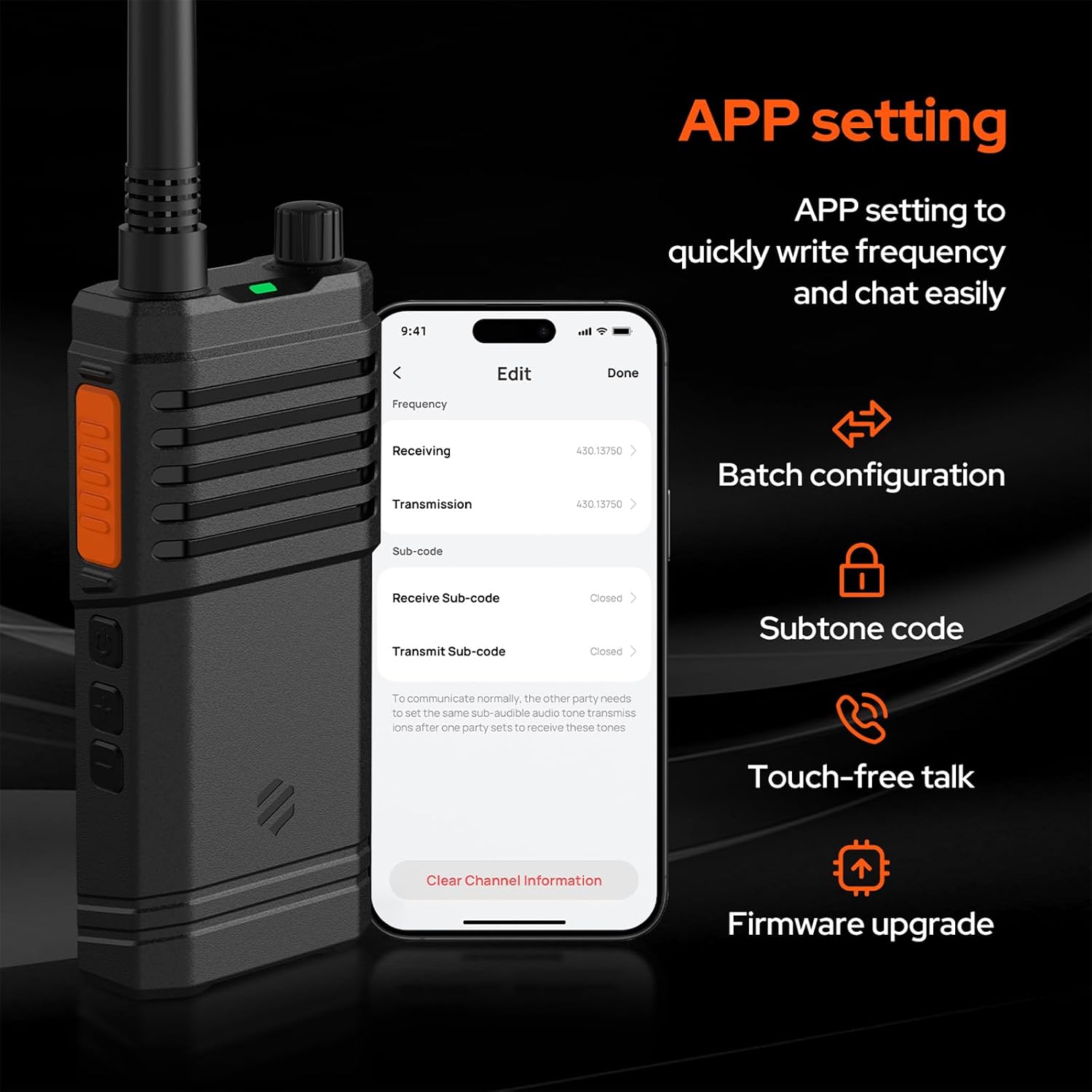
Image: BEEBEST A108OS Walkie Talkie shown alongside a mobile phone displaying the APP programming interface.
Video: Illustrates the process of connecting the A108 Walkie Talkie to the mobile app and modifying channel settings.
6. Quick-Sync Frequency Sharing
The quick-sync feature allows for easy cloning of frequencies from one radio to another. This simplifies the setup process for groups, ensuring all radios are synchronized without requiring individual manual programming.

Image: Two BEEBEST A108OS Walkie Talkies shown in a quick-sync frequency sharing scenario.
Maintenance
- Cleaning: Keep the radio clean and dry. Use a soft, damp cloth to wipe the surface. Avoid harsh chemicals or abrasive cleaners.
- Storage: Store the radio in a cool, dry place away from direct sunlight and extreme temperatures.
- Battery Care: Use only the approved charging cable and power sources. Do not attempt to open or replace the internal battery.
- Antenna: Ensure the antenna is always securely attached. Avoid bending or forcing the antenna, as this can damage the radio's performance.
Troubleshooting
- No Power: Check if the battery is charged. Ensure the power/volume knob is rotated clockwise to the 'on' position.
- Cannot Communicate with Other Radios: Verify that all radios are set to the same channel and privacy codes (if enabled). Ensure radios are within the effective communication range and there are no major obstructions.
- App Connection Issues: Confirm that Bluetooth is enabled on your mobile device and the radio. Try restarting both the radio and the mobile application.
- Poor Audio Quality: Adjust the volume level. Ensure the antenna is securely attached. Move to an open area with fewer physical obstructions.
- Radio Unresponsive/Frozen: If the radio becomes unresponsive, perform a factory reset. Press and hold the power button and the PTT button simultaneously for approximately 10 seconds until the radio resets.
Product Specifications
| Feature | Detail |
|---|---|
| Item Weight | 8.4 ounces |
| Package Dimensions | 6.34 x 3.5 x 1.46 inches |
| Item Model Number | A108OS |
| Batteries | 1 A battery required (included) |
| Manufacturer | BEEBEST |
| Brand | BEEBEST |
| Color | Black |
| Number of Channels | 16 |
| Special Features | Lightweight, Long Range, Noise Reduction, Rechargeable |
| Frequency Range | UHF (430-440 MHz) |
| Talking Range Maximum | 3 Mile |
| Voltage | 5 Volts |
| Water Resistance Level | Water Resistant |
Warranty and Support
The BEEBEST A108OS Two-Way Radio comes with a 1-year warranty from the date of purchase. For technical support, troubleshooting assistance, or warranty claims, please refer to the contact information provided in your product packaging or visit the official BEEBEST website.