
Wotintde W01
Wotintde Wireless Meat Thermometer User Manual
Brand: Wotintde | Model: W01
1. Introduction
The Wotintde Wireless Meat Thermometer is designed to provide precise temperature monitoring for various cooking applications. Featuring Bluetooth 5.2 connectivity and an ultra-thin probe, it allows for remote tracking of internal meat and ambient temperatures via a user-friendly smartphone application. This manual provides detailed instructions for setup, operation, and maintenance to ensure optimal performance and longevity of your device.
2. Package Contents
- 1x Wireless Meat Thermometer Probe
- 1x Charging Base (also acts as repeater)
- 1x Type-C Charging Cable
- 1x User Manual

Image: Contents of the Wotintde Wireless Meat Thermometer package, including the thermometer probe, charging base, Type-C charging cable, and user manual.
3. Product Features
- True Wireless Design: Utilizes Bluetooth 5.2 for a completely wire-free cooking experience, allowing remote monitoring from your smartphone.

Image: The wireless meat thermometer probe inserted into a whole roasted chicken inside an oven, demonstrating its wire-free functionality.
- Dual High-Precision Sensors: Equipped with two temperature sensors. One monitors internal meat temperature up to 212°F (-20°C to 100°C), and the other measures ambient/external temperature up to 572°F (0°C to 300°C), ensuring accurate readings.
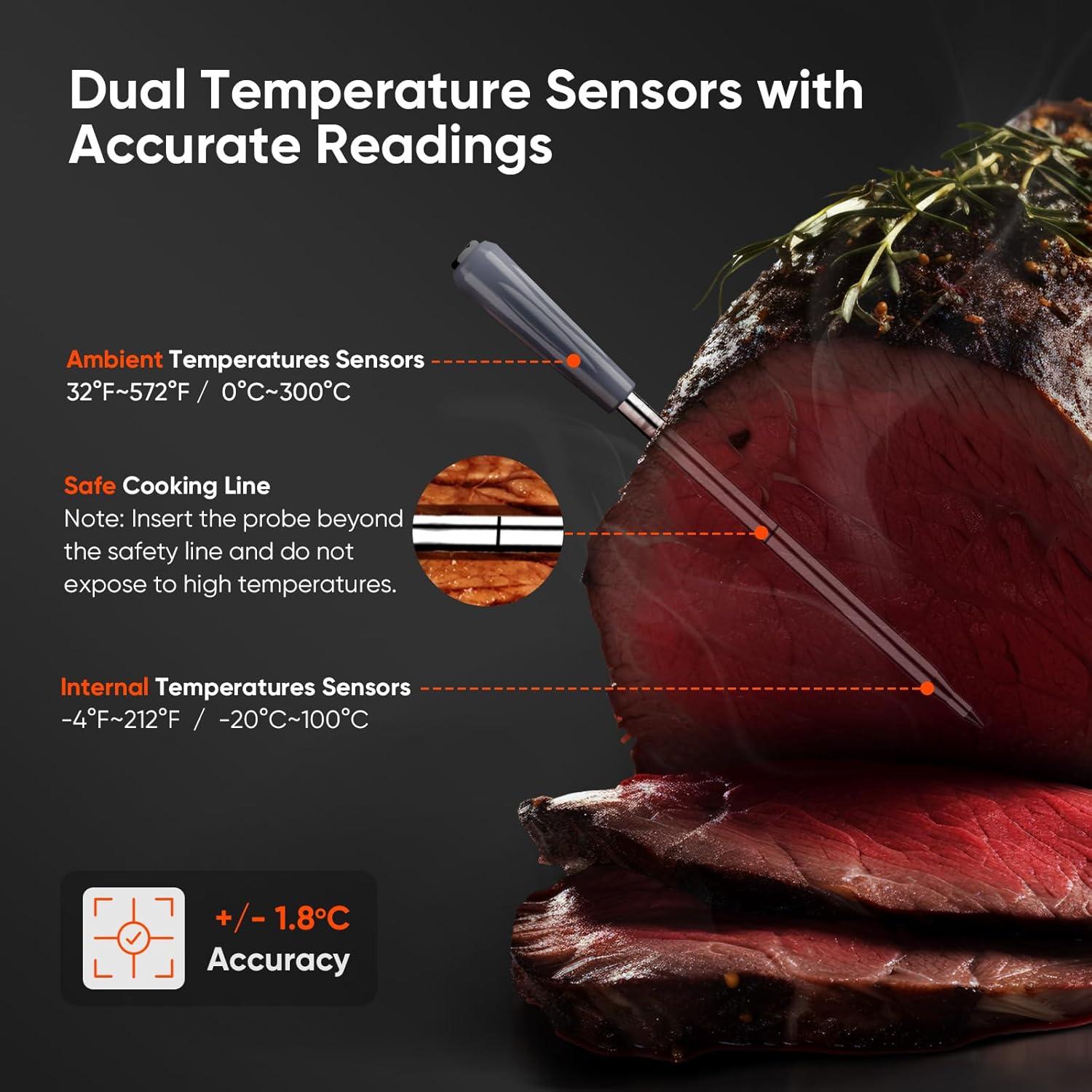
Image: A cross-section diagram of the meat thermometer probe highlighting the internal temperature sensor at the tip and the ambient temperature sensor near the ceramic handle, along with the safe cooking line.
- Ultra-Thin Probe with Ceramic Handle: The probe's slender design allows for easy insertion into various meat cuts without compromising integrity. The ceramic handle is heat-resistant and easy to clean.
- IP67 Waterproof Rating: The probe is designed to withstand various cooking scenarios and is easy to clean under running water or in a dishwasher.

Image: A hand holding the meat thermometer probe under running water in a sink, illustrating its IP67 waterproof feature for easy cleaning.
- Rechargeable Battery: The probe charges in 15 minutes for up to 30 hours of use. The repeater (charging base) charges in 2 hours for up to 160 hours of continuous use.

Image: The Wotintde charging base with the thermometer probe inserted, connected via a Type-C cable, indicating its built-in 1000mAh rechargeable battery and charging times.
- Magnetic Back: The thermometer case features a magnetic back for convenient attachment to refrigerators or other metal surfaces.

Image: The Wotintde charging base magnetically attached to the side of a refrigerator, demonstrating its integrated magnetic design for easy placement.
- Versatile Application: Suitable for electric grills, smokers, ovens, BBQ grills, air fryers, frying pans, and sous vide cooking methods.

Image: A collage showcasing the Wotintde thermometer being used in diverse cooking environments, including pan-frying, air frying, oven roasting, smoking, grilling, and rotisserie, highlighting its versatility.
- Privacy Protection: The accompanying app operates without cloud servers, ensuring your personal information is not collected.
4. Setup Guide
- Charge the Device:
- Connect the charging base to a power source using the provided Type-C charging cable.
- Insert the thermometer probe into the charging base. Ensure it is properly seated for charging. The probe and base station both need to be charged.
- Allow the probe to charge for approximately 15 minutes for 30 hours of use. The base station requires 2 hours for 160 hours of use.
- Download the AIBBQ App:
- Scan the QR code provided in the user manual or on the product packaging, or visit the following link to download the "AIBBQ" app: Download AIBBQ App.
- The app is compatible with both iOS and Android devices.
- Pairing the Device:
- Ensure Bluetooth is enabled on your smartphone.
- Open the AIBBQ app.
- The app will automatically search for and connect to the thermometer's charging base (repeater).
- For optimal performance, keep the probe and the charging base within 10 feet (3 meters) of each other. The base station then communicates with your smartphone.

Image: A visual representation of the wireless connection flow: probe to charging base (up to 10ft), and charging base to smartphone via Bluetooth 5.2, enabling remote monitoring.
5. Operating Instructions
- Inserting the Probe:
- Carefully insert the ultra-thin probe into the thickest part of the meat, avoiding bones.
- Ensure the probe is inserted past the "safe cooking line" marked on the probe to protect the internal electronics from high heat.
- Do not expose the ceramic handle directly to a heat source or open flame.
- Monitoring Temperature with the App:
- Once the probe is inserted and the app is connected, real-time internal and ambient temperatures will be displayed on your smartphone.
- The AIBBQ app offers customized cooking settings and 11 preset menus for various food types (e.g., beef, ground beef, poultry, veal).

Image: Multiple screenshots of the intuitive AIBBQ app, showing options for customized cooking settings, preset menus, temperature pre-alarms, estimated cooking timers, and temperature trend charts.
- You can select your desired food type and degree of doneness (e.g., Rare, Medium, Well Done). The app provides USDA-recommended temperatures.
- Set custom notifications to suit your preferences.
- Temperature Alerts:
- The app will provide an alarm and notify you when the target internal temperature of your food is reached, preventing overcooking or undercooking.

Image: A smartphone screen showing a temperature alarm notification, with a roasted chicken visible in the background inside an oven, indicating the preset temperature has been reached.
- The app will provide an alarm and notify you when the target internal temperature of your food is reached, preventing overcooking or undercooking.
6. Maintenance
- Cleaning: After use, allow the probe to cool. The probe is IP67 waterproof and can be cleaned under running water. It is also dishwasher safe.
- Storage: Store the probe in its charging base when not in use to keep it charged and protected.
- Battery Care: Recharge the probe and base station regularly to maintain battery health, even if not used frequently.
7. Troubleshooting
- No Connection to App:
- Ensure Bluetooth is enabled on your smartphone.
- Make sure the thermometer probe is fully charged and inserted into the charging base.
- Verify that the charging base is powered on and within 10 feet (3 meters) of the probe.
- Restart the AIBBQ app and try reconnecting.
- Inaccurate Temperature Readings:
- Ensure the probe is inserted correctly into the thickest part of the meat, past the safe cooking line, and not touching any bones.
- Avoid direct exposure of the ceramic handle to open flames or extreme heat sources.
- Calibrate the thermometer if the issue persists (refer to app settings or contact support).
- Short Battery Life:
- Ensure both the probe and charging base are fully charged before use.
- Avoid leaving the probe in extremely high temperatures for extended periods beyond cooking needs.
8. Specifications
| Feature | Detail |
|---|---|
| Product Dimensions | 1.77 x 0.93 x 7.09 inches; 4.71 ounces |
| Item Model Number | W01 |
| Batteries | 1 A batteries required. (included) |
| Date First Available | April 14, 2024 |
| Manufacturer | Wotintde |
| Special Feature | Dual Probe, High Accuracy, Vibration Alert, Waterproof |
| Included Components | 1x Meat Thermometer with Charging Base, 1x Type-C Charging Cable |
| Outer Material | Stainless Steel |
| Display Type | Digital |
| Connectivity Technology | Bluetooth |
| Product Care Instructions | Machine Wash, Oven Safe |
| Unit Count | 1.0 Count |
| Power Source | Battery Powered |
9. Warranty & Support
For warranty information and technical support, please refer to the contact details provided on the product packaging or visit the official Wotintde website. Keep your purchase receipt for warranty claims.
Related Documents - W01
 |
W01 Smart Bracelet User Manual Comprehensive user manual for the W01 smart bracelet, covering app installation, firmware updates, troubleshooting, safety tips, and wearing instructions. |
 |
AECOJOY Manual Retraction Slope Patio Awning Assembly Instructions Official assembly instructions for the AECOJOY Manual Retraction Slope Patio Awning. This guide lists essential components and provides context for installation. Features model numbers like aboj1027, aboj1232, and various 16013-W02 variants. |
 |
Tuya WiFi & Bluetooth LED Controller Series Manual Comprehensive manual for Tuya WiFi & Bluetooth LED controllers, covering features, specifications, installation, and app control for models CX-W01-P1-12A through CX-W01-P5-12A. |
 |
ACKFORM PUCK WIRELESS CHARGER TF-W01 User Manual | Qi Charging Official user manual for the ACKFORM PUCK WIRELESS CHARGER, model TF-W01. Provides essential information on product specifications, important safety notes, and FCC compliance requirements for this Qi-compatible wireless charger. |
 |
Metal Storage Shed Owner Manual & Assembly Guide SS16235GR This manual provides comprehensive instructions for assembling and maintaining the SS16235GR Metal Storage Shed. It includes a detailed parts list, hardware inventory, step-by-step assembly guidance, and care recommendations. |
 |
Tuya WiFi & Bluetooth LED Controller Series: Installation and Features This manual provides detailed information on the Tuya WiFi & Bluetooth LED Controller Series, covering features, parameters for various models (Dimmer, CCT, RGB, RGBW, RGBCCT), remote compatibility, signal transmitting, mode synchronization, app control (Tuya Smart Life/Smart Life), Bluetooth control, and important attention points for installation and usage. |
Ask a question about this manual
Ask about setup, troubleshooting, compatibility, parts, safety, or missing instructions. Manuals+ will review the question and use this page’s manual context to help answer it.