
Introduction
This manual provides comprehensive instructions for the Estink Universal ESC Programming Card, designed to optimize the performance of 1/10 scale brushless RC cars. This compact and lightweight programming card allows for precise adjustments to various Electronic Speed Controller (ESC) parameters, enhancing your driving experience and control over your RC vehicle.
The programming card features a user-friendly interface with four buttons (ITEM, VALUE, OK, RESET) and indicator lights for easy navigation and setting adjustments. It is compatible with HOBBYFANS and other brushless ESCs, making it a versatile tool for RC enthusiasts.

Image: The Estink Universal ESC Programming Card, a compact black device with LED indicators and four control buttons.
Setup Instructions
Follow these steps to connect your programming card to your ESC:
- Ensure your ESC is powered off.
- Locate the programming port on your ESC.
- Connect the programming card to the ESC's programming port. Pay attention to the positive and negative ends to ensure correct orientation.
- Connect the battery to your ESC.
- Turn on the ESC. The programming card's indicator lights should illuminate, indicating a successful connection.

Image: The programming card connected to an ESC, with an RC car chassis visible in the background, illustrating the connection process.
Setup Video Guide
Video: A detailed demonstration of connecting the programming card to an ESC and battery, showing the correct orientation and power-up sequence.
Operating Instructions
The programming card allows you to adjust various parameters of your ESC. Use the four buttons to navigate and modify settings:
- ITEM: Press to cycle through the available parameters (e.g., Low Voltage Cut-Off, Start Mode).
- VALUE: Press to change the value of the currently selected parameter.
- OK: Press to confirm and save the selected value for the parameter.
- RESET: Press to restore all parameters to their factory default settings.
The LED indicators on the card will show the currently selected ITEM number and its VALUE. Refer to the parameter table below for a complete list of adjustable settings and their options.
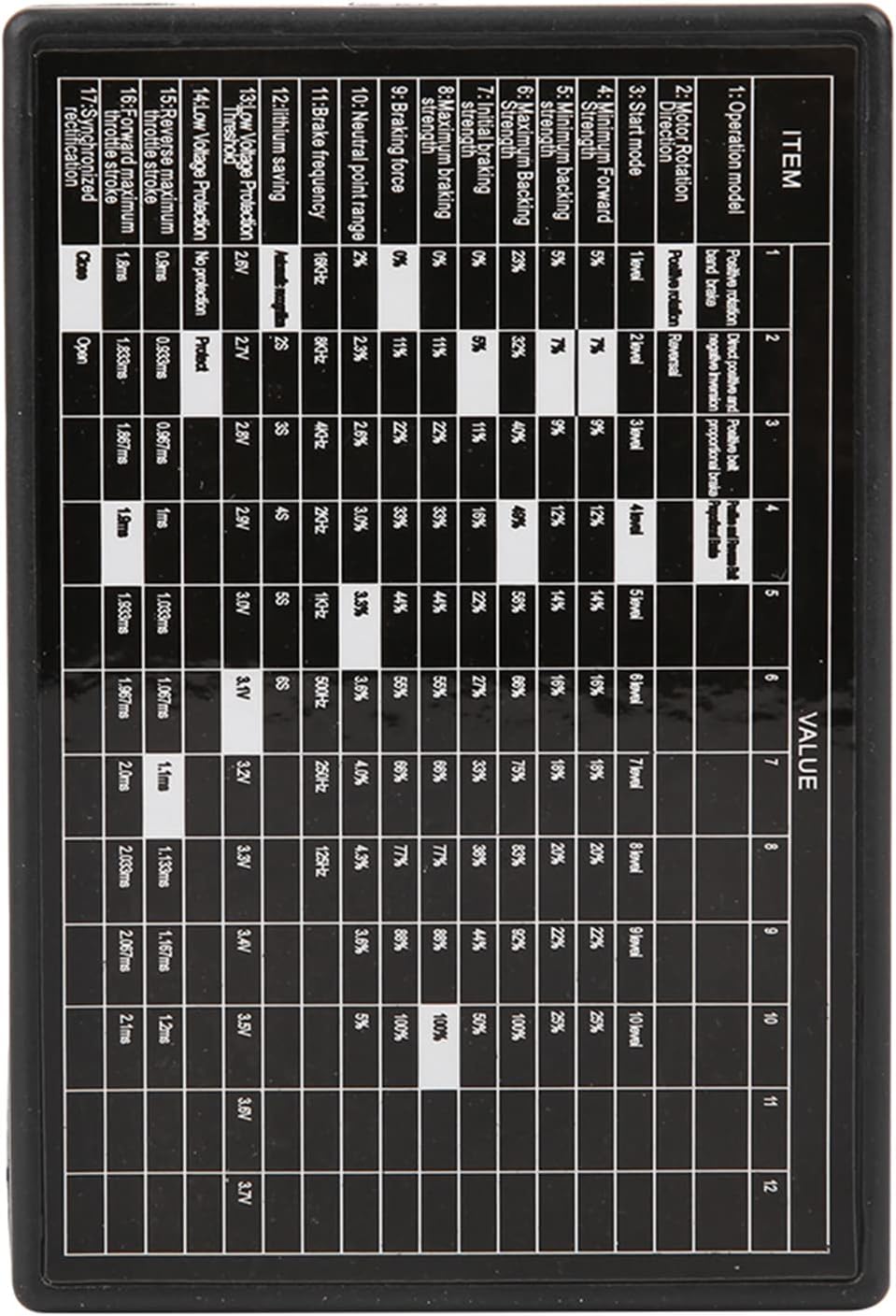
Image: A close-up view of the programming card's surface, detailing the parameter table with various settings and their corresponding values.
Operation Video Guides
Video: A brief demonstration of using the programming card to adjust ESC settings, highlighting button functions and LED feedback.
Video: An instructional video demonstrating how to use an RC ESC programming card, including connection and parameter adjustment steps.
Video: A setup guide for a similar LED program card (Hobbywing brand), which may offer additional insights into general LED programming card operation.
Parameters Overview
The following table outlines the programmable parameters and their available settings:
| Parameter | Available Settings |
|---|---|
| Low Voltage Cut-Off | 2.6V, 2.7V, 2.8V, 2.9V, 3.0V, 3.1V, 3.3V, 3.4V, 3.5V, 3.6V, 3.7V |
| Start Mode | Soft, Medium, Strong |
| Maximum Braking Force (25A, 35A, 45A, 60A ESCs) | 25%, 50%, 75% |
| Maximum Braking Force (80A, 120A ESCs) | 25%, 50%, 75% |
| Highest Reverse Force | 25%, 50%, 75% |
| Neutral Range | 6%, 9%, 12% (Working status) |
Maintenance
To ensure the longevity and proper functioning of your Estink Universal ESC Programming Card, please observe the following maintenance guidelines:
- Keep the device clean and free from dust and debris. Use a soft, dry cloth for cleaning.
- Avoid exposing the card to moisture or extreme temperatures.
- Store the programming card in a safe, dry place when not in use.
- Handle the connection ports and buttons gently to prevent damage.
Troubleshooting
If you encounter issues while using the programming card, consider the following:
- No Power/Display: Ensure the programming card is correctly connected to the ESC and the ESC is powered on. Check all cable connections for looseness or damage.
- Settings Not Applying: After changing a value, ensure you press the 'OK' button to confirm and save the setting. If issues persist, try resetting the card to factory defaults using the 'RESET' button.
- Incompatible ESC: While designed for universal compatibility, some ESC models may have specific programming requirements. Consult your ESC's instruction manual for compatibility details.
- Incorrect Parameter Values: Double-check the parameter table in this manual and your ESC's manual to ensure you are selecting appropriate values for your specific RC setup.
Specifications
- Condition: Brand New
- Item Type: Programing Card
- Material: ABS
- Low Voltage Cut-Off: 3.7V / 3.6V / 3.5V / 3.4V / 3.3V / 3.1V / 3.0V / 2.9V / 2.8V / 2.7V / 2.6V
- Startup Mode: Medium, soft, strong
- Maximum Braking Force: 50%, 25%, 75% (for 25A, 35A, 45A, 60A ESCs); 25%, 50%, 75% (for 80A, 120A ESCs)
- Highest Reverse Force: 25%, 50%, 75%
- Neutral Range: 9%, 6%, 12% Working status
- Color: Black
- Fitment: Compatible with HOBBYFANS Brushless ESC Programing, and other similar brushless ESCs.
- Size: Approx. 8 x 5.4 x 1.3cm / 3.1 x 2.1 x 0.5in
- Item Weight: 1.09 ounces
- Package Dimensions: 5.12 x 3.54 x 0.79 inches
- Model Number: Estink3wt14vqubg

Image: The programming card shown with its physical dimensions (8cm x 5.4cm x 1.3cm) clearly indicated.