Introduction
This manual provides comprehensive instructions for the Bietrun WXM19A Wireless Microphone, designed for various audio applications such as karaoke, speeches, and live performances. Please read this manual carefully before using the product to ensure proper operation and longevity.
Product Overview and Package Contents
The Bietrun WXM19A system includes a wireless microphone, a compact receiver, and essential accessories, all housed in a portable storage case.

Image: The Bietrun WXM19A wireless microphone, its receiver, and the included portable storage case. The microphone features a black body with a green LED light ring and a digital display. The receiver is a small black unit with a 6.35mm jack.
What's in the Box:
- 1 x Bietrun WXM19A Wireless Microphone
- 1 x Wireless Receiver (with 6.35mm jack)
- 1 x 6.35mm to 3.5mm Audio Converter
- 1 x USB Charging Cable
- 1 x Portable Storage Case
- User Manual (this document)

Image: Components of the Bietrun WXM19A system laid out: the wireless microphone, the receiver, and a gold-colored 6.35mm to 3.5mm audio adapter.
Setup
1. Charging the Devices:
Both the microphone and the receiver are equipped with built-in 1200 mAh rechargeable lithium-ion batteries. Before first use, ensure both devices are fully charged.
- Connect the provided USB charging cable to the charging port on the microphone (DC 5V IN) and the receiver (PWR-CHR).
- Connect the other end of the USB cable to a standard USB power adapter (not included) or a computer USB port.
- The LED light ring on the microphone will glow red during charging and turn green when fully charged.
- Charging time is approximately 3-4 hours for a full charge, providing up to 7 hours of working time.

Image: Illustration showing the rechargeable nature of the microphone and receiver. It highlights the 1200mAh battery capacity, 3-4 hours charging time, and 7+ hours working time. The microphone's LED ring is shown in green for working and red for charging.
2. Connecting to an Audio Device:
The Bietrun WXM19A is designed for plug-and-play operation with devices featuring a 6.35mm (1/4") or 3.5mm (1/8") MIC input port.
- Turn on the Receiver: Long press the "PWR-CHR" button on the receiver.
- Turn on the Microphone: Long press the "PWR·VOL" button at the bottom of the microphone. The display will light up.
- Plug the Receiver: Insert the receiver directly into the 6.35mm MIC input port of your audio device (e.g., speaker, singing machine, audio amplifier, PA system).
- For 3.5mm Input: If your audio device has a 3.5mm MIC input, use the included 6.35mm to 3.5mm audio converter. Attach the converter to the receiver, then plug into your device.

Image: A step-by-step visual guide for setting up the microphone. Step 1 shows turning on the receiver, Step 2 shows turning on the microphone, and Step 3 shows plugging the receiver into a speaker's microphone input.
Important Note:
Do NOT use this product with audio devices that do not have a dedicated "MIC IN" port, such as "LINE IN" or "AUX IN" ports, as this may result in no sound or poor performance.
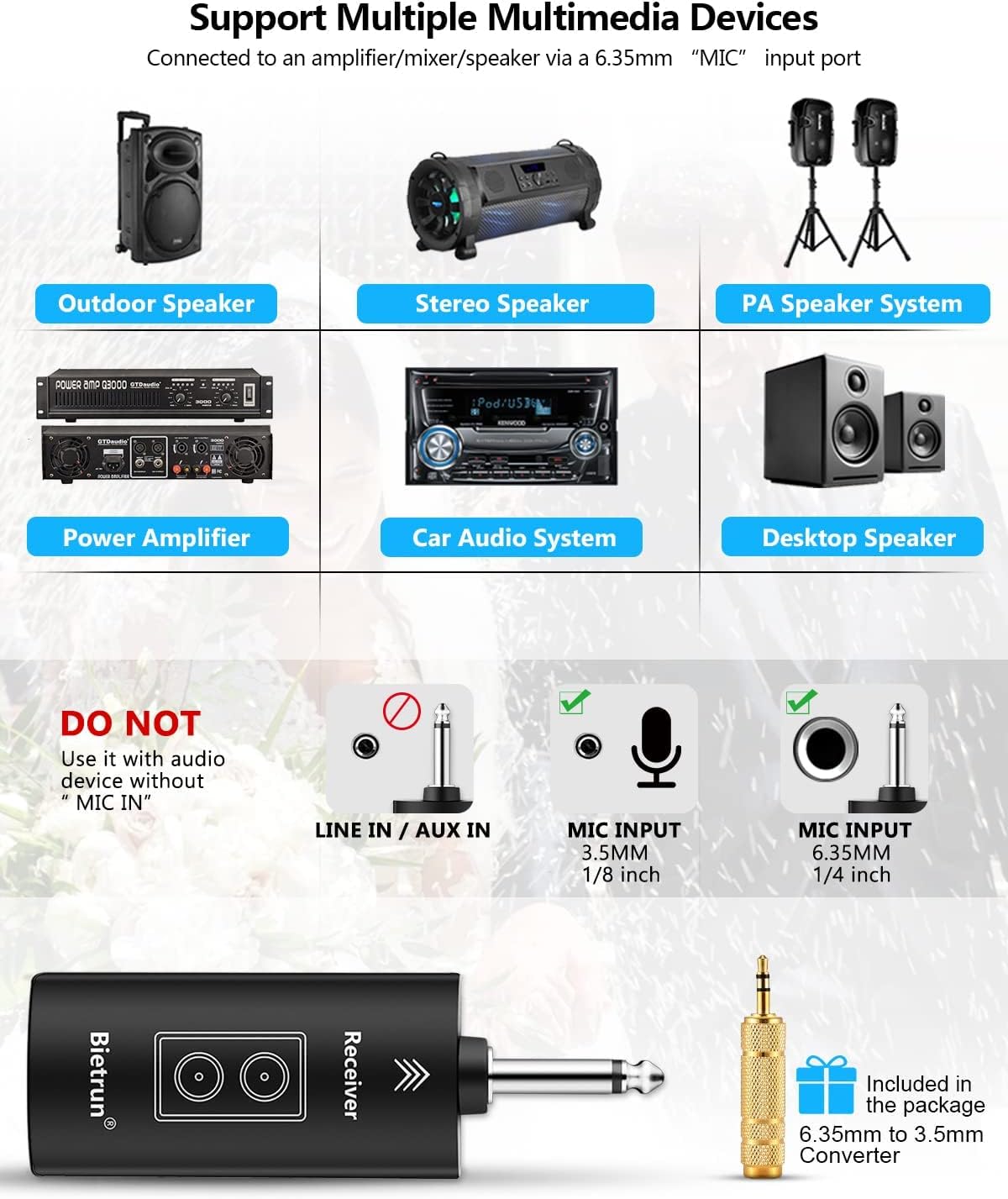
Image: A diagram illustrating compatible and incompatible audio input ports. It clearly shows that "LINE IN / AUX IN" ports are not supported, while "MIC INPUT 3.5mm (1/8 inch)" and "MIC INPUT 6.35mm (1/4 inch)" are supported. Various compatible devices like outdoor speakers, stereo speakers, and PA systems are also shown.
Operating Instructions
1. Adjusting Volume:
The "PWR·VOL" button at the bottom of the microphone also controls the volume. Short press this button to cycle through volume levels.
2. Changing Frequency Channel:
The microphone operates on the UHF frequency band and offers 15 adjustable channels. If you experience interference or are using multiple microphones simultaneously, you can change the channel:
- Locate the "CH" button near the charging port at the bottom of the microphone.
- Short press the "CH" button to cycle through the available channels. The channel number will be displayed on the microphone's screen.
- Ensure the microphone and receiver are on the same channel for optimal performance.

Image: A detailed view of the Bietrun WXM19A microphone highlighting its key features: Steel Meshed Head, LED Light Ring, Clear White Display, PWR·VOL button (for power and volume), and the Charge/Channel port (DC 5V IN and CH button).
3. Bluetooth Connectivity (Receiver):
The receiver features Bluetooth connectivity, allowing you to play music from your smartphone or other Bluetooth-enabled devices through your audio system for karaoke or background music.
- Ensure the receiver is turned on and plugged into your audio device.
- On your Bluetooth-enabled device (e.g., smartphone), search for Bluetooth devices.
- Select "Bietrun" from the list of available devices to pair.
- Once paired, you can play music through your audio system, and the microphone's sound will mix with it.

Image: An illustration demonstrating the wireless signal range of the Bietrun WXM19A. It shows a UHF distance of 168ft/50m in open spaces and a Bluetooth range of 32ft/10m. An iPhone screen is depicted, suggesting Bluetooth music playback.
Maintenance
- Cleaning: Use a soft, dry cloth to clean the microphone and receiver. Do not use abrasive cleaners or solvents.
- Storage: When not in use, store the microphone and receiver in the provided portable storage case to protect them from dust, moisture, and physical damage.
- Battery Care: To prolong battery life, avoid fully discharging the devices frequently. Recharge them regularly, especially if they will be stored for an extended period.
- Environmental Conditions: Avoid exposing the devices to extreme temperatures, direct sunlight, or high humidity.

Image: An overhead view of the open Bietrun WXM19A storage case, showing its interior compartments designed to securely hold the microphone and receiver. Dimensions are indicated: 10.3 inches length for the microphone slot, 2 inches width, and 1.5 inches depth.

Image: An angled view of the Bietrun WXM19A storage case, displaying its compact and portable design. Exterior dimensions are indicated: 11 inches length, 4 inches height, and 3.2 inches width.
Troubleshooting
| Problem | Possible Cause | Solution |
|---|---|---|
| No sound from microphone. |
|
|
| Sound is distorted or has static. |
|
|
| Bluetooth connection issues. |
|
|
Specifications
| Model Name | WXM19A |
| Brand | Bietrun |
| Connectivity Technology | UHF Wireless, Bluetooth |
| Microphone Type | Dynamic Cardioid |
| Frequency Band | UHF (US FCC Standard Frequency Band) |
| Wireless Range (UHF) | Up to 168ft / 50m (Open Place) |
| Bluetooth Range | Up to 32ft / 10m |
| Number of Channels | 15 (Adjustable) |
| Battery Capacity | 1200 mAh (Microphone & Receiver) |
| Charging Time | 3-4 hours |
| Working Time | Up to 7 hours |
| Connector Type | 6.35mm (1/4") Jack, 3.5mm (1/8") with adapter |
| Compatible Devices | Amplifier, Karaoke Machine, Laptop, Smartphone, Speaker, Tablet (with MIC IN) |
| Microphone Material | Alloy |
Warranty and Support
Bietrun products are designed for reliability and performance. For warranty information, technical support, or service inquiries, please refer to the contact information provided with your product packaging or visit the official Bietrun website. Keep your purchase receipt as proof of purchase for warranty claims.
For further assistance, you may contact Bietrun customer support through their official channels.


