
1. Introduction
This manual provides detailed instructions for the proper use and maintenance of your BAOFENG 5RX Handheld Ham Radio. Please read this manual thoroughly before operating the device to ensure safe and efficient communication.
2. Key Features
The BAOFENG 5RX is an advanced multi-band two-way radio designed for reliable communication. Key features include:
- Multi-Band Transmitting and Receiving capabilities.
- 128 Memory Channels for storing frequencies.
- 50 CTCSS and 210 DCS codes for enhanced privacy.
- SOS Emergency function.
- Scan function for active frequency monitoring.
- VOX (Voice Operated Exchange) for hands-free operation.
- Dual Band, Dual Display, and Dual Standby modes.
- Built-in Flashlight for illumination.
- Automatic Keypad Lock.
- FCC ID: 2AJGM-5RX.
- Support for Chirp programming software (compatible with UV-5RX).
- One-Key Frequency Match replication function for cloning nearby walkie-talkie frequencies.
- Multi-Band TX/RX: VHF (144-148MHz), VHF2 (1.25M), UHF (420-450MHz).
- Multi-Band Receiving: VHF (2M), VHF2 (1.25M), UHF (70CM), 220-260MHz, AM/FM full receiver.

Figure 2.1: Overview of BAOFENG UV-5RX Ham Radio features.

Figure 2.2: Detailed frequency bands for transmitting and receiving on the BAOFENG 5RX.

Figure 2.3: The BAOFENG 5RX supports AM/FM aviation band receiving.

Figure 2.4: Feature comparison between BAOFENG 5RX and UV-5R models.
3. Setup
3.1. Unpacking and Initial Inspection
Carefully unpack all components from the box. Verify that all items listed in the "What's in the Box" section are present and undamaged. If any items are missing or damaged, contact customer service.
- 2 x BAOFENG 5RX Ham Radio Handheld units
- 2 x 1800mAh Batteries
- 2 x Earpieces
- 2 x Desktop Chargers
- 2 x Belt Clips
- 2 x Hand Straps
- 2 x Standard Antennas
- 1 x User's Manual
3.2. Battery Installation and Charging
- Align the battery pack with the grooves on the back of the radio.
- Slide the battery pack upwards until it clicks into place.
- To remove, press the battery release latch and slide the battery downwards.
- Place the radio (with battery installed) into the desktop charger.
- Connect the desktop charger to a power outlet. The indicator light on the charger will show charging status (typically red for charging, green for fully charged).
- Charge the battery completely before first use (approximately 4-5 hours).
3.3. Antenna Attachment
Screw the antenna clockwise into the connector on the top of the radio until it is firmly seated. Do not overtighten.
3.4. Attaching Belt Clip and Hand Strap
Attach the belt clip to the back of the radio using the provided screws. Secure the hand strap to the designated loop on the radio for added security during use.

Figure 3.1: Back view of the BAOFENG 5RX, illustrating battery attachment area and FCC ID label.
4. Operation
4.1. Power On/Off and Volume Control
- To power on, rotate the volume knob clockwise until a click is heard.
- To power off, rotate the volume knob counter-clockwise until a click is heard.
- Adjust the volume by rotating the volume knob.
4.2. Channel Selection and Frequency Mode
- Press the VFO/MR button to switch between Frequency (VFO) mode and Channel (MR) mode.
- In Channel mode, use the Up/Down arrow keys or the keypad to select a memory channel.
- In Frequency mode, enter the desired frequency directly using the keypad.
4.3. Transmitting and Receiving
- To transmit, press and hold the PTT (Push-To-Talk) button on the side of the radio. Speak clearly into the microphone.
- Release the PTT button to receive.
4.4. One-Key Frequency Match (Copy Function)
This feature allows you to quickly copy the frequency of a nearby walkie-talkie.
- Turn on the radio and long-press the BAND button to activate the copy frequency function.
- Press the # button to switch between UHF or VHF frequency search.
- The radio will monitor and display the frequency and CTCSS/DCS codes when another radio transmits nearby.
- Press the MENU button to save the detected frequency and CTCSS/DCS to a channel.
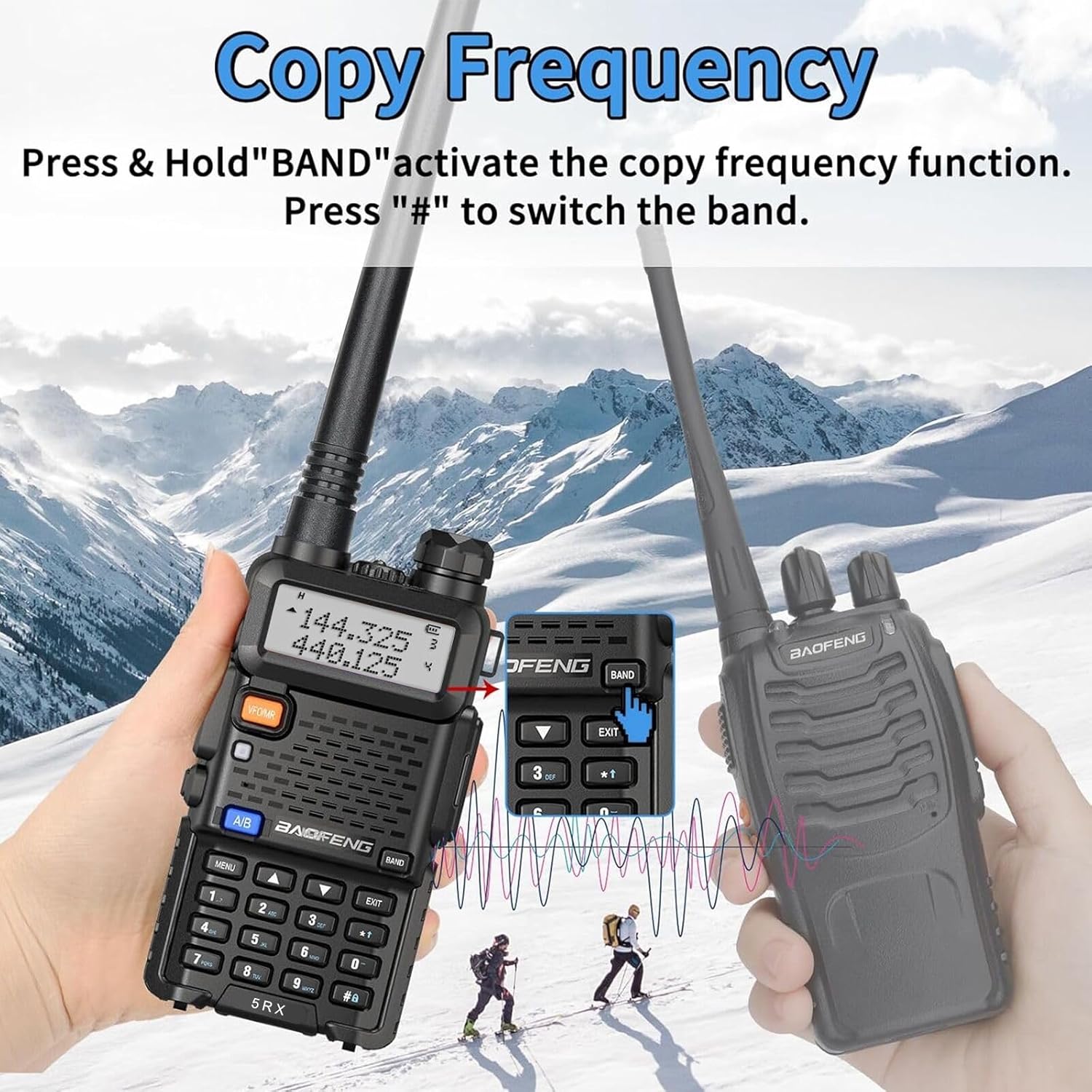
Figure 4.1: Visual guide for using the One-Key Frequency Match feature.
4.5. VOX Function
VOX enables voice-activated transmission without pressing the PTT button.
- To activate/deactivate VOX, navigate to the VOX setting in the menu and select your desired sensitivity level.
4.6. Scan Function
The scan function allows the radio to automatically search for active signals across programmed channels or a frequency range.
- Press the SCAN button (usually the * key) to start or stop scanning.
4.7. Built-in Flashlight
The radio includes a built-in LED flashlight for convenience in low-light conditions.
- To turn the flashlight on/off, refer to the specific button assignment in your radio's menu settings (often a short press of the MONI button or a dedicated side button).

Figure 4.2: The BAOFENG 5RX features a built-in flashlight for dark environments.
5. Maintenance
5.1. Cleaning
- Wipe the radio's surface with a soft, damp cloth. Do not use harsh chemicals or abrasive cleaners.
- Ensure the charging contacts on both the radio and the charger are clean and free of debris.
5.2. Battery Care
- Avoid overcharging or completely discharging the battery.
- If the radio will not be used for an extended period, remove the battery and store it in a cool, dry place.
- Replace batteries when their performance significantly degrades.
5.3. Storage
- Store the radio in a dry, dust-free environment away from direct sunlight and extreme temperatures.
- Keep the radio and accessories out of reach of children.
6. Troubleshooting
| Problem | Possible Cause | Solution |
|---|---|---|
| Radio does not power on. | Battery is low or not installed correctly. | Charge the battery or re-install it securely. |
| Cannot transmit or receive. | Incorrect frequency/channel, antenna not attached, or out of range. | Verify frequency/channel, ensure antenna is attached, move closer to other radios. |
| Poor audio quality. | Low battery, weak signal, or incorrect squelch setting. | Charge battery, move to an area with better signal, adjust squelch level. |
| Keypad is unresponsive. | Keypad lock is active. | Deactivate keypad lock (refer to menu for specific key combination). |
7. Specifications
| Feature | Detail |
|---|---|
| Model Number | BAOFENG 5RX |
| Item Weight | 1.81 pounds |
| Package Dimensions | 10.12 x 8.7 x 2.32 inches |
| Batteries | 2 Lithium Polymer batteries required (included) |
| Number of Channels | 128 |
| Frequency Range | VHF, 1.25M, UHF (Multi-Band TX/RX and AM/FM Reception) |
| Talking Range Maximum | 5 Kilometer |
| Voltage | 7.4 Volts |
| Water Resistance Level | Water Resistant |
8. Warranty & Support
8.1. Warranty Information
The BAOFENG 5RX Handheld Ham Radio comes with a 1-year limited warranty from the date of purchase. This warranty covers manufacturing defects and malfunctions under normal use. It does not cover damage caused by misuse, accidents, unauthorized modifications, or natural disasters.
Please retain your proof of purchase for warranty claims.
8.2. Customer Support
For any questions, technical assistance, or warranty claims, please contact BAOFENG customer service through the Amazon platform where the product was purchased. Our support team is dedicated to assisting you with any issues you may encounter.
We are committed to ensuring your satisfaction with our products.


