
1. Product Overview
The DROK DC-DC Buck-Boost Converter is a versatile power supply module designed for stable voltage and current regulation. It accepts an input voltage range of DC 6-36V and provides an adjustable output voltage from DC 0.5-36V, with an adjustable output current of 0-5A. The maximum output power is 90W, making it suitable for a wide array of applications requiring a stable power source.
This module features user-friendly plug-in terminals for easy installation and replacement. It incorporates a multi-functional operating interface with a built-in buzzer that provides audible feedback during key operations and alerts, ensuring quick awareness of status and potential issues.
Equipped with multiple protection functions, including reverse connection protection, reverse current protection, undervoltage protection, overvoltage protection, overcurrent protection, overtemperature protection, and overpower protection, this converter ensures safety and reliability across various uses. Its flexible output adjustment and broad input voltage compatibility make it ideal for laboratories, factories, educational institutions, and hobby projects.
2. Specifications
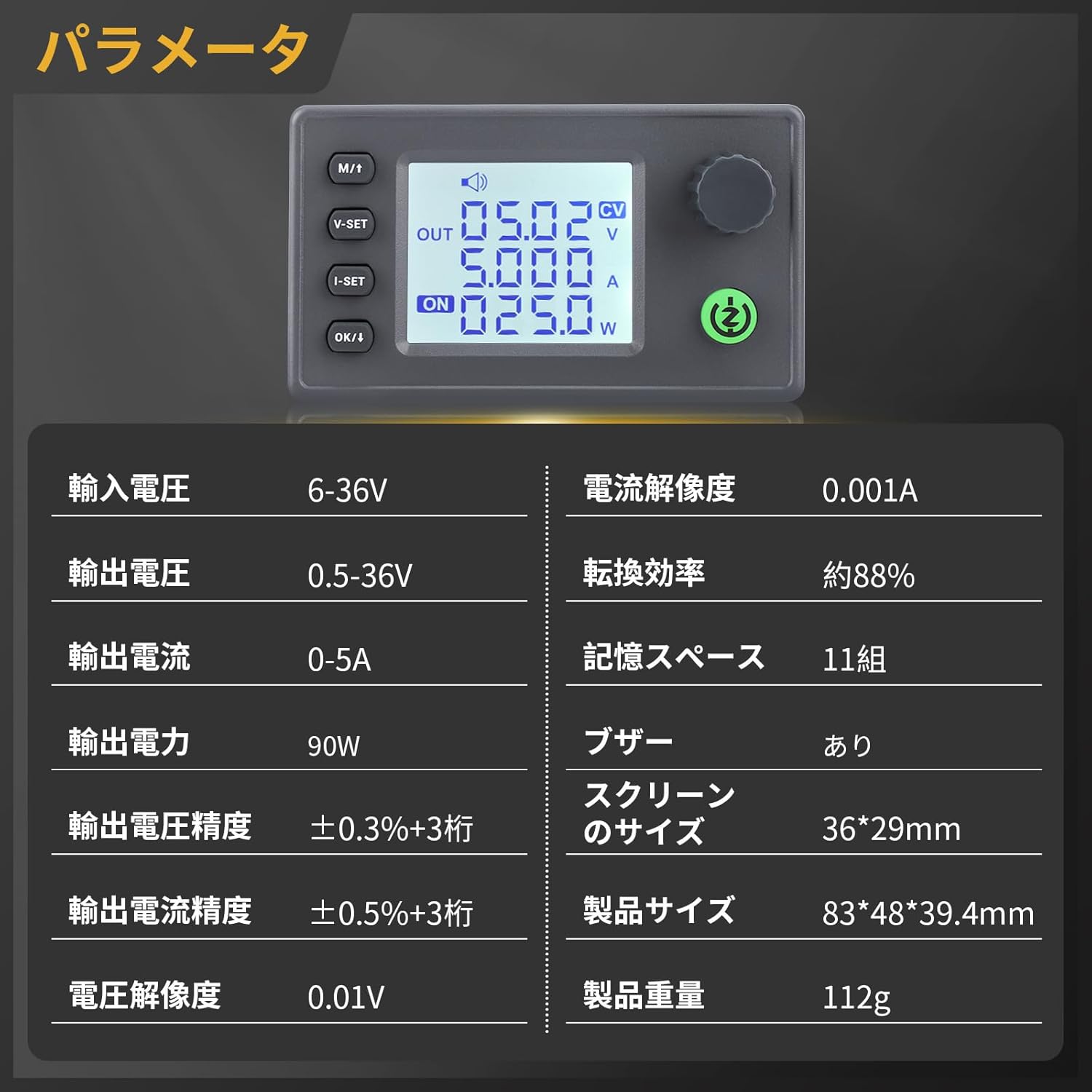
Image: Detailed specifications of the DROK DC-DC Buck-Boost Converter, including input/output voltage, current, power, and dimensions.
| Feature | Value |
|---|---|
| Brand | DROK |
| Product Size | 3 x 5 x 3 cm |
| Nameplate Name | 6-36V to 0.5-36V 0-5A 90W |
| Product Weight | 150 g |
| ASIN | B0CYZCHBDH |
| Input Voltage Range | DC 6-36V |
| Output Voltage Range | DC 0.5-36V |
| Output Current Range | 0-5A (Adjustable) |
| Output Power | 90W |
| Output Voltage Accuracy | ±0.3% + 3 digits |
| Output Current Accuracy | ±0.5% + 3 digits |
| Voltage Resolution | 0.01V |
| Current Resolution | 0.001A |
| Conversion Efficiency | Approx. 88% |
| Memory Space | 11 groups |
| Buzzer | Yes |
| Screen Size | 36 x 29 mm |

Image: Front, back, and side views with dimensions of the DROK DC-DC Buck-Boost Converter.
3. Setup
The DROK DC-DC Buck-Boost Converter is designed for straightforward setup. It features plug-in terminals for easy and secure wire connections.
3.1. Component Identification
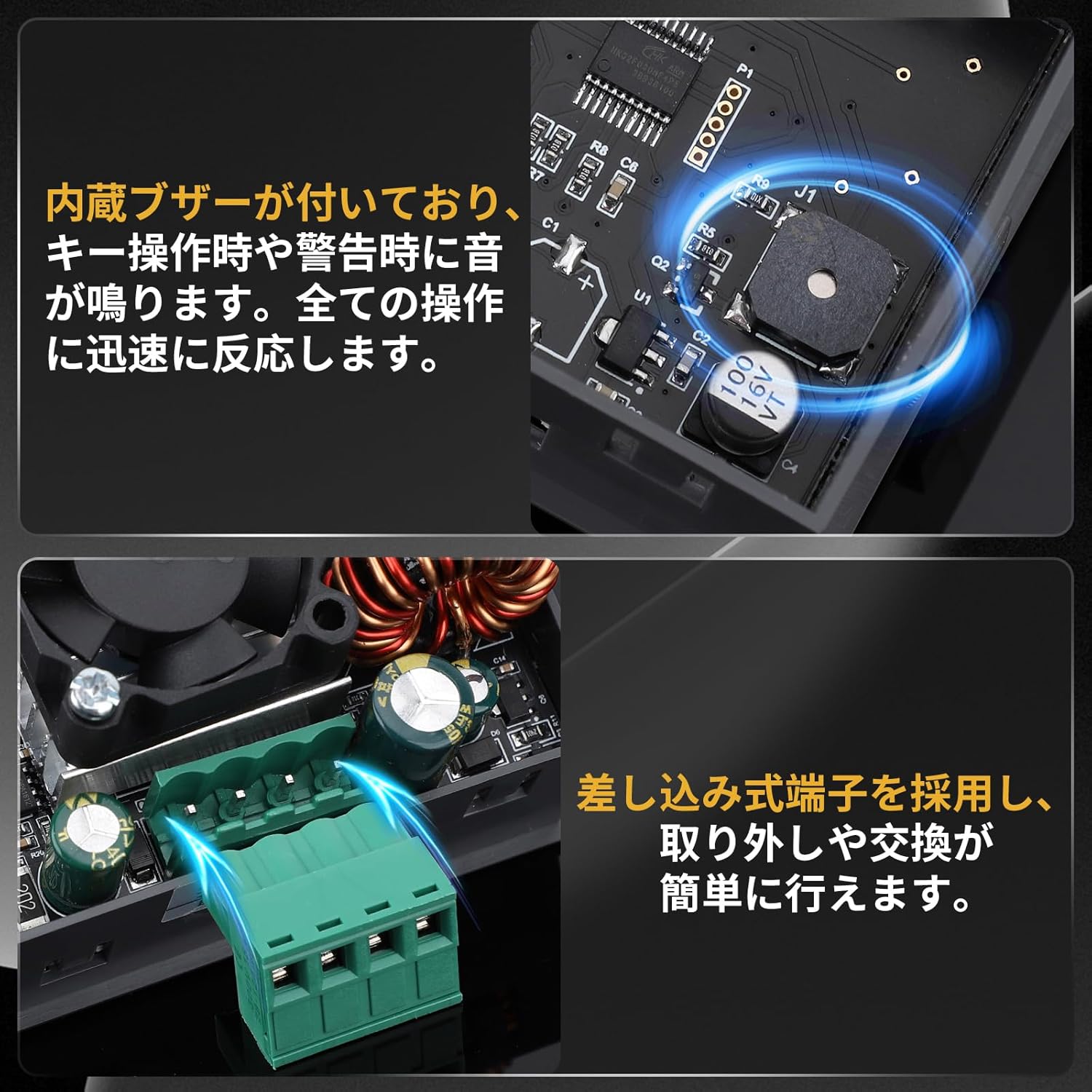
Image: Close-up view of the converter's internal components, including the built-in buzzer and the plug-in terminals for easy wiring.
3.2. Wiring Instructions
- Input Connection: Connect your DC power source (6-36V) to the 'IN+' and 'IN-' terminals. Ensure correct polarity.
- Output Connection: Connect your load to the 'OUT+' and 'OUT-' terminals.
- Secure Connections: Use the plug-in terminals to ensure all wires are securely fastened.
3.3. Assembly (if applicable)
If your converter came with an acrylic case, follow these steps for assembly:
Video: Assembly guide for a similar DROK buck-boost converter with an acrylic case. Note that the specific model in the video (50W, 3A) may differ slightly from your 90W, 5A model, but the assembly process is generally similar.
- Carefully remove the protective film from all acrylic case pieces.
- Attach the standoffs to the main circuit board.
- Align the acrylic panels with the board and secure them using the provided screws.
- Ensure all components are properly seated and the case is firmly assembled.
4. Operating Instructions
The converter features an intuitive LCD display and control buttons for easy operation.
4.1. Button Functions

Image: Illustration detailing the functions of the buttons and rotary encoder for voltage, current, and display settings.
- M/1 Button (Short Press): Toggles between input voltage and output voltage display.
- V-SET Button (Short Press): Enters voltage setting mode.
- I-SET Button (Short Press): Enters current setting mode.
- OK/I Button (Short Press): Toggles display of output power (W), capacity (Ah), energy (Wh), time (h), and temperature (°C).
- SW Button (Short Press): Toggles output ON/OFF.
- Rotary Encoder (Short Press): Enables/disables lock function.
- Rotary Encoder (Rotate): Adjusts numerical values (left to decrease, right to increase).
- Long Press M/1: Enters or exits the setting menu.
- Long Press SW: Enters sleep mode and shuts down.
4.2. LCD Display Modes

Image: Overview of the LCD display, showing input/output voltage, current, power, capacity, energy, time, and temperature. It also illustrates constant voltage (CV) and constant current (CC) modes.
- Input Voltage (IN): Displays the voltage supplied to the converter.
- Output Voltage (OUT): Displays the regulated output voltage.
- Output Current (A): Displays the current drawn by the load.
- Output Power (W): Displays the real-time output power.
- Capacity (Ah), Energy (Wh), Time (h), Temperature (°C): These values can be cycled through using the OK/I button.
- CV (Constant Voltage) / CC (Constant Current): Indicators show the active regulation mode.
- ON/OFF Status: Indicates whether the output is active.
4.3. Setting Output Voltage and Current
- Set Voltage: Short press the V-SET button. The voltage value on the display will flash. Rotate the rotary encoder to adjust the desired output voltage. Short press V-SET again to confirm.
- Set Current: Short press the I-SET button. The current value on the display will flash. Rotate the rotary encoder to adjust the desired output current limit. Short press I-SET again to confirm.
- Enable Output: After setting, short press the SW button to turn on the output. The 'ON' indicator will light up.
5. Protection Functions
The DROK Buck-Boost Converter is equipped with comprehensive protection features to ensure safe operation and prolong its lifespan:
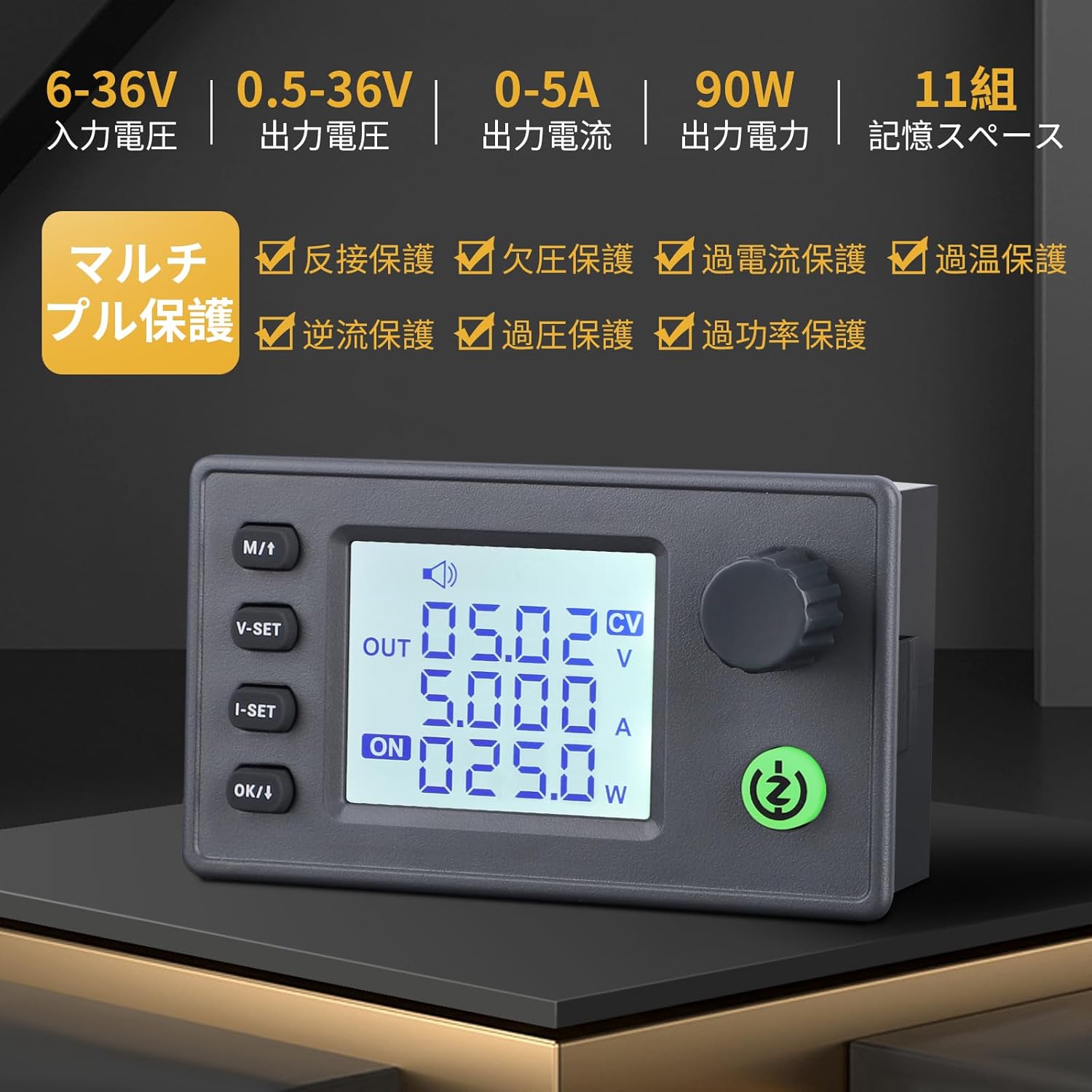
Image: Visual representation of the various protection functions, including reverse connection, reverse current, undervoltage, overvoltage, overcurrent, overtemperature, and overpower protection.
- Reverse Connection Protection: Protects the module from damage if input polarity is reversed.
- Reverse Current Protection: Prevents current from flowing back into the input source from the output.
- Undervoltage Protection: Shuts off output if input voltage drops below a safe threshold.
- Overvoltage Protection: Limits output voltage to prevent damage to the connected load.
- Overcurrent Protection: Limits output current to prevent damage to the module or load.
- Overtemperature Protection: Activates a fan or reduces output if the module's temperature exceeds safe limits.
- Overpower Protection: Limits output power to prevent exceeding the module's maximum capacity.
6. Maintenance
To ensure optimal performance and longevity of your DROK DC-DC Buck-Boost Converter, follow these general maintenance guidelines:
- Keep Clean: Regularly clean the module with a soft, dry cloth to prevent dust accumulation, especially on the heatsink and fan (if present).
- Proper Ventilation: Ensure the module is operated in a well-ventilated area to prevent overheating. Do not block the fan or heatsink.
- Inspect Connections: Periodically check all wiring connections to ensure they are secure and free from corrosion.
- Avoid Extreme Conditions: Do not expose the module to excessive moisture, extreme temperatures, or corrosive environments.
- Software Updates: While not typically applicable to this type of hardware, always check the manufacturer's website for any firmware updates if available for advanced models.
7. Troubleshooting
If you encounter issues with your DROK DC-DC Buck-Boost Converter, refer to the following common troubleshooting steps:
- No Output Voltage:
- Check if the input power source is connected correctly and providing voltage within the 6-36V range.
- Ensure the output is turned ON by pressing the SW button. The 'ON' indicator should be lit.
- Verify that the output voltage setting is not set to 0V.
- Check for any activated protection functions (e.g., overcurrent, undervoltage) indicated by the buzzer or display.
- Incorrect Output Voltage/Current:
- Re-enter the voltage (V-SET) and current (I-SET) setting modes and ensure the desired values are correctly set.
- Confirm that the input voltage is stable and sufficient for the desired output.
- Ensure the load is not drawing more current than the set limit or the module's maximum capacity.
- Buzzer Sounds Continuously:
- This indicates a warning or protection activation. Check the display for error messages (e.g., OVP, OCP, OTP).
- Identify the cause of the protection (e.g., short circuit, excessive load, high temperature) and rectify it.
- Display Not Working:
- Check input power.
- Ensure all connections are secure.
If the problem persists after following these steps, please contact customer support.
8. Warranty and Support
For warranty information, technical support, or any inquiries regarding your DROK DC-DC Buck-Boost Converter, please contact the seller, DROKING, directly through your purchase platform. Please have your product model and purchase details ready when contacting support.


