
1. Introduction
Thank you for choosing the HYCHIKA 450W Orbital Sander, Model TX106. This powerful and versatile tool is designed for efficient sanding of various materials, including wood and metal. Featuring a 450W pure copper motor and six adjustable speeds from 6000 to 12000 OPM (Orbits Per Minute), it provides precise control for different sanding tasks. The ergonomic design ensures comfortable operation, while the advanced dust collection system helps maintain a clean working environment. Please read this manual thoroughly before use to ensure safe and optimal performance.
2. General Safety Instructions
Always follow basic safety precautions when using electric tools to reduce the risk of fire, electric shock, and personal injury. Keep this manual for future reference.
- Work Area Safety: Keep your work area clean and well-lit. Cluttered or dark areas invite accidents. Do not operate power tools in explosive atmospheres, such as in the presence of flammable liquids, gases, or dust.
- Electrical Safety: Power tool plugs must match the outlet. Never modify the plug in any way. Avoid body contact with earthed or grounded surfaces such as pipes, radiators, ranges, and refrigerators.
- Personal Safety: Always wear eye protection. Use dust masks, non-skid safety shoes, hard hats, or hearing protection for appropriate conditions. Dress properly; avoid loose clothing or jewelry. Keep hair, clothing, and gloves away from moving parts.
- Tool Use and Care: Do not force the power tool. Use the correct power tool for your application. Disconnect the plug from the power source before making any adjustments, changing accessories, or storing power tools.
- Maintenance: Have your power tool serviced by a qualified repair person using only identical replacement parts. This will ensure that the safety of the power tool is maintained.
3. Product Components
Familiarize yourself with the parts of your HYCHIKA Orbital Sander TX106 before operation.
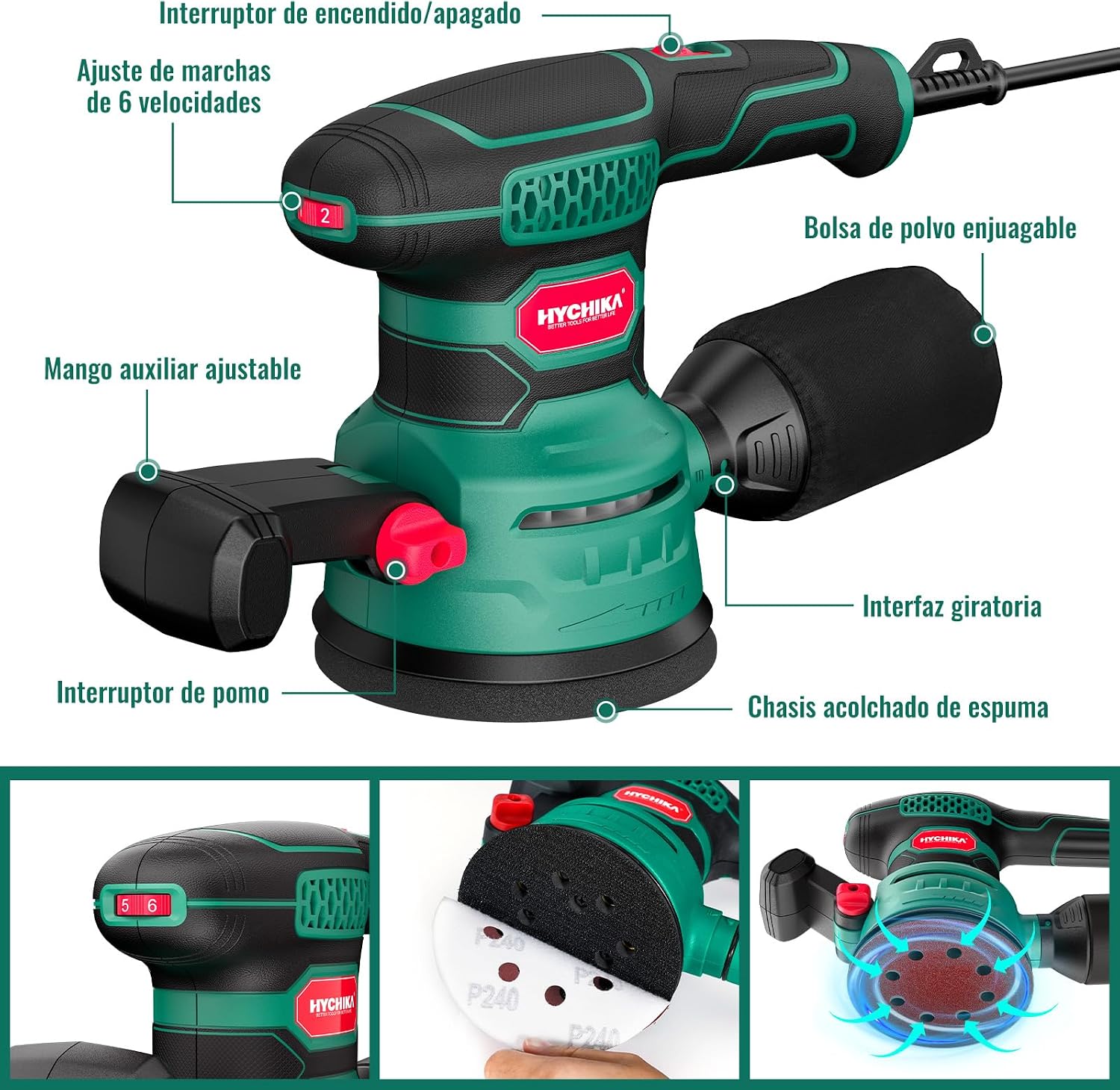
Figure 3.1: HYCHIKA Orbital Sander TX106 labeled components. This image shows the main body of the sander, highlighting key parts such as the On/Off switch, 6-speed adjustment dial, auxiliary handle, dust bag, rotating interface, and cushioned foam chassis.
- On/Off Switch: Controls the power to the sander.
- 6-Speed Adjustment Dial: Allows selection of sanding speed from 6000 to 12000 OPM.
- Auxiliary Handle: Provides additional grip and control during operation.
- Dust Bag: Collects dust generated during sanding. It is washable for easy maintenance.
- Rotating Interface: The base where sandpaper is attached.
- Cushioned Foam Chassis: Provides damping and helps prevent the sander from spinning too fast after shutdown.
4. Setup
4.1 Attaching Sandpaper
The HYCHIKA Orbital Sander uses 125mm (5-inch) 8-hole sandpaper with a hook and loop fastening system for quick and easy changes.

Figure 4.1: Included 125mm 8-hole sandpaper assortment. The sander comes with 20 pieces of sandpaper in various grits (P40, P80, P120, P180, P240) for different sanding requirements.
- Ensure the sander is unplugged from the power source.
- Select the appropriate grit sandpaper for your task. Coarser grits (P40, P80) are for heavy material removal, medium grits (P120) for smoothing, and finer grits (P180, P240) for finishing.
- Align the 8 holes on the sandpaper with the holes on the sander's rotating interface.
- Press the sandpaper firmly onto the hook and loop surface until it is securely attached.
4.2 Attaching the Dust Collection System
The sander offers two dust collection methods: an integrated dust bag or connection to an external vacuum cleaner.

Figure 4.2: Attaching the dust bag. This image illustrates the simple twist-and-lock mechanism for securing the dust bag to the sander's dust port.
- Using the Dust Bag: Slide the dust bag onto the dust collection port at the rear of the sander until it clicks into place. Ensure it is securely fastened to prevent dust leakage.
- Connecting to a Vacuum Cleaner: For enhanced dust collection, remove the dust bag and connect a compatible vacuum cleaner hose to the dust collection port. The sander is equipped with an interface for this purpose.
5. Operating Instructions
5.1 Powering On/Off and Speed Adjustment
- Plug the sander into a suitable power outlet (230V).
- Use the 6-speed adjustment dial to select the desired OPM. Lower speeds (6000 OPM) are suitable for delicate work or polishing, while higher speeds (12000 OPM) are for rapid material removal.
- To turn on the sander, press the On/Off switch. To turn it off, press the switch again.

Figure 5.1: Power switch and speed adjustment dial. This image highlights the red power button and the speed selection dial, indicating how to control the sander's operation.
5.2 Sanding Techniques
Hold the sander firmly with both hands, utilizing the ergonomic main handle and the auxiliary handle for optimal control.

Figure 5.2: Sander in operation. This collage shows the HYCHIKA Orbital Sander being used on different materials like painted wood, raw wood, and metal, demonstrating its versatility.
- Place the sander flat on the workpiece before turning it on.
- Apply light, even pressure. Let the sander do the work; excessive pressure can reduce efficiency and damage the surface.
- Move the sander in smooth, overlapping passes across the surface. Avoid holding it in one spot for too long to prevent gouging.
- For best results, sand with the grain of the wood when possible.
- When finished, lift the sander from the workpiece before turning it off. The integrated brake function will quickly stop the pad's rotation.

Figure 5.3: Before and after sanding results. This image displays a comparison of a wooden surface before and after being sanded with the HYCHIKA Orbital Sander, illustrating the smooth finish achieved.
6. Maintenance
6.1 Cleaning the Dust Bag
Regularly empty and clean the dust bag to maintain optimal dust collection efficiency.

Figure 6.1: Dust collection system in action. This image shows the sander in operation, highlighting the integrated dust collection port and the effectiveness of the system.
- Unplug the sander from the power source.
- Remove the dust bag from the dust collection port.
- Empty the collected dust into a waste receptacle.
- The dust bag is washable. Clean it with water and allow it to dry completely before reattaching.
6.2 Replacing Sandpaper
Replace sandpaper when it becomes worn or clogged to ensure effective sanding.
- Ensure the sander is unplugged.
- Peel off the old sandpaper from the hook and loop pad.
- Follow the steps in Section 4.1 to attach new sandpaper.
6.3 General Cleaning
Periodically clean the exterior of the sander and ensure ventilation openings are clear.

Figure 6.2: Cooling and ventilation system. This diagram illustrates the internal airflow designed to cool the motor and prevent overheating during extended use.
- Use a soft, damp cloth to wipe down the tool. Do not use harsh chemicals or abrasive cleaners.
- Use compressed air to clear dust from ventilation slots to prevent overheating.
7. Troubleshooting
If you encounter issues with your HYCHIKA Orbital Sander, refer to the following common problems and solutions.
| Problem | Possible Cause | Solution |
|---|---|---|
| Sander does not turn on. | No power supply; faulty switch; damaged cord. | Check power outlet and cord. Ensure switch is fully engaged. If problem persists, contact customer support. |
| Poor sanding performance. | Worn or incorrect sandpaper; excessive pressure; clogged dust bag. | Replace sandpaper. Use appropriate grit. Apply light, even pressure. Empty dust bag. |
| Excessive vibration or noise. | Loose sandpaper; damaged sanding pad; internal component issue. | Ensure sandpaper is securely attached. Inspect sanding pad for damage. If severe, discontinue use and contact support. |
| Ineffective dust collection. | Full or improperly attached dust bag; clogged dust port. | Empty and reattach dust bag correctly. Clear any blockages in the dust port. |
8. Specifications
| Feature | Specification |
|---|---|
| Brand | HYCHIKA BETTER TOOLS FOR BETTER LIFE |
| Model Number | TX106 |
| Power | 450W |
| Voltage | 230 Volts |
| Power Source | Corded Electric |
| Max Rotation Speed | 12000 RPM (Orbits Per Minute) |
| Speed Settings | 6 speeds (6000-12000 OPM) |
| Product Weight | 1.5 Kilograms |
| Product Dimensions (L x W x H) | 28 x 12.5 x 18 centimeters |
| Sandpaper Diameter | 125mm (5 inch) |
| Sandpaper Hole Count | 8 holes |
| Included Items | 1x 450W Orbital Sander, 20x Sandpaper (various grits) |
| Country of Origin | China |
| GTIN | 615272914360 |
9. Warranty and Support
HYCHIKA products are manufactured to high-quality standards. For information regarding warranty coverage, technical support, or replacement parts, please refer to the warranty card included with your product or contact HYCHIKA customer service directly. Contact details can typically be found on the official HYCHIKA website or through your retailer.
10. Video Resources
No official product videos from the seller were available for embedding based on the provided data. Please check the manufacturer's website or product page for any available video tutorials or demonstrations.


