
Mastech GL-MS6252D
MASTECH MS6252D Digital Anemometer User Manual
Model: GL-MS6252D
Introduction
This manual provides comprehensive instructions for the safe and effective operation of the MASTECH MS6252D Digital Anemometer. Please read this manual thoroughly before using the device and retain it for future reference.
The MS6252D is a versatile digital anemometer designed for measuring wind speed, air volume, ambient temperature, and humidity. It features a wireless interface for convenient data transfer and a clear display with backlight for easy readability.
Product Overview

Figure 1: Front view of the MS6252D Digital Anemometer, showing the impeller, LCD display, and control buttons.
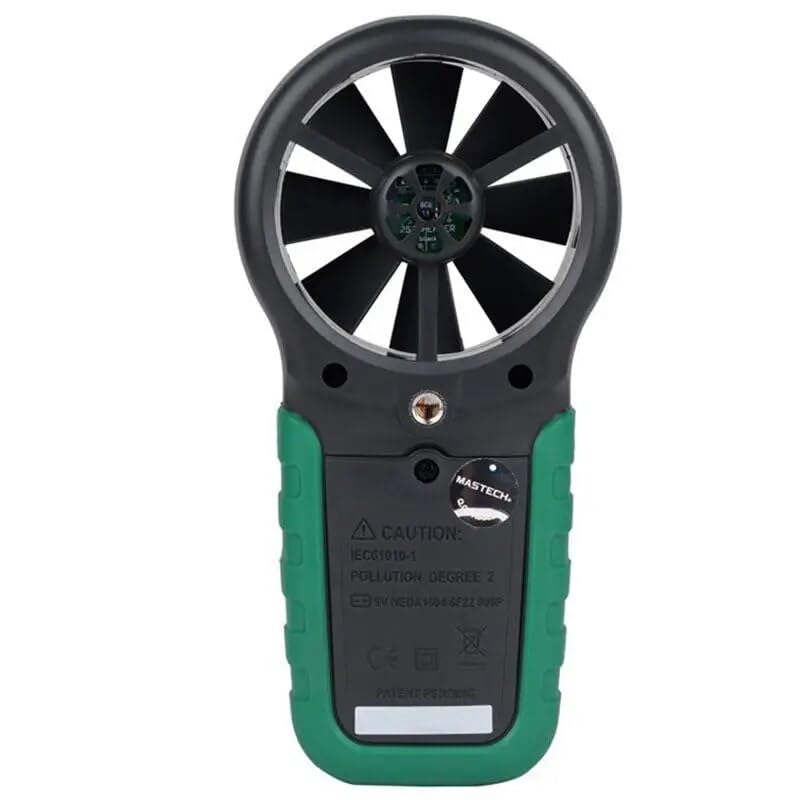
Figure 2: Back view of the MS6252D Digital Anemometer, showing the battery compartment cover.
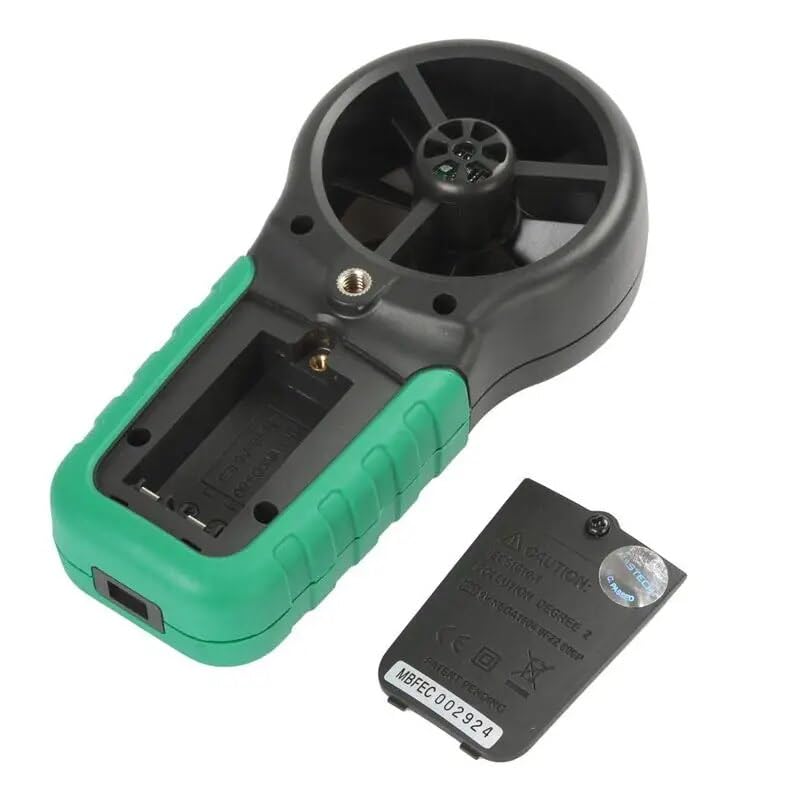
Figure 3: Back view of the MS6252D Digital Anemometer with the battery compartment open, revealing the battery slot.
Key Features:
- Display 9999 counts for precise readings.
- Automatic Power Off function to conserve battery life.
- Adjustable Flow Area Setting for accurate air volume calculations.
- MAX / MIN measurement modes to capture extreme values.
- Data Hold function to freeze current readings on the display.
- Display Backlight for improved visibility in low-light conditions.
- Low Battery Display indicator.
- Selectable temperature units (℃/℉).
- Measurement of Ambient temperature, Dew Point, and Wet Bulb temperature.
- Wireless Interface for data connectivity.
Setup
Battery Installation:
- Locate the battery compartment on the back of the device.
- Use a small screwdriver to open the battery compartment cover.
- Insert 2 LR44 batteries, ensuring correct polarity (+/-).
- Replace the battery compartment cover and secure it with the screw.
Initial Power On:
Press the POWER button to turn on the device. The display backlight will illuminate, and the device will perform a self-test before entering measurement mode.
Operating Instructions
Measuring Wind Speed:
Hold the anemometer so that the impeller faces directly into the airflow. The wind speed will be displayed on the LCD. Use the UNIT button to cycle through different units (m/s, km/h, ft/s, Knots, mile/h, ft/m).
Measuring Air Volume:
To measure air volume (CFM, CMM, CMS), you must first set the flow area. Refer to the 'Flow Area Setting' section for detailed instructions. Once the area is set, the device will calculate and display the air volume based on the measured wind speed.
Temperature and Humidity Measurement:
The device automatically measures ambient temperature and humidity. Press the FUNC button to cycle through Ambient Temperature, Dew Point, and Wet Bulb temperature displays. Use the ℃/℉ button to switch between Celsius and Fahrenheit.
MAX/MIN and Data Hold:
- Press MAX/MIN once to display the maximum recorded value. Press again for the minimum value. Press a third time to exit MAX/MIN mode.
- Press HOLD to freeze the current reading on the display. Press HOLD again to release and resume live measurements.
Display Backlight:
Press the LIGHT button to turn the display backlight on or off. The backlight will automatically turn off after a period of inactivity to save power.
Maintenance
Cleaning:
Wipe the device with a soft, damp cloth. Do not use abrasive cleaners or solvents. Ensure the impeller is free from dust and debris for accurate readings.
Battery Replacement:
When the low battery indicator appears on the display, replace the batteries as described in the 'Battery Installation' section. Dispose of old batteries responsibly.
Storage:
If the device will not be used for an extended period, remove the batteries to prevent leakage. Store the anemometer in a cool, dry place, away from direct sunlight and extreme temperatures.
Troubleshooting
| Problem | Possible Cause | Solution |
|---|---|---|
| Device does not power on. | Dead or incorrectly installed batteries. | Check battery polarity or replace batteries. |
| Inaccurate readings. | Impeller obstructed or dirty; incorrect flow area setting. | Clean the impeller; verify and adjust flow area setting. |
| Display is dim or blank. | Low battery; backlight off. | Replace batteries; press the LIGHT button to activate backlight. |
| Wireless connection issues. | Out of range; interference; software issue. | Move closer to the receiver; check for sources of interference; restart device and software. |
Specifications
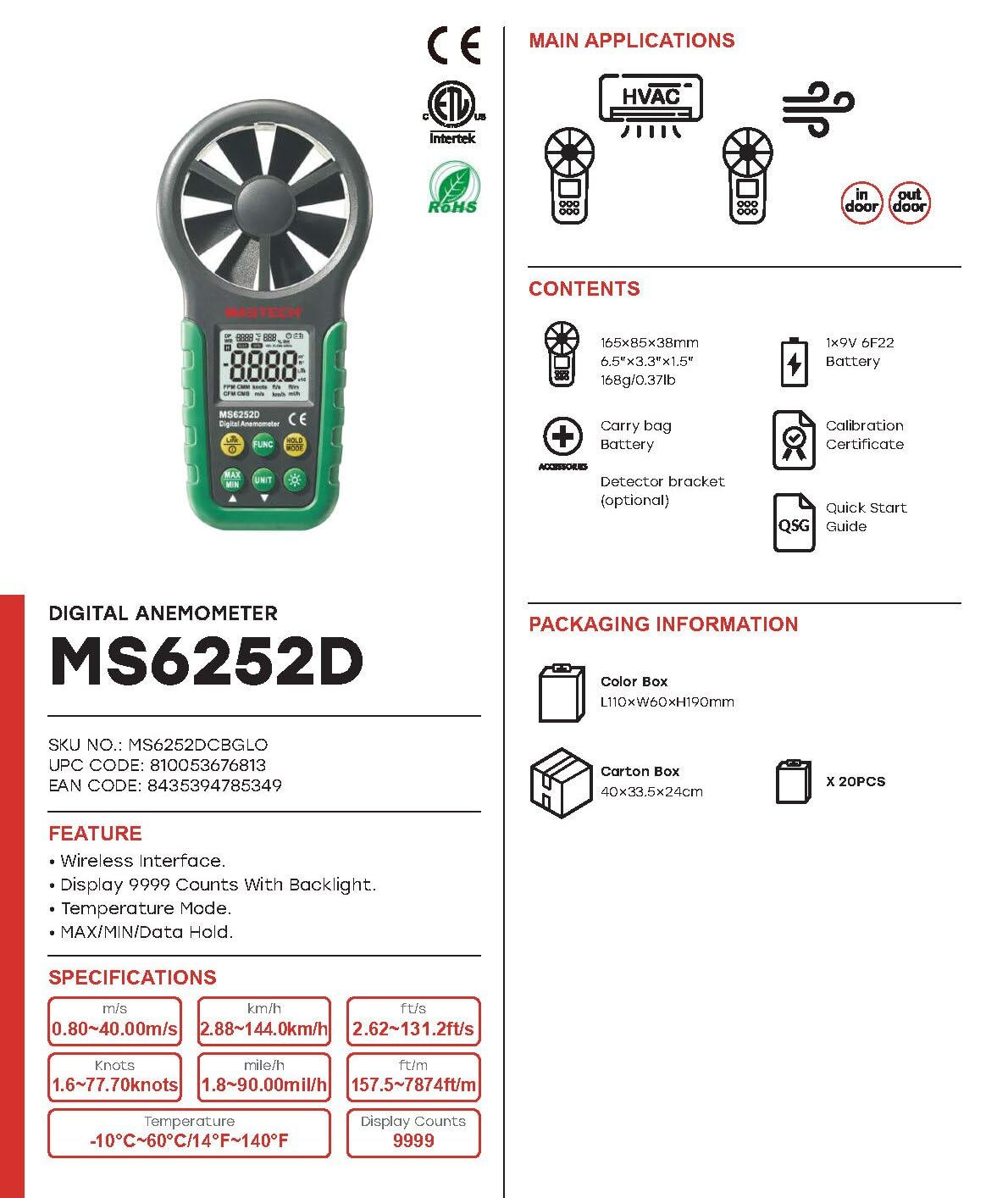
Figure 4: Overview of MS6252D features, specifications, and included accessories.

Figure 5: Detailed technical specifications including measurement ranges, resolutions, and accuracies.
| Parameter | Value |
|---|---|
| Model Number | GL-MS6252D |
| Display Counts | 9999 |
| Power Source | 2 x LR44 Batteries (included) |
| Product Dimensions (L x W x H) | 6.3 x 3.54 x 1.97 inches |
| Item Weight | 0.5 Kilograms (1.1 Pounds) |
| Material | Acrylonitrile Butadiene Styrene (ABS) |
| Temperature Range | -10℃ to 60℃ (14℉ to 140℉) |
| Wind Speed Range (m/s) | 0.80 ~ 30.00 m/s |
| Wind Speed Range (km/h) | 2.88 ~ 108.0 km/h |
| Wind Speed Range (ft/s) | 2.62 ~ 98.50 ft/s |
| Wind Speed Range (Knots) | 1.6 ~ 58.30 knots |
| Wind Speed Range (mile/h) | 1.8 ~ 90.00 mile/h |
| Wind Speed Range (ft/m) | 157.5 ~ 5900 ft/m |
| Relative Humidity Range | 20-80% RH |
| Interface | Wireless |
Warranty and Support
MASTECH/MGL provides a 1-year EU Spare Part Availability Duration for this product. For technical support, warranty claims, or service inquiries, please contact your local distributor or visit the official MASTECH website.
Please retain your purchase receipt as proof of purchase for warranty purposes.
Ask a question about this manual
Ask about setup, troubleshooting, compatibility, parts, safety, or missing instructions. Manuals+ will review the question and use this page’s manual context to help answer it.