
1. Introduction
This manual provides detailed instructions for the installation, operation, and maintenance of the Tomzn TOVPD1-80-EC Adjustable Over/Under Voltage and Over Current Protection Device. This device is designed to protect electrical appliances and circuits from damage caused by voltage fluctuations and excessive current. Please read this manual thoroughly before use to ensure safe and correct operation.
2. Safety Information
- Installation must be performed by a qualified electrician.
- Ensure the power supply is disconnected before installation or maintenance.
- Do not operate the device in wet conditions or with wet hands.
- Verify that the device's specifications match your electrical system requirements.
- Keep children away from electrical installations.
3. Product Overview
3.1. Key Functions
- Over-voltage protection
- Under-voltage protection
- Over-current protection
- Automatic recovery
- Real-time voltage display
- Real-time current display
- Adjustable voltage calibration (±10%)
- Factory reset function
- Error inquiry function
3.2. Device Components
The device features a digital display for voltage and current, indicator lights for protection status, and control buttons for settings adjustment.
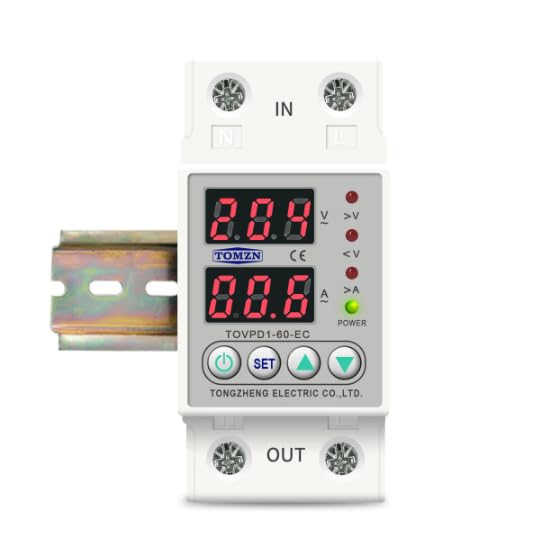
Figure 1: Front view of the Tomzn TOVPD1-80-EC protection device. Note: The image displays model TOVPD1-60-EC, but the instructions apply to the TOVPD1-80-EC model with an 80 Ampere rating.
The device includes input terminals (IN) and output terminals (OUT) for electrical connections, along with a power indicator and status LEDs for over-voltage (>V), under-voltage (<V), and over-current (>A).
4. Installation
The TOVPD1-80-EC device is designed for DIN rail mounting (35mm). Follow these steps for proper installation:
- Power Disconnection: Before starting, ensure the main power supply to the circuit is completely disconnected to prevent electrical shock.
- Mounting: Snap the device onto a standard 35mm DIN rail in your electrical panel.
- Wiring:
- Connect the incoming live (L) and neutral (N) wires from the power source to the "IN" terminals of the device.
- Connect the outgoing live (L) and neutral (N) wires to the load (appliances/circuit) from the "OUT" terminals of the device.
- Ensure all connections are tight and secure.
- Verification: Double-check all wiring connections for correctness and security.
- Power Restoration: Restore power to the circuit. The device will power on and display the current voltage and current readings.
5. Operating Instructions and Settings
The device displays real-time voltage and current. Use the control buttons to adjust protection parameters.
5.1. Button Functions
- Power Button: Turns the device ON/OFF (if applicable, or for display cycling).
- SET Button: Enters/exits setting mode and cycles through parameters.
- Up Arrow Button (▲): Increases parameter values.
- Down Arrow Button (▼): Decreases parameter values.
5.2. Adjusting Parameters
To adjust a parameter:
- Press the SET button to enter the setting mode. The first parameter will flash.
- Press SET repeatedly to cycle through the available parameters (e.g., Over-voltage protection threshold, Under-voltage protection threshold, Over-current protection threshold, recovery delays, etc.).
- When the desired parameter is flashing, use the ▲ (Up) and ▼ (Down) buttons to adjust its value.
- After setting the value, wait a few seconds for the device to automatically save the setting and exit the setting mode, or press SET again to move to the next parameter.
5.3. Parameter Ranges and Default Values (for 220V/80A model)
| Parameter | Adjustable Range | Default Value |
|---|---|---|
| Over-voltage Protection (UVP) | 230V ~ 300V (OFF) | 270V |
| Over-voltage Recovery (UVR) | 225V ~ 295V | 250V |
| UVP Action Time | 0.1s ~ 30s | 0.5s |
| UVP Recovery Delay | 1s ~ 500s | 30s |
| Under-voltage Protection (LVP) | 140V ~ 210V (OFF) | 170V |
| Under-voltage Recovery (LVR) | 145V ~ 215V | 190V |
| LVP Action Time | 0.1s ~ 30s | 0.5s |
| LVP Recovery Delay | 1s ~ 500s | 30s |
| Over-current Protection (OCP) | 1A ~ 80A (adjustable) | 40A (Note: Default may vary based on specific model variant.) |
| OCP Action Time | 0.1s ~ 30s | 0.5s |
| OCP Recovery Delay | 1s ~ 500s | 30s |
| Power-on Delay Time | 1s ~ 500s | 10s |
Note: The over-current adjustment range is inferred to be up to 80A for the TOVPD1-80-EC model, although the provided description mentions 40A and 63A variants. Always refer to the specific markings on your device.
5.4. Factory Reset
To restore the device to its factory default settings, press and hold the ▼ (Down) button for more than 12 seconds. The display will indicate a reset.
5.5. Error Inquiry
To inquire about past error events, press and hold the ▲ (Up) button for more than 12 seconds. The device will display error codes or logs if available.
6. Maintenance
- Regularly inspect the device for any signs of physical damage or loose connections.
- Keep the device clean and free from dust. Use a dry, soft cloth for cleaning.
- Do not use abrasive cleaners or solvents.
- Ensure proper ventilation around the device to prevent overheating.
7. Troubleshooting
| Problem | Possible Cause | Solution |
|---|---|---|
| Device not powering on | No power supply; incorrect wiring; internal fault. | Check main power supply. Verify wiring connections. If problem persists, contact support. |
| Device trips frequently | Protection thresholds set too low; actual voltage/current exceeds limits. | Adjust protection parameters (UVP, LVP, OCP) to appropriate levels. Check load for faults. |
| Display shows error code | Internal error or specific fault detected. | Refer to the error inquiry function (Section 5.5) for details. If unknown, contact support. |
| Device does not recover automatically | Automatic recovery feature disabled or recovery delay too long. | Ensure automatic recovery is enabled in settings. Check recovery delay times. |
8. Specifications
| Feature | Value |
|---|---|
| Model Number | TOVPD1-80-EC |
| Rated Current | 80 Ampere |
| Power Source | 220V AC 50/60Hz (Nominal) |
| Over-voltage Protection Range | 230V ~ 300V (OFF) |
| Under-voltage Protection Range | 140V ~ 210V (OFF) |
| Over-current Adjustment Range | 1A ~ 80A |
| Power Consumption | <2W |
| Electrical Life | 100,000 times |
| Installation Type | DIN Rail Mount (35mm) |
| Dimensions (L x W x H) | 9.3 x 7.8 x 4.5 cm |
| Weight | 200 grams |


