
1. Introduction
Welcome to the user manual for your new Simfer H 9050 DEBSP 90 cm Built-in Electric Cooktop. This manual provides essential information for the safe and efficient installation, operation, maintenance, and troubleshooting of your appliance. Please read these instructions carefully before using the cooktop and keep them for future reference.
2. Safety Information
Your safety and the safety of others are paramount. Please observe the following safety precautions:
- Electrical Safety: Ensure the cooktop is connected to a properly grounded electrical outlet by a qualified electrician. Do not use adapter plugs or extension cords. Disconnect power before any maintenance or cleaning.
- Heat Safety: The ceramic surface and cooking zones become very hot during operation and remain hot for some time after use. Avoid touching hot surfaces. Use oven mitts or pot holders.
- Child Safety: Keep children away from the cooktop during operation and when it is cooling down. Never allow children to operate the appliance.
- Proper Use: Use the cooktop only for its intended purpose of cooking food. Do not use it as a work surface or for storage.
- Ventilation: Ensure adequate ventilation around the cooktop as specified in the installation instructions.
- Cleaning: Always allow the cooktop to cool completely before cleaning. Use only recommended cleaning agents and methods.
3. Product Overview
The Simfer H 9050 DEBSP is a 90 cm built-in electric cooktop featuring a sleek black ceramic surface and five high-efficiency cooking zones. It is designed for seamless integration into your kitchen countertop.
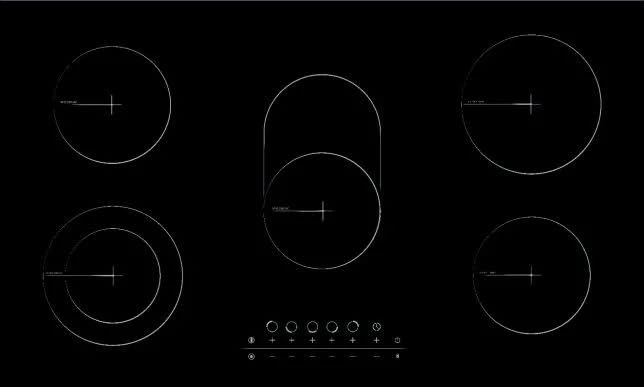
Image 1: Front view of the Simfer H 9050 DEBSP 90 cm Built-in Electric Cooktop, showcasing its black ceramic surface and touch controls.
Key Features:
- 5 Ceramic Cooking Zones
- Touch Control Panel
- Black Ceramic Glass Surface
- Residual Heat Indicator for each zone
- Easy to Clean Design
4. Setup and Installation
Installation of this built-in electric cooktop must be performed by a qualified technician or electrician in accordance with local regulations and standards. Incorrect installation can lead to electric shock, fire, or damage to the appliance.
Pre-Installation Checks:
- Verify that the power supply voltage (220-240V) and frequency (50/60Hz) match the cooktop's requirements.
- Ensure the countertop cutout dimensions are appropriate for the cooktop (approximately 90 cm width x 60 cm depth).
- Confirm that there is sufficient ventilation space beneath and around the cooktop.
Installation Steps (for Qualified Personnel):
- Prepare the countertop cutout according to the provided template (if applicable) or specified dimensions.
- Carefully place the cooktop into the cutout, ensuring it sits flush with the countertop.
- Secure the cooktop using the provided mounting brackets.
- Connect the cooktop to the main electrical supply using appropriate wiring and terminals. Ensure proper grounding.
- Perform a functional test to ensure all cooking zones and controls operate correctly.
5. Operating Instructions
This section guides you through the basic operation of your Simfer electric cooktop.
Turning On/Off:
- To turn on the cooktop, press and hold the main power button (ON/OFF symbol) for a few seconds. The display will light up.
- To turn off the cooktop, press and hold the main power button again.
Selecting a Cooking Zone and Adjusting Heat:
- Place a suitable pot or pan on the desired cooking zone.
- Touch the corresponding zone selection button on the control panel.
- Use the '+' and '-' touch controls to adjust the heat level from 1 (low) to 9 (high). The selected heat level will be displayed.
- To turn off a specific zone, select the zone and reduce the heat level to '0' or press the zone's power button (if available).
Residual Heat Indicator:
After a cooking zone is turned off, an 'H' symbol may appear in the display. This indicates that the zone is still hot due to residual heat. Do not touch the surface while the 'H' symbol is displayed. This heat can be used to keep food warm or for gentle simmering.
6. Cleaning and Maintenance
Regular cleaning and proper maintenance will ensure the longevity and optimal performance of your cooktop.
General Cleaning:
- Always ensure the cooktop is completely cool before cleaning.
- Wipe the ceramic surface with a soft cloth or sponge and warm soapy water.
- For stubborn stains, use a specialized ceramic hob cleaner. Follow the product instructions.
- Rinse thoroughly and dry with a clean cloth to prevent water spots.
Important Notes:
- Do not use abrasive cleaners, scouring pads, or harsh chemicals, as these can scratch or damage the ceramic surface.
- Immediately clean up spills, especially sugary liquids, to prevent them from burning onto the surface and causing permanent damage.
- Avoid dropping heavy or sharp objects on the ceramic surface, as this can cause cracks or breakage.
7. Troubleshooting
Before contacting customer service, please refer to the following common issues and their potential solutions:
| Problem | Possible Cause | Solution |
|---|---|---|
| Cooktop does not turn on. | No power supply; power button not pressed correctly. | Check circuit breaker/fuse. Ensure power button is pressed and held for a few seconds. |
| Cooking zone not heating. | Zone not selected; heat level set to '0'; incorrect cookware. | Ensure the correct zone is selected and heat level is set above '0'. Use flat-bottomed cookware suitable for electric hobs. |
| Cooktop displays 'E' or error code. | Internal fault; sensor error. | Turn off the cooktop at the main power supply for a few minutes, then turn it back on. If the error persists, contact customer service. |
| Cooktop makes unusual noises. | Normal expansion/contraction of materials; fan noise (if applicable). | Some noises are normal during heating and cooling. If the noise is loud or unusual, contact customer service. |
If the problem persists after attempting these solutions, please contact Simfer customer service or a qualified service technician.
8. Specifications
Detailed technical specifications for the Simfer H 9050 DEBSP Built-in Electric Cooktop:
| Feature | Specification |
|---|---|
| Brand | Simfer |
| Model Number | H9050DEBSP |
| Product Type | Built-in Electric Cooktop |
| Number of Cooking Zones | 5 |
| Control Type | Touch Control |
| Surface Material | Ceramic Glass |
| Color | Black |
| Installation Type | Built-in |
| Product Dimensions (H x D x W) | 7 cm x 60 cm x 90 cm |
| Voltage | 220-240V |
| Frequency | 50/60 Hz |
| Item Weight | 29 kg |
| Country of Manufacture | Turkey |
9. Warranty and Support
Your Simfer H 9050 DEBSP Built-in Electric Cooktop comes with a manufacturer's warranty to cover any defects in materials or workmanship.
Warranty Information:
- Warranty Period: This product is covered by a three-year warranty from the date of purchase, provided by the authorized agent.
- Coverage: The warranty covers manufacturing defects and malfunctions under normal household use. It does not cover damage caused by improper installation, misuse, accidents, unauthorized repairs, or normal wear and tear.
- Claim Process: To make a warranty claim, please retain your proof of purchase and contact the authorized Simfer service center in your region.
Customer Support:
For technical assistance, spare parts, or service inquiries, please refer to the contact information provided with your purchase documentation or visit the official Simfer website for your region. When contacting support, please have your model number (H9050DEBSP) and serial number ready.


