
Black Shark S1 Pro
Contents
Black Shark S1 Pro Smartwatch User Manual
Model: S1 Pro
Brand: Black Shark
Introduction
Welcome to the Black Shark S1 Pro Smartwatch user manual. This guide provides detailed instructions on how to set up, operate, and maintain your new smartwatch. The Black Shark S1 Pro is designed to enhance your daily life with advanced features such as AI chatbot support, comprehensive health monitoring, and a wide array of sports modes, all presented on a vibrant AMOLED display with exceptional battery life.

Image: Front view of the Black Shark S1 Pro Smartwatch, showcasing its hexagonal design and vibrant display.
What's in the Box
Upon opening the package, please ensure all the following items are present:
- 1 x Smartwatch
- 1 x Magnetic Charger
- 1 x User Manual
- 1 x Packaging Box

Image: The Black Shark S1 Pro Smartwatch, its magnetic charger, and packaging box laid out.
Setup Guide
1. Charging the Smartwatch
Before first use, fully charge your Black Shark S1 Pro. Connect the magnetic charger to the charging points on the back of the watch and plug the USB end into a power adapter (not included) or a computer's USB port.
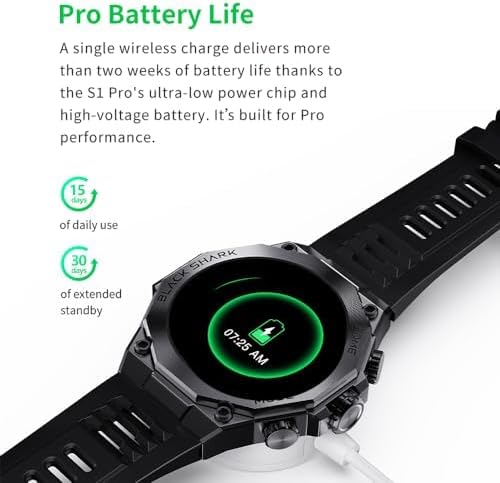
Image: The Black Shark S1 Pro Smartwatch placed on its magnetic charging dock.
2. Pairing with Your Smartphone
- Download the official Black Shark app from your smartphone's app store (iOS or Android).
- Ensure Bluetooth is enabled on your smartphone.
- Open the Black Shark app and follow the on-screen instructions to search for and connect to your S1 Pro Smartwatch.
- Confirm the pairing request on both your phone and the smartwatch.
Operating Instructions
Navigation
- Touchscreen: Swipe left, right, up, or down to navigate through menus and notifications. Tap to select items.
- Side Buttons: The S1 Pro features physical buttons for quick access to functions like Home and Mode. Refer to the watch face for specific button labels.
Key Functions
- Accessing Features: From the watch face, swipe to access quick settings, notifications, and app lists.
- Making Calls: Once paired, you can answer or make calls directly from your smartwatch.
- Music Control: Control music playback on your smartphone from the watch.
Features Overview
1.43" AMOLED Display
Experience vivid visuals and pristine clarity on the Black Shark S1 Pro's 1.43-inch HD AMOLED screen. With a resolution of 466*466, a 60Hz refresh rate, 326PPI, 16.7 million colors, and 600nit brightness, your display will be clear and vibrant in any environment.
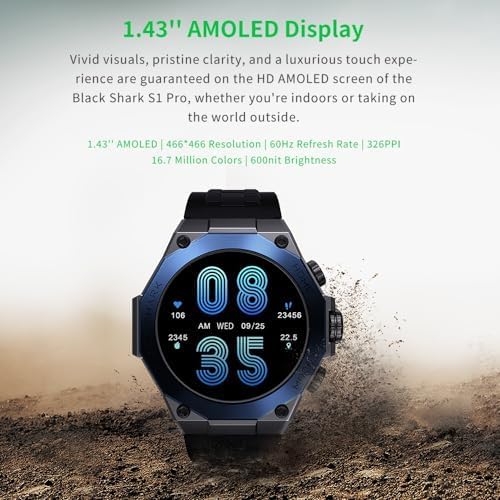
Image: The Black Shark S1 Pro Smartwatch display highlighting its AMOLED features and specifications.
AI Chatbot Support (ChatGPT)
The S1 Pro integrates an artificial intelligence chatbot, making information retrieval easier than ever. Ask any question, random or serious, and receive instant answers directly on your wrist.

Image: A visual representation of the AI chatbot interface on the Black Shark S1 Pro, showing example questions.
Gaming Health Monitoring Mode
Activate the dedicated game mode to monitor your heart rate and stress levels during intense gaming sessions. This feature allows you to stay focused on your game while the S1 Pro keeps track of your health metrics.
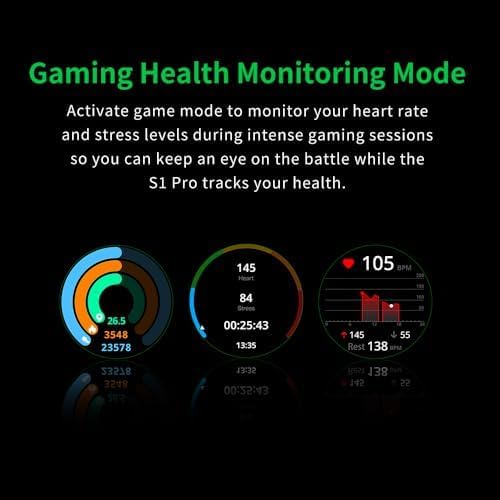
Image: Screenshots of the Black Shark S1 Pro's gaming health monitoring mode, displaying heart rate, stress, and activity data.
15-Day Battery Life
Thanks to its ultra-low power chip and high-voltage battery, a single wireless charge provides over two weeks of battery life, ensuring professional performance and extended usage without frequent recharging.
Image: The Black Shark S1 Pro Smartwatch on its charging dock, illustrating its long battery life capability.
100+ Sports Modes
Push your limits with over 100 different workout modes. The Black Shark S1 Pro accurately tracks your performance whether you are running, jumping, or engaging in strength training, providing comprehensive data for your fitness journey.

Image: A person wearing the Black Shark S1 Pro Smartwatch during an outdoor activity, with icons representing various sports modes.
IP68 Water Resistance
The S1 Pro boasts an IP68 waterproof rating, allowing you to dive into any sporting scenario without fear. It is resistant to dust and can withstand immersion in water up to 1.5 meters for 30 minutes.

Image: A person's arm with the Black Shark S1 Pro Smartwatch being splashed with water, demonstrating its water resistance.
Customizable Watch Faces
Personalize your Black Shark S1 Pro with over 150 watch faces to choose from, or customize your own to suit your mood and style.

Image: A collage of various digital and analog watch faces available for the Black Shark S1 Pro Smartwatch.
Maintenance
- Cleaning: Regularly wipe the watch and strap with a soft, damp cloth. For stubborn dirt, use a mild soap solution and rinse thoroughly. Ensure the watch is dry before charging.
- Storage: Store the smartwatch in a cool, dry place away from direct sunlight and extreme temperatures.
- Avoid Chemicals: Do not use harsh chemicals, cleaning solvents, or strong detergents, as they may damage the watch's finish or internal components.
Troubleshooting
| Problem | Possible Cause | Solution |
|---|---|---|
| Watch does not turn on | Low battery; System crash | Charge the watch for at least 30 minutes. If still unresponsive, perform a forced restart (refer to app for specific instructions). |
| Cannot pair with phone | Bluetooth off; App issue; Watch not discoverable | Ensure Bluetooth is on. Restart both phone and watch. Reinstall the Black Shark app. Ensure watch is in pairing mode. |
| Inaccurate health data | Improper fit; Sensor obstruction | Ensure the watch is worn snugly on your wrist. Clean the sensors on the back of the watch. |
| Short battery life | Frequent use of power-intensive features; Background apps | Reduce screen brightness, disable always-on display, limit notifications, close unnecessary background apps. |
Specifications
| Feature | Detail |
|---|---|
| Brand | Black Shark |
| Model Number | S1 |
| Operating System | Wear OS |
| Screen Size | 1.43 Inches |
| Display Type | AMOLED |
| Connectivity | Bluetooth |
| Special Features | GPT Chat Support, Gaming Health Monitoring Mode, IP68 Waterproof, 100+ Sports Modes, 15-day Battery Life |
| Compatible Devices | Smartphone, Tablet |
| Battery Type | Lithium-ion |
| Rechargeable Battery | Yes |
| GPS | Integrated GPS |
| Shape | Round |
| Memory Storage Capacity | 32 GB |
Warranty and Support
The Black Shark S1 Pro Smartwatch comes with a manufacturer's warranty of 3 months from the date of purchase. Additionally, a 30-day return policy is available through the retailer.
For technical support, troubleshooting assistance, or warranty claims, please contact Black Shark customer service or refer to the official Black Shark website for updated support information.
Online Resources:
- Official Black Shark Website: global.blackshark.com
- Amazon Store Page: Black Shark Amazon Store
Documents and downloads
Ask a question about this manual
Ask about setup, troubleshooting, compatibility, parts, safety, or missing instructions. Manuals+ will review the question and use this page’s manual context to help answer it.