1. Introduction
This manual provides essential information for the installation, operation, maintenance, and troubleshooting of your Super Flower Leadex VII XP PRO 850W power supply. Designed for high-performance computing systems, this power supply unit (PSU) offers exceptional efficiency and reliability.
The Leadex VII XP PRO 850W is fully compatible with Intel ATX 3.1 and PCIe 5.0 specifications, ensuring support for modern components, including graphics cards with 12VHPWR connectors. It features a full modular design with flexible ribbon cables for optimized cable management and airflow within your PC chassis.

Figure 1: Front and side view of the Super Flower Leadex VII XP PRO 850W Power Supply.
2. Key Features
- 80 PLUS Platinum Certified: Achieves 90%, 92%, and 89% efficiency at 20%, 50%, and 100% rated load respectively.
- Cybenetics Platinum Certified: Ensures high overall efficiency (89% <91% at 115V input, 91% <93% at 230V input).
- Intel ATX 3.1 & PCIe 5.0 Ready: Compliant with the latest standards, supporting up to 200% power excursion and featuring native 12VHPWR (2x8pin-16pin) cables for next-generation graphics cards.
- Full Modular Design: All cables are detachable, allowing for clean builds and improved airflow. Ultra-flexible ribbon cables are included.
- Universal SUPER CONNECTOR: Patented 9-pin connectors on the modular panel allow flexible connection of CPU, PCI-E, and peripheral cables to any 9-pin socket.
- 140mm F.D.B Fan: Features a Fluid Dynamic Bearing fan with a unique blade design for high airflow, stable cooling, and minimal noise (dBA).
- ECO-design Fan Control: Offers both automatic and ECO fan control modes, allowing the fan to remain off at low loads for silent operation.
- 100% Japanese 105°C Capacitors: Utilizes high-quality Japanese capacitors on the main board and modular back panel for enhanced durability and stable power delivery.
- Comprehensive Protection: Includes Over Voltage Protection (OVP), Over Current Protection (OCP), Over Power Protection (OPP), Short Circuit Protection (SCP), Under Voltage Protection (UVP), Over Temperature Protection (OTP), No Load Operation (NLO), and Surge & Inrush Protection.
- Tight Voltage Regulation: Maintains stable DC output (+12V/+5V/+3.3V) within ±0.5%.
3. Setup and Installation
Before beginning installation, ensure your computer system is powered off and disconnected from the main power outlet. Refer to your PC case and motherboard manuals for specific installation guidelines.
3.1. Physical Installation
- Carefully place the Super Flower Leadex VII XP PRO 850W PSU into the designated power supply bay of your PC case.
- Secure the PSU to the case using the provided screws. Ensure it is firmly mounted to prevent vibration.
3.2. Cable Connections
The Leadex VII XP PRO 850W features a fully modular design. Connect only the necessary cables for your system components. Utilize the patented Universal SUPER CONNECTORS for flexible cable routing.

Figure 2: Modular panel showing various connection ports for CPU, PCIe, SATA, and the Universal Super Connectors.
- 20+4 Pin ATX Cable: Connect the main ATX cable to your motherboard. Ensure both the 20-pin and 4-pin sections are securely latched.
- CPU (EPS) Cables: Connect the 4+4 pin or 8-pin CPU cables to the corresponding ports on your motherboard.
- PCIe Cables (Graphics Cards):
- For traditional graphics cards, use the 6+2 pin PCIe cables.
- For next-generation graphics cards requiring 12VHPWR, use the native 2x8pin-16pin cable. Ensure the 16-pin connector is fully inserted into the graphics card's socket to prevent potential issues.
- SATA Cables: Connect SATA power cables to your SSDs, HDDs, and optical drives.
- Peripheral (Molex) Cables: Connect Molex cables for older peripherals or case fans if needed.
After connecting all necessary cables, organize them neatly to improve airflow and aesthetics within your case.
4. Operating Instructions
4.1. Powering On/Off
- Once all components are connected, plug the AC power cord into the PSU's power inlet and then into a wall outlet.
- Locate the main power switch on the back of the PSU (Figure 3) and flip it to the 'ON' (I) position.
- Power on your computer using the case's power button.
- To power off, shut down your operating system, then flip the main power switch on the PSU to the 'OFF' (O) position.
4.2. Fan Control (ECO Mode)
The Leadex VII XP PRO 850W features an ECO-design fan control switch, allowing you to choose between two fan modes:
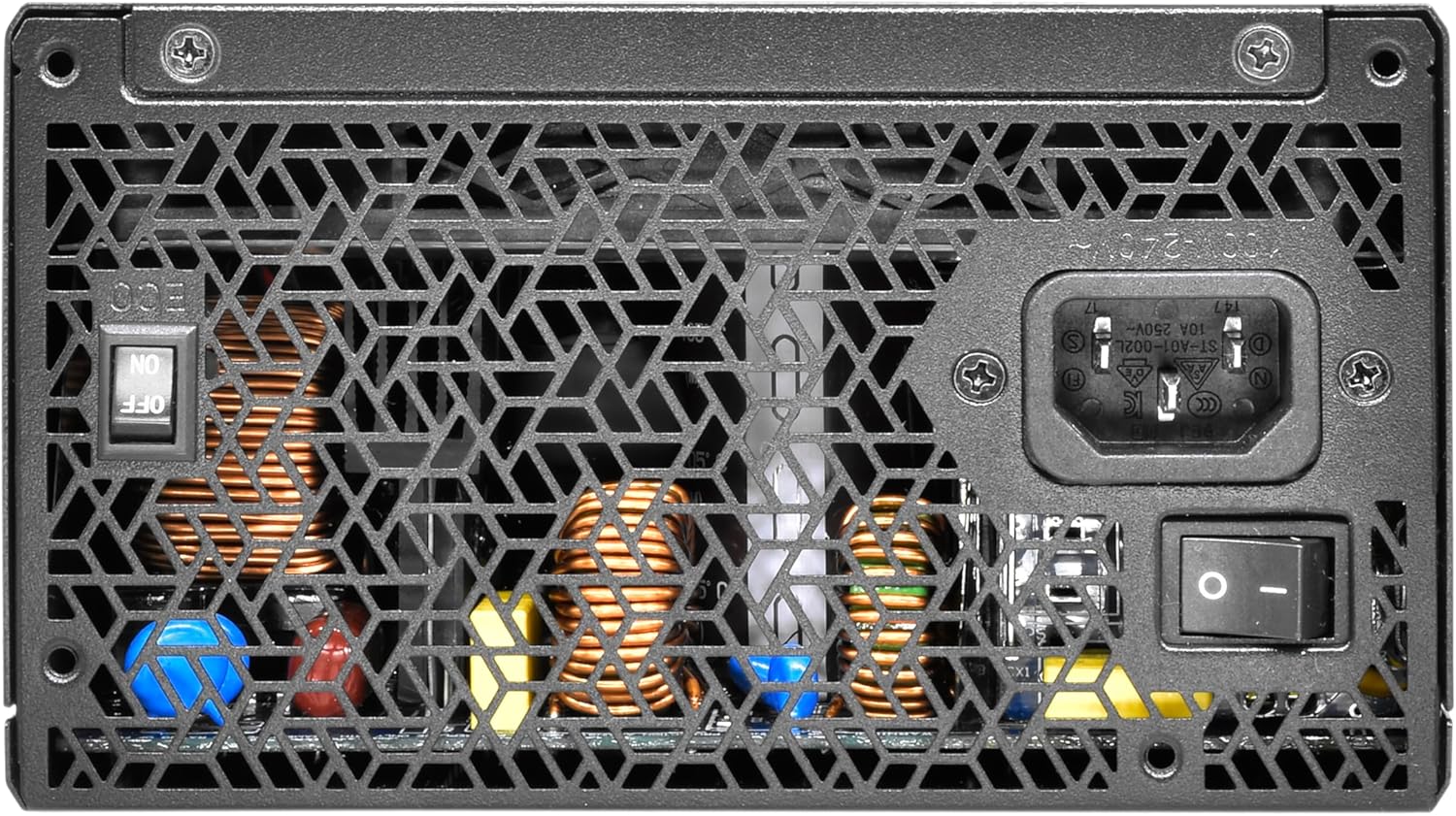
Figure 3: Rear view of the power supply, highlighting the main power switch and the ECO fan control switch.
- ECO Mode (Switch ON): In this mode, the 140mm F.D.B fan will not operate when the PSU is under low load (typically below 30% of its maximum capacity), providing silent operation. The fan will automatically start spinning when the load increases or internal temperature rises.
- Normal Mode (Switch OFF): The fan will operate continuously, adjusting its speed based on the PSU's temperature and load. This mode ensures constant airflow through the unit.
Select the mode that best suits your preference for noise levels and cooling performance.
5. Maintenance
Regular maintenance helps ensure the longevity and optimal performance of your power supply.
- Dust Removal: Periodically clean the exterior of the PSU and the fan grille using compressed air or a soft brush to remove dust buildup. Excessive dust can impede cooling and reduce efficiency.
- Ventilation: Ensure adequate airflow around the PSU. Do not block the intake or exhaust vents.
- Cable Inspection: Occasionally check all modular cable connections to ensure they are secure and free from damage.
6. Troubleshooting
If you encounter issues with your power supply, refer to the following common troubleshooting steps:
- No Power:
- Verify the AC power cord is securely plugged into both the PSU and the wall outlet.
- Ensure the main power switch on the PSU is in the 'ON' (I) position.
- Check the power outlet by plugging in another device.
- Confirm all modular cables (especially the 20+4 pin ATX and CPU cables) are correctly and fully seated.
- System Instability/Crashes:
- Ensure your PSU wattage is sufficient for all your components, especially high-power graphics cards.
- Check all power connections to components, particularly PCIe cables to graphics cards, ensuring they are fully inserted.
- Monitor system temperatures to rule out overheating.
- Fan Not Spinning (ECO Mode):
- If the ECO switch is ON, the fan is designed not to spin under low loads. This is normal operation.
- If the fan does not spin even under high load or with the ECO switch OFF, contact customer support.
- Unusual Noises:
- A slight coil whine can sometimes occur under specific loads; this is generally not indicative of a fault.
- If you hear grinding or loud fan noises, inspect the fan for obstructions or contact customer support.
If issues persist after following these steps, please contact Super Flower customer support for further assistance.
7. Specifications
Detailed technical specifications for the Super Flower Leadex VII XP PRO 850W (SF-850F14XP).
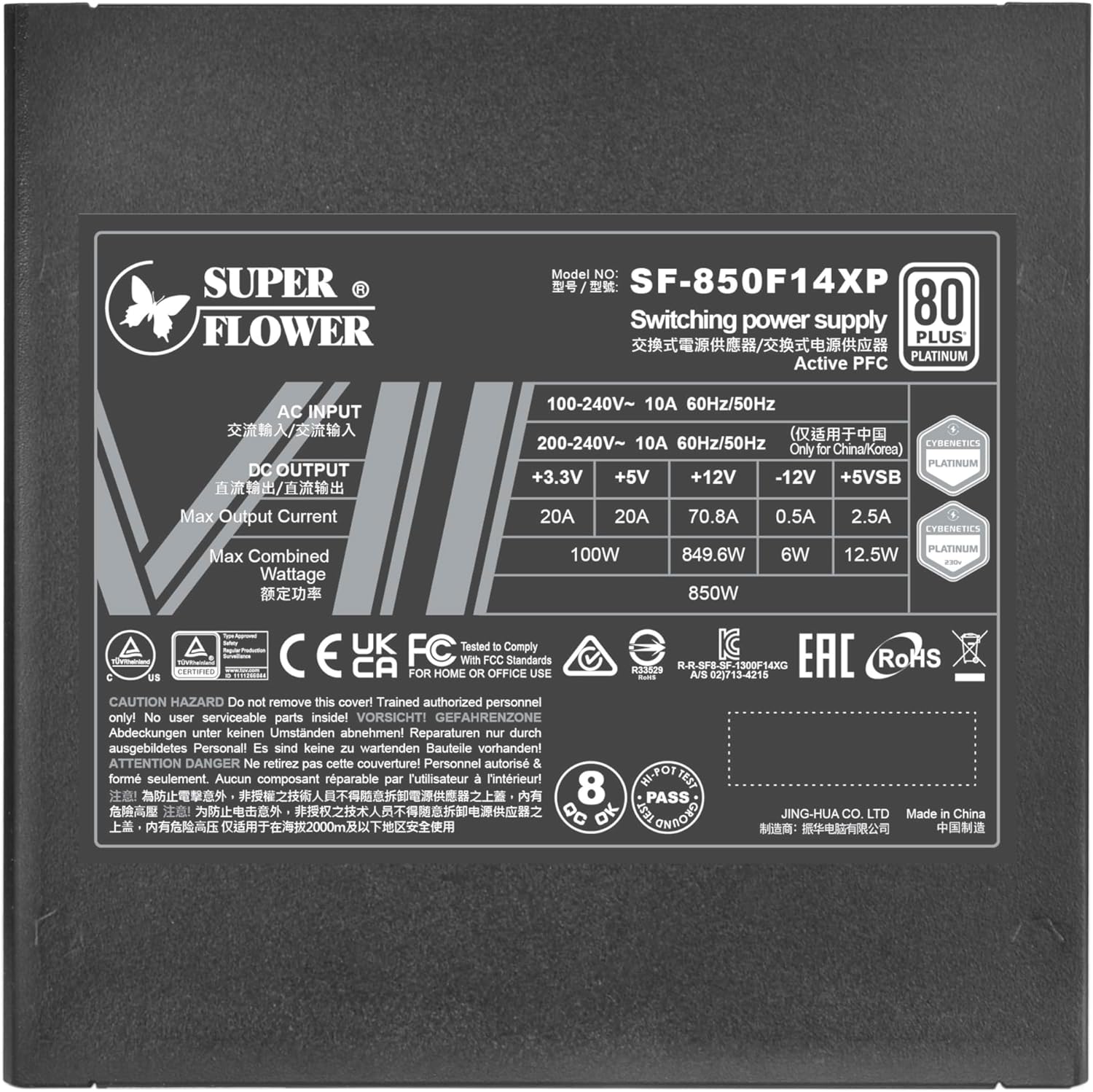
Figure 4: Product label displaying detailed electrical specifications.
| Feature | Detail |
|---|---|
| Brand | SUPER FLOWER |
| Series | Leadex VII XP ATX 3.1 850W |
| Model Number | SF-850F14XP |
| Output Wattage | 850 Watts |
| 80 PLUS Certification | Platinum (90% 92% 89% Efficiency At 20% 50% 100% Rated Load) |
| Cybenetics Certification | Platinum (89% & <91% overall efficiency (115 INPUT), 91% & <93% overall efficiency (230 INPUT)) |
| ATX Standard | ATX 12V v3.1, EPS 12V v2.92 |
| PCIe Standard | PCIe 5.0 (with native 12VHPWR 2x8pin-16pin cables) |
| Form Factor | ATX |
| Cooling Method | Air (140mm F.D.B Fan) |
| Capacitors | 100% Japanese 105°C Capacitors |
| Input Voltage | 100V~240V (Active PFC) |
| Dimensions (LxWxH) | 5.9 x 5.9 x 3.4 inches (150 x 150 x 86 mm) |
| Item Weight | 4.4 pounds |
| Color | Black |
8. Warranty and Support
Super Flower power supplies are known for their quality and reliability. This product typically comes with a manufacturer's warranty, often extending up to 10 years, covering defects in materials and workmanship. For specific warranty terms, conditions, and duration applicable to your region, please refer to the official Super Flower website or the warranty card included with your product.
For technical support, troubleshooting assistance, or warranty claims, please visit the official Super Flower support website or contact their customer service department. Keep your purchase receipt and product serial number handy when seeking support.


