
SMACO S5 Underwater Scooter
Contents
SMACO S5 Underwater Scooter User Manual
Model: S5
Product Overview
The SMACO S5 Underwater Scooter is a compact and portable device designed to enhance your underwater diving and snorkeling experiences. It features a powerful brushless motor, multiple speed adjustments, and a long-lasting rechargeable battery, making it suitable for various aquatic environments.

Figure 1: The SMACO S5 Underwater Scooter, showcasing its compact design and integrated handles.
Key Features:
- Compact and Portable: Measuring 10.8 x 10.6 x 5.2 inches and weighing only 4.52 lbs, designed for easy transport.
- User-Friendly Controls: Intuitive power button and accelerator for simple operation and mode switching.
- Three Speed Modes: Offers Normal, Sport, and Sports+ modes with varying thrust and speed capabilities.
- Long Battery Life: Standard 129.5Wh battery provides up to 60 minutes of use, with options for additional battery capacities.
- Fast Charging: Fully charges in approximately 90 minutes using the included PD100W-GAN charger.
- Action Camera Mount: Integrated mount for capturing underwater moments.
- Deep Water Capability: Operates effectively up to a maximum depth of 50 meters.
Package Contents
Upon unboxing, please verify that all components listed below are present and in good condition:
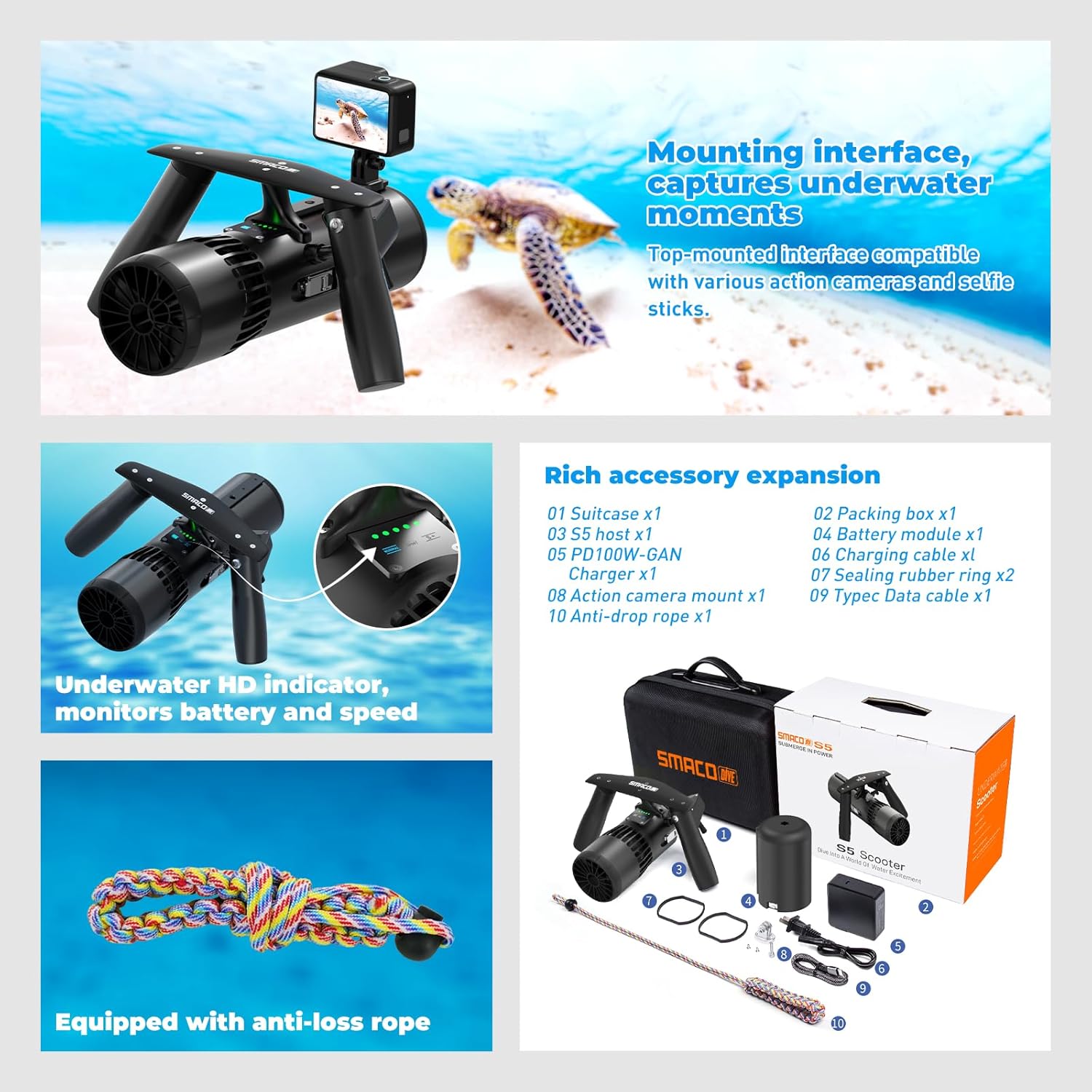
Figure 2: Illustration of the SMACO S5 Underwater Scooter and its included accessories.
- SMACO S5 Underwater Scooter (Motor Unit)
- Battery Module (Standard 129.5Wh)
- PD100W-GAN Charger
- Battery Charging Cable
- Type-C Charge Cable
- Action Camera Mount
- Anti-lost Rope
- Instruction Manual (this document)
- Storage Suitcase
- Packing Box
- Sealing Rubber Ring (spare)
Setup and Assembly
Before first use, ensure the battery is fully charged and all components are correctly assembled.
1. Charging the Battery
- Connect the PD100W-GAN charger to a power outlet.
- Connect the battery charging cable to the charger and the battery module.
- The battery indicator lights will show charging progress. A full charge takes approximately 90 minutes.
- Once fully charged, disconnect the charger.

Figure 3: The battery module connected to the PD100W-GAN charger for fast charging.
Note: The battery module can also function as a power bank via its Type-C interface for charging other electronic devices.
2. Assembling the Scooter
- Insert the charged battery module into the main motor unit, ensuring it clicks securely into place.
- Attach the action camera mount to the designated slot on the top of the scooter, if desired.
- Secure the anti-lost rope to the scooter and to your wrist or diving gear to prevent accidental loss underwater.
Operating Instructions
Familiarize yourself with the controls before entering the water.
1. Power On/Off
- To power on the device, long press the power button for 3 seconds. The indicator lights will illuminate.
- To power off, long press the power button for 3 seconds again.

Figure 4: Depiction of the power button location for turning the scooter on and off.
2. Speed Adjustment
- When the scooter is powered on, short press the power button to cycle through the three speed modes:
- Normal Mode: Provides a thrust of 3kg and a speed of 1m/s (approx. 2.2 MPH). Runtime up to 60 minutes.
- Sport Mode: Provides a thrust of 5.3kg and a speed of 1.6m/s (approx. 3.6 MPH). Runtime up to 25 minutes.
- Sports+ Mode: Provides a thrust of 7.8kg and a speed of 2m/s (approx. 4.5 MPH). Runtime up to 15 minutes.
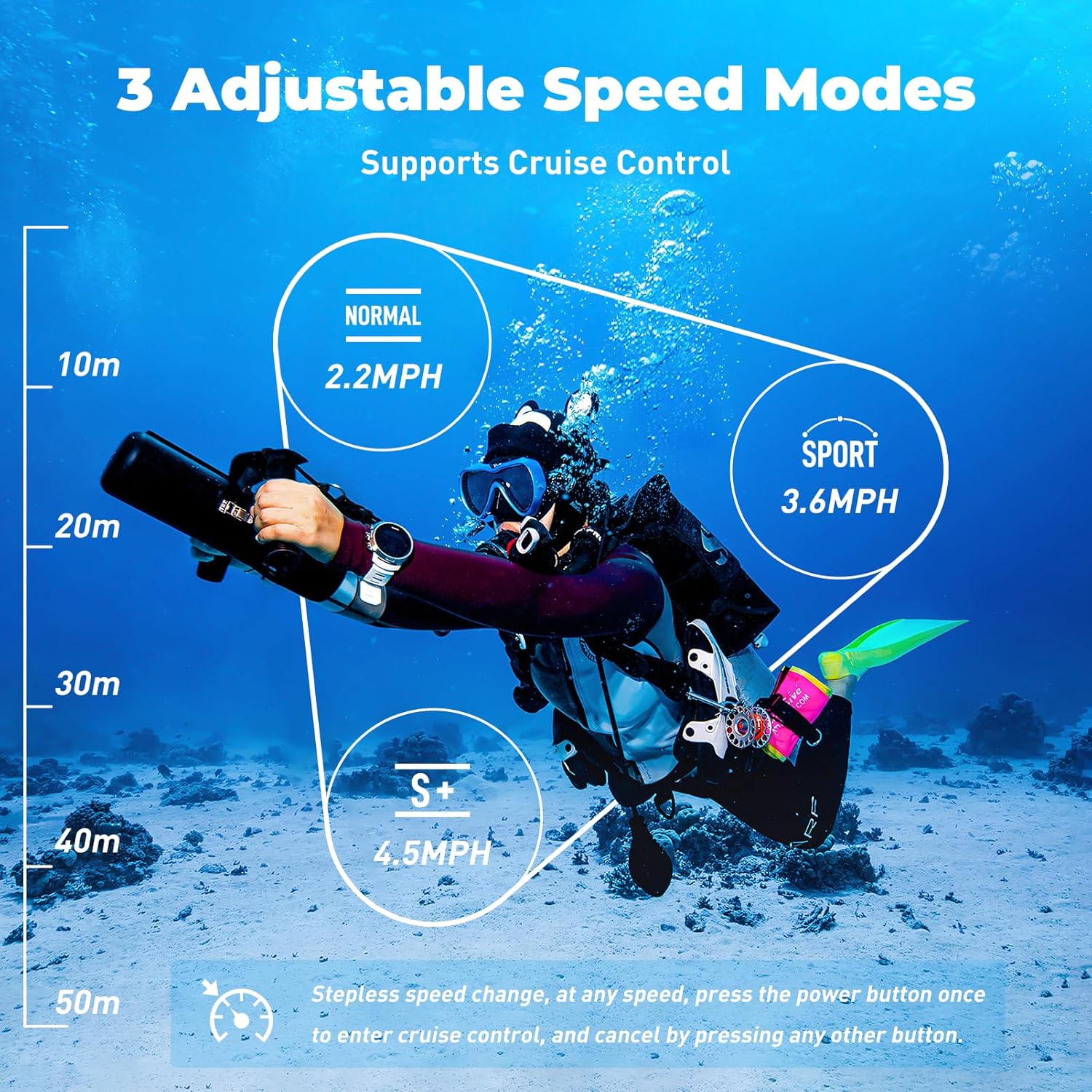
Figure 5: Visual representation of the three adjustable speed modes and their corresponding depths.

Figure 6: Demonstrates how to switch between Normal, Sport, and Sports+ modes while underwater.
3. Propulsion and Cruise Mode
- To move forward, pull the accelerator trigger. Release the trigger to stop.
- To activate cruise mode, short press the power button once while the scooter is propelling forward. The scooter will maintain its current speed.
- To deactivate cruise mode, press any other button (e.g., the accelerator or power button again).

Figure 7: Illustrates the continuous variable speed and how to engage and disengage cruise control.
4. Battery Indicator
The scooter features a five-grid power display. Each illuminated grid represents approximately 20% of the remaining battery power (20%, 40%, 60%, 80%, 100%). Monitor this indicator to ensure sufficient power for your activity.
Maintenance and Care
Proper maintenance ensures the longevity and optimal performance of your SMACO S5 Underwater Scooter.
- After Each Use:
- Rinse the scooter thoroughly with fresh water, especially after use in saltwater, to remove salt, sand, and debris.
- Ensure all ports and seals are clean and free of foreign particles.
- Wipe the scooter dry with a soft cloth.
- Battery Care:
- Always fully charge the battery before storage if it will not be used for an extended period.
- Store the battery in a cool, dry place, away from direct sunlight and extreme temperatures.
- Avoid completely draining the battery, as this can reduce its lifespan.
- Seals and O-rings:
- Regularly inspect the sealing rubber rings and O-rings for any signs of wear, cracks, or damage.
- Replace damaged seals immediately to maintain waterproof integrity.
- Apply a thin layer of silicone grease to O-rings periodically to keep them pliable and ensure a good seal.
- Storage:
- Store the scooter in its original suitcase or a protective case to prevent damage.
- Keep the scooter and battery in a dry, well-ventilated area.
Troubleshooting
If you encounter issues with your SMACO S5 Underwater Scooter, refer to the following common problems and solutions:
| Problem | Possible Cause | Solution |
|---|---|---|
| Scooter does not power on. | Battery is not charged or not properly inserted. | Ensure battery is fully charged and securely inserted. Long press power button for 3 seconds. |
| Scooter does not propel. | Accelerator not pulled, low battery, or propeller obstruction. | Pull accelerator firmly. Check battery level. Inspect propeller for debris and clear if necessary. |
| Reduced performance or short runtime. | Battery not fully charged, aging battery, or operating in Sports+ mode for extended periods. | Fully charge battery. Consider replacing battery if it's old. Use Normal or Sport mode for longer runtime. |
| Water leakage. | Damaged or improperly seated seals/O-rings. | Inspect all seals and O-rings. Clean and re-seat them properly. Replace if damaged. |
If the problem persists after attempting these solutions, please contact SMACO customer support for further assistance.
Specifications
| Feature | Detail |
|---|---|
| Model | S5 |
| Dimensions (Product) | 10.8 x 10.6 x 5.2 inches (27.4 x 26.9 x 13.2 cm) |
| Weight (Product) | 4.52 lbs (2.05 kg) |
| Max Operating Depth | 50 meters (164 feet) |
| Battery Capacity (Standard) | 129.5 Wh |
| Charging Time | Approx. 90 minutes (with PD100W-GAN charger) |
| Speed Modes & Runtime |
|
| Manufacturer | smacosports |
| Date First Available | March 21, 2024 |
Warranty and Support
Warranty Information
The SMACO S5 Underwater Scooter comes with a warranty period of 6 months from the date of purchase. This warranty covers manufacturing defects and issues arising from normal use. Please retain your proof of purchase for warranty claims.
If an issue is determined to be covered under warranty, SMACO will provide repair or replacement at no cost.
Customer Support
For technical assistance, troubleshooting not covered in this manual, or warranty claims, please contact SMACO customer support through the official website or your point of purchase. Provide your product model (S5) and purchase details when contacting support to expedite assistance.
Ask a question about this manual
Ask about setup, troubleshooting, compatibility, parts, safety, or missing instructions. Manuals+ will review the question and use this page’s manual context to help answer it.